
Winado WND-AC-2Zone-99K
Winado 18000 BTU Dual 2 Zone WiFi Mini Split Air Conditioner User Manual
Model: WND-AC-2Zone-99K
1. Product Overview
The Winado 18000 BTU Dual 2 Zone WiFi Mini Split Air Conditioner is a versatile climate control system designed for multi-room applications. It features two independent indoor air handlers (9,000 BTU each) connected to a single outdoor condenser, allowing for individualized temperature control in different areas. This system provides efficient cooling, heating, dehumidifying, and fan-only modes, suitable for spaces up to 800 sq. ft.

Figure 1: Complete Winado Dual Zone Mini Split System components.
The system is equipped with inverter technology for enhanced energy efficiency and can operate effectively in temperatures as low as 5°F. Its quiet operation and smart control features via remote or a dedicated mobile application provide a comfortable and convenient user experience.

Figure 2: Illustration of the dual-zone cooling application in a multi-level home.
2. Key Features
- Dual Zone Capability: Two 9,000 BTU indoor units with separate controllers for individual room temperature management.
- Wide Coverage: Provides cooling and heating for areas up to 800 Sq.Ft (400 Sq.Ft per indoor unit).
- Energy Efficiency: 19 SEER2 rating with inverter technology, saving up to 30% energy compared to traditional AC units. AHRI Certified.
- Heat Pump System: Capable of heating down to 5°F (-15°C).
- Smart Operation: Full control via remote control (Fan Speed, Sleep Mode, 24 Hour Timer, ECO Mode, Turbo Mode, Mute Mode) and a built-in microprocessor chip for precise adjustments.
- Quiet Operation: Ultra-silent performance at 27-42 dB(A), with a dedicated sleep and mute mode for minimal noise.
- 4-in-1 Multi-Function: Offers Cooling, Heating, Dehumidifying, and Fan-only modes.
- 4-Way Swing Function: Ensures scientific and even airflow distribution.

Figure 3: Overview of convenient and energy-efficient features.

Figure 4: Energy saving benefits of the 19 SEER unit.

Figure 5: The four primary functions of the system.
3. Package Contents
The Winado 18000 BTU Dual 2 Zone Mini Split Air Conditioner system comes with the following components:
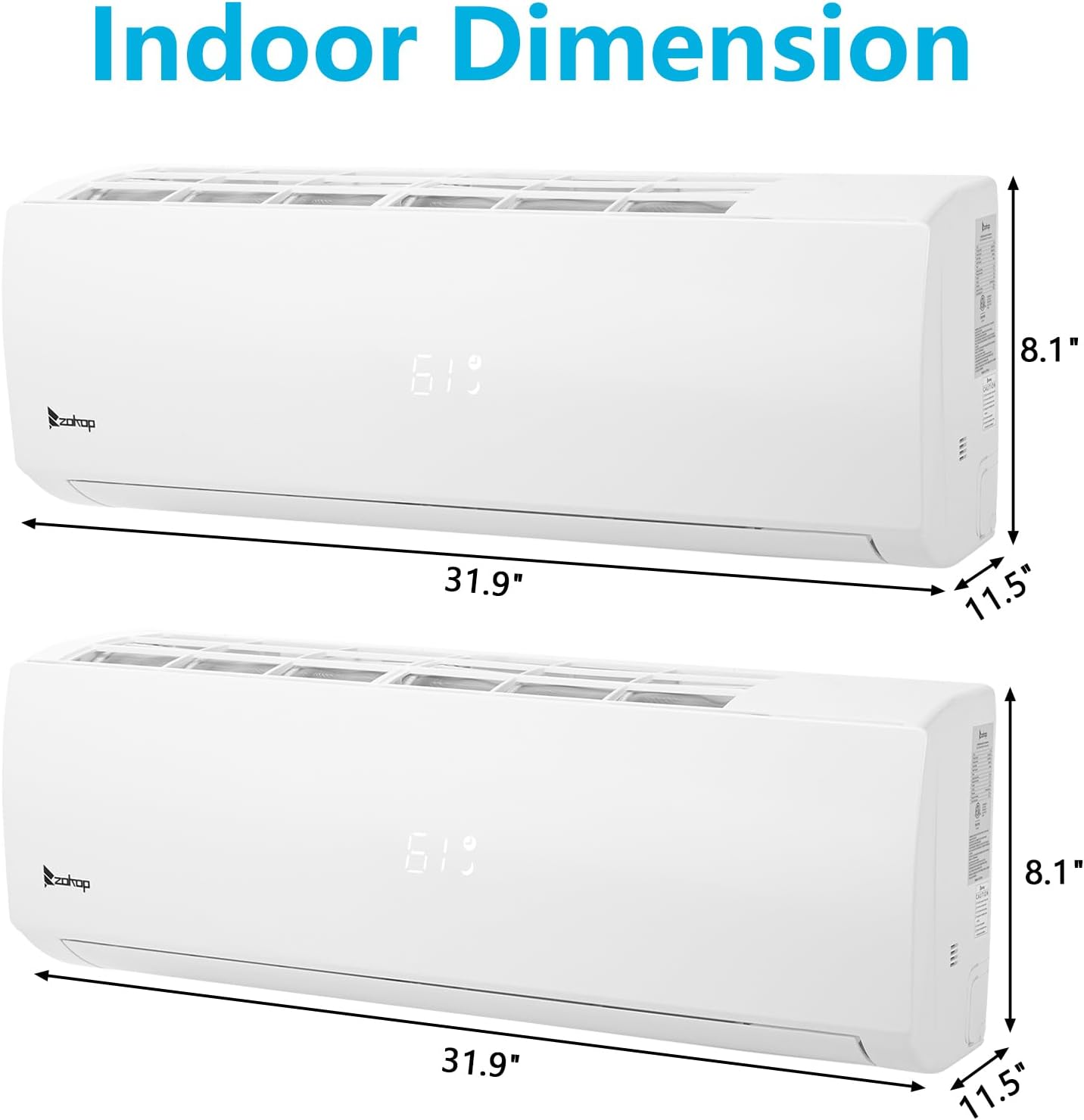
Figure 6: Detailed list of included package components.
- 2 x Indoor Units (9,000 BTU each)
- 1 x Outdoor Condenser Unit
- 2 x Remote Controls
- Installation Kit (includes copper line sets, drain hoses, signal cables, wall covers, sealing gum, drain joints, tape, liner sleeves)
- Rubber Feet for outdoor unit
- Screws
- Instruction Manuals
Note: The system may arrive in multiple boxes. Please ensure all packages are received before beginning installation.
4. Setup and Installation
Installation of a mini split air conditioning system requires specialized knowledge and tools. It is highly recommended that installation be performed by a qualified HVAC professional to ensure proper function, safety, and adherence to local building codes.
4.1 Pre-Installation Checks
- Verify that the electrical supply matches the unit's requirements (208-230V~60Hz).
- Ensure adequate space for both indoor and outdoor units, allowing for proper airflow and maintenance access.
- Confirm all components listed in the package contents are present and undamaged.
4.2 General Installation Steps (Professional Recommended)
- Mount the indoor units in desired locations, ensuring proper drainage.
- Install the outdoor condenser unit on a stable, level surface, away from obstructions.
- Connect the refrigerant lines (copper line sets) and electrical wiring between the indoor and outdoor units.
- Evacuate the refrigerant lines to remove air and moisture.
- Perform a leak test to ensure all connections are secure.
- Connect the drain hoses from the indoor units to a suitable drainage point.
- Complete electrical connections and test the system.
5. Operating Instructions
The Winado Mini Split system offers multiple operating modes and smart control options for optimal comfort.
5.1 Remote Control Operation
Each indoor unit is controlled by its dedicated remote. The remote allows you to select modes, adjust temperature, fan speed, and set timers.
- Power On/Off: Press the power button to turn the unit on or off.
- Mode Selection: Cycle through Cooling, Heating, Dehumidifying, and Fan modes using the 'Mode' button.
- Temperature Adjustment: Use the up/down arrows to set your desired temperature.
- Fan Speed: Adjust fan speed (Auto, Low, Medium, High) using the 'Fan' button.
- Sleep Mode: Activates a quiet operation mode for comfortable sleep.
- 24 Hour Timer: Set the unit to turn on or off automatically at a specified time.
- ECO Mode: Optimizes energy consumption for efficient operation.
- Turbo Mode: Provides rapid cooling or heating.
- Mute Mode: Reduces operational noise to the lowest possible level.
5.2 Smart App Control (WiFi Ready)
The system can be controlled remotely via a smartphone application, offering convenience and advanced features.

Figure 7: The ZOKOP App for WiFi control.

Figure 8: Intelligent control options via app and remote.
- Download the official ZOKOP App from the App Store or Google Play.
- Follow the in-app instructions to connect your mini split unit to your home WiFi network.
- Once connected, you can control all functions of the air conditioner from your smartphone, anytime, anywhere.
6. Maintenance
Regular maintenance ensures optimal performance and longevity of your Winado Mini Split system. Always disconnect power to the unit before performing any maintenance.
6.1 Indoor Unit Maintenance
- Air Filter Cleaning: Clean the air filters every 2-4 weeks, or more frequently if the unit is used heavily or in dusty environments. Remove filters, wash with lukewarm water and mild detergent, rinse thoroughly, and allow to air dry completely before reinserting.
- Surface Cleaning: Wipe the indoor unit's surface with a soft, damp cloth. Do not use harsh chemicals or abrasive cleaners.
6.2 Outdoor Unit Maintenance
- Coil Cleaning: Periodically inspect the outdoor coil for dirt, leaves, or debris. Gently clean with a soft brush or rinse with a garden hose (ensure power is off).
- Clear Obstructions: Ensure the area around the outdoor unit is clear of vegetation, snow, or other obstructions that could block airflow.
- Professional Check-up: Consider an annual professional inspection and cleaning to ensure the system is running efficiently and to identify any potential issues.
7. Troubleshooting
Before contacting customer support, please refer to the following common issues and their potential solutions:
| Problem | Possible Cause | Solution |
|---|---|---|
| Unit does not turn on | No power supply; Remote control batteries dead; Circuit breaker tripped. | Check power connection; Replace remote batteries; Reset circuit breaker. |
| Insufficient cooling/heating | Dirty air filters; Blocked outdoor unit; Incorrect mode selected; Room size exceeds capacity; Low refrigerant. | Clean air filters; Clear obstructions from outdoor unit; Select correct mode; Ensure unit matches room size; Contact professional for refrigerant check. |
| Unusual noise | Loose parts; Fan obstruction; Refrigerant flow noise (normal). | Check for loose parts; Remove any obstructions; If noise persists or is abnormal, contact professional. |
| Water leakage from indoor unit | Clogged drain hose; Improper installation. | Check and clear drain hose; Contact professional for installation check. |
| Remote control not working | Dead batteries; Obstruction between remote and unit; Remote sensor blocked. | Replace batteries; Remove obstruction; Ensure remote is pointed at unit's sensor. |
For issues not listed above or if solutions do not resolve the problem, please contact Winado customer support.
8. Specifications
| Specification | Value |
|---|---|
| Brand | Winado |
| Model Number | WND-AC-2Zone-99K |
| Cooling Capacity | 18000 BTU (2 x 9000 BTU Indoor Units) |
| Heating Capacity | Heat Pump System (effective down to 5°F) |
| SEER Rating | 19 SEER2 |
| Voltage | 208-230V~60Hz |
| Noise Level | 27-42 dB(A) |
| Coverage Area | Up to 800 Sq.Ft (400 Sq.Ft per indoor unit) |
| Indoor Unit Dimensions (D x W x H) | 11.5" x 31.9" x 8.1" |
| Outdoor Unit Dimensions (D x W x H) | 14.97" x 33.27" x 27.5" |
| Item Weight | 20.9 pounds (likely indoor unit weight) |
| Material Type | Plastic, Zinc, Steel |
| Special Features | Cooling, Heating, Dehumidifying, Fan, Smart APP Control |
| Certification | Energy Star, AHRI Certified |

Figure 9: Indoor Unit Dimensions.

Figure 10: Outdoor Unit Dimensions.
9. Warranty and Support
For warranty information, claims, or technical support, please refer to the warranty card included with your product or contact Winado customer service directly. Keep your purchase receipt as proof of purchase for any warranty-related inquiries.
Contact information for Winado support can typically be found on their official website or within the product packaging.
Ask a question about this manual
Ask about setup, troubleshooting, compatibility, parts, safety, or missing instructions. Manuals+ will review the question and use this page’s manual context to help answer it.