
Winado WND-AC-2Zone-1212K
Winado Dual Zone Mini Split Air Conditioner User Manual
Model: WND-AC-2Zone-1212K | Brand: Winado
1. Product Overview
The Winado 18000 BTU Dual 2 Zone WiFi Mini Split Air Conditioner is a versatile and energy-efficient system designed to provide comfortable climate control for multiple rooms. Featuring inverter technology, it offers both cooling and heating functions, along with dehumidifying and fan-only modes. Its smart operation capabilities, including remote control and WiFi app integration, ensure convenient use. This system is ideal for residential and light commercial applications, covering areas up to 1100 sq.ft.

Image: Complete Winado Dual Zone Mini Split Air Conditioner system, showing outdoor unit, two indoor units, remote controls, and installation accessories.
2. Safety Information
Please read all safety warnings and instructions carefully before installing or operating this appliance. Failure to follow these instructions may result in electric shock, fire, property damage, or personal injury.
- Installation must be performed by a qualified and certified HVAC professional in accordance with all local and national electrical and building codes.
- Ensure the power supply matches the unit's specifications (208-230V, 60Hz).
- Do not operate the outdoor unit if the ambient temperature is below 5 degrees Fahrenheit, as this may damage the system.
- Always disconnect power before performing any maintenance or cleaning.
- Keep hands and objects clear of moving parts, especially the fan blades.
- Do not block air inlets or outlets on either the indoor or outdoor units.
- This appliance is not intended for use by persons (including children) with reduced physical, sensory or mental capabilities, or lack of experience and knowledge, unless they have been given supervision or instruction concerning use of the appliance by a person responsible for their safety.

Image: Outdoor unit in a snowy environment with a warning about operating below 5 degrees Fahrenheit.
3. Package Contents
Carefully unpack the system and verify that all components are present. If any items are missing or damaged, contact your retailer immediately.

Image: Detailed breakdown of all components included in the Winado Mini Split package.
Included Components:
- 2 x Indoor Units (12000 BTU each)
- 1 x Outdoor Unit (18000 BTU)
- 2 x Remote Controls
- 2 x Copper Line Sets (25 ft)
- 1 x Drain Hose (7 ft)
- 1 x Signal Cable (25 ft)
- 4 x Rubber Feet
- Screws and Mounting Hardware
- Wall Sleeve Cover
- Sealing Gum
- Drain Joint
- Tape
- Insulation Sleeve
- Instruction Manuals
4. Setup & Installation
Installation of a mini-split air conditioning system requires specialized knowledge and tools. It is strongly recommended that installation be performed by a certified HVAC professional to ensure proper functioning, safety, and warranty validity.
4.1 Site Selection
- Indoor Units: Choose locations that allow for optimal air distribution throughout the desired zones. Ensure sufficient clearance around the unit for airflow and maintenance.
- Outdoor Unit: Select a stable, level surface away from direct sunlight, excessive dust, or heat sources. Ensure adequate clearance for airflow and service access. Avoid locations where noise might disturb neighbors.

Image: Diagram illustrating how to choose the appropriate capacity based on square footage for dual zone systems.
4.2 Mounting the Indoor Units
Mount the indoor units securely to a wall using the provided mounting plate. Ensure the wall is strong enough to support the unit's weight. Drill a hole through the wall for the refrigerant lines, drain hose, and electrical cable.
4.3 Installing the Outdoor Unit
Place the outdoor unit on a solid, level surface or a dedicated mounting pad. Use the provided rubber feet to reduce vibration. Connect the refrigerant lines and electrical wiring from the indoor units to the outdoor unit.
4.4 Electrical Connections
All electrical wiring must comply with local and national electrical codes. Ensure proper grounding and use a dedicated circuit breaker for the unit. Connect the power supply to the outdoor unit and the signal cables between the indoor and outdoor units.
4.5 Vacuuming and Refrigerant Charging
After connecting the refrigerant lines, the system must be thoroughly vacuumed to remove any air and moisture. Once vacuumed, the refrigerant can be released into the system. This step is critical for system performance and longevity and must be done by a professional.
5. Operating Instructions
Your Winado Mini Split system can be controlled via the included remote control or the dedicated ZOKOP smartphone application.
5.1 Remote Control Functions
The remote control allows you to access all primary functions of your air conditioner.
- Power On/Off: Press the power button to turn the unit on or off.
- Mode Selection: Cycle through Cooling, Heating, Dehumidifying, and Fan modes.
- Temperature Adjustment: Use the up/down arrows to set your desired temperature.
- Fan Speed: Adjust fan speed (Auto, Low, Medium, High, Turbo).
- Swing Function: Activate 4-way swing for optimal air distribution.
- Sleep Mode: Optimizes temperature and fan speed for quiet, comfortable sleep (as low as 27 dB).
- ECO Mode: Energy-saving operation.
- Turbo Mode: Provides rapid cooling or heating.
- 24-Hour Timer: Set the unit to turn on or off automatically.
- Follow Me: The remote control acts as a thermostat, sensing the temperature at its location for more precise control.

Image: Overview of special features including Silence, Turbo, Follow Me, Sleep, Application Area, Timer, WiFi, and Swing Function.
5.2 Smart App Control (WiFi Function)
The Winado Mini Split system is WiFi-ready and can be controlled via the free ZOKOP App, available on the App Store and Google Play. This allows you to control your unit from anywhere, anytime.
- Download the ZOKOP App from your smartphone's app store.
- Follow the in-app instructions to connect your air conditioner to your home WiFi network.
- Once connected, you can remotely adjust settings, monitor status, and schedule operations.

Image: Illustration showing smartphone app control for the Winado Mini Split system.
5.3 Operating Modes
Your Winado system offers four primary operating modes:
- Cooling: Cools the room to your desired temperature (down to 61°F).
- Heating: Heats the room to your desired temperature (up to 88°F).
- Dehumidifying (Dry): Removes excess moisture from the air, improving comfort.
- Fan Only: Circulates air without heating or cooling. Features 8 fan speeds.

Image: Visual representation of the four multi-functions: Cool, Heat, Fan, and Dry.
5.4 Quiet Operation
The Winado Mini Split is designed for ultra-quiet operation, especially in Sleep Mode, where noise levels can be as low as 27 dB(A), ensuring a peaceful environment.

Image: Chart showing indoor noise levels at different fan speeds (Turbo, High, Med, Low, Mute).
6. Maintenance
Regular maintenance ensures optimal performance and extends the lifespan of your Winado Mini Split system. Always disconnect power before performing any maintenance.
6.1 Air Filter Cleaning
The indoor unit's air filters should be cleaned every two weeks or more frequently depending on usage and air quality. Dirty filters can reduce efficiency and airflow.
- Open the front panel of the indoor unit.
- Remove the air filters.
- Wash the filters with lukewarm water and a mild detergent. Rinse thoroughly.
- Allow filters to air dry completely before reinserting them. Do not expose to direct sunlight.
6.2 Outdoor Unit Cleaning
The outdoor unit should be inspected and cleaned periodically to remove dirt, leaves, and other debris that can accumulate on the coils and fan. This should be done at least once a year, preferably before the cooling or heating season.
- Ensure the power to the outdoor unit is completely disconnected.
- Carefully remove any visible debris from the coils and fan blades.
- Gently rinse the coils with a garden hose. Avoid using high-pressure washers.
- Ensure the area around the outdoor unit is clear of obstructions for proper airflow.
6.3 Professional Servicing
It is recommended to have a qualified HVAC technician perform a professional service check on your system annually. This includes checking refrigerant levels, electrical connections, and overall system performance.
7. Troubleshooting
Before contacting customer support, please refer to the following common issues and solutions:
| Problem | Possible Cause | Solution |
|---|---|---|
| Unit does not turn on | No power; Remote control batteries dead; Circuit breaker tripped | Check power supply; Replace batteries; Reset circuit breaker |
| Insufficient cooling/heating | Dirty air filters; Blocked outdoor unit; Incorrect mode/temperature setting; Low refrigerant | Clean air filters; Clear obstructions; Adjust settings; Contact professional for refrigerant check |
| Unusual noise | Loose parts; Debris in fan; Unit not level | Check for loose components; Clean fan; Ensure unit is level; Contact professional if noise persists |
| Water leakage from indoor unit | Clogged drain hose; Improper installation | Clear drain hose; Contact professional for inspection |
| Remote control not working | Batteries dead; Obstruction between remote and unit; Remote sensor dirty | Replace batteries; Remove obstruction; Clean remote sensor |
8. Specifications
Detailed technical specifications for your Winado Dual Zone Mini Split Air Conditioner.
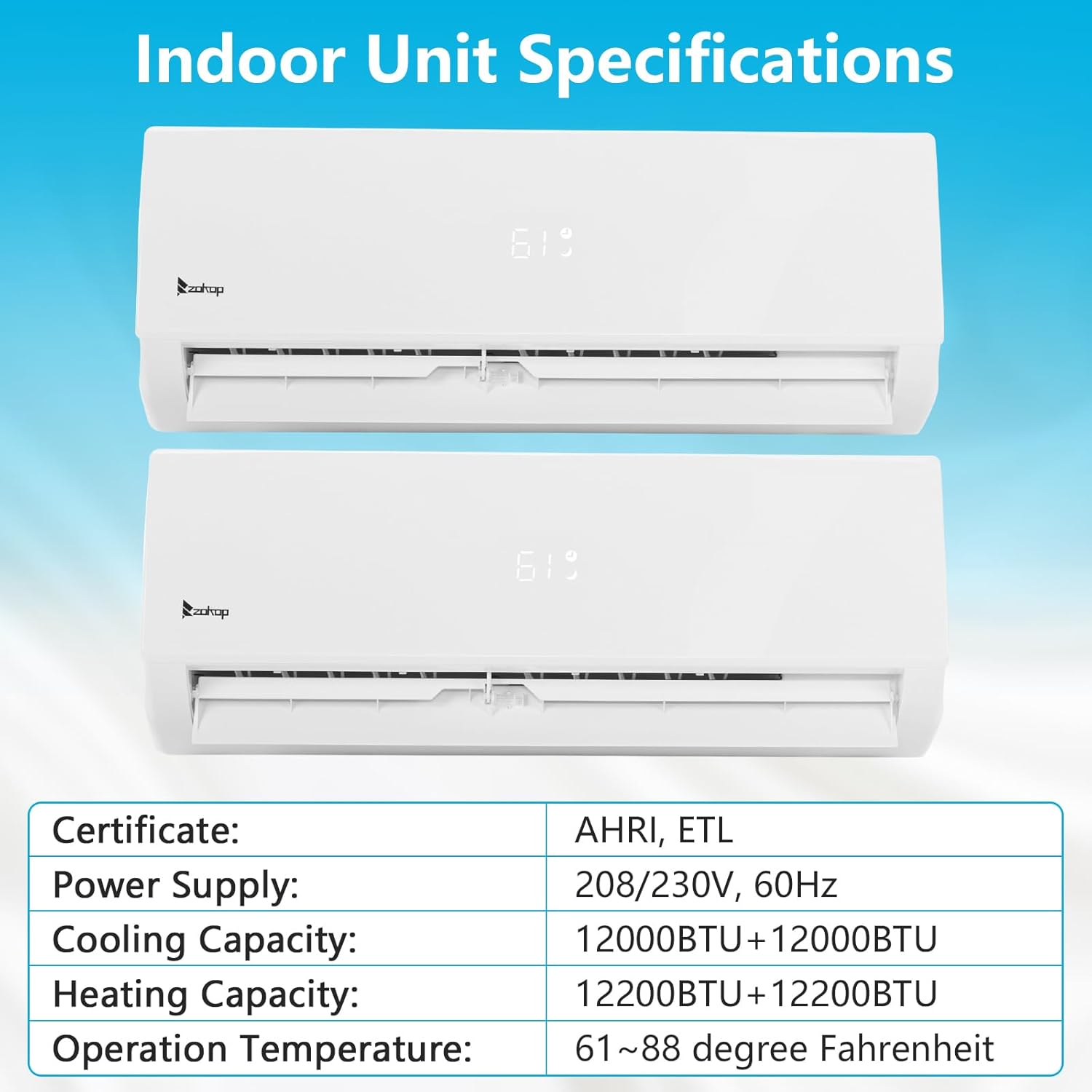
Image: Table detailing indoor unit specifications including capacity and operation temperature.
| Specification | Value |
|---|---|
| Brand | Winado |
| Model Number | WND-AC-2Zone-1212K |
| System Type | Dual Zone Mini Split AC with Heat Pump |
| Indoor Unit Cooling Capacity | 2 x 12000 BTU |
| Indoor Unit Heating Capacity | 2 x 12200 BTU |
| Outdoor Unit Cooling Capacity | 18000 BTU |
| Outdoor Unit Heating Capacity | 20000 BTU |
| SEER Rating | 19.00 |
| Voltage | 208-230 Volts, 60Hz |
| Noise Level (Indoor) | 27-42 dB(A) |
| Operating Temperature Range | Cooling: 61-88°F; Heating: Down to 5°F |
| Applicable Area | Up to 1100 Sq.Ft |
| Certifications | AHRI, ETL, Energy Star |
| Material Type | Plastic, Zinc, Steel |
| Included Components | Full Installation Kit |
9. Warranty & Support
Winado products are designed for reliability and performance. For specific warranty terms and conditions, please refer to the warranty card included with your product or visit the official Winado website. Keep your purchase receipt as proof of purchase.
For technical support, troubleshooting assistance, or to inquire about replacement parts, please contact Winado customer service. Contact information can typically be found in your product's documentation or on the Winado brand website.
Ask a question about this manual
Ask about setup, troubleshooting, compatibility, parts, safety, or missing instructions. Manuals+ will review the question and use this page’s manual context to help answer it.