
1. Product Overview
The SUERBEATY Red Light Mask is a cordless, portable, and rechargeable facial skincare device designed for at-home use. It features an expansive 90-light array covering the entire face, with concentrated zones on the forehead, cheeks, and chin. The mask offers seven distinct light modes, plus an automatic cycling mode, to address various skincare needs. Its ergonomic design ensures comfortable wear, and the one-touch control simplifies operation for a convenient 10-minute treatment session.

Image 1: SUERBEATY Red Light Mask, showcasing its sleek design and cordless nature.
2. What's in the Box
Upon opening your SUERBEATY Red Light Mask package, you will find the following items:
- Red Light Therapy Mask
- Velcro Strap (for securing the mask)
- USB-C Cable (for charging)
- User Manual

Image 2: Contents of the product box, including the mask, strap, USB-C cable, and user manual.
3. Setup
Before first use, ensure the mask is fully charged using the provided USB-C cable. A red light indicates charging, and a green light indicates a full charge. The mask is designed for comfort and ease of use.
- Attach the Strap: Securely attach the adjustable Velcro strap to the designated slots on both sides of the mask. Adjust the strap to fit your head comfortably without excessive pressure.
- Cleanse Your Face: Before each session, thoroughly clean your face and ensure it is dry. This prepares your skin for optimal light absorption.
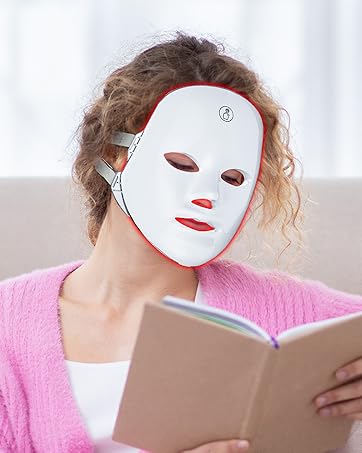
Image 3: The mask's ergonomic design with soft eye pads and adjustable strap for a comfortable fit.
4. Operating Instructions
The SUERBEATY Red Light Mask features a simple one-touch control for easy operation. Each session is typically 10-20 minutes long, recommended 2-3 times a week for consistent results over 4-6 weeks.
- Power On: Press and hold the touch switch located on the forehead of the mask for 2 seconds to power it on. You will hear a beep, and the mask will illuminate.
- Select Light Mode: Short press the touch switch to cycle through the seven different light colors. After the seventh color, the eighth press will activate the automatic cycling mode, which transitions through all colors.
- Begin Treatment: Place the mask on your face, ensuring the eye covers are comfortably positioned. Relax for 10-20 minutes. The mask has an auto-timing feature and will turn off automatically.
- Post-Treatment: Remove the mask and continue with your regular skincare routine.
Light Modes and Benefits:
- Red Light (630nm): Reduces fine lines and supports anti-aging.
- Blue Light (465nm): Diminishes pimples and helps with acne.
- Green Light (525nm): Balances oil production and brightens skin tone.
- Purple Light (450nm): Boosts cellular energy and aids in skin repair.
- Orange Light (610nm): Brightens skin, reduces dullness, and helps with pigmentation.
- Cyan Light (490nm): Calms skin and reduces redness.
- White Light (510nm): Brightens overall complexion.

Image 4: Visual representation of the 7 different light colors and their specific skincare benefits.

Image 5: An illustration showing how each of the 7 light waves penetrates different layers of the skin for targeted care.
Product Demonstration Video:
Video 1: Official SUERBEATY demonstration of the 7-1 Colors Red Light Face Mask, showing how to operate and cycle through the different light modes.
5. Maintenance
To ensure the longevity and hygiene of your SUERBEATY Red Light Mask, follow these maintenance guidelines:
- Cleaning: After each use, gently wipe the mask with a soft, damp cloth. Do not use harsh chemicals or abrasive cleaners. Ensure the mask is completely dry before storing.
- Storage: Store the mask in a cool, dry place away from direct sunlight and extreme temperatures. Keep it in its original box to protect it from dust and damage.
- Charging: Charge the mask regularly to maintain battery health. Avoid overcharging or completely draining the battery for extended periods.
6. Troubleshooting
If you encounter any issues with your SUERBEATY Red Light Mask, please refer to the following common troubleshooting steps:
- Mask Not Turning On: Ensure the mask is fully charged. Connect it to the USB-C cable and a power source. If the issue persists, try a different charging cable or adapter.
- Lights Not Changing: Press the touch switch firmly. If the lights are unresponsive, power off the mask by holding the switch for 2 seconds, then power it back on and try again.
- Discomfort During Use: Adjust the Velcro strap to ensure a comfortable fit. The mask should not feel too tight. If light sensitivity is an issue, ensure the silicone eye covers are properly positioned.
- Charging Issues: If the mask is not charging (red light not appearing), ensure the USB-C cable is securely connected to both the mask and the power source. Check if the charging port is clean and free of debris.
If these steps do not resolve the issue, please contact SUERBEATY Customer Support for further assistance.
7. Specifications
| Feature | Detail |
|---|---|
| Product Dimensions | 9.06 x 7.68 x 4.92 inches |
| Item Weight | 1.04 Pounds |
| Manufacturer | SUERBEATY |
| ASIN | B0CZXCRSTF |
| Brand | SUERBEATY |
| Item Form | Sheet |
| Product Benefits | Even Toning |
| Scent | Unscented |
| Skin Type | All, Oily, Combination, Sensitive, Normal |
| Material | ABS |
8. Warranty and Support
SUERBEATY is committed to providing high-quality products and excellent customer service.
- 18-Month Limited Warranty: Your SUERBEATY Red Light Mask is covered by an 18-month limited warranty from the date of purchase, protecting against manufacturing defects.
- Lifetime Technical Support: We offer lifetime technical support for your product. Should you have any questions or require assistance, our team is ready to help.
- 24/7 Customer Support: Our dedicated customer support team is available 24/7 to address any inquiries or concerns you may have.
For support, please visit the SUERBEATY Store on Amazon or refer to the contact information provided in your user manual.

Image 6: Information regarding SUERBEATY's 24/7 customer support, 18-month limited warranty, and lifetime technical support.