
LLS LM-100-24-U2D2
LLS Intelligent LED Driver (Constant Voltage) LM-100-24-U2D2 DALI-2 User Manual
Model: LM-100-24-U2D2 | Brand: LLS
1. Introduction
This manual provides comprehensive instructions for the installation, operation, and maintenance of the LLS LM-100-24-U2D2 Intelligent LED Driver. This constant voltage LED driver is designed for adapting the color temperature of lighting atmospheres, offering a full range of lighting temperatures from cool blue to warm yellow. It features DALI-2 DT8 tunable white capabilities for optimal control over white tones and supports a maximum power output of 100W.
Key features include:
- Compact and lightweight design with V0 flame-retardant PC materials.
- Clamshell design with screwless strain-relief and dismountable end cap for adjustable housing length.
- Constant power program design ensures consistent brightness during color temperature adjustments.
- Soft-on and fade-in dimming function for enhanced visual comfort.
- Dimming range from 0% to 100%, down to 0.1%.
- High frequency exemption level.

Figure 1: LLS LM-100-24-U2D2 Intelligent LED Driver. This image shows the compact, rectangular white casing of the LED driver with various labels and connection points visible on its surface.
2. Setup and Installation
2.1. Physical Installation
The LM-100-24-U2D2 driver features a clamshell design with screwless strain-relief. The dismountable end cap allows for adjustment of the housing length as needed. Ensure the driver is installed in a suitable environment, protected from moisture and extreme temperatures.

Figure 2: Protective Housing Application and Removal. This diagram illustrates how to secure the tension plate to fix electric wires, push the side plate outwards to remove the tension plate, and pull the housing left and right from the bottom to remove it for wiring access.
- Secure Wiring: Push the tension plate down to firmly fix the electric wires.
- Access Housing: To open the housing, push the side plate outwards and simultaneously remove the tension plate by prying it up with a tool.
- Remove Housing: Pull the housing left and right from the bottom to fully remove it for internal access.
2.2. Wiring Diagram
Proper wiring is crucial for safe and correct operation. Always ensure power is disconnected before performing any wiring. The driver supports both DALI connection and Push DIM/CCT connection.

Figure 3: DALI and Push DIM/CCT Wiring Diagrams. This image displays two main wiring configurations: one for DALI connection showing N, L, DALI, and LED outputs, and another for Push DIM/CCT connection detailing N, L, Push DIM, Push CCT, and LED outputs. Wire diameters and strip lengths are specified for each connection type.
2.2.1. DALI Connection
- Connect the AC input (N, L) to the driver.
- Connect the DALI control lines to the DALI terminals.
- Connect the LED output (CCT: 2700-6500K) to the LED fixture.
- Ensure wire diameter is 0.75-1.5 mm² and strip length is 8-9mm for input/DALI.
- Ensure wire diameter is 1.5-2.5 mm² and strip length is 6-7mm for LED output.
2.2.2. Push DIM/CCT Connection
- Connect the AC input (N, L) to the driver.
- Connect the Push DIM and Push CCT control lines.
- Connect the LED output (DIM: 0-100% dimming range, CCT: 2700-6500K) to the LED fixture.
- Push DIM is invalid under DC voltage input.
- Dimming interface priority: DALI first, then Push DIM/CCT.
- Ensure wire diameter is 0.75-1.5 mm² and strip length is 8-9mm for input/Push controls.
- Ensure wire diameter is 1.5-2.5 mm² and strip length is 6-7mm for LED output.
Important: The driver is a constant power device. When ordering, ensure the constant power LED fixture is 100W. For example, a 100W driver can connect to 100W x 2CH LED strip, but the total power of the 2 channels will be kept within 100W.
3. Operating Instructions
The LM-100-24-U2D2 LED driver offers flexible control options for dimming and color temperature adjustment, primarily through DALI-2 or Push DIM/CCT interfaces.
3.1. Push DIM/CCT Control
When using a Push DIM/CCT switch, the following operations are available:
- DIM (Brightness Control):
- On/Off Control: Short press the DIM switch.
- Stepless Dimming: Long press the DIM switch.
- Brightness Adjustment: With every other long press, the brightness level will adjust in the opposite direction.
- Memory Function: The driver remembers the last brightness level adjusted when lights are turned on.
- CCT (Color Temperature Control):
- Color Temperature Adjustment: Long press the CCT switch.
- Directional Adjustment: With every other long press, color temperature will adjust in the opposite direction.
- Memory Function: The driver remembers the last color temperature adjusted when lights are turned on.
Figure 4: Push DIM/CCT Switch Operation. This section of the image illustrates the functions of a Push DIM/CCT switch, detailing short press for on/off, long press for stepless dimming and color temperature adjustment, and memory functions for both brightness and color temperature.
3.2. DALI-2 Control
The LM-100-24-U2D2 is compatible with DALI-2 control systems, allowing for advanced control over dimming and tunable white (DT8) functionalities. Refer to your DALI-2 control system's manual for specific programming and operation details.
4. Maintenance
The LM-100-24-U2D2 LED driver is designed for reliable operation with minimal maintenance. However, periodic checks and proper handling are recommended.
4.1. General Care
- Keep the driver clean and free from dust accumulation.
- Ensure adequate ventilation around the driver to prevent overheating.
- Avoid exposing the driver to direct sunlight, high humidity, or corrosive environments.
4.2. Housing Removal for Access
If internal access is required for inspection or wiring adjustments, follow the steps outlined in Section 2.1 for safe housing removal. Always disconnect power before opening the unit.
5. Troubleshooting and Safety Precautions
This section provides general precautions and advice for addressing common issues.
5.1. Important Considerations
- Professional Installation: Products should be installed by qualified professionals.
- Outdoor Use: For outdoor installations, ensure the unit is mounted in a waterproof enclosure.
- Compatibility: Use only with compatible LED fixtures and wiring. Refer to product parameters.
- Wiring Integrity: The diameter of wire used must be able to load the light fixtures you connect and ensure firm wiring.
- Overload Protection: Do not overload the driver. Overloading can cause damage to light fixtures.
- Repairs: Do not attempt to fix the product yourself. If you have questions or issues, contact your supplier.
This manual is subject to changes without further notice. Product functions depend on the goods. Please feel free to contact our official distributors if you have any question.
6. Specifications
Detailed technical specifications for the LM-100-24-U2D2 LED Driver are provided below.

Figure 5: Technical Specifications. This image presents a detailed table of technical parameters for the LM-100-24-U2D2 LED driver, including output, input, environment, protection, EMC, and other general specifications.
6.1. General Technical Data
| Category | Parameter | Value | ||
|---|---|---|---|---|
| Output | Output Voltage | 24VDC | ||
| Output Current | Max. 4.17A | |||
| Output Power | Max. 100W | |||
| Output Power Range | 0-100W | |||
| Strobe Level | High frequency exemption level | |||
| Input | PWM Frequency | 3600Hz | ||
| Dimming Range | 0-100%, down to 0.1% | |||
| Overload Power Limitation | ≤102% | |||
| Ripple & Noise | Switch ripples≤150mV, noise≤500mV | |||
| Dimming Interface | DALI-2 DT8, Push DIM/CCT | |||
| Input Voltage | 120-277VAC | |||
| Frequency | 50/60Hz | |||
| Input Current | 0.85A/120Vac, 0.55A/230Vac, 0.45A/277Vac | |||
| Power Factor | PF>0.99/120Vac, PF>0.95/230Vac, PF>0.9/277Vac (at full load) | |||
| THD | 120Vac@THD <5%, 230Vac@THD <8%, 277Vac@THD <11% (at full load) | |||
| Environment | Efficiency (Typ.) | 92% | ||
| Standby Power Loss | ≤0.5W | |||
| Inrush Current | Cold start 45A/230Vac (Test width = 860us under 50% Ipeak) | |||
| Leakage Current | Max. 0.5mA | |||
| Working Temperature | Ta: -20~50°C Tc: 85°C | |||
| Protection | Working Humidity | 20~95%RH, non-condensing | ||
| Storage Temperature/Humidity | -40~80°C, 10-95%RH | |||
| Temperature Coefficient | ±0.03%/°C (0-50°C) | |||
| Vibration | 10-500Hz, 2G 10min/1cycle, 72 min for X, Y and Z axes respectively | |||
| Over Voltage Protection | Shut down and auto-restart or turn off the output current if the PCB temperature >110°C, and recover automatically | |||
| Overload Protection | Shut down the output when non-load voltage>28V, and recover automatically | |||
| EMC | Over Temperature Protection | Shut down the output when output current load>102%, and recover automatically | ||
| Short Circuit Protection | Enter hiccup mode in case of short circuit, and recover automatically | |||
| Withstand Voltage | I/P-O/P: 3750VAC | |||
| Others | Insulation Resistance | I/P-O/P: 100MΩ/500VDC/25°C/70%RH | ||
| Safety Standards | UL | UL8750 | ||
| CUL | Canada | CSA C22.2 NO. 250.13 | ||
| CE | European Union | EN61347-1, EN61347-2-13, EN62384 | ||
| EMC Emission | CE | European Union | EN55015 | |
| EMC Immunity | CE | European Union | EN61000-3-2, EN61000-3-3, EN61547 | |
| Dimensions | Product Dimensions | 352 x 44 x 33mm (13.86 x 1.73 x 1.30 inches) | ||
| Gross Weight (GW) | 430g | |||
| Carton Size | 392x270x230mm, 9.4kg/5pcs/ctn | |||
| Model Number | LM-100-24-U2D2 |
6.2. Performance Characteristics
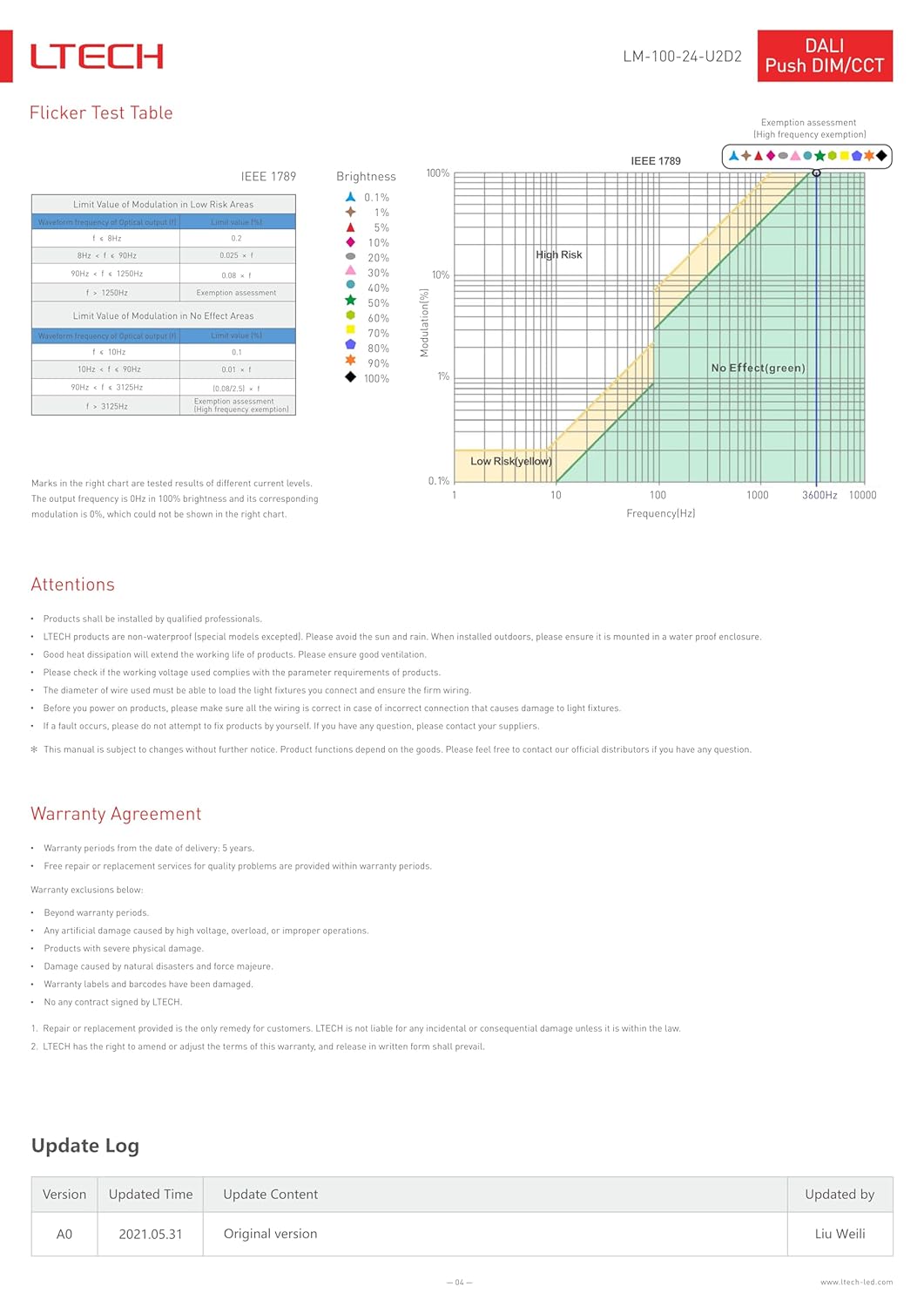
Figure 6: Performance Graphs and Flicker Test. This image displays several graphs including Efficiency vs Load, Power Factor Characteristic, THD vs Load, and Over Load Diagram, illustrating the driver's performance under various conditions. It also includes a Flicker Test Table and a Flicker Test Chart based on IEEE 1789 standards.
6.2.1. Flicker Test Table (IEEE 1789)
| Limit Value of Modulation in Low Risk Areas | Limit Value of Modulation in No Effect Areas |
|---|---|
| f < 90Hz: 0.025 x f | f < 1250Hz: 0.08 x f |
| f ≥ 1250Hz: 1 | f ≥ 1250Hz: 1 |
The output frequency is 0Hz in 100% brightness, and its corresponding modulation is 0%, which is not shown in the chart.
7. Warranty Agreement
This product is covered by a warranty agreement provided by LTECH. Please review the terms below.
- Warranty Period: 5 years from the date of delivery.
- Quality Assurance: Free repair or replacement for quality problems within the warranty period.
7.1. Warranty Exclusions
The warranty does not cover:
- Beyond the specified warranty period.
- Damage caused by high voltage, overload, or improper operations.
- Damage due to physical impact.
- Damage caused by natural disasters and force majeure.
- Damage to warranty labels or barcodes.
- Damage caused by unauthorized disassembly.
Repair or replacement is the sole remedy for customers. LTECH is not liable for any incidental or consequential damage unless it is within the law. LTECH reserves the right to amend or adjust the terms of this warranty, and release in written form shall prevail.
8. Support and Contact
For any questions, technical assistance, or warranty claims, please contact your supplier or an authorized LLS distributor. Do not attempt to repair the product yourself, as this may void the warranty and pose safety risks.
8.1. Update Log
| Version | Updated Time | Update Content | Updated by |
|---|---|---|---|
| A0 | 2021.05.31 | Original version | Liu Weili |