
Introduction
The Tiiyee High to Low Line Audio Impedance Converter is designed to integrate aftermarket car audio amplifiers or subwoofers with factory car stereo systems that lack dedicated low-frequency RCA outputs. This device converts the high-frequency speaker-level output from your car's head unit into a low-frequency, line-level signal suitable for amplifier input. It features adjustable output sensitivity and a transparent shell design for easy inspection.

This image shows the Tiiyee High to Low Line Audio Impedance Converter, highlighting its compact, transparent casing and the RCA output jacks. The wiring harness extends from the rear of the unit.
Features
- Signal Conversion: Converts high-frequency speaker output to low-frequency line-level signal for amplifier or subwoofer input.
- Noise Separation: Utilizes a transformer to help separate and reduce noise in the audio signal.
- Adjustable Sensitivity: Output sensitivity is adjustable to match the input requirements of various amplifiers.
- Wide Compatibility: Ideal for car mainframes without low-frequency outputs, such as cassette players, card readers, CD/VCD/DVD players.
- Durable Construction: Made from high-quality ABS material, ensuring reliability, wear resistance, and durability.
- Transparent Design: Features a transparent shell for stylish appearance and easy visual inspection of internal components.
- Anti-Interference: Designed with good anti-interference capabilities to produce pure and clear sound.

This image combines the product with a car's rear view and text overlays highlighting key features: transformer for noise separation, adjustable output sensitivity, transparent shell, and design for cars without audio output.
Setup and Installation
The Tiiyee High to Low Line Audio Impedance Converter is designed for straightforward installation. Please follow these general steps:
- Disconnect Power: Before beginning any installation, ensure your vehicle's battery is disconnected to prevent electrical shorts or damage.
- Identify Speaker Wires: Locate the speaker output wires from your car's factory head unit. These are typically pairs of positive and negative wires for each speaker channel (e.g., front left, front right, rear left, rear right).
- Connect Speaker Inputs: Connect the high-level speaker wires from your head unit to the corresponding input wires on the impedance converter. Ensure correct polarity (positive to positive, negative to negative). The converter typically has clearly marked input wires.
- Connect RCA Outputs: Connect the RCA output jacks of the impedance converter to the RCA input jacks of your aftermarket amplifier or subwoofer.
- Ground Connection: Ensure the converter's ground wire (if present) is securely connected to a clean, unpainted metal surface on the vehicle's chassis.
- Secure Mounting: Mount the converter in a secure location, away from excessive heat or moisture, using appropriate fasteners.
- Reconnect Power: Once all connections are verified, reconnect your vehicle's battery.
Note: Professional installation is recommended if you are unfamiliar with car audio wiring.

The impedance converter is shown in the context of a car's interior, suggesting its intended use for integrating aftermarket audio components with factory car stereo systems.
Operating Instructions
After installation, the primary operation involves adjusting the output sensitivity to match your amplifier's input requirements.
- Power On: Turn on your car's audio system and the connected amplifier.
- Adjust Sensitivity: The converter features 'LEVEL' and 'ADJUST' controls (often small potentiometers or screws) on its transparent casing. Use a small screwdriver to carefully turn these controls.
- Set Amplifier Gain: Begin with your amplifier's gain (input sensitivity) set to its minimum.
- Increase Converter Output: Play a known audio track through your car stereo. Slowly increase the 'ADJUST' level on the impedance converter until you achieve a clear, undistorted signal at your amplifier.
- Fine-tune Amplifier Gain: Once the converter's output is set, you can then fine-tune your amplifier's gain to achieve the desired volume and sound quality without distortion.
The goal is to provide a strong enough signal to the amplifier without introducing clipping or distortion from the converter itself.

An angled close-up of the converter, clearly showing the model designation 'K-103A' and the 'LEVEL' and 'ADJUST' indicators, which are used for setting the output sensitivity.
Maintenance
The Tiiyee High to Low Line Audio Impedance Converter requires minimal maintenance to ensure optimal performance and longevity.
- Keep Dry: Ensure the unit remains dry and is not exposed to moisture or liquids.
- Clean Connections: Periodically check all wiring connections to ensure they are secure and free from corrosion.
- Dust Removal: If accessible, gently wipe the exterior of the unit with a dry, soft cloth to remove dust buildup. Avoid using harsh chemicals or abrasive cleaners.
- Temperature Control: Avoid installing the unit in areas subject to extreme temperatures, as this can affect electronic components.
Troubleshooting
If you encounter issues with your Tiiyee High to Low Line Audio Impedance Converter, consider the following troubleshooting steps:
| Problem | Possible Cause | Solution |
|---|---|---|
| No audio output from amplifier/subwoofer. | Incorrect wiring, loose connections, converter not receiving signal, amplifier issues. | Verify all speaker input and RCA output connections. Check polarity. Ensure the car stereo is on and playing audio. Test the amplifier independently if possible. |
| Distorted or noisy audio. | Gain levels set too high, poor ground connection, electrical interference. | Adjust the converter's sensitivity and amplifier gain levels. Ensure a clean, secure ground connection. Check for proper shielding of audio cables. |
| Low audio output level. | Converter sensitivity or amplifier gain set too low. | Increase the 'ADJUST' level on the converter and/or the gain on your amplifier. |
| Unit feels hot. | Overload, poor ventilation. | Ensure proper ventilation around the unit. Check for short circuits in wiring. If overheating persists, discontinue use and consult a professional. |
Specifications
| Attribute | Specification |
|---|---|
| Model Number | Tiiyeetg7aozr3qd |
| Material | ABS |
| Package Dimensions | 4.88 x 2.68 x 1.06 inches |
| Item Weight | 1.23 ounces |
| Number of Pins | 4 |
| Interface Type | Coaxial (RCA) |
| Number of Channels | 1 (Stereo input converted to stereo output) |
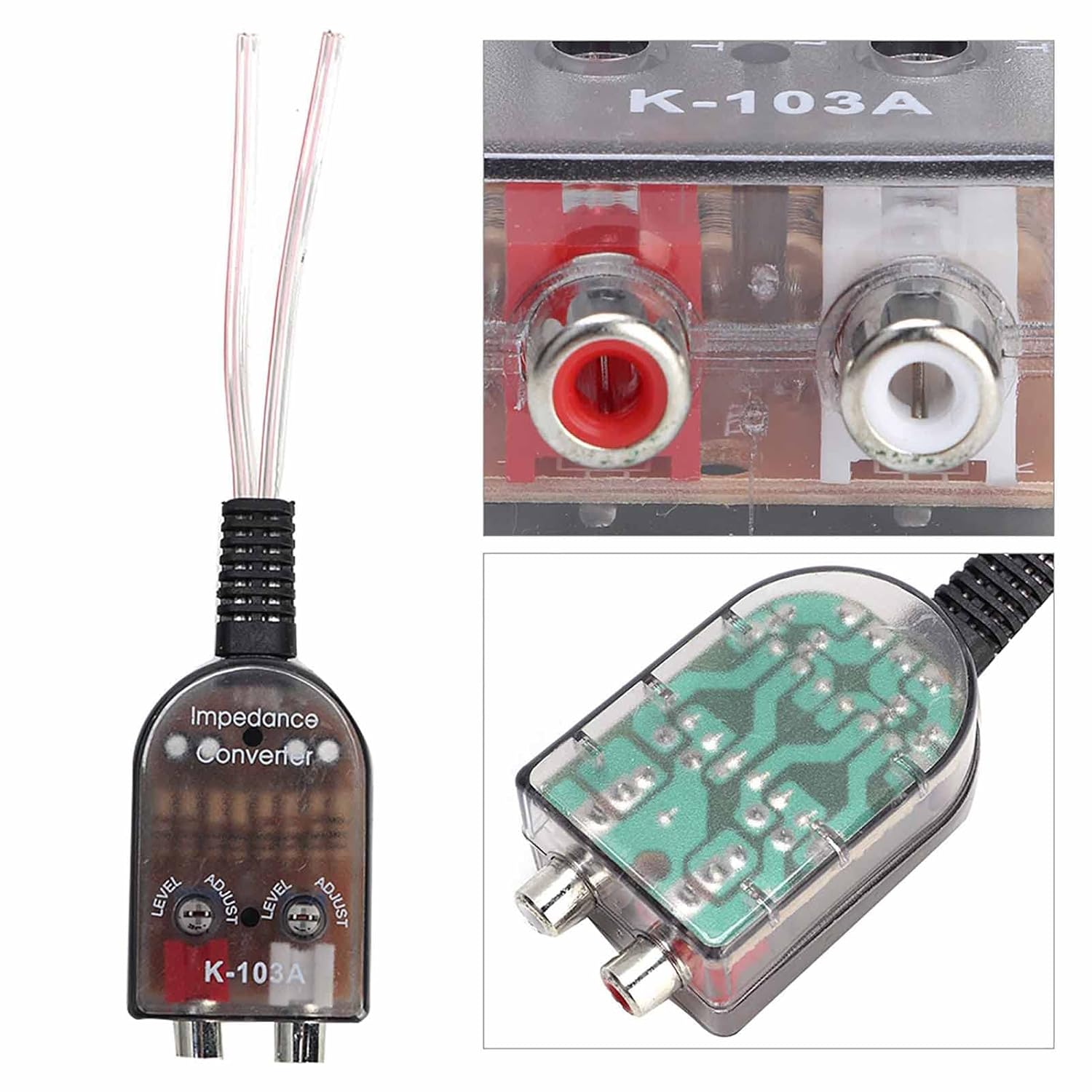
A close-up shot revealing the red and white RCA output jacks, the transparent casing, and a glimpse of the internal circuit board, demonstrating the device's construction.
Warranty and Support
For information regarding product warranty or technical support, please refer to the documentation included with your purchase or contact the manufacturer directly through their official website or customer service channels. Specific warranty terms and support contact details are typically provided by the seller or manufacturer at the time of purchase.