
1. Product Overview
The MT-VIKI 4K HDMI Splitter 1 in 2 Out (Model 4K30) is designed to duplicate one HDMI input signal to two identical HDMI output signals. This device allows you to display the same high-definition video and audio content on two separate screens simultaneously. It is ideal for applications requiring mirrored displays, such as presentations, home entertainment, or digital signage.

Figure 1: MT-VIKI 4K HDMI Splitter 1 in 2 Out
Key Features:
- 1 Input to 2 Outputs: Duplicates one HDMI source to two displays.
- 4K Resolution: Supports resolutions up to 4Kx2K@30Hz, 1080p@60Hz, and 720p@60Hz.
- HDMI 1.4 & HDCP 1.4 Compatible: Ensures broad compatibility with various HDMI devices.
- Long Distance Transmission: Supports distances up to 110ft (50ft from splitter to monitor, 60ft to source).
- Plug and Play: No software or drivers required for installation.
- Slim and Lightweight Design: Compact form factor for easy placement.
2. Package Contents
Please check the package for the following items:
- HDMI Splitter 1x2 (Model 4K30) x 1
- Type-C Charging Cable x 1
- User Manual x 1
Note: A DC 5V 1A power adapter is NOT included and must be supplied by the user.

Figure 2: Package Contents
3. Setup Instructions
Follow these steps to set up your MT-VIKI 4K HDMI Splitter:
- Connect the HDMI Source: Connect your HDMI source device (e.g., computer, PS4, Fire Stick, Blu-Ray player) to the IN port of the HDMI splitter using an HDMI cable.
- Connect the Displays: Connect your two HDMI display devices (e.g., TVs, monitors, projectors) to the OUT 1 and OUT 2 ports of the HDMI splitter using HDMI cables.
- Connect Power: Connect the provided Type-C charging cable to the DC 5V port on the splitter and then to a 5V 1A USB power adapter (not included) or a USB port on your source device. The power indicator light on the splitter will illuminate.
- Power On Devices: Power on your HDMI source device and both display devices. The splitter will automatically detect the signals and duplicate the display.

Figure 3: Typical Setup for Dual Monitors
Compatibility:
The splitter is compatible with most devices featuring a standard HDMI interface. This includes:
- Input Devices: Computers, Xbox One, PS3, PS4 Pro, Fire Stick, Blu-Ray DVD players, Roku, etc.
- Output Devices: Full HD TVs, monitors, projectors, etc.
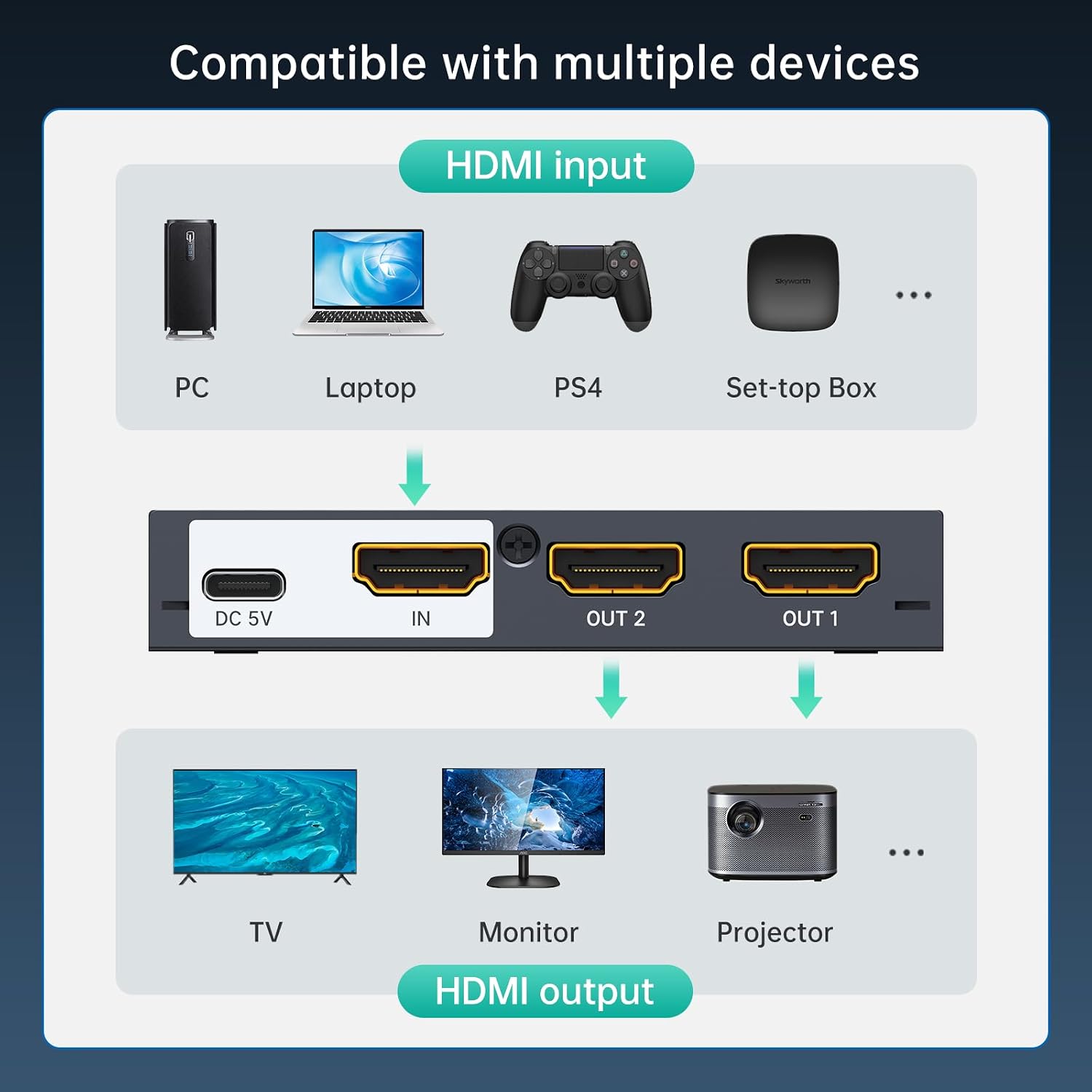
Figure 4: Compatible Devices
Installation Video:
Video 1: Step-by-step guide on how to install the HDMI Splitter 1 in 2 out.
4. Operating Modes
Mirror/Duplicate Mode:
The MT-VIKI 4K HDMI Splitter operates primarily in mirror/duplicate mode. This means that the same video and audio content from your single HDMI source will be displayed on both connected output screens (OUT 1 and OUT 2).
Important Note: This HDMI splitter supports mirror/duplicate mode (A-AA/A-BB). The two outputs will show the exact same image. It cannot support extended mode to display two different screens from a single source. However, if you use a laptop as the input source, you can utilize its built-in screen as an extended display, while the two external monitors connected to the splitter will mirror each other. To achieve this, press Win + P (on Windows) and select the 'Extend' option to use your laptop screen for working, while the two splitter outputs show identical content.
Cascade Support:
For applications requiring more than two mirrored displays, multiple MT-VIKI HDMI splitters can be cascaded. This involves connecting the output of one splitter to the input of another, allowing you to expand the number of displays showing the same content from a single source.

Figure 5: Cascade Connection Example
5. Technical Specifications
| Feature | Specification |
|---|---|
| Model | 4K30 (SP102) |
| Input Interface | 1x HDMI Female |
| Output Interface | 2x HDMI Female |
| Resolution Support | Max to 3840x2160@30Hz, 1080p@60Hz, 720p@60Hz |
| HDMI Version | HDMI 1.4 (Downward compatible with 1.3/1.2) |
| HDCP Version | HDCP 1.4 |
| HDR Support | Yes |
| EDID Support | Auto |
| Max Transmission Distance | 4K@30Hz: 15 meters (50ft) total (Input 7m, Output 8m) 1080p: 40 meters (130ft) total (Input 15m, Output 25m) |
| Power Supply | DC 5V 2A (via Type-C interface) |
| Shell Material | Metal |
| Dimensions | 90mm x 52mm x 16mm (approx.) |
| Item Weight | 3.52 ounces |

Figure 6: Product Dimensions

Figure 7: Ports Overview
6. Troubleshooting
- No Signal on Displays:
- Ensure all HDMI cables are securely connected to the correct input and output ports.
- Verify that the splitter is receiving power and its power indicator light is on.
- Check the resolution settings of your source device. Ensure it is compatible with the splitter's supported resolutions (up to 4K@30Hz).
- Try connecting the HDMI source directly to one of the displays to confirm the source and display are working correctly.
- Use high-quality HDMI cables, especially for 4K resolutions and longer distances.
- Flickering or Intermittent Signal:
- This can often be caused by long or low-quality HDMI cables. Try shorter, certified HDMI cables.
- Ensure the power supply is stable and provides sufficient power (DC 5V 1A).
- Check for electromagnetic interference from other electronic devices.
- Resolution Issues (e.g., not getting 4K):
- Confirm that both your source device and display devices support 4K@30Hz.
- Ensure your HDMI cables are rated for 4K transmission.
- The maximum recommended cable length for 4K@30Hz is 15 meters (50ft) total (input + output). Exceeding this may result in lower resolutions or signal loss.
- Cannot Extend Display (different content on each screen):
- This splitter is designed for mirroring/duplicating the same content to multiple screens. It does not support extending a single source to multiple unique displays.
- If using a laptop, you can extend your desktop to the laptop's built-in screen, while the two external monitors connected to the splitter will mirror each other.
7. General Information
Maintenance:
- Keep the device in a cool, dry place, away from direct sunlight and heat sources.
- Avoid exposing the device to water or excessive moisture.
- Clean the device with a soft, dry cloth. Do not use liquid or aerosol cleaners.
- Do not attempt to open or repair the device yourself. Refer to qualified service personnel.
Product Series Overview:
MT-VIKI offers a range of HDMI splitters with various port configurations. For a broader understanding of the product line, you may refer to the following video:
Video 2: Overview of MT-VIKI's HDMI Splitter series, including 2, 4, 8, and 16 port models.
8. Contact & Support
For any questions, technical support, or warranty inquiries, please contact MT-VIKI customer service through your purchase platform or visit the official MT-VIKI website.
Manufacturer: MT-VIKI
Date First Available: April 3, 2024