
1. Introduction
The Toshiba 26L Air Fry Auto Menu Combo 6-in-1 Microwave Oven is a versatile kitchen appliance designed to simplify your cooking experience. This unit combines the functionalities of a microwave, air fryer, convection oven, grill, steamer, and defrosting unit, offering a comprehensive solution for various culinary needs. Equipped with Origin Inverter technology, it ensures precise temperature control and efficient energy use, while the Chef Defrost feature provides even thawing. This manual provides essential information for safe operation, maintenance, and troubleshooting.

2. Important Safety Instructions
When using electrical appliances, basic safety precautions should be followed, including the following:
- Read all instructions before using the appliance.
- Ensure the appliance is properly grounded. Connect only to properly grounded outlets.
- Do not operate the oven when empty.
- Do not attempt to operate this oven if it is damaged or malfunctioning.
- Do not allow children to use the oven without supervision.
- Do not use corrosive chemicals or vapors in this appliance.
- Do not heat liquids or other foods in sealed containers as they are liable to explode.
- Do not use metal utensils or containers in microwave mode.
- Always use oven mitts when handling hot items from the oven.
- Ensure proper ventilation around the appliance.
3. Product Overview
Familiarize yourself with the components of your Toshiba microwave oven.


Components:
- Control Panel: Digital display and function buttons/dial for operation.
- Oven Door: Equipped with a safety lock system.
- Oven Cavity: Interior cooking space.
- Glass Turntable: Rotates food for even cooking.
- Roller Ring: Supports the glass turntable.
- Grill Rack: For use with grill and convection functions.
- Chef Pot (Steamer): For steam cooking.
4. Setup and Installation
Unpacking:
- Remove all packaging materials from inside and outside the oven.
- Check the oven for any damage, such as dents or a misaligned door. Do not operate if damaged.
Placement:
- Place the oven on a flat, stable surface that can support its weight.
- Ensure adequate ventilation: leave a minimum of 20cm (8 inches) of space above the oven, 10cm (4 inches) at the rear, and 5cm (2 inches) on each side.
- Do not block air vents.
Electrical Connection:
- Plug the oven into a dedicated, properly grounded 240V AC outlet.
- Do not use extension cords or adapters.
Turntable Assembly:
- Place the roller ring in the center of the oven cavity.
- Place the glass turntable on top of the roller ring, ensuring it sits securely in the center hub.
5. Operating Instructions
Control Panel Overview:
The control panel features a digital display, function buttons (Microwave, Function, Chef Defrost, Timer/Clock), and a rotary dial for time/weight adjustment and selection. The START/+30SEC button initiates cooking, and the STOP/CANCEL button stops operation or clears settings.
Basic Microwave Operation:
- Place food in a microwave-safe container on the turntable.
- Close the oven door.
- Press the 'Microwave' button to select microwave mode.
- Turn the dial to set the desired cooking time.
- Press the 'START/+30SEC' button to begin cooking.
Auto Menu Cooking:
The oven features 10 pre-programmed auto menus for convenient cooking.

- Press the 'Function' button repeatedly until 'Auto Menu' is displayed.
- Turn the dial to select the desired auto menu (A-1 to A-10).
- Turn the dial to adjust the food weight/quantity if prompted.
- Press 'START/+30SEC' to begin.
Available Auto Menus:
- A-1: Auto Reheat
- A-2: Potato
- A-3: Meat
- A-4: Vegetable
- A-5: Fish
- A-6: Pasta
- A-7: Soup
- A-8: Cake
- A-9: Pizza
- A-10: Chicken
Air Fry Function:
Enjoy healthier fried foods with the dedicated air fry function. This mode uses hot air circulation to achieve crispy results with less oil.
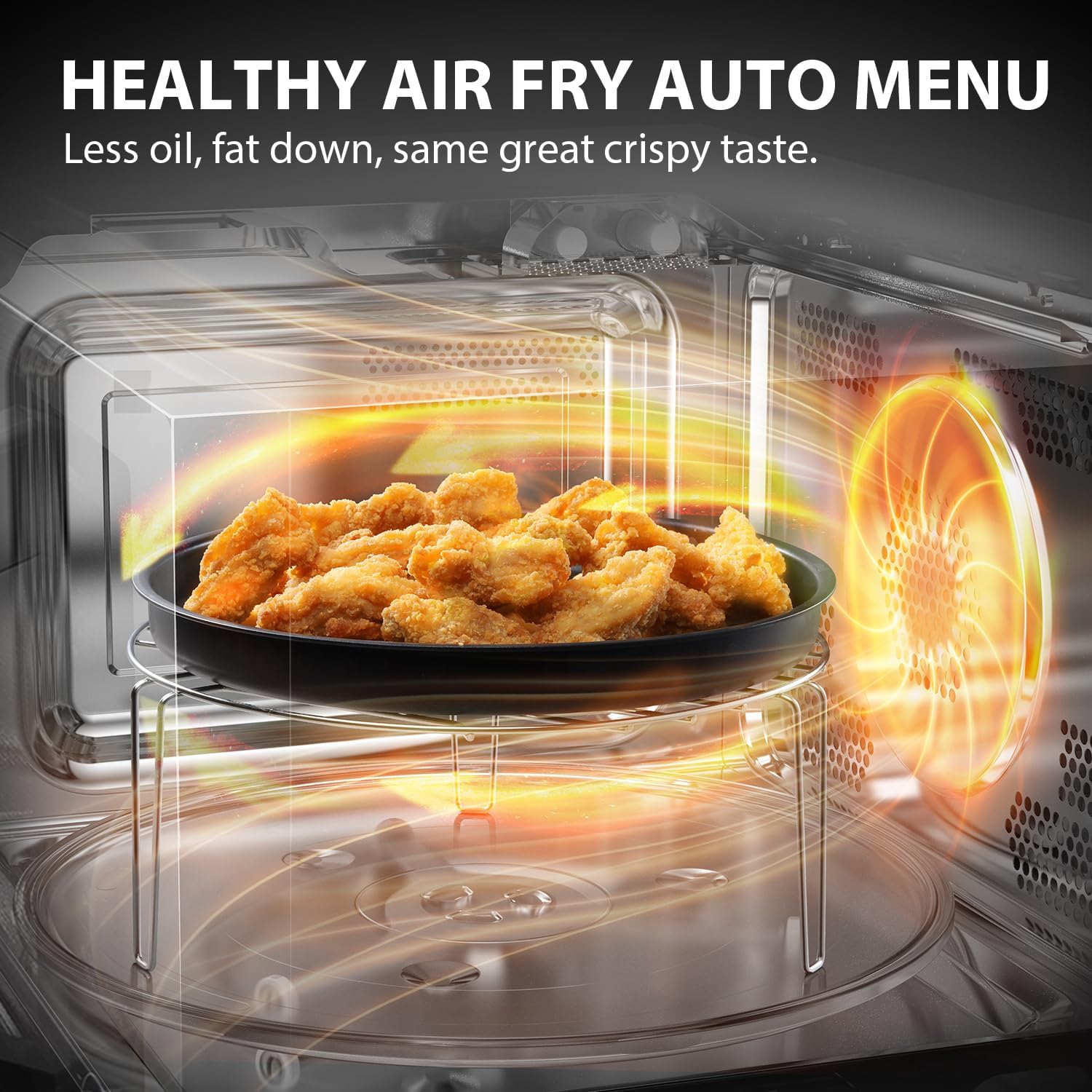
Refer to the manual for specific air fry auto menu settings and recommended food types.
Convection Function:
The convection function allows for baking and roasting with circulating hot air, similar to a traditional oven.
- Press the 'Function' button to select 'Convection' mode.
- Set the desired temperature using the dial.
- Set the cooking time.
- Press 'START/+30SEC'.
Grill Function:
Use the grill function for browning and toasting.
- Place food on the grill rack.
- Press the 'Function' button to select 'Grill' mode.
- Set the cooking time.
- Press 'START/+30SEC'.
Combi (Combination) Cooking:
Combine microwave, convection, and grill functions for faster and more versatile cooking. Refer to the full manual for specific combination settings.
Steam Function:
Utilize the included Chef Pot for healthy steam cooking.

- Add water to the bottom of the Chef Pot.
- Place food in the steamer tray.
- Cover with the lid and place in the microwave.
- Select the steam function or an appropriate auto menu setting.
- Press 'START/+30SEC'.
Chef Defrost Function:
The Chef Defrost program intelligently adjusts power to prevent overheating on the outside and under-thawing on the inside, ensuring even defrosting.
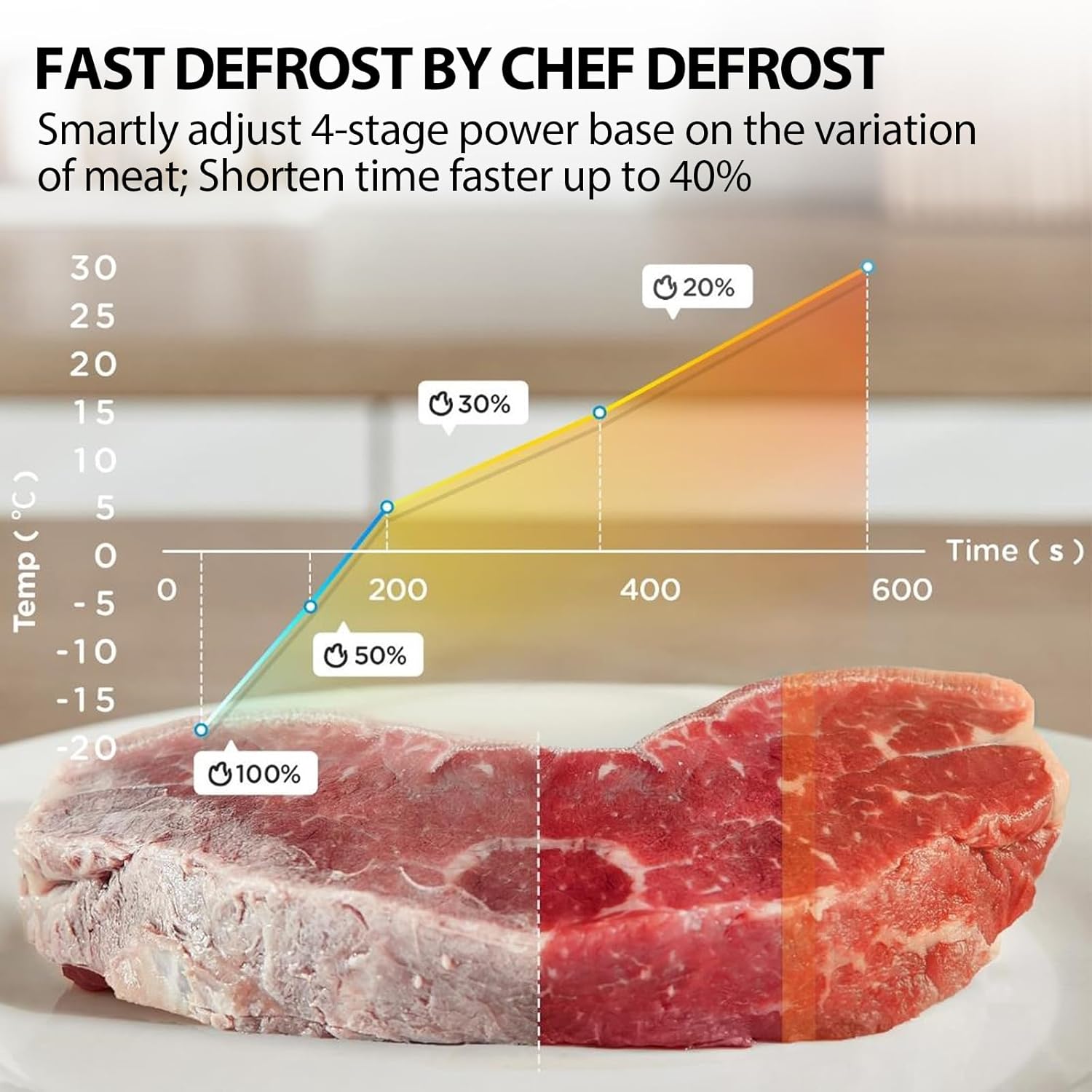
- Place the frozen food in the oven.
- Press the 'Chef Defrost' button.
- Turn the dial to select the food type and weight.
- Press 'START/+30SEC'.
Origin Inverter Technology:
The Origin Inverter technology provides a linear power output, allowing for precise temperature control. This results in faster heating, more even cooking, and reduced noise levels compared to traditional microwave ovens.

6. Maintenance and Cleaning
Regular cleaning and maintenance will ensure the longevity and optimal performance of your microwave oven.

- Interior Cleaning: After each use, wipe the interior cavity with a damp, soft cloth and mild detergent. For stubborn stains, place a bowl of water with lemon slices inside and microwave for a few minutes to loosen residue.
- Exterior Cleaning: Clean the exterior surface with a soft, damp cloth. Avoid abrasive cleaners.
- Turntable and Roller Ring: The glass turntable and roller ring can be removed and washed in warm, soapy water or in the dishwasher. Ensure they are completely dry before placing them back in the oven.
- Door Seal: Keep the door seal clean to ensure proper closure and efficient operation.
- Odor Removal: To remove odors, combine a cup of water with several tablespoons of lemon juice or vinegar in a microwave-safe bowl. Microwave on high for 5-7 minutes.
7. Troubleshooting
If you encounter issues with your microwave oven, consult the table below for common problems and solutions.
| Problem | Possible Cause | Solution |
|---|---|---|
| Oven will not start | Door not closed properly; Plug not inserted firmly; Fuse blown or circuit breaker tripped. | Close door securely; Ensure plug is firmly in outlet; Check household fuse/circuit breaker. |
| Food not cooking evenly | Food not stirred/turned; Incorrect power level/time; Turntable not rotating. | Stir/turn food during cooking; Adjust power/time; Check turntable and roller ring for obstructions. |
| Light not working | Bulb needs replacement. | Contact qualified service personnel for bulb replacement. |
| Excessive steam from door | High moisture content in food. | This is normal for high moisture foods. Ensure proper ventilation. |
| Oven causing interference to radio/TV | Microwave oven is operating near radio/TV. | Move the oven away from the radio/TV or vice versa. |
If the problem persists after attempting these solutions, please contact customer support.
8. Specifications
| Feature | Detail |
|---|---|
| Brand | Toshiba |
| Model Number | MW3-AC26SFI(MG) / AC9P032TW-SV0F00 |
| Colour | Morandi Gray |
| Product Dimensions (D x W x H) | 44.5 x 49.5 x 29 cm |
| Capacity | 26 litres |
| Power / Wattage | 900 watts |
| Voltage | 240 Volts |
| Material | Stainless Steel |
| Item Weight | 12.2 kg |
| Special Features | Child Safety Lock, Defrost, Turntable, Express Cook, Grill Function, Air Fry, Steam, Convection, Inverter Technology |
| Included Components | Grill, Chef pot, Roller Ring |
9. Warranty and Support
This Toshiba microwave oven comes with a manufacturer's warranty. Please refer to the warranty card or your purchase documentation for specific terms, conditions, and duration of the warranty applicable to your region.
Customer Support:
For technical assistance, service, or to inquire about replacement parts, please contact Toshiba customer support. Contact details can typically be found on the Toshiba official website or on your product's packaging.
When contacting support, please have your product model number (MW3-AC26SFI(MG)) and serial number ready.