1. Introduction
This manual provides essential instructions for the safe and effective operation of your FACEIL BSX325 Blood Pressure Monitor. This device is designed for home use to measure systolic and diastolic blood pressure and pulse rate on the wrist. Please read this manual thoroughly before first use and retain it for future reference.
2. Important Safety Information
- Consult a Physician: This device is intended for home use and should not replace professional medical advice. Always consult your doctor for diagnosis and treatment of high blood pressure.
- Self-Measurement: Do not self-diagnose or self-medicate based on measurement results. Always follow the instructions of your healthcare provider.
- Proper Use: Use the device only for its intended purpose as described in this manual.
- Children and Pets: Keep the device out of reach of children and pets.
- Environmental Conditions: Avoid using the device in extreme temperatures, high humidity, or direct sunlight.
- Interference: Do not use the device near strong electromagnetic fields, such as mobile phones or microwave ovens, as this may affect accuracy.
3. Package Contents
Verify that all components are present and undamaged upon opening the package:
- FACEIL BSX325 Blood Pressure Monitor Unit
- Adjustable Wrist Cuff (5.3" - 7.67")
- Carrying Case
- User Manual (this document)
4. Product Overview
Familiarize yourself with the main components of your blood pressure monitor:
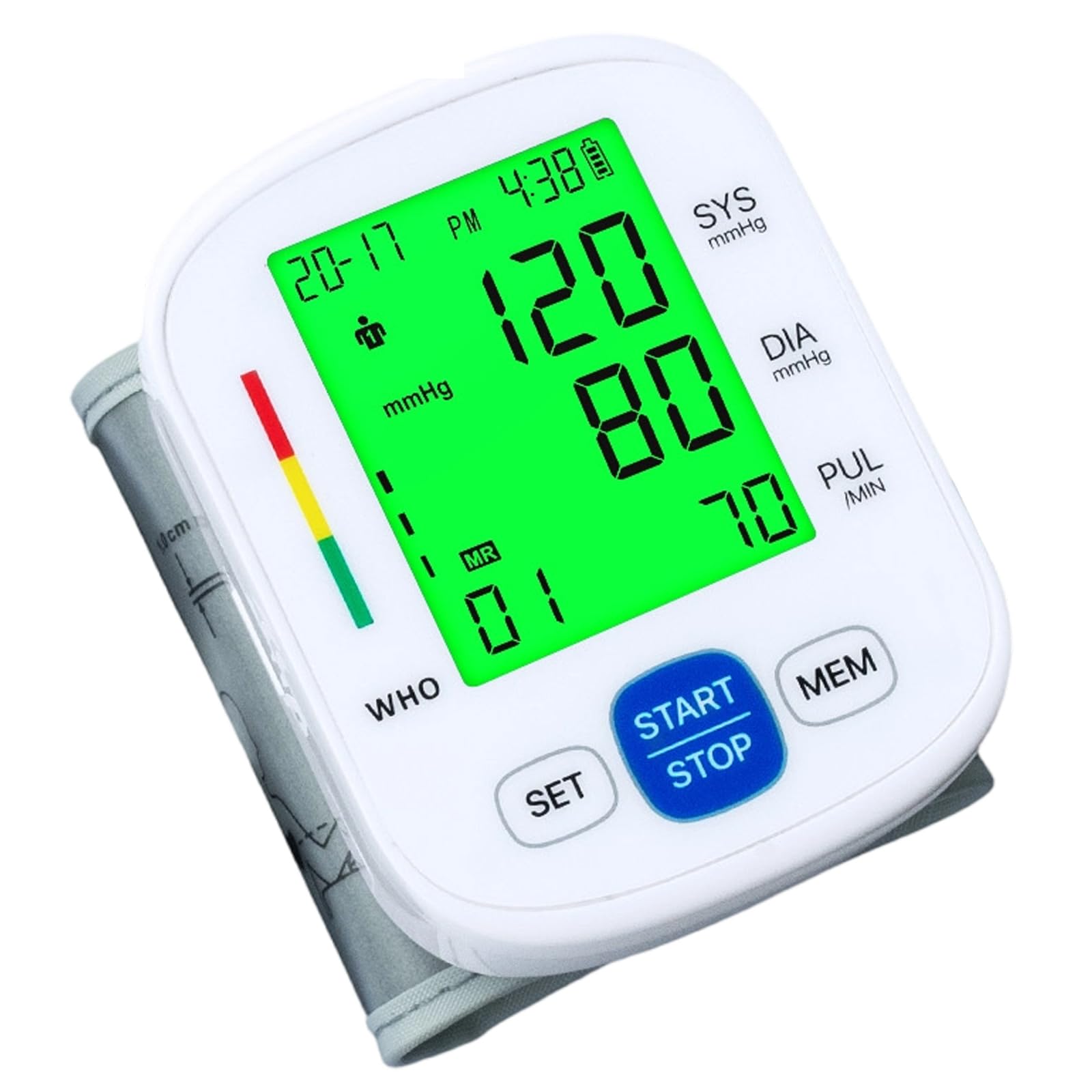
Image 4.1: FACEIL BSX325 Blood Pressure Monitor. This image shows the main unit with its LCD screen, control buttons, and the attached wrist cuff. The device is compact and designed for easy home use.
Main Unit Components:
- LCD Display: Shows blood pressure readings (systolic, diastolic), pulse rate, date, time, and user indicator.
- START/STOP Button: Powers the device on/off and starts/stops a measurement.
- MEM Button: Accesses stored measurement records.
- SET Button: Used for setting date, time, and user selection.
- Wrist Cuff: Adjustable cuff for placement on the wrist.
5. Setup
5.1 Battery Installation
- Open the battery compartment cover on the back of the monitor.
- Insert two AAA batteries (not included) according to the polarity indicators (+ and -) inside the compartment.
- Close the battery compartment cover securely.
- Note: If the low battery indicator appears on the display, replace both batteries simultaneously.
5.2 Setting Date and Time
- With the device off, press the SET button. The year will begin flashing.
- Press the MEM button to adjust the year. Press SET to confirm and move to the month.
- Repeat this process for month, day, hour, and minute.
- Press SET one last time to save the settings and exit.
5.3 Applying the Wrist Cuff
- Remove any tight clothing from your wrist.
- Place the monitor on your left wrist with the display facing upwards. The cuff should be positioned approximately 1-2 cm from your palm.
- Wrap the cuff snugly around your wrist. Ensure it is not too tight or too loose. The adjustable range is 5.3" to 7.67".
- Rest your arm on a table so that the monitor is at the same level as your heart.
6. Operating Instructions
6.1 Taking a Measurement
- Sit comfortably with your back supported and feet flat on the floor. Avoid talking or moving during the measurement.
- Ensure the cuff is correctly applied to your wrist and your arm is at heart level.
- Press the START/STOP button. The cuff will begin to inflate automatically.
- Remain still and quiet until the measurement is complete. The display will show your systolic pressure, diastolic pressure, and pulse rate.
- The measurement will automatically be stored in the device's memory.
- Press the START/STOP button again to turn off the device, or it will automatically shut off after 1 minute of inactivity.
6.2 Memory Function
The device stores up to 2x99 measurements for two users.
- With the device off, press the MEM button to view the average of the last three readings.
- Press MEM repeatedly to scroll through individual past measurements, from most recent to oldest.
- To switch between User 1 and User 2 memory, press the SET button while viewing memory records.
- To exit memory mode, press START/STOP or wait for automatic shut-off.
6.3 Clearing Memory
To clear all records for the currently selected user:
- Enter memory mode by pressing the MEM button.
- Press and hold the SET button for approximately 3 seconds until "DEL ALL" appears and flashes.
- Press MEM to confirm deletion. All records for that user will be erased.
7. Maintenance
7.1 Cleaning
- Wipe the monitor and cuff gently with a soft, dry cloth.
- If necessary, use a cloth lightly dampened with water or a mild detergent, then wipe dry immediately.
- Do not use abrasive cleaners, solvents, or immerse the device in water.
7.2 Storage
- Store the device in its carrying case when not in use.
- Keep it in a cool, dry place, away from direct sunlight, high temperatures, and humidity.
- If the device will not be used for an extended period, remove the batteries to prevent leakage.
8. Troubleshooting
| Problem | Possible Cause | Solution |
|---|---|---|
| No display when powered on | Batteries are dead or incorrectly inserted. | Replace batteries or reinsert them with correct polarity. |
| "Err" or "E" symbol on display | Cuff not applied correctly, movement during measurement, or irregular pulse. | Reapply cuff, remain still, or consult a physician if errors persist. |
| Inconsistent readings | Improper cuff placement, talking/moving, incorrect body position, or recent activity. | Ensure proper technique (see Section 6.1). Wait 5 minutes between measurements. |
| Cuff does not inflate | Air leakage or pump malfunction. | Check cuff connection. If problem persists, contact customer support. |
9. Specifications
- Model: BSX325
- Display: LCD Digital Display
- Measurement Method: Oscillometric method
- Measurement Range: Pressure: 0-299 mmHg; Pulse: 40-199 beats/minute
- Accuracy: Pressure: ±3 mmHg; Pulse: ±5% of reading
- Memory: 2 users x 99 sets of data
- Cuff Size: Adjustable wrist cuff, 5.3" - 7.67" (13.5 cm - 19.5 cm)
- Power Source: 2 x AAA batteries (DC 3V)
- Product Dimensions: Approximately 10L x 10W x 10Th Centimetres
- Operating Environment: Temperature: 5°C-40°C; Humidity: 15%-85% RH
- Storage Environment: Temperature: -20°C-55°C; Humidity: 10%-93% RH
- Intended Age Range: Adult
10. Warranty and Support
For warranty information or technical support, please refer to the contact details provided with your purchase or visit the official FACEIL website. Keep your purchase receipt as proof of purchase.


