1. Introduction
Thank you for choosing the AROEVE MK08W Air Purifier Fan. This 2-in-1 device combines advanced air purification with powerful air circulation to provide a healthier and more comfortable indoor environment. This manual provides essential information for the safe and efficient operation and maintenance of your new appliance. Please read it thoroughly before use and retain it for future reference.
2. Important Safety Instructions
- Always place the air purifier on a firm, level surface.
- Keep the appliance away from heat sources, direct sunlight, and moisture.
- Do not block air inlets or outlets. Maintain at least 8 inches (20 cm) clearance from walls and other objects.
- Ensure the voltage of your power supply matches the appliance's rating.
- Unplug the appliance before cleaning, performing any maintenance, or when not in use.
- Do not operate the appliance with a damaged cord or plug.
- Keep out of reach of children and pets.
- Do not use the appliance in areas with flammable or combustible gases.
- Only use AROEVE genuine replacement filters.
3. Package Contents
- AROEVE MK08W Air Purifier Fan Unit
- Washable Pre-Filter (pre-installed)
- HEPA Filter (pre-installed)
- User Manual
4. Product Overview
The AROEVE MK08W features a sleek, cylindrical design with a rotatable fan head for optimal air circulation. The control panel is located on the front of the unit, providing easy access to all functions.

Figure 1: AROEVE MK08W Air Purifier Fan
Control Panel Features:
- Power Button: Turns the unit on/off.
- Fan Speed/Mode Button: Cycles through fan speeds (Low, High, Turbo) and modes (Auto, Sleep).
- Timer Button: Sets the operating time (1-24 hours).
- Oscillation Button: Activates 3D wide-angle oscillation (90° up/down, 90° left/right).
- Air Quality Display: Shows real-time PM values (PM1.0, PM2.5, PM10) and changes color based on air quality (Blue: Very Good, Green: Good, Yellow: Moderate, Red: Poor).
- Filter Reset Indicator: Lights up when filter replacement is needed.
- Light Button: Controls the ambient lighting.
5. Setup
5.1 Unpacking and Filter Preparation
- Carefully remove the air purifier from its packaging.
- Locate the filter compartment on the back of the unit. Open the cover.
- Remove the pre-installed filter. Ensure all plastic packaging is removed from the filter before use.
- Re-insert the filter into the unit, ensuring the washable pre-filter is on the outermost layer. Close the filter compartment cover securely.
5.2 Power Connection
- Place the air purifier on a stable, flat surface.
- Plug the power cord into a standard electrical outlet.
5.3 Smart WiFi Setup
The AROEVE MK08W supports Smart WiFi control via a dedicated app. Refer to the separate Quick Start Guide for detailed instructions on connecting your device to your home WiFi network and setting up app control.
6. Operating Instructions
6.1 Power On/Off
Press the Power Button on the control panel to turn the unit on or off.
6.2 Fan Speed and Modes
Press the Fan Speed/Mode Button to cycle through the following settings:
- Low: Quiet operation for continuous purification.
- High: Increased airflow for faster purification.
- Turbo: Maximum fan speed for rapid air circulation and purification.
- Auto Mode: The purifier automatically adjusts fan speed based on real-time air quality detected by the millisecond air detector.
- Sleep Mode: Operates at the lowest fan speed (approx. 27 dB) with minimal display light for undisturbed rest.
6.3 Oscillation
Press the Oscillation Button to activate the 3D wide-angle fan swing. The fan head will oscillate 90 degrees up/down and 90 degrees left/right to distribute purified air evenly throughout the room.
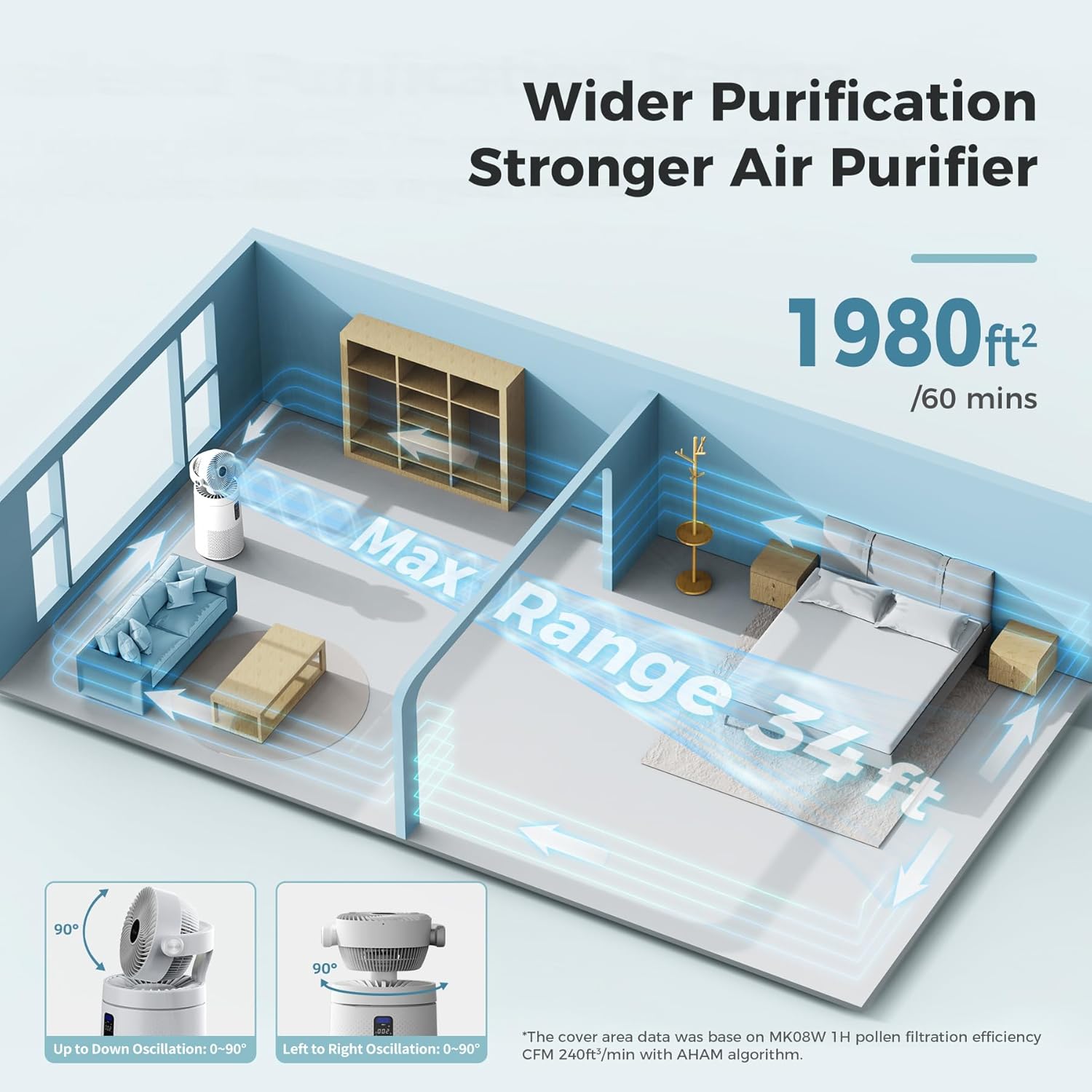
Figure 2: 3D Wide-Angle Oscillation
6.4 Timer Function
Press the Timer Button repeatedly to set the desired operating time in 1-hour increments, up to 24 hours. The unit will automatically turn off once the set time expires.
6.5 Air Quality Indicator
The integrated millisecond air detector provides real-time air quality readings (PM1.0, PM2.5, PM10) on the digital display. The display color changes to indicate air quality levels:
- Blue: Very Good Air Quality
- Green: Good Air Quality
- Yellow: Moderate Air Quality
- Red: Poor Air Quality

Figure 3: Millisecond Laser Sensors and Air Quality Display
6.6 Ambient Light Control
Press the Light Button to turn the ambient light on/off or adjust its brightness. This feature is particularly useful in bedrooms to avoid bright lights during sleep.
6.7 Aromatherapy Feature
The unit includes a hidden aroma box. Open the aroma box, add a few drops of your preferred essential oil to the sponge, and close the box. The fan will then disperse the scent throughout the room.

Figure 4: Aromatherapy Box
7. Maintenance
Regular maintenance ensures optimal performance and extends the lifespan of your AROEVE Air Purifier Fan.
7.1 Filter Replacement
The filter replacement indicator light will illuminate when it's time to replace the HEPA filter (approximately every 6-8 months, depending on usage and air quality).
- Unplug the air purifier from the power outlet.
- Open the filter compartment cover on the back of the unit.
- Remove the old filter. Dispose of it properly.
- Insert a new AROEVE genuine replacement filter, ensuring the washable pre-filter is correctly positioned.
- Close the filter compartment cover.
- Plug the unit back in.
- To reset the filter indicator, press and hold the Filter Reset Button (usually combined with the Air Info button) for 3-5 seconds until the light turns off.
7.2 Washable Pre-Filter Cleaning
The outermost layer of the filter is a washable pre-filter designed to capture larger particles like hair and dander. Clean it regularly to maintain efficiency.
- Remove the filter as described in section 7.1.
- Carefully detach the washable pre-filter from the main HEPA filter.
- Rinse the pre-filter under running water until clean.
- Allow the pre-filter to air dry completely before reattaching it to the HEPA filter and re-inserting it into the unit.

Figure 5: Cleaning the Washable Pre-Filter
7.3 Exterior Cleaning
Wipe the exterior of the air purifier with a soft, dry cloth. Do not use abrasive cleaners or solvents.
8. Troubleshooting
| Problem | Possible Cause | Solution |
|---|---|---|
| Unit does not turn on | No power; filter not installed correctly | Check power connection; ensure filter is correctly installed and cover is closed. |
| Poor air quality reading despite operation | Dirty filter; blocked air inlets/outlets | Clean/replace filter; ensure proper clearance around the unit. |
| Filter replacement indicator light is on | Filter needs replacement | Replace the HEPA filter and reset the indicator as per Section 7.1. |
| WiFi connection issues | Incorrect setup; router issues | Refer to the Smart WiFi Setup Guide; ensure you are using a 2.4GHz network. |
9. Specifications
| Feature | Detail |
|---|---|
| Model Number | MK08W |
| Brand | AROEVE |
| Color | White |
| Product Dimensions | 12.4"D x 12.4"W x 25.6"H |
| Item Weight | 15.65 pounds |
| Floor Area Coverage | 1980 Square Feet |
| Noise Level | 27 Decibels (Sleep Mode) |
| Wattage | 53 watts |
| Filter Class | HEPA |
| Contaminant Filtration | Solid and Gaseous Pollutants |
| Controller Type | Touch Panel, Smart WIFI (Amazon Alexa, Google Assistant) |
| Special Feature | Programmable Timer, 3D Oscillation, Aromatherapy |
| Certification | CARB Certified |
10. Warranty and Support
AROEVE products come with a standard manufacturer's warranty. For specific warranty details, product support, or to purchase replacement filters, please visit the official AROEVE website or contact customer service through your retailer.
For further assistance, please refer to the contact information provided with your purchase or on the AROEVE brand store page.


