1. Introduction
This document provides comprehensive instructions for the Generic Replacement Remote Control, designed for use with specific Jiepak Heavy Bass Bluetooth Home Theatre Systems. This remote functions as an infrared (IR) replacement. Please ensure your original remote control matches the appearance of this replacement for optimal compatibility. While this remote is designed to replicate core functions, some advanced or unique features of your original system's remote may not be fully supported.
Compatible Jiepak Models: SZ-11, JP-8088, JP-A3, JP-C1, JP-C2, JP-3011.
If your specific model is not listed, please verify compatibility before use. The remote requires two AAA batteries (not included).
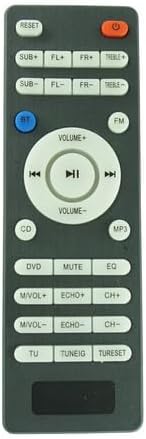
Figure 1: Front view of the Generic Replacement Remote Control. This image displays the layout of all buttons, including power, volume, playback controls, and various input/audio adjustments.
2. Setup
2.1 Battery Installation
The remote control requires two AAA batteries for operation. Follow these steps to install them:
- Locate the battery compartment cover on the back of the remote control.
- Press down on the latch and slide the cover downwards to open the compartment.
- Insert two AAA batteries, ensuring the positive (+) and negative (-) terminals align correctly with the markings inside the compartment.
- Slide the battery compartment cover back into place until it clicks securely.
Note: Always replace both batteries at the same time. Do not mix old and new batteries, or different types of batteries.

Figure 2: Back view of the remote control, highlighting the battery compartment cover at the bottom.
3. Operating Instructions
Point the remote control directly at the infrared receiver on your Jiepak Home Theatre System. Ensure there are no obstructions between the remote and the system.
3.1 Button Functions Overview
The remote control features a standard layout for common home theatre functions. Refer to the image below for button identification.

Figure 3: Angled view of the remote control, providing a clear perspective of the button layout for operational reference.
- POWER (Red Button): Turns the home theatre system on or off.
- RESET: Resets system settings to default.
- SUB+/SUB-: Adjusts subwoofer volume levels.
- FL+/FL-: Adjusts front left speaker volume levels.
- FR+/FR-: Adjusts front right speaker volume levels.
- TREBLE+/TREBLE-: Adjusts treble audio levels.
- BT (Blue Button): Switches input to Bluetooth mode.
- FM: Switches input to FM radio mode.
- VOLUME+/VOLUME-: Increases or decreases overall system volume.
- PLAY/PAUSE (►▮▮): Plays or pauses media playback.
- PREVIOUS (◀◀): Skips to the previous track/station.
- NEXT (►►): Skips to the next track/station.
- CD: Switches input to CD mode.
- MP3: Switches input to MP3 mode (e.g., USB playback).
- DVD: Switches input to DVD mode.
- MUTE: Mutes or unmutes audio output.
- EQ: Cycles through equalizer presets.
- M/VOL+/M/VOL-: Adjusts microphone volume (if applicable).
- ECHO+/ECHO-: Adjusts echo effect levels (if applicable).
- CH+/CH-: Changes channels (e.g., FM radio) or navigates menus.
- TU: Likely for tuner functions.
- TUNEIG: Likely for tuning adjustments.
- TURESET: Resets tuner settings.
4. Maintenance
4.1 Cleaning the Remote Control
To maintain the remote control's appearance and functionality:
- Wipe the surface with a soft, dry cloth.
- For stubborn dirt, lightly dampen the cloth with water or a mild, non-abrasive cleaner.
- Avoid using harsh chemicals, solvents, or abrasive cleaning pads, as these can damage the remote's finish or internal components.
4.2 Battery Replacement
Replace batteries when the remote control's range decreases or it stops responding. Refer to Section 2.1 for detailed battery installation instructions. Always dispose of used batteries responsibly according to local regulations.
5. Troubleshooting
| Problem | Possible Cause | Solution |
|---|---|---|
| Remote control does not work. |
|
|
| Some functions do not work. |
|
|
6. Specifications
- Product Type: Replacement Infrared Remote Control
- Brand: Generic
- Manufacturer: Easytry
- Compatible Devices: Jiepak Home Theatre Systems (Models: SZ-11, JP-8088, JP-A3, JP-C1, JP-C2, JP-3011)
- Power Source: 2 x AAA Batteries (not included)
- Color: Black
- Special Features: Ergonomic design, direct replacement functionality.
7. Support
For further assistance or inquiries regarding this replacement remote control, please contact your retailer or the manufacturer, Easytry. When contacting support, please provide the product's ASIN (B0CZRDK9VP) for quicker service.


