Introduction
Thank you for choosing the LiebeWH 37 Keys Piano Keyboard. This electronic keyboard is designed for beginners, offering a comprehensive and engaging musical learning experience. It features a full 37-key keyboard, various tones, rhythms, and sound effects, along with a built-in microphone for interactive play. This manual provides essential information on setting up, operating, maintaining, and troubleshooting your new instrument to ensure optimal performance and enjoyment.
Safety Information
Please read and understand all safety instructions before using the product. Keep this manual for future reference.
- Do not expose the keyboard to water or excessive moisture.
- Avoid placing the keyboard near heat sources or in direct sunlight.
- Use only the specified power supply methods (USB cable or 3 AA batteries).
- Ensure adult supervision for young children during use.
- Do not attempt to disassemble or modify the keyboard.
- Clean the keyboard with a soft, dry cloth. Avoid abrasive cleaners.
Package Contents
Verify that all items are present in the package:
- 1 x Electronic Keyboard
- 1 x USB Power Cord
- 1 x Microphone
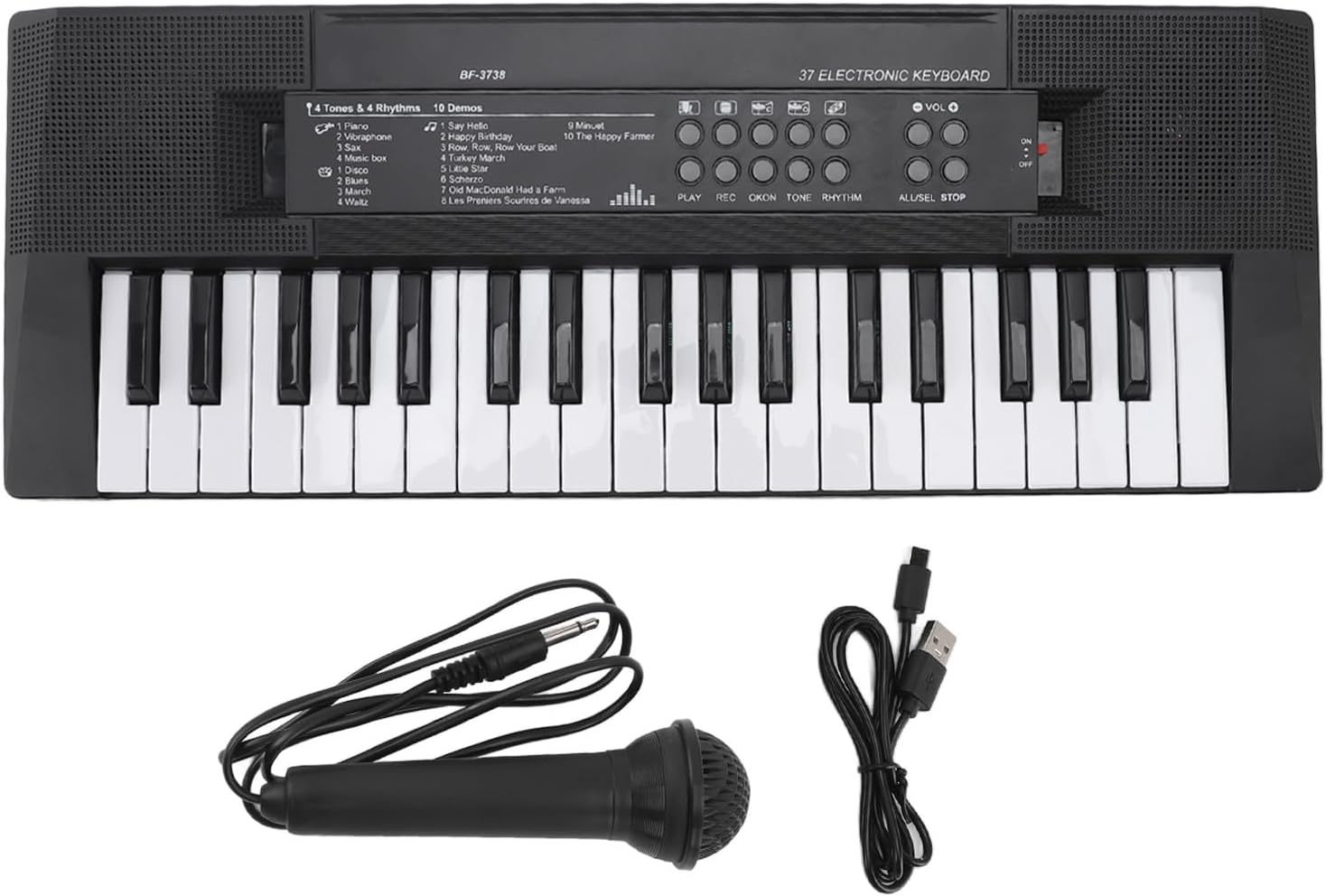
Image: The LiebeWH 37 Keys Piano Keyboard, showing the main unit, the wired microphone, and the USB power cord.
Product Overview
The LiebeWH 37 Keys Piano Keyboard is designed with user-friendly features for an engaging musical experience.
- 37-Key Keyboard: A full keyboard suitable for beginners to practice and learn.
- Multifunctional Design: Includes 4 tones, 4 rhythm styles, 5 instrumental sound effects, and integrated drum pad buttons.
- Built-in Demo Songs: Features 10 pre-recorded demo songs for listening and learning.
- Volume Control: Adjustable volume for comfortable listening.
- Microphone: Connectable microphone for singing along.
- Recording and Playback: Allows users to record and listen to their performances.
- Portable Design: Lightweight and compact for easy transport.

Image: An angled view of the keyboard, highlighting the keys and the control panel.
Setup
The keyboard can be powered in two ways:
- USB Power Cord:
Connect the provided USB power cord to the 5V USB port on the keyboard. Plug the other end into a compatible USB power adapter (e.g., a mobile phone charger) or a USB port on a computer. Ensure the power source provides 5V DC.

Image: A close-up view of the keyboard's side, showing the 5V USB power input and the microphone input jack.
- AA Batteries:
The keyboard can also be powered by 3 x AA batteries (not included). Locate the battery compartment on the underside of the keyboard, open it, and insert the batteries according to the polarity markings (+/-). Close the compartment securely.
Once powered, slide the ON/OFF switch located on the control panel to the "ON" position to turn on the keyboard.

Image: A detailed view of the control panel, showing the volume up/down buttons and the red ON/OFF slide switch.
Operating Instructions
Basic Functions
- Power On/Off: Use the red slide switch on the control panel.
- Volume Control: Press the VOL + and VOL - buttons to adjust the master volume.
- Tones: Select from 4 different tones (Piano, Microphone, Music Box, Organ) using the dedicated buttons.
- Rhythms: Choose from 4 rhythm styles (Waltz, March, Disco, Rock) using the rhythm selection buttons.
- Instrumental Sound Effects: Access 5 different instrumental sound effects.
- Drum Pads: Utilize the integrated drum pad buttons to add drumming effects to your music.
Microphone Usage
Connect the provided microphone to the MIC input jack on the side of the keyboard. Once connected, you can sing along while playing the keyboard. Adjust the keyboard's volume to balance the sound.

Image: A close-up view of the wired microphone, showing its design and the audio jack.
Demo Songs
The keyboard includes 10 built-in demo songs. Press the "DEMO" button to cycle through the songs. This feature is excellent for listening to pre-recorded melodies and learning new tunes.
The demo songs include:
- Say Hello
- Happy Birthday
- Row Row Row Your Boat
- Turkey March
- Old MacDonald Had a Farm
- Les P'tites Souris de Vanessa
- Minuet
- The Happy Farmer
Recording and Playback
The keyboard allows you to record your own performances and play them back.
- To Record: Press the REC button. Play your desired melody on the keyboard. The keyboard will record your notes.
- To Playback: After recording, press the PLAY button to listen to your recorded performance.
- To Stop: Press the ALL/SEL STOP button to stop playback or recording.
Maintenance
Proper maintenance ensures the longevity and optimal performance of your keyboard.
- Cleaning: Use a soft, dry cloth to wipe the surface of the keyboard. Do not use liquid cleaners, sprays, or abrasive materials, as they may damage the finish or internal components.
- Storage: When not in use, store the keyboard in a cool, dry place away from direct sunlight and extreme temperatures. If storing for an extended period, remove the batteries to prevent leakage.
- Handling: Handle the keyboard with care. Avoid dropping it or subjecting it to strong impacts.
Troubleshooting
If you encounter issues with your keyboard, refer to the following common problems and solutions:
| Problem | Possible Cause | Solution |
|---|---|---|
| Keyboard does not turn on. | No power supply; batteries are dead or incorrectly inserted; USB cable not connected properly. | Ensure the ON/OFF switch is in the "ON" position. Check battery polarity and replace if necessary. Verify USB cable connection and power source. |
| No sound from the keyboard. | Volume is too low; speaker is obstructed; internal malfunction. | Increase the volume using the VOL + button. Ensure the speaker grille is not covered. If the problem persists, contact customer support. |
| Microphone not working. | Microphone not fully plugged in; microphone faulty. | Ensure the microphone is securely plugged into the MIC jack. Test with another compatible microphone if available. |
| Recording function not working. | Incorrect button sequence; memory full (unlikely for simple recording). | Ensure you press REC before playing and PLAY to listen. |
Specifications
| Feature | Detail |
|---|---|
| Model Number | LiebeWHwn031cpdt6 |
| Brand | LiebeWH |
| Number of Keys | 37 |
| Material | Plastic |
| Product Dimensions | Approx. 408x150mm (16.1x5.9in) / 42 x 16 x 5 cm; 547 g |
| Power Supply | 3 x AA batteries (not included) or USB cable (5V) |
| Recommended Age | 4 years and up |
| ASIN | B0CZPHP9S1 |

Image: The keyboard with its approximate dimensions (408mm length, 150mm width) indicated.
Warranty and Support
For any questions, concerns, or support needs regarding your LiebeWH 37 Keys Piano Keyboard, please refer to the seller's return policy or contact the seller directly through the platform where the purchase was made. Information regarding returns and replacements is typically available for 45 days from the purchase date.
For more information about LiebeWH products, you may visit the official LiebeWH store page on Amazon.