
1. Safety Information
Always read and understand the entire instruction manual before operating the generator. Failure to follow instructions can result in serious injury or death.
- Carbon Monoxide Hazard: Generators produce carbon monoxide, an odorless, colorless gas that can kill you. Operate generators outdoors only, far away from windows, doors, and vents.
- Electrical Shock Hazard: Never operate the generator in wet conditions. Ensure all connections are dry and properly insulated.
- Fire Hazard: Gasoline is highly flammable. Fill the fuel tank in a well-ventilated area with the engine off and cool. Do not smoke while refueling.
- Hot Surfaces: The generator's engine and muffler become very hot during operation. Avoid touching hot surfaces to prevent burns.
- Hearing Protection: Prolonged exposure to generator noise can cause hearing damage. Use appropriate hearing protection.
- Children and Pets: Keep children and pets away from the generator at all times.
2. Product Components
Familiarize yourself with the key components of your PowerSmart 2580-Watt Portable Inverter Generator.

Figure 2.1: Control Panel Overview. This image displays the generator's control panel, highlighting key features such as the Overload Indicator, Energy-Saving Switch, On/Off Switch, 120V AC Outlets, 12V DC Outlet, and 5V USB Port. Understanding these controls is essential for safe and efficient operation.
- Control Panel: Features the main engine switch, various power outlets, and indicator lights.
- Fuel Tank Cap: For adding gasoline.
- Recoil Starter: Manual pull-start mechanism.
- Air Filter Cover: Provides access to the air filter for maintenance.
- Oil Fill/Dipstick: For adding and checking engine oil.
- Exhaust Outlet: Releases engine exhaust.
- Carrying Handle: For easy transport.
3. Setup
3.1 Unpacking
Carefully remove the generator from its packaging. Inspect for any shipping damage. Ensure all included accessories are present: wrench, oil funnel, and propane hose connector (if applicable for dual-fuel models).
3.2 Adding Engine Oil
The generator is shipped without engine oil. You must add the correct amount of oil before first use. Failure to do so will cause severe engine damage and void the warranty.
- Place the generator on a level surface.
- Remove the oil fill cap/dipstick.
- Using the provided funnel, slowly add 10W-30 4-cycle engine oil until the oil level reaches the upper mark on the dipstick. This model requires approximately 16.2 fluid ounces (0.48 liters).
- Reinstall the oil fill cap/dipstick securely.
3.3 Adding Fuel (Gasoline)
Use only fresh, unleaded gasoline with an octane rating of 87 or higher. Do not use E85 or any gasoline containing more than 10% ethanol.
- Ensure the engine is off and cool.
- Remove the fuel tank cap.
- Slowly pour gasoline into the fuel tank, being careful not to overfill. The tank capacity is 1.05 gallons (4 liters).
- Securely replace the fuel tank cap.
3.4 Connecting Propane (for Dual Fuel models)
If your model supports dual fuel, you can connect a propane tank.
- Ensure the generator is off and the propane tank valve is closed.
- Connect one end of the provided propane hose to the generator's propane inlet.
- Connect the other end of the hose to a standard 20lb propane tank.
- Tighten all connections securely.
- Slowly open the propane tank valve.
4. Operating Instructions
4.1 Starting the Generator
Always operate the generator in a well-ventilated outdoor area, away from any structures.
- Ensure the generator has sufficient oil and fuel (gasoline or propane).
- Turn the main engine switch to the "ON" position. If starting cold, turn to "CHOKE" first, then move to "ON" once the engine starts.
- Pull the recoil starter handle firmly and steadily until the engine starts.
- Allow the engine to warm up for a few minutes before connecting any electrical loads.
4.2 Connecting Electrical Devices
Connect devices one at a time, starting with the highest wattage device.
- Plug your electrical devices into the appropriate AC 120V outlets, DC 12V outlet, or USB ports.
- Do not overload the generator. The Overload Indicator light will illuminate if the generator is overloaded. If this happens, disconnect devices and restart the generator.
- For sensitive electronics, ensure the Eco Mode is engaged for stable power delivery.
4.3 Stopping the Generator
- Disconnect all electrical loads from the generator.
- Turn the main engine switch to the "OFF" position.
- If using propane, close the valve on the propane tank.
- Allow the generator to cool down completely before storing.
5. Maintenance
Regular maintenance ensures optimal performance and extends the life of your generator. Always perform maintenance with the engine off and cool.
5.1 Engine Oil Check and Change
- Check Oil: Before each use, check the oil level using the dipstick. Add oil if necessary.
- Change Oil: Change the engine oil after the first 20 hours of operation, and every 100 hours or 6 months thereafter.
5.2 Air Filter Maintenance
- Inspect: Inspect the air filter every 50 hours or 3 months.
- Clean/Replace: Clean or replace the air filter element if it is dirty or damaged.
5.3 Spark Plug Inspection
- Inspect: Inspect the spark plug every 100 hours or 6 months.
- Clean/Replace: Clean or replace the spark plug if it is fouled or worn.
5.4 Storage
For long-term storage (more than 30 days), prepare the generator as follows:
- Drain the fuel tank and carburetor. Run the engine until it stops from lack of fuel.
- Add a fuel stabilizer to fresh gasoline if you plan to keep fuel in the tank.
- Change the engine oil.
- Clean the air filter.
- Store the generator in a clean, dry, well-ventilated area.
6. Troubleshooting
This section provides solutions to common operational issues. For problems not listed here, contact customer support.
| Problem | Possible Cause | Solution |
|---|---|---|
| Engine will not start | No fuel; Low oil level; Choke not set correctly; Spark plug issue | Add fuel; Add oil; Adjust choke; Inspect/replace spark plug |
| No power output | Overload; Circuit breaker tripped; Device faulty | Reduce load; Reset circuit breaker; Check device |
| Engine runs rough | Stale fuel; Dirty air filter; Incorrect spark plug gap | Use fresh fuel; Clean/replace air filter; Adjust/replace spark plug |
| Excessive noise | Loose components; Muffler damage | Check for loose parts; Inspect muffler for damage |
7. Specifications
| Feature | Detail |
|---|---|
| Brand | PowerSmart |
| Model Name | Inverter Generator |
| Starting Wattage | 2580 Watts |
| Running Wattage | 1900 Watts |
| Fuel Type | Gasoline |
| Engine Type | 4 Stroke, 79 Cubic Centimeters |
| Fuel Tank Capacity | 1.05 Gallons |
| Runtime (50% load) | Up to 5.7 hours |
| Noise Level (50% load) | 56 dB at 23 feet |
| Item Weight | 40 Pounds |
| Product Dimensions | 19.1"L x 13.4"W x 20.1"H |
| Voltage | 120 Volts |
| Total Power Outlets | 2 (120V 20A), 1 (12V DC), 2 (USB) |
| Special Features | Portable, Super Quiet, Pure Sine Wave, Parallel Capable, Low Oil Shutdown, Overload Protection, Carbon Monoxide Auto-Shutdown |
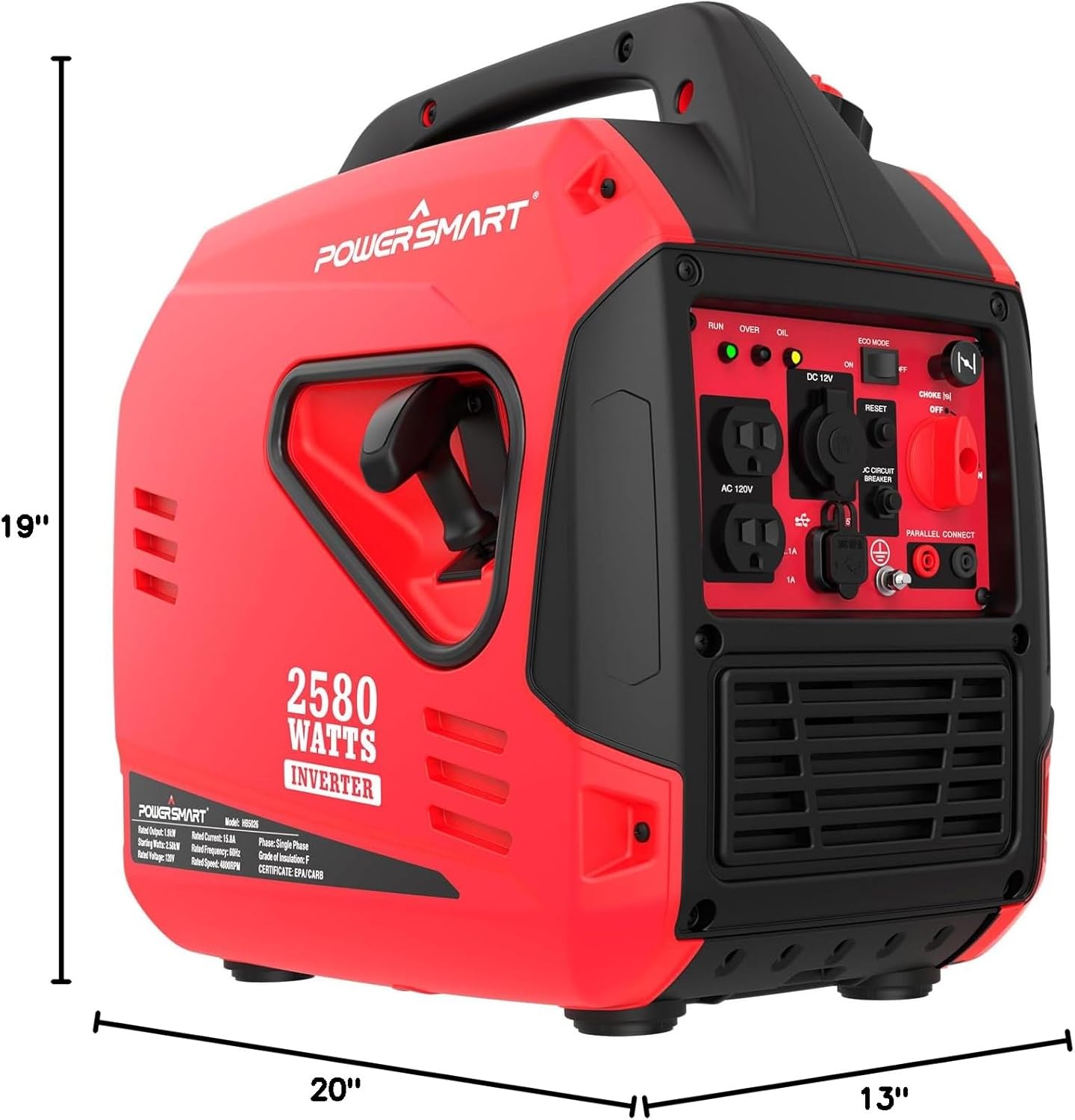
Figure 7.1: Generator Dimensions. This image illustrates the compact dimensions of the PowerSmart 2580-Watt Portable Inverter Generator, showing its length, width, and height for easy storage and transport.
8. Warranty & Support
For warranty information, technical support, or to order replacement parts, please contact PowerSmart customer service.
- Customer Service: Refer to your product registration card or visit the official PowerSmart website for contact details.
- Online Resources: Additional support and FAQs may be available on the PowerSmart Store.


