
Introduction
Thank you for choosing the UBPet Smart Cooled Automatic Wet Food Feeder. This device is designed to provide your pet with fresh, healthy meals throughout the day, ensuring their well-being even when you are away. Please read this manual carefully before use to ensure proper operation and maintenance.
Safety Information
- Always place the feeder on a stable, level surface.
- Ensure the power cord is not damaged and is placed where it cannot be tripped over or chewed by pets.
- Do not immerse the main unit in water. Only the removable food trays are washable.
- Keep out of reach of children.
- Use only the power adapter provided with the device.
- This product is intended for indoor use only.
Product Overview
The UBPet Smart Cooled Automatic Wet Food Feeder features a unique design with multiple compartments and an integrated cooling system to keep wet food fresh for up to 24 hours. It allows for scheduled feeding of up to five meals.

Image Description: An exploded diagram showing the various components of the UBPet Smart Cooled Automatic Wet Food Feeder. Key parts include the top lid, the five-compartment food tray, the cooling panel, the main base unit, and the push-button mechanism.
Components:
- Main Unit: Houses the cooling system and control panel.
- Food Tray: A removable tray with five individual compartments, each with a capacity of approximately 330 ml.
- Lid: Covers the food tray to maintain freshness and prevent access until scheduled feeding times.
- Power Adapter: For connecting the feeder to an electrical outlet.
Setup
- Unpack: Carefully remove all components from the packaging.
- Clean: Wash the removable food tray and lid with mild soap and water. Rinse thoroughly and dry completely before use.
- Assemble: Place the clean, dry food tray into the main unit. Ensure it sits securely.
- Fill Compartments: Place your pet's wet food into the desired compartments. Each compartment can hold up to 330 ml of food.
- Secure Lid: Place the lid onto the feeder, ensuring it is properly aligned.
- Connect Power: Plug the power adapter into the feeder and then into a wall outlet. The display will illuminate.
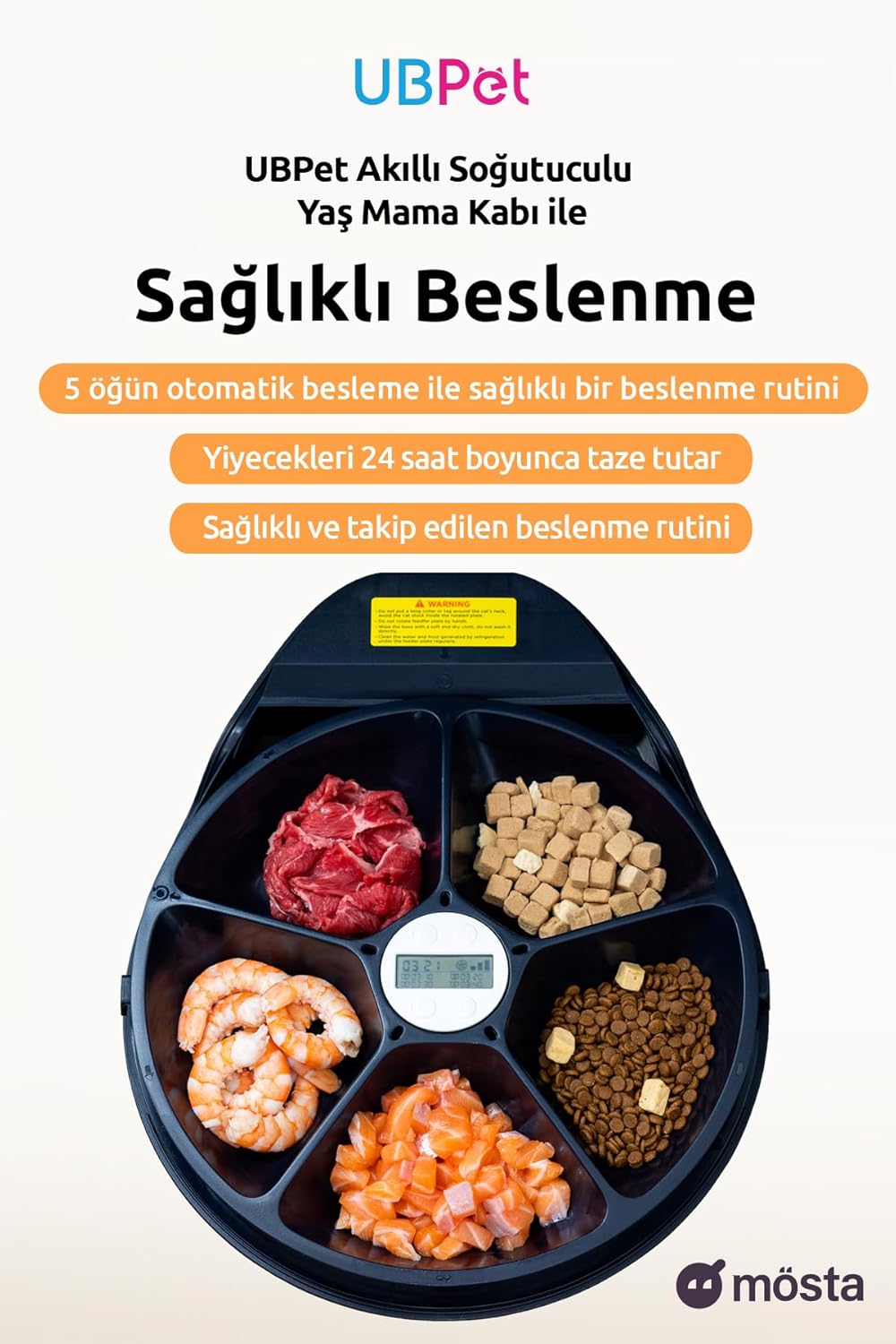
Image Description: A top-down view of the UBPet Smart Cooled Automatic Wet Food Feeder with its lid removed, showing the five compartments filled with different types of pet food, including wet meat, shrimp, and dry kibble.
Operating Instructions
Setting Meal Times:
The feeder allows you to schedule up to five meals per day. The smart timer ensures precise delivery of each meal.
- Access Settings: Refer to the control panel on the feeder. Typically, there are buttons for 'Set', 'Up', and 'Down'.
- Set Current Time: Before setting meal times, ensure the current time is correctly set on the device.
- Program Meals: Use the 'Set' button to cycle through meal slots (e.g., M1, M2, M3, M4, M5). For each meal slot, use the 'Up' and 'Down' buttons to set the desired feeding time.
- Activate Meals: Ensure each programmed meal slot is activated (usually indicated by an icon or number on the display).

Image Description: The UBPet Smart Cooled Automatic Wet Food Feeder with its digital display showing programmed feeding times for multiple meals, indicating precise timing capabilities.
Adjusting Cooling Temperature:
The feeder features a semiconductor cooling system with three adjustable temperature levels to keep food fresh.
- Locate the temperature control button or setting on the control panel.
- Cycle through the three available temperature levels (e.g., Low, Medium, High) to select the appropriate cooling intensity for your pet's food and ambient conditions.
Manual Feeding:
If available, a manual feed button allows you to dispense a meal immediately, outside of the scheduled times.
Maintenance
Regular cleaning ensures hygiene and extends the life of your feeder.
- Daily Cleaning: Remove any leftover food from the compartments.
- Weekly Cleaning: Disassemble the food tray and lid. Wash them with mild soap and water. Rinse thoroughly to remove all soap residue and dry completely before reassembling.
- Main Unit: Wipe the main unit with a damp cloth. Do not use abrasive cleaners or immerse the main unit in water.
- Ensure all parts are dry before reassembling and plugging in the device.
Troubleshooting
- Feeder not turning on: Check if the power adapter is securely plugged into both the feeder and the wall outlet. Ensure the outlet is functional.
- Food not dispensing: Verify that meal times are correctly set and activated. Check if the food tray is properly installed and not obstructed. Ensure there is food in the compartments.
- Cooling not working: Check if the cooling function is enabled and the temperature level is set. Ensure the feeder is not placed in direct sunlight or near a heat source.
- Unusual noises: If you hear unusual noises, unplug the feeder immediately and contact customer support.
Specifications
| Feature | Specification |
|---|---|
| Brand | UBPET |
| Model | B0CZP54KPM |
| Target Species | Pet |
| Recommended Use | Indoor |
| Color | White |
| Compartment Capacity | 300 Milliliters (each) |
| Number of Meals | Up to 5 |
| Cooling System | Semiconductor, 3 temperature levels |
Warranty and Support
For warranty information and customer support, please refer to the documentation included with your product or visit the official UBPet website. Keep your purchase receipt as proof of purchase.

