
Qwiizlab ES40UR (Gray)
Qwiizlab ES40UR Fanless USB4 Thunderbolt External SSD Enclosure Instruction Manual
Model: ES40UR (Gray) | Brand: Qwiizlab
Introduction
The Qwiizlab ES40UR is a high-performance, fanless external SSD enclosure designed for M.2 NVMe PCIe SSDs. It supports data transfer speeds up to 40Gbps via USB4 and Thunderbolt 4/5 ports, offering a robust and efficient solution for expanding storage or creating a portable high-speed drive. Its aluminum heat sink chassis ensures effective heat dissipation without the need for a noisy fan, making it ideal for demanding applications.
What's in the Box
Please verify that all the following components are included in your package:
- Fanless SSD enclosure (model name ES40UR)
- Silicone thermal pads (packed inside of the enclosure)
- Velvet drawstring gift bag
- Quick start guide/User manual
- Coaxial USB-C cable (40Gbps, 25cm/10-inch)
- Screw driver and screws
Note: M.2 NVMe SSD is not included with this product.

Image: All components included in the Qwiizlab ES40UR package.
Setup and Installation
Follow these steps to install your M.2 NVMe PCIe SSD into the Qwiizlab ES40UR enclosure:
- Disassemble the Enclosure: Using the provided screwdriver, remove the 4 screws on the edges of the aluminum enclosure to separate the top cover from the main body.
- Insert SSD: Carefully insert your M.2 NVMe PCIe SSD into the M.2 slot on the PCB board. Ensure it is fully seated.
- Secure SSD: Put the screw on the edge of the SSD and lock it into the hole to secure the SSD in place.
- Apply Thermal Pads: Place one silicone thermal pad on the surface of the SSD. Place the other silicone thermal pad on the surface of the controller chip for optimal heat dissipation.
- Reassemble Enclosure: Carefully align the top cover with the main body and close the enclosure. Secure it by re-inserting and tightening the 4 screws.
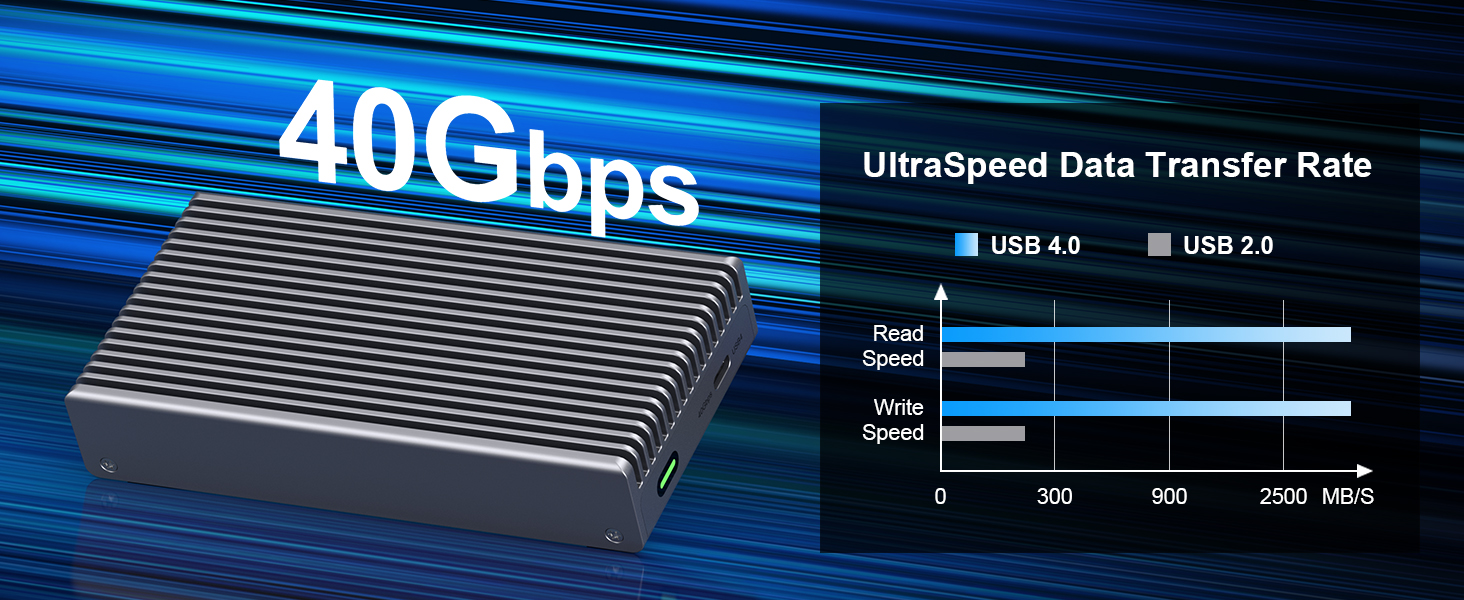
Image: Visual guide for SSD installation into the enclosure.

Image: Supported M.2 SSD sizes and key types.
Operating Instructions
Once your SSD is installed, connect the Qwiizlab ES40UR enclosure to your computer or compatible device using the provided coaxial USB-C data cable. The enclosure is compatible with both macOS and Windows operating systems.
The enclosure supports ultra-high data transfer speeds up to 40Gbps (3,840/3,840 MB/s sequential read/write) when connected to USB4 or Thunderbolt 4/5 ports. It is also backward compatible with Thunderbolt 3 ports. For optimal performance, ensure your host device and cable support the desired transfer speeds.

Image: Demonstration of USB4 UltraSpeed performance.

Image: Features of the coaxial USB-C data cable.

Image: Physical dimensions and weight of the enclosure.
Maintenance
The Qwiizlab ES40UR enclosure is designed for minimal maintenance due to its fanless operation and robust aluminum construction. To ensure optimal performance and longevity:
- Cleaning: Use a soft, dry cloth to wipe the exterior of the enclosure. Avoid using liquid cleaners or abrasive materials.
- Heat Dissipation: The enclosure utilizes a fanless design with an aluminum heat sink chassis and thermal pads for efficient heat dissipation. This design eliminates noise and reduces points of failure associated with mechanical fans. It is normal for the enclosure to feel warm during operation, especially during intensive data transfers, as this indicates effective heat transfer away from the SSD.
- Storage: When not in use, store the enclosure in a cool, dry place, preferably in the provided velvet drawstring bag to protect it from dust and scratches.

Image: Remarkable Heat Dissipation Effect without noisy fan.

Image: Noiseless Industrial Design.
Troubleshooting
If you encounter issues with your Qwiizlab ES40UR enclosure, please refer to the following common problems and solutions:
- Enclosure Not Recognized by Computer:
- Ensure the USB-C cable is securely connected to both the enclosure and your computer's port.
- Try connecting to a different USB4 or Thunderbolt port on your computer.
- Verify that the M.2 SSD is correctly installed and seated firmly within the enclosure.
- Test with a different compatible USB-C to USB-C cable if available.
- Check your computer's Disk Management (Windows) or Disk Utility (macOS) to see if the drive is detected but uninitialized or unformatted.
- Slow Data Transfer Speeds:
- Ensure you are using a USB4 or Thunderbolt 4/5 compatible port on your computer. Connecting to a standard USB 3.x port will result in lower speeds.
- Verify that the SSD installed is a high-speed NVMe PCIe SSD capable of 40Gbps speeds. The enclosure's speed is limited by the slowest component (SSD, cable, or port).
- Confirm the provided coaxial USB-C cable is being used, as it is designed for 40Gbps transfer rates.
- Enclosure Gets Hot During Use:
- It is normal for the aluminum enclosure to become warm or hot to the touch during operation, especially during sustained high-speed data transfers. This indicates that the passive cooling system is effectively dissipating heat from the SSD.
- Ensure the thermal pads are correctly placed on the SSD and controller chip as per the installation instructions to facilitate heat transfer to the enclosure.
- Avoid placing the enclosure in enclosed spaces that restrict airflow.
- Power Consumption Concerns:
- High-performance USB4/Thunderbolt enclosures, especially those with ASM2464PD controller chips, can draw more power at idle and during peak activity compared to simpler USB3 devices.
- If using with a laptop on battery power, be aware that sustained high usage may deplete the laptop battery faster. For prolonged intensive tasks, it is recommended to connect your laptop to a power source.
- Consider disconnecting the enclosure when not in active use to conserve power, especially with battery-powered devices.
Specifications
| Brand | Qwiizlab |
| Model Number | ES40UR (Gray) |
| Material | Aluminum |
| Item Weight | 8.8 ounces (250g) |
| Product Dimensions | 4.92 x 2.55 x 0.92 inches (125 x 65 x 23.3 mm) |
| Memory Storage Capacity | Up to 8 TB (SSD not included) |
| Compatible Devices | Laptop, Gaming Console, Desktop |
| Max Number of Supported Devices | 1 |
| Data Transfer Rate | 40 Gigabits Per Second (40Gbps) |
| Hardware Interface | USB Type C, Thunderbolt |
| Hardware Platform | PC, Mac |
| Country of Origin | China |
Warranty and Support
For warranty information, technical support, or any inquiries regarding your Qwiizlab ES40UR Fanless USB4 Thunderbolt External SSD Enclosure, please refer to the contact information provided in the quick start guide included with your product or visit the official Qwiizlab website. Qwiizlab is committed to providing user-friendly products and dedicated customer service.
Ask a question about this manual
Ask about setup, troubleshooting, compatibility, parts, safety, or missing instructions. Manuals+ will review the question and use this page’s manual context to help answer it.