1. Product Overview
This manual provides essential information for the safe and effective use of your MULS replacement battery. Please read these instructions carefully before installation and operation.

Image 1.1: The MULS replacement battery, showing its label with voltage and capacity, accompanied by a small screwdriver for installation.
1.1 Key Features
- Capacity: 2600mAh
- Voltage: 14.4V
- Battery Type: Rechargeable Li-ion
- Safety Certifications: CE, FCC, RoHS
- Integrated protection against short circuit, overheat, overcharge, over-discharge, over-current, and over-voltage.
1.2 Compatible Robot Vacuum Models
This MULS replacement battery is compatible with the following Ecovacs Deebot robot vacuum cleaner models:
- Ecovacs D83
- Deebot U2
- Deebot U2 Pro
- DGN22
- DGN22-11
- ECOMB83
It replaces part numbers: 220-6225-0020, 220-6225-0021, NR18650 M26-4S1P-1.

Image 1.2: The MULS replacement battery shown alongside compatible Ecovacs D83 and Deebot U2 robot vacuum cleaners, illustrating compatibility.
2. Setup and Installation
Follow these steps to safely install the replacement battery into your robot vacuum cleaner.
- Power Off: Ensure your robot vacuum cleaner is completely powered off and disconnected from its charging base or power adapter.
- Access Battery Compartment: Locate the battery compartment on the underside of your robot vacuum. This usually requires removing a few screws with a screwdriver. Refer to your robot vacuum's original manual for specific instructions on accessing the battery.
- Remove Old Battery: Carefully disconnect the old battery's connector from the vacuum's port. Lift out the old battery.
- Verify Connector Type: Before installing, ensure the connector on the MULS replacement battery matches the connector type in your robot vacuum.
- Install New Battery: Connect the MULS replacement battery's connector firmly into the vacuum's port. Place the new battery into the compartment.
- Secure Compartment: Close the battery compartment cover and secure it with the screws removed earlier.
- Initial Charge: Place the robot vacuum on its charging base or connect it to its power adapter for an initial charge.
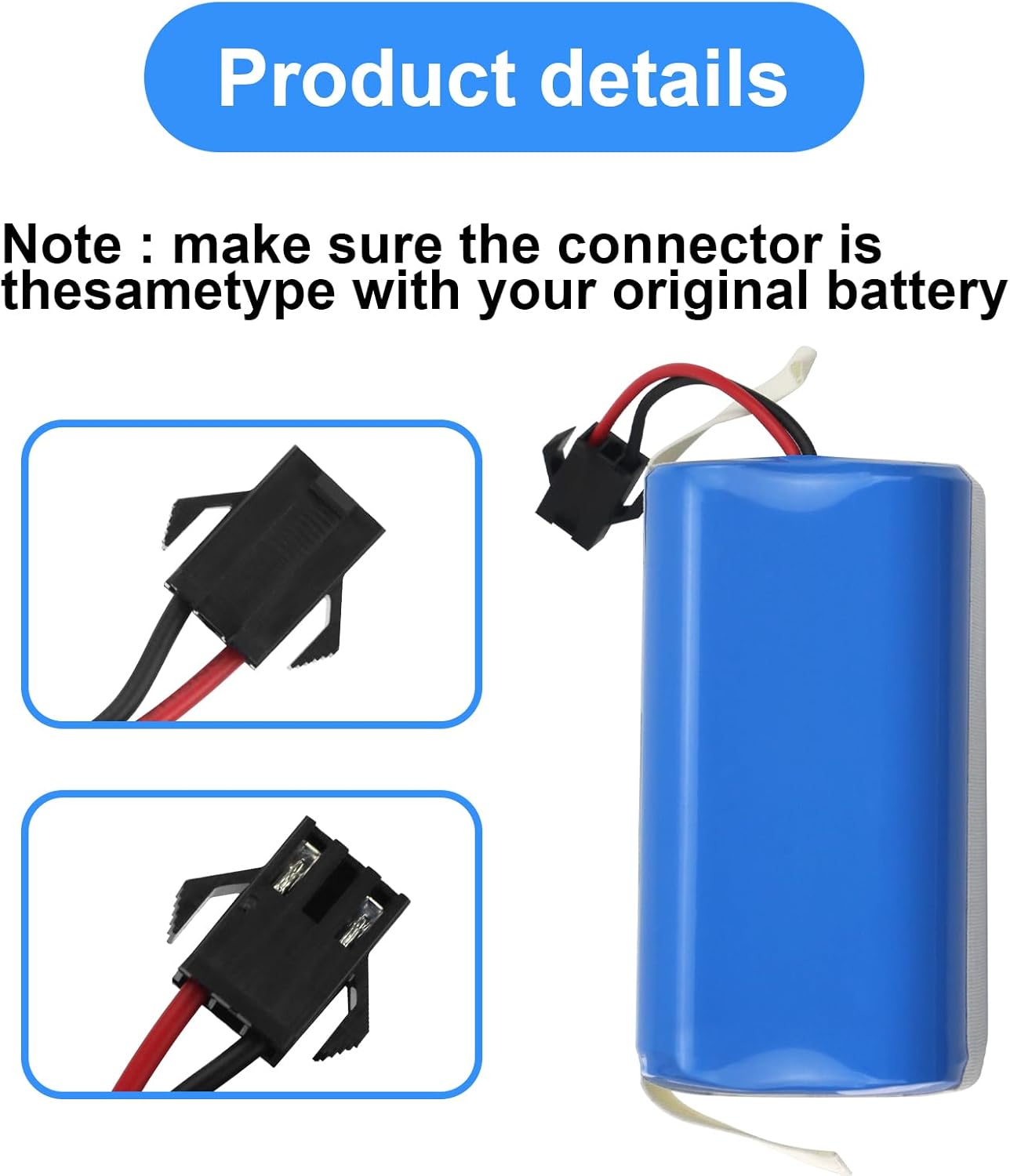
Image 2.1: A detailed view of the MULS battery connector, highlighting its specific design. It is crucial to verify this matches your vacuum's port before installation.
3. Operating Instructions
Once installed, the battery operates as part of your robot vacuum's power system. Observe the following guidelines for optimal performance.
- First Use: A new battery may require several charging cycles to reach its full capacity and optimal performance. It is normal for the vacuum to stop charging and resume during the initial charge.
- Regular Charging: Always return the robot vacuum to its charging base after each cleaning cycle to ensure the battery remains charged.
- Avoid Deep Discharge: To prolong battery life, avoid completely discharging the battery to 0%. If the battery level drops to 3%, it is recommended to shut down the vacuum or recharge it immediately.
- Storage: If storing the vacuum for an extended period, ensure the battery is charged to approximately 50-60% and store it in a cool, dry place. Recharge every 3-6 months to prevent deep discharge.
4. Maintenance and Safety
Proper care and adherence to safety guidelines will ensure the longevity and safe operation of your MULS replacement battery.
4.1 General Maintenance
- Keep the battery and its connectors clean and free from dust or debris.
- Periodically inspect the battery for any signs of damage, swelling, or leakage. Discontinue use immediately if any issues are observed.
4.2 Safety Precautions
- Temperature: Avoid using or storing the battery in environments with excessively high or low temperatures. Optimal operating temperature is typically between 0°C and 45°C (32°F and 113°F).
- Physical Damage: Do not drop, hit, or subject the battery to strong impacts.
- Water and Fire: Never expose the battery to water or fire.
- Disassembly: Do not attempt to disassemble or modify the battery pack. This can lead to serious injury or damage.
- Short Circuit: Prevent short circuits by ensuring metal objects do not come into contact with the battery terminals.
- Disposal: Dispose of old batteries according to local regulations for lithium-ion batteries. Do not dispose of with household waste.

Image 4.1: Icons representing the safety features of the MULS battery, including protection against over-current, over-heating, over-discharge, short-circuit, over-voltage, and over-charge.
5. Troubleshooting
If you encounter issues with your new MULS replacement battery, refer to the following common scenarios.
5.1 Battery Not Charging Initially
Symptom: The robot vacuum does not seem to charge the new battery, or charging stops prematurely during the first charge.
Solution: This is often normal for new batteries. Due to voltage and current instability during the first charge, the vacuum may pause charging. Remove the battery from the vacuum, then reinsert it and resume charging. This process may need to be repeated several times until the battery fully charges and stabilizes.
5.2 Reduced Run Time
Symptom: The robot vacuum's operating time is significantly shorter than expected after a full charge.
- Check Charging: Ensure the vacuum is fully charging. Verify the charging contacts on both the vacuum and the charging base are clean.
- Battery Cycles: New batteries may require a few full charge/discharge cycles to reach optimal performance.
- Vacuum Condition: Check if the vacuum's brushes or wheels are obstructed, causing it to draw more power.
5.3 Vacuum Not Powering On
Symptom: The robot vacuum does not power on after battery installation.
- Connection: Re-check that the battery connector is securely plugged into the vacuum's port.
- Charge Level: Ensure the battery has sufficient charge. Place the vacuum on its charging base for at least 30 minutes.
- Compatibility: Double-check that the battery model is compatible with your specific robot vacuum model.
6. Specifications
| Battery Type | Rechargeable Lithium-Ion |
| Voltage | 14.4V |
| Capacity | 2600mAh (37.44Wh) |
| Dimensions | Approximately 6.5 x 2.89 x 5.2 inches (Product Dimensions) |
| Weight | Approximately 7.7 ounces |
| Compatible Part Numbers | 220-6225-0020, 220-6225-0021, NR18650 M26-4S1P-1 |
| Certifications | CE, FCC, RoHS |

Image 6.1: A diagram illustrating the approximate dimensions of the MULS replacement battery.
7. Warranty and Support
MULS is committed to providing high-quality products and customer satisfaction.
- Money-Back Guarantee: 30-day no-questions-asked full money-back guarantee from the date of purchase.
- Exchange Guarantee: 12-month exchange guarantee for product defects or performance issues.
- Customer Support: For any questions, concerns, or support needs, please contact our customer service team. We provide 24/7 email service to assist you.
Please retain your proof of purchase for warranty claims.