PI-442 Digital Process Indicator User Manual
Comprehensive guide for setup, operation, and maintenance of your PI-442 Digital Process Indicator.
1. Introduction
The PI-442 Digital Process Indicator is a versatile device designed for precise measurement and display of various process parameters. It features a 4-Digit 7 segment LED display and supports a wide range of sensor inputs, including Thermocouples (TC-J, K, R, S, N, T, B) and RTD, as well as analog inputs (0-20mA, 4-20mA, 0-1VDC). With a broad measurement range from -1999 to 9999 and adjustable resolution, it is suitable for diverse industrial applications.
This manual provides detailed instructions to help you effectively install, operate, and maintain your PI-442 Digital Process Indicator, ensuring optimal performance and longevity.
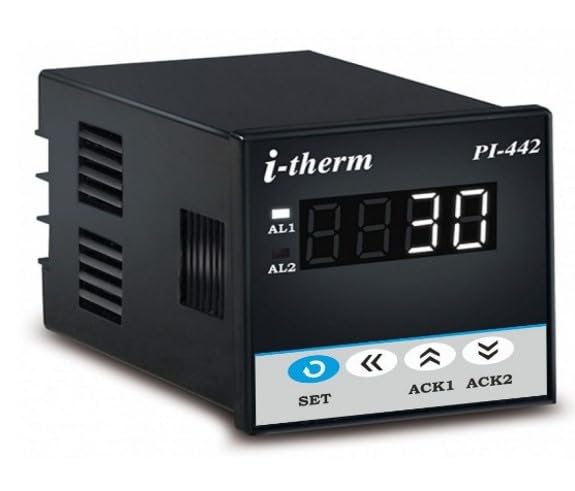
Figure 1: Front view of the PI-442 Digital Process Indicator. The display shows '8.8.8.0' and buttons for SET, ACK1, ACK2, and navigation are visible below.
2. Setup and Installation
Proper installation is crucial for the accurate and reliable operation of the PI-442. Ensure the device is mounted in a stable environment, away from excessive vibration, moisture, and extreme temperatures.
2.1 Power Supply
- Verify that the power supply voltage matches the specifications indicated on the device label.
- Connect the power supply to the designated terminals on the rear of the indicator.
2.2 Sensor and Analog Input Connections
The PI-442 supports various input types. Refer to the wiring diagram on the device or in the detailed technical specifications for correct terminal connections.
- Thermocouple (TC) Inputs: Connect TC-J, K, R, S, N, T, B type thermocouples to the appropriate terminals, observing polarity.
- RTD Inputs: Connect RTD sensors (e.g., Pt100) to the designated terminals. Ensure correct 2-wire, 3-wire, or 4-wire connection as per your sensor type.
- Analog Inputs: For 0-20mA, 4-20mA, or 0-1VDC signals, connect the signal source to the analog input terminals. Observe polarity for voltage inputs and current direction for current inputs.

Figure 2: Rear view of the PI-442 Digital Process Indicator, illustrating the various screw terminals for power, sensor, and analog input connections.

Figure 3: Side view of the PI-442 Digital Process Indicator, highlighting the ventilation slots for heat dissipation.
3. Operating Instructions
Once installed and powered on, the PI-442 will display the measured process value on its 4-digit LED screen.
3.1 Display Overview
The main display shows the current process value. Indicators for AL1 and AL2 (Alarm 1 and Alarm 2) may illuminate to signify alarm conditions, if configured.

Figure 4: Close-up view of the PI-442 display, showing the 4-digit LED and alarm indicators.
3.2 Button Functions
- SET Button: Used to enter programming mode, confirm settings, or cycle through parameters.
- Arrow Buttons (Up/Down): Used to navigate through menu options or adjust parameter values.
- ACK1 / ACK2 Buttons: Typically used to acknowledge or reset Alarm 1 and Alarm 2 conditions, respectively.
3.3 Parameter Configuration
To configure parameters such as input type, range, resolution, or alarm setpoints, press the SET button to enter the programming menu. Use the arrow buttons to navigate and adjust values, and the SET button to confirm and move to the next parameter. Refer to the detailed programming guide (if provided separately) for specific parameter codes and their functions.
- Range: Configurable from -1999 to 9999.
- Resolution: Selectable as 0.001, 0.01, 0.1, or 1°C (or equivalent unit based on input).
- Digital Filter: Adjustable from 1 to 1 to stabilize readings in noisy environments.
4. Maintenance
The PI-442 Digital Process Indicator is designed for low maintenance. However, regular checks can ensure its continued accuracy and longevity.
- Cleaning: Gently wipe the display and casing with a soft, dry cloth. Avoid using abrasive cleaners or solvents.
- Environmental Conditions: Ensure the operating environment remains within specified temperature and humidity ranges.
- Connections: Periodically check all wiring connections for tightness and signs of corrosion.
- Calibration: If accuracy issues are suspected, professional calibration may be required.
5. Troubleshooting
If you encounter issues with your PI-442, refer to the following common problems and solutions:
- No Display/Power:
- Check power supply connections and ensure the correct voltage is applied.
- Verify the power source is active.
- Incorrect Readings:
- Confirm the sensor input type is correctly configured in the device settings.
- Check sensor wiring for proper connection and polarity.
- Ensure the sensor itself is functioning correctly.
- Verify the input range and resolution settings match your application.
- Display Flashing/Unstable:
- Adjust the digital filter setting to a higher value to stabilize readings in noisy environments.
- Check for electromagnetic interference (EMI) near the device or sensor wiring.
If the problem persists after attempting these solutions, contact technical support.
6. Specifications
| Feature | Specification |
|---|---|
| Display Type | 4-Digit 7 segment LED |
| Sensor Input | TC-J, K, R, S, N, T, B and RTD |
| Analog Input | 0-20mA, 4-20mA, 0-1VDC |
| Range | -1999 to 9999 |
| Resolution | 0.001, 0.01, 0.1 and 1°C |
| Digital Filter | 1 to 1 |
| Other Display Features | Wireless |
| Country of Origin | India |
7. Warranty and Support
7.1 Warranty Information
The PI-442 Digital Process Indicator comes with a 1 Year Warranty from the date of purchase. This warranty covers manufacturing defects and faulty components under normal operating conditions. Please retain your purchase receipt as proof of warranty.
7.2 Technical Support
For technical assistance, troubleshooting, or warranty claims, please contact the manufacturer:
Manufacturer: SYSTEM CONTROLS
Address: System Controls, 27, Hareram Industrial Estate, I.B.Patel Road, Opp. Shanta Ind. Est. Goregaon East, Mumbai 400063, India.
Contact No.: 9324466415
When contacting support, please have your product model (PI-442) and a description of the issue ready.


