
EGSCATEE EG-UPS-2500W
EGSCATEE 2500W Sump Pump Battery Backup System User Manual
Model: EG-UPS-2500W
1. Introduction
The EGSCATEE 2500W Sump Pump Battery Backup System is designed to provide reliable backup power for your sump pump during power outages, ensuring continuous operation and protecting your property from flooding. This system features a pure sine wave output, a built-in 25A quick charger, and an automatic transfer switch for seamless power transition. It is also versatile enough to power other essential household devices.

Image: The EGSCATEE 2500W Sump Pump Battery Backup System, highlighting its purpose as a primary sump pump backup power system.
2. Safety Information
Please read and understand all safety instructions before installing or operating this unit. Failure to follow these instructions may result in electric shock, fire, serious injury, or property damage.
- Always connect the battery cables with correct polarity: Red to Positive (+), Black to Negative (-).
- Ensure the unit is properly grounded.
- Do not expose the unit to rain, moisture, or extreme temperatures.
- Do not open the unit casing; there are no user-serviceable parts inside. Refer all servicing to qualified personnel.
- Keep children and pets away from the unit during operation.
- Use only 12V deep cycle batteries for backup power operation. Battery is not included.
- Ensure adequate ventilation around the unit to prevent overheating.

Image: Diagram illustrating the multi-functional safety protections including high-voltage, overload, high-temperature, smart IC, low voltage, and short-circuit protection.
3. Product Overview and Components
The EGSCATEE 2500W Sump Pump Battery Backup System integrates an inverter, a battery charger, and an automatic transfer switch into a single compact unit. Key components include:
- Main Unit: The core inverter/charger with input/output ports.
- LCD Remote Controller: A wired remote display (15ft cable) for real-time monitoring of voltage, power, battery level, and other vital information.
- Battery Cables: For connecting to a 12V deep cycle battery.
- AC Power Cord: For connecting the unit to grid power.
- Multiple Output Ports: Includes 3 AC outlets, a 36W Type-C port, and a 5V/3.1A USB port.

Image: The main unit of the 2500W Sump Pump Battery Backup System, accompanied by its LCD remote controller, AC power cable, and battery connection cables.

Image: Detailed view of the unit's front and rear panels, showing positive and negative terminals, smart cooling fan, power LED, fault LED, AC fuse, 30W Type-C port, AC charge input, 120V AC outputs, 3.1A USB port, remote controller port, ON/OFF switch, battery type selection button, earth wire terminal, L, N, PE terminals, and charging indicator.
4. Setup and Installation
Follow these steps for proper setup and installation of your sump pump battery backup system.
4.1 Mounting the Unit
The unit can be securely mounted to a wall or stable surface using appropriate fasteners. Ensure the mounting location allows for adequate ventilation around the unit.
Video: This video illustrates the simple mounting process of the EGSCATEE 2500W Sump Pump Battery Backup System to a wall and the connection of battery cables.
4.2 Battery Connection
Connect the provided battery cables to a 12V deep cycle battery. Ensure the red cable connects to the positive (+) terminal and the black cable connects to the negative (-) terminal. Secure the connections tightly. Note: The battery is not included and must be purchased separately.
4.3 Sump Pump and AC Power Connection
Plug your sump pump(s) into the AC outlets on the unit. The unit can power up to 3 primary sump pumps simultaneously, provided their combined current draw does not exceed 16.6 Amps (2500W). Then, plug the unit's AC power cord into a standard wall outlet.

Image: The 2500W Sump Pump Battery Backup System connected and powering three sump pumps, demonstrating its capacity.

Image: Illustration showing the three AC output ports on the unit, capable of powering multiple sump pumps simultaneously.
4.4 Battery Type Selection
Before turning on the inverter, select the appropriate battery type using the switches on the unit. Refer to the table below for settings. This ensures optimal charging and extends battery life.
| Switch 1 | Switch 2 | Battery Type | Bulk/Absorption (V) | Float (V) |
|---|---|---|---|---|
| OFF | OFF | GEL | 14.2V | 13.6V |
| OFF | ON | AGM/SLA | 14.4V | 13.6V |
| ON | OFF | Flooded/Wet | 14.7V | 13.6V |
| ON | ON | LiFePO4 | 14.6V | 14.6V |
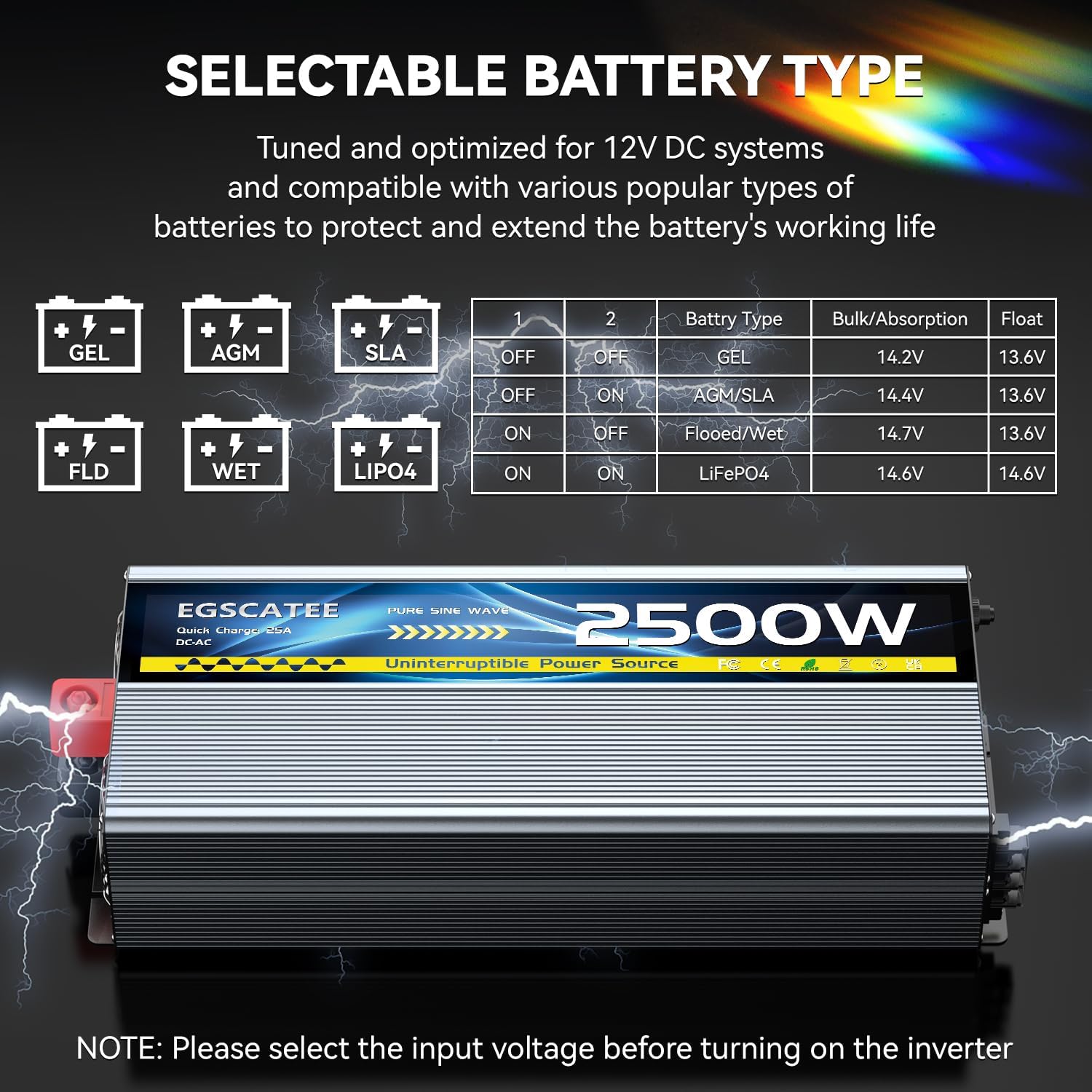
Image: Visual guide for selecting the correct battery type (GEL, AGM, SLA, Flooded/Wet, LiFePO4) using the DIP switches on the unit.
5. Operating Instructions
Once installed, the system operates automatically to provide continuous power.
5.1 Power On/Off
After all connections are made and the battery type is selected, turn on the unit using the ON/OFF switch. The green power LED should illuminate.
5.2 Operating Modes
The system operates in two primary modes:
- Charge Mode: When grid power is available, the unit acts as a 25A quick charger, recharging the connected 12V battery. The charging indicator will show the charging status.
- Inverter Mode: In the event of a power outage, the unit automatically switches to inverter mode within 12 milliseconds, drawing power from the battery to supply 120 VAC to the connected sump pump(s) and other devices.
Video: This video demonstrates the seamless transition between Inverter Mode (battery power during outage) and Charge Mode (grid power charging battery) of the EGSCATEE 2500W Sump Pump Battery Backup System.

Image: Illustration depicting the two operational modes: Inverter Mode (powering devices from battery) and Charge Mode (charging battery from AC input), highlighting the 12ms rapid conversion time.

Image: Diagram showing the 25A quick charge capability and the two modes of operation, ensuring faster charging and reliable backup during blackouts.
5.3 Remote Controller
The wired LCD remote controller provides real-time monitoring. It displays critical information such as input/output voltage, power consumption, battery level, and fault indicators. Use the buttons on the remote to turn it on/off or control the backlight.

Image: The LCD remote controller displaying battery status, DC input, AC output, power consumption, and indicators for high/low battery, overheat, and overload.
6. Maintenance
Regular maintenance ensures the longevity and optimal performance of your backup system.
- Battery Check: Periodically check the battery terminals for corrosion and ensure they are clean and tight. For flooded batteries, check electrolyte levels as per battery manufacturer's instructions.
- Ventilation: Ensure the cooling fans and vents on the unit are free from dust and obstructions. Clean gently with a soft, dry cloth or compressed air.
- Testing: It is recommended to periodically test the system by simulating a power outage (e.g., by temporarily unplugging the unit from the wall outlet) to ensure it switches to battery power correctly.
- Storage: If storing the unit for an extended period, ensure the battery is fully charged and disconnect it from the unit. Store in a cool, dry place.
7. Troubleshooting
This section addresses common issues you might encounter with your EGSCATEE Sump Pump Battery Backup System.
| Problem | Possible Cause | Solution |
|---|---|---|
| Unit does not power on. | No AC input; Battery not connected or low; ON/OFF switch is off. | Check AC power connection; Ensure battery is connected and charged; Turn ON/OFF switch to ON. |
| Sump pump not running on battery power. | Battery low or discharged; Overload; Fault condition. | Check battery charge level on remote; Reduce load; Check fault LED and remote for error codes. |
| Battery not charging. | AC input not connected; Incorrect battery type selection; Faulty battery. | Verify AC input; Check battery type selection switches; Test battery independently. |
| Remote controller not displaying. | Remote cable loose or damaged; Unit not powered on. | Ensure remote cable is securely connected; Power on the main unit. |
| Overload warning. | Connected devices exceed 2500W capacity. | Disconnect some devices to reduce load. |
8. Specifications
Detailed technical specifications for the EGSCATEE 2500W Sump Pump Battery Backup System.
- Model: EG-UPS-2500W
- Rated Power: 2500W
- Input Voltage: 12V DC (from battery)
- Output Voltage: 120V AC (Pure Sine Wave)
- AC Output Ports: 3
- USB Output: 5V/3.1A
- Type-C Output: 36W
- Built-in Charger: 25A Quick Charge
- Auto Switch Time: 12ms
- Compatible Battery Types: GEL, AGM/SLA, Flooded/Wet, LiFePO4 (12V deep cycle battery required, not included)
- Item Weight: 13.92 pounds
- Package Dimensions: 21.75 x 10.15 x 7.1 inches
- Included Components: 2500W Sump Pump Battery Backup System, Battery Cables, User Manual, Remote Controller
- Certification: UL
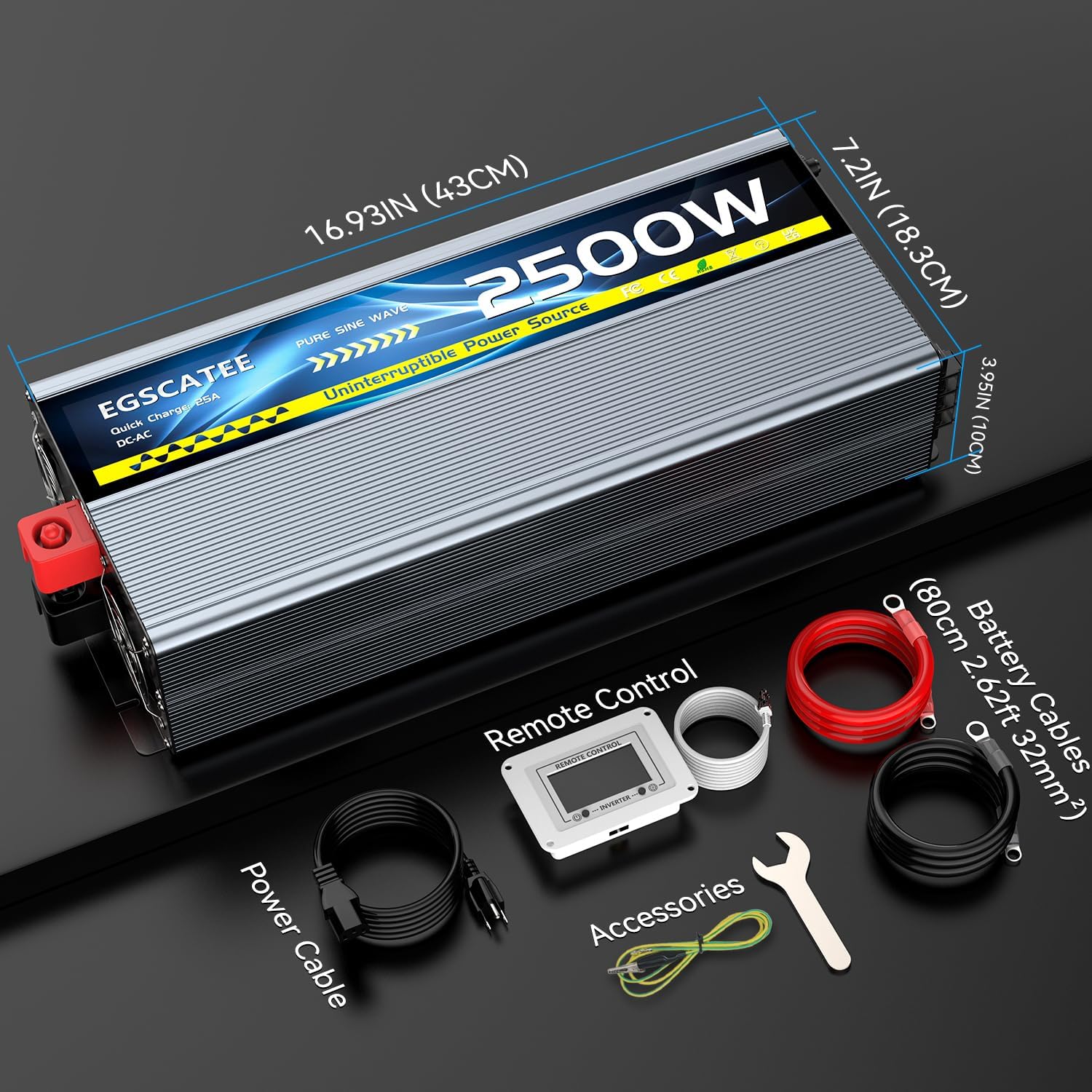
Image: Diagram showing the physical dimensions of the unit and a visual representation of the included accessories: power cable, remote control, battery cables, and a wrench.
9. Warranty and Support
The EGSCATEE 2500W Sump Pump Battery Backup System comes with a 12 Months Warranty from the date of purchase. This warranty covers defects in materials and workmanship under normal use.
For technical support, warranty claims, or any questions regarding your product, please contact EGSCATEE customer service through the retailer where you purchased the product or visit the official EGSCATEE brand store online. Please have your model number (EG-UPS-2500W) and purchase date ready when contacting support.
For more information, you may visit the EGSCATEE Store.
Ask a question about this manual
Ask about setup, troubleshooting, compatibility, parts, safety, or missing instructions. Manuals+ will review the question and use this page’s manual context to help answer it.