
Volteck RV-1600
Volteck RV-1600 Voltage Regulator User Manual
Model: RV-1600
1. Introduction
Thank you for choosing the Volteck RV-1600 Voltage Regulator. This device is designed to protect your electronic equipment from voltage fluctuations, surges, and short circuits, ensuring stable power delivery. Please read this manual carefully before using the product to ensure proper operation and safety.
2. Important Safety Instructions
Always follow basic safety precautions to reduce the risk of fire, electric shock, and injury to persons when using this product.
- Read all instructions: Before operating the voltage regulator, read all safety and operating instructions.
- Do not open the casing: There are no user-serviceable parts inside. Refer all servicing to qualified service personnel.
- Avoid moisture: Do not expose the unit to rain or moisture. Do not use near water or in excessively humid environments.
- Proper ventilation: Ensure adequate ventilation around the unit. Do not block ventilation openings.
- Power source: Connect the voltage regulator only to a grounded power outlet with the correct voltage (127 Volts).
- Overload protection: Do not overload the unit beyond its specified capacity (1600 VA / 800 W). This can cause damage to the unit and connected devices.
- Indoor use only: This product is intended for indoor use only.
3. Product Overview
Familiarize yourself with the components of your Volteck RV-1600 Voltage Regulator.
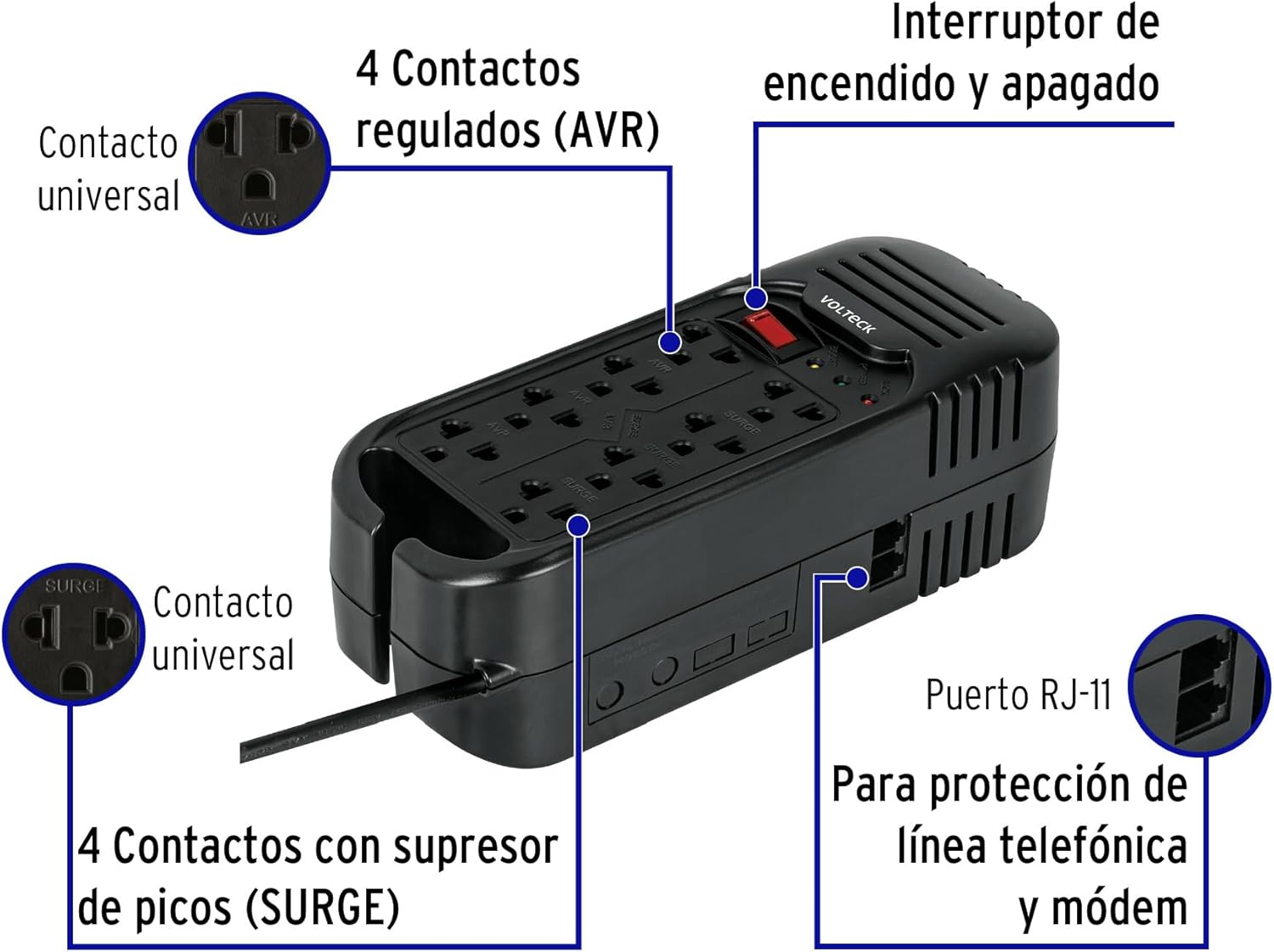
Image Description: This image shows the Volteck RV-1600 Voltage Regulator from a top-down perspective, highlighting its key features. It has a black ABS body. On the top surface, there are eight universal outlets: four labeled 'AVR' (Automatic Voltage Regulation) and four labeled 'SURGE' (Surge Protection). A red ON/OFF switch is prominently located near the top. To the right of the switch, there are indicator lights for Power, AVR, and Surge. On the side, there is an RJ-11 port for telephone line/modem protection. The power cord extends from the left side of the unit.
Key Components:
- Universal Outlets (AVR): 4 outlets providing automatic voltage regulation for sensitive electronics.
- Universal Outlets (SURGE): 4 outlets offering surge protection against voltage spikes.
- ON/OFF Switch: Controls the power to all connected devices.
- Indicator Lights:
- Power: Indicates the unit is receiving power.
- AVR: Illuminates when the Automatic Voltage Regulation is active.
- Surge: Indicates surge protection is active.
- RJ-11 Port: For protecting telephone lines and modems from surges.
- Power Cord: Connects the unit to the main power supply.
4. Setup Instructions
- Unpack the unit: Carefully remove the voltage regulator from its packaging.
- Placement: Place the unit on a stable, flat surface, away from direct sunlight, heat sources, and moisture. Ensure there is adequate space for ventilation.
- Connect to power: Plug the voltage regulator's power cord into a standard 127V AC grounded wall outlet.
- Connect devices:
- For devices requiring stable voltage (e.g., computers, monitors), plug them into the AVR outlets.
- For devices primarily needing surge protection (e.g., printers, lamps), plug them into the SURGE outlets.
- Telephone/Modem Protection (Optional): If desired, connect your telephone line or modem to the RJ-11 IN port on the voltage regulator, and then connect the RJ-11 OUT port to your telephone or modem.
- Power On: Press the ON/OFF switch to the 'ON' position. The 'Power' indicator light should illuminate.
5. Operating the Voltage Regulator
The Volteck RV-1600 operates automatically to protect your connected devices.
- Automatic Voltage Regulation (AVR): The AVR outlets continuously monitor the incoming voltage. If the voltage deviates significantly from the nominal 127V, the AVR circuit will automatically adjust the output voltage to a safe range, protecting your sensitive electronics from damage due to sags or spikes. The 'AVR' indicator light will illuminate when this function is active.
- Surge Protection: All 8 outlets provide surge protection. In the event of a sudden, high-voltage spike (e.g., from lightning or power grid fluctuations), the surge protection circuit will divert excess voltage away from your devices, absorbing the surge to prevent damage. The 'Surge' indicator light confirms this protection is active.
- Overload Protection: The unit features an internal circuit breaker that will trip if the total power consumption of connected devices exceeds 800W or 1600VA. If an overload occurs, the unit will shut off. To reset, disconnect some devices, then press the reset button (if available, or cycle the ON/OFF switch).
6. Maintenance
The Volteck RV-1600 requires minimal maintenance.
- Cleaning: Disconnect the unit from the power outlet before cleaning. Use a soft, dry cloth to wipe the exterior. Do not use liquid or aerosol cleaners.
- Ventilation: Periodically check that the ventilation openings are not blocked by dust or debris.
- Storage: If storing the unit for an extended period, disconnect it from power and store it in a cool, dry place.
7. Troubleshooting
If you encounter issues with your voltage regulator, refer to the following common problems and solutions:
| Problem | Possible Cause | Solution |
|---|---|---|
| No power to connected devices. | Unit is off, power cord is loose, or circuit breaker tripped. | Ensure ON/OFF switch is on. Check power cord connection. Reduce load and reset circuit breaker (if applicable) or cycle power. |
| 'AVR' light is constantly on. | Input voltage is consistently outside the normal range. | This indicates the AVR is working as intended. If this is frequent, consider checking your home's electrical wiring or consulting an electrician. |
| Unit makes unusual noises. | Normal operation during voltage correction, or potential internal issue. | A slight hum during AVR activation is normal. If noises are loud or continuous, disconnect the unit and contact customer support. |
| Connected devices still experience issues despite using the regulator. | Overload, faulty device, or severe power issue. | Ensure total wattage does not exceed 800W. Test devices directly in a wall outlet. If issues persist, the power problem might be beyond the regulator's capacity or the device itself is faulty. |
If the problem persists after trying these solutions, please contact Volteck customer support.
8. Specifications
Technical details for the Volteck RV-1600 Voltage Regulator:

Image Description: This image displays the Volteck RV-1600 Voltage Regulator from a top-down, slightly angled view, with its physical dimensions clearly marked. The length is indicated as 24 cm, the width (fondo) as 9 cm, and the height (alto) as 7.5 cm. The power cord length is also shown as 90 cm. This provides a clear visual representation of the product's size.
| Feature | Detail |
|---|---|
| Model Number | RV-1600 |
| Manufacturer | Truper (Volteck Brand) |
| Capacity | 1600 VA / 800 W |
| Input Voltage | 127 Volts AC |
| Outlets | 8 Universal Outlets (4 AVR, 4 Surge) |
| Protection Features | Overload, Short Circuit, Voltage Spikes, Telephone Line (RJ-11) |
| Color | Black |
| Body Material | ABS |
| Dimensions (L x W x H) | 24 cm x 9 cm x 7.5 cm (Approx. 9.45 in x 3.54 in x 2.95 in) |
| Weight | 1.55 kg (Approx. 3.42 lbs) |
| Power Cord Length | 90 cm (Approx. 35.4 inches) |
9. Warranty and Support
This Volteck product comes with a standard manufacturer's warranty. For specific warranty terms and conditions, please refer to the documentation included with your purchase or visit the official Volteck website.
For technical support, troubleshooting assistance, or warranty claims, please contact Volteck customer service. Keep your purchase receipt as proof of purchase.
Additionally, please note that products purchased through Amazon.com.mx are eligible for a 30-day free return period from the date of receipt, subject to Amazon's return policy.
Ask a question about this manual
Ask about setup, troubleshooting, compatibility, parts, safety, or missing instructions. Manuals+ will review the question and use this page’s manual context to help answer it.