
1. Setup Instructions
1.1 Battery Installation
To install batteries, open the battery compartment cover located on the back of the remote control. Insert two AAA batteries, ensuring the positive (+) and negative (-) terminals align correctly with the markings inside the compartment. Close the cover securely.

Image: Back of the remote control with the battery compartment open, illustrating correct battery placement.
1.2 Brand Search and Pairing
This remote control is designed to work with RCA TVs without programming. However, if specific functions do not work, you may need to perform a brand search:
- Press and hold the brand key on the remote control for approximately 3 seconds.
- The indicator light will flash once to signal the start of the brand search.
- The remote will send the current brand's volume key code.
- When the "volume" symbol appears on your TV screen, release the button.
- The indicator light will turn off, confirming the code has been saved.
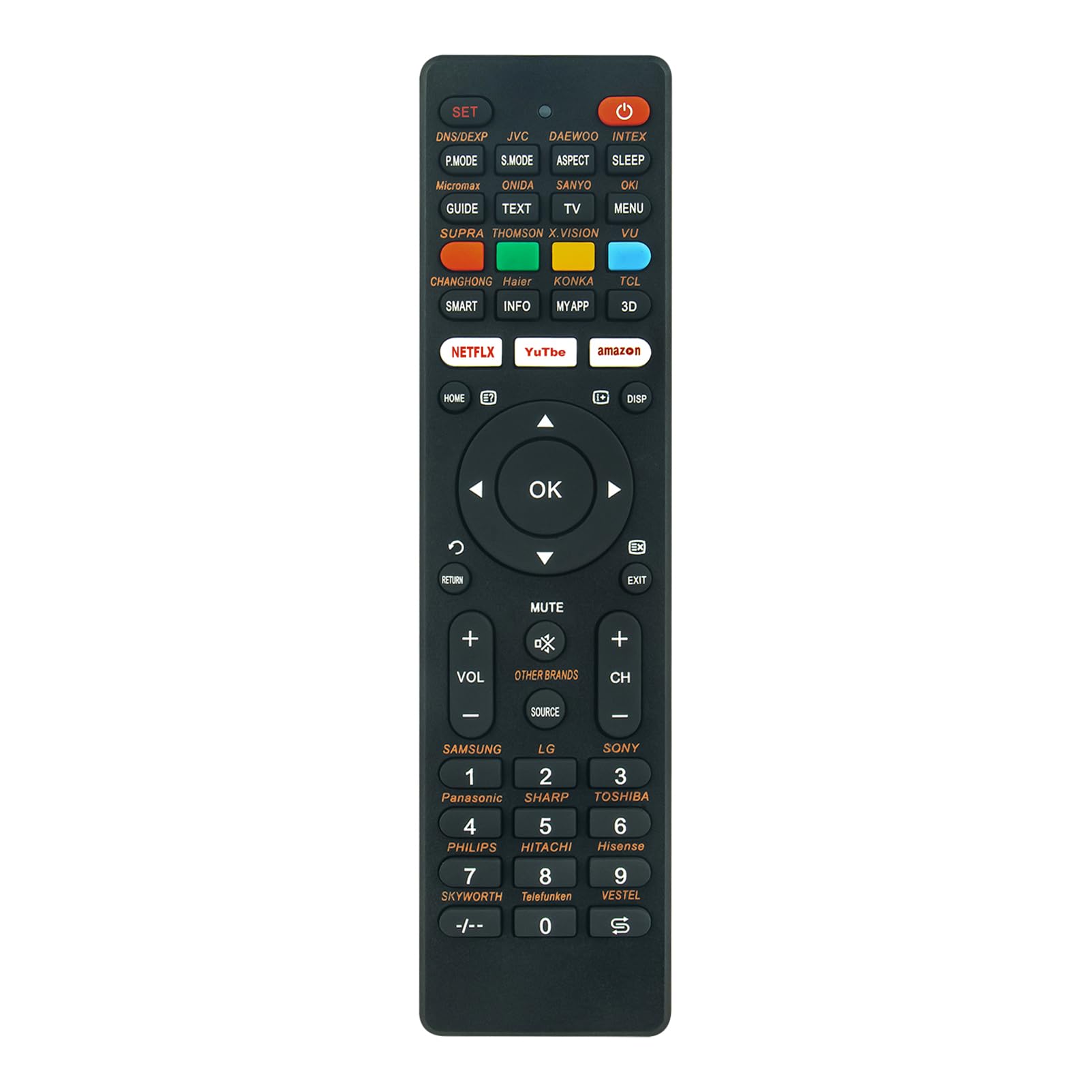
Image: Back of the remote control showing printed instructions for brand search.
2. Operating Instructions
To operate your TV using the remote control, aim it directly at the TV's infrared sensor, ensuring there are no obstacles between the remote and the TV.

Image: Front view of the remote control displaying its button layout.
2.1 Key Functions
- Power Button (⏻): Turns the TV on or off.
- Number Pad (0-9): Selects channels directly.
- VOL +/-: Adjusts the volume level.
- CH +/-: Changes channels up or down.
- MUTE: Silences the TV audio.
- SOURCE: Selects input sources (e.g., HDMI 1, AV).
- Navigation Buttons (Up, Down, Left, Right, OK): Navigates menus and confirms selections.
- HOME: Accesses the TV's home screen or smart features.
- NETFLIX, YouTube, Amazon: Direct access buttons for streaming services.
- RETURN: Goes back to the previous screen or menu.
- EXIT: Exits the current menu or application.
3. Maintenance
- Cleaning: Wipe the remote control with a soft, dry cloth. Avoid using liquid cleaners or abrasive materials.
- Battery Replacement: Replace batteries when the remote's response becomes sluggish or stops working. Always replace both batteries at the same time with new ones of the same type.
- Storage: Store the remote in a cool, dry place away from direct sunlight and extreme temperatures. If not used for an extended period, remove the batteries to prevent leakage.
4. Troubleshooting
- Remote Not Responding: Check if the batteries are inserted correctly and have sufficient charge. Replace batteries if necessary.
- Specific Buttons Not Working: Ensure the remote is aimed directly at the TV's sensor. If the issue persists, try the brand search and pairing process again (Section 1.2).
- Interference: Ensure there are no objects blocking the line of sight between the remote and the TV. Strong light sources can sometimes interfere with infrared signals.
If you encounter persistent issues or are unsure about compatibility, please contact the manufacturer for assistance.
5. Specifications
- Model Number: NCLIUS-RC-G009
- Brand: AIDITIYMI
- Product Dimensions: 6.88 x 1.77 x 0.65 inches (17.5 x 4.5 x 1.65 cm)
- Item Weight: 1.94 ounces (55 grams)
- Compatible Devices: Television
- Special Feature: Ergonomic design
- Color: Black

Image: Remote control with labeled dimensions for length and width.
6. Warranty and Support
For any questions regarding product functionality, compatibility, or warranty information, please refer to the product packaging or contact the AIDITIYMI customer support directly. Keep your purchase receipt for any warranty claims.