
EasyKeys X1369
CompX Fort X1369 Tubular Replacement Key User Manual
1. Product Overview
The CompX Fort X1369 Tubular Replacement Key is a precision-cut key designed to replace lost or damaged keys for CompX Fort tubular locks. This key is specifically cut on a D137-CLC key blank and is compatible with the Fort/GEM series of tubular locks, often identified by lock codes ranging from X1001 to X8704.
Important Note: The correct key for your lock is determined by the lock code, which is typically stamped on your original key or directly on the face of the lock cylinder itself.
2. Key Identification
To ensure you have the correct replacement key, verify the following:
- Lock Code: Locate the lock code on your existing key or on the lock cylinder. This key is designed for specific CompX Fort series codes (X1001-X8704).
- Key Type: This is a tubular key, characterized by its cylindrical shaft and circular arrangement of cuts.
- Key Blank: The key is cut on a D137-CLC key blank.
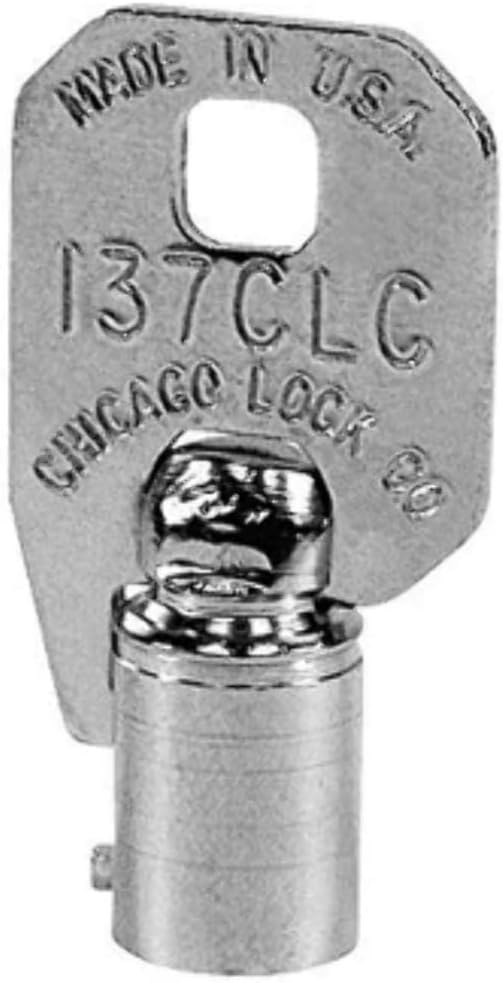
This image displays the CompX Fort X1369 tubular replacement key. The key features a cylindrical barrel and a flat, rectangular head. The head is stamped with 'MADE IN U.S.A.', '137CLC', and 'CHICAGO LOCK CO.', indicating its origin and key blank type. The key is made of a metallic material, likely steel or brass, and is designed for tubular locks.
3. Usage
Using your CompX Fort X1369 replacement key is straightforward:
- Insert the Key: Align the key with the tubular lock cylinder. The key should slide smoothly into the lock without excessive force.
- Turn the Key: Once fully inserted, turn the key clockwise or counter-clockwise as required to engage or disengage the lock mechanism.
- Remove the Key: After operating the lock, return the key to its original position (usually vertical) and gently pull it out.
4. Maintenance
Proper care will extend the life of your key and ensure reliable operation:
- Keep Clean: Avoid exposing the key to dirt, dust, or corrosive substances. If the key becomes dirty, wipe it with a soft, dry cloth.
- Avoid Bending: Do not apply excessive force that could bend or twist the key. A bent key can damage the lock cylinder.
- Proper Storage: Store the key in a safe place where it will not be scratched or damaged by other metal objects.
5. Troubleshooting
If you encounter issues with your replacement key, consider the following:
- Key Does Not Insert Smoothly: Ensure the key is correctly aligned with the lock cylinder. Check for any obstructions in the lock or damage to the key. Do not force the key.
- Key Does Not Turn: Verify that the lock code on the key matches your lock. The key may be incorrect for your specific lock. The lock mechanism might also be jammed or damaged.
- Lock Is Stiff: A small amount of graphite lubricant (not oil-based lubricants) can be applied to the lock cylinder to improve smoothness.
If problems persist, it is recommended to consult a professional locksmith or contact the seller for assistance.
6. Specifications
| Feature | Detail |
|---|---|
| Product Name | CompX Fort X1369 Tubular Replacement Key |
| Key Series Compatibility | CompX Fort X1001-X8704 |
| Key Blank Type | D137-CLC |
| Key Type | Tubular |
| Item Weight | 0.247 ounces |
| Manufacturer | CompX Fort |
7. Warranty and Support
For information regarding warranty, returns, or further support for your CompX Fort X1369 Tubular Replacement Key, please refer to the purchase documentation or contact the seller directly. As this is a custom-cut replacement key, ensuring the correct lock code was provided at the time of order is crucial for functionality.
Seller: EasyKeys Inc. USA
Return Policy: Typically 30 days for refund/replacement, as per seller's policy at the time of purchase.
Ask a question about this manual
Ask about setup, troubleshooting, compatibility, parts, safety, or missing instructions. Manuals+ will review the question and use this page’s manual context to help answer it.