
1. Introduction
The XPR3SS AVR-63S (Model 302WB) is a multi-function Din Rail device designed to protect your electrical appliances from damage caused by voltage fluctuations and overcurrent conditions. It integrates over/under voltage protection, overcurrent protection, and an energy meter into a single unit. This device automatically disconnects power during fault conditions and reconnects when safe, ensuring the longevity and safe operation of your connected equipment.
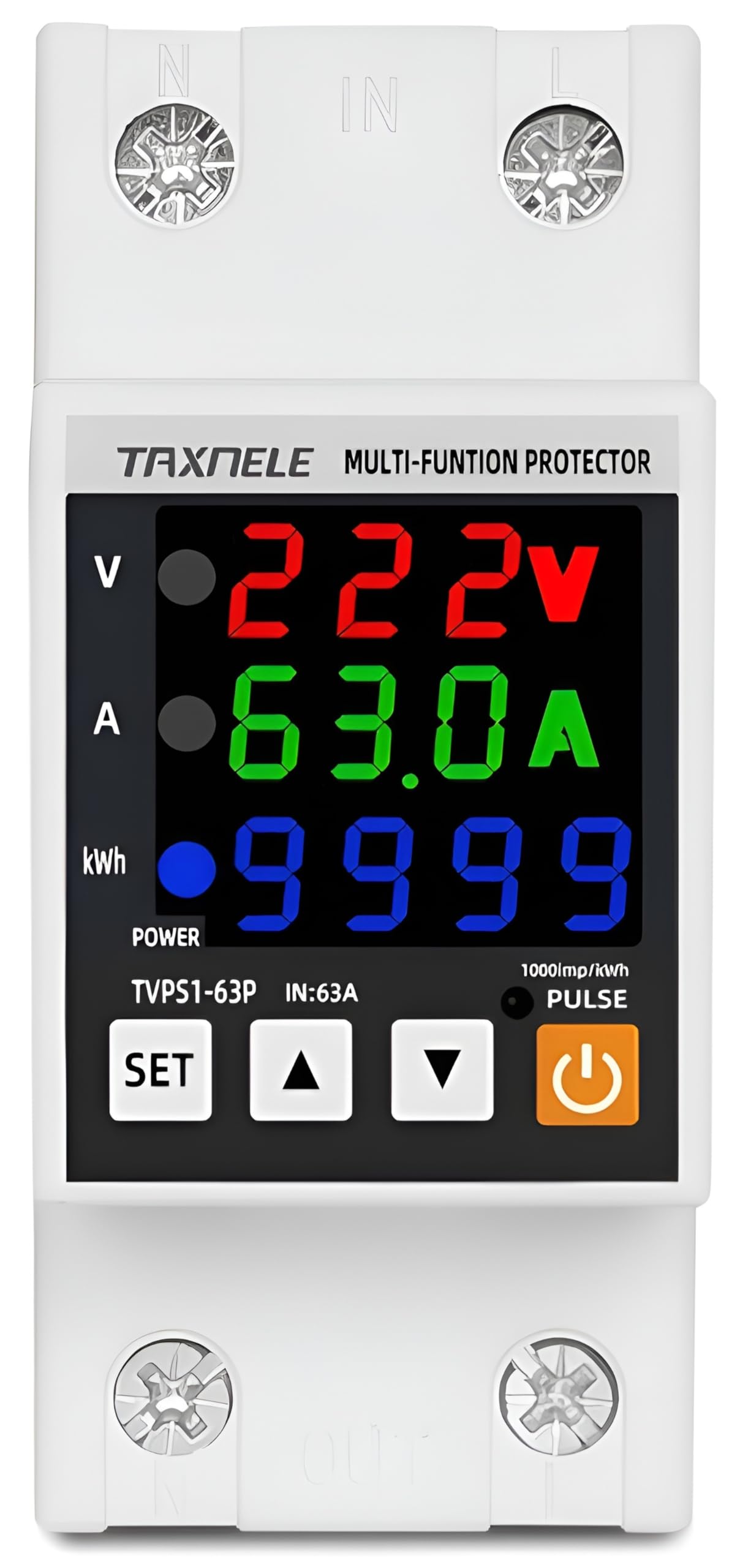
Figure 1: XPR3SS AVR-63S 63Amp Din Rail Voltage Protector and Energy Meter.
2. Key Features
- Comprehensive Protection: Safeguards appliances against over-voltage, under-voltage, and over-current conditions.
- Adjustable Settings: User-configurable parameters for voltage protection (80-300V), overcurrent protection (1-63A), and various delay times to suit specific regional and application requirements.
- Integrated Energy Meter: Displays real-time active power (W), total energy (kWh), voltage (V), power factor, and current (A) on an easy-to-read LCD.
- Automatic Recovery: Automatically restores power supply after a fault condition has cleared and the adjustable recovery delay time has elapsed.
- Quick Action Time: Fast response to voltage and current anomalies to minimize potential damage to connected devices.
- Din Rail Mountable: Designed for easy installation in standard 35mm Din Rail setups.

Figure 2: Protection capabilities of the device.
3. Specifications
| Parameter | Value |
|---|---|
| Brand | XPR3SS |
| Model Number | 302WB |
| Current Rating | 63 Amps (Adjustable 1-63A) |
| Voltage Protection Range | 80 - 300V (Adjustable) |
| Frequency | 35Hz/75Hz |
| Power Factor | 0.01~1.00 |
| Power Range | 0.1~13860W |
| Energy KWH Range | 0.1~99999999.9 kWh |
| Action Time | 0.1~10.0 seconds |
| Reset Waiting Time | 2~600 seconds (adjustable) |
| High/Low Voltage Error Waiting Time | 0-10 seconds (adjustable) |
| Power On Delay Time | 2-300 seconds (adjustable) |
| Operating Temperature | -20 to +55 Celsius |
| Product Dimensions (D x W x H) | 65D x 49W x 35H Millimeters |
| Item Weight | 0.3 Kilograms |
| Mounting Type | Din Rail (35mm) |
| Country of Origin | China |
Adjustable Parameters (P-Codes)

Figure 3: Detailed adjustable product parameters.

Figure 4: Product dimensions.
4. Setup and Installation
Installation should be performed by a qualified electrician to ensure safety and proper functionality. Ensure the main power supply is disconnected before beginning installation.
4.1 Din Rail Assembly
The device is designed for household use and mounts onto a standard 35mm Din Rail. Securely clip the device onto the Din Rail within your electrical panel.

Figure 5: Din Rail assembly.
4.2 Wiring Diagram
Connect the device according to the wiring diagram provided. Incorrect connections can damage the device or connected appliances. Ensure proper phase (L) and neutral (N) connections for both input and output terminals.

Figure 6: Product wiring diagram.
5. Operating Instructions
The XPR3SS AVR-63S features an LCD display and control buttons for monitoring and adjusting settings.
5.1 Button Functions

Figure 7: Function button display.
- SET Button: Used to enter the settings menu and confirm selections.
- Up/Down Adjustment Keys: Used to navigate through menu options and adjust parameter values.
- ON/OFF Button: Toggles the power output of the device.
5.2 Display Modes
Press the SET button briefly to cycle through different display modes, showing various electrical parameters.

Figure 8: Real-time display of current, voltage, and energy.

Figure 9: Multi-function display modes.
- KWH: Total energy consumption (0.1~99999999.9 kWh).
- Frequency: Mains frequency (Hz).
- Voltage: Current input voltage (V).
- Current: Current load (A).
- Power Factor: Power factor of the load.
- Active Power: Real power consumed by the load (W).
- Temperature: Internal temperature in Celsius or Fahrenheit.
5.3 Adjusting Parameters
To adjust protection settings (e.g., over-voltage limit, over-current limit, delay times):
- Press and hold the SET button for a few seconds to enter the settings menu. The display will show a P-code (e.g., P-1).
- Use the Up and Down adjustment keys to navigate through the P-codes (refer to Figure 3 for a list of P-codes and their functions).
- Once the desired P-code is displayed, press the SET button again to select it. The current value for that parameter will flash.
- Use the Up and Down adjustment keys to change the value.
- Press the SET button to confirm the new value.
- To exit the settings menu, either wait for the device to time out or press and hold the SET button again.
Note: Adjust the over-current and high/low voltage settings according to the operating current and voltage values of the load you will protect.
6. Maintenance
The XPR3SS AVR-63S is designed for minimal maintenance. To ensure optimal performance and longevity:
- Keep the device clean and free from dust and debris. Use a dry, soft cloth for cleaning.
- Periodically check all electrical connections to ensure they are secure. Loose connections can lead to overheating or intermittent operation.
- Do not expose the device to excessive moisture or extreme temperatures outside its operating range.
- Do not attempt to open or repair the device yourself. Refer to qualified personnel for any servicing needs.
7. Troubleshooting
If you encounter issues with your XPR3SS AVR-63S, refer to the following common scenarios:
7.1 Device Not Powering On
- Check the main power supply to ensure it is active.
- Verify all wiring connections are correct and secure as per Figure 6.
- Ensure the ON/OFF button is in the 'ON' position.
7.2 Device Trips Frequently (Over-current Error State)
If the current value rises above the set over-current limit, the device will de-energize the relay, and the error LED will turn on. The overload value will flash on the display.
- Check the connected load to ensure it is not drawing excessive current.
- Verify that the over-current protection setting (P-9) is appropriate for your load. Adjust if necessary (refer to Section 5.3).
- Ensure the over-current action time (P-10) and continuous overcurrent times (P-11) are set correctly.
7.3 Device Trips Frequently (Voltage Error State)
If the mains voltage goes above the high voltage set value or below the low voltage set value, the device will de-energize the relay, and the error LED will turn on. The mains input voltage value will flash on the display.
- Check the incoming mains voltage for stability.
- Verify that the over-voltage (P-3) and under-voltage (P-5) protection settings are appropriate for your region. Adjust if necessary (refer to Section 5.3).
- Ensure the over/undervoltage action time (P-7) is set correctly.
7.4 Device Does Not Reconnect Automatically
- Check the 'Automatic Recovery' setting (P-17) to ensure it is enabled.
- Verify the 'Recovery Delay' setting (P-2). The device will wait for this duration after a fault clears before reconnecting.
- Ensure the fault condition (over/under voltage, overcurrent) has genuinely cleared and the mains supply is stable.
8. Warranty Information
This XPR3SS product comes with a 6-month warranty against any manufacturing defects from the date of purchase. To claim warranty service, please refer to the contact information provided in the warranty card included with your product.
9. Support
For technical assistance, product inquiries, or support, please contact:
- Importer: XPR3SS, Bengaluru
- Manufacturer: Yueqing Taixin Electric Co., Ltd., Liushi Town, Yueqing City, Zhejiang, China
Please have your product model number (302WB) and purchase details ready when contacting support.