
1. Important Safety Information
Read all instructions before using this appliance to reduce the risk of fire, electric shock, or injury. This appliance contains a refrigerant. Consult a qualified service technician for disposal. Do not store explosive substances such as aerosol cans with a flammable propellant in this appliance. This appliance must be properly grounded. Do not use an adapter plug or extension cord.
- Electrical Safety: Ensure the appliance is connected to a dedicated, grounded 120V, 60Hz, 15A circuit.
- Ventilation: Maintain proper ventilation around the appliance as specified in the installation instructions.
- Child Safety: Supervise children to ensure they do not play with the appliance.
- Flammable Materials: Keep flammable materials and vapors away from the appliance.
- Proposition 65 Warning: This product can expose you to chemicals including Diisononyl phthalate (DINP), which is known to the State of California to cause cancer, and Di-isodecyl phthalate (DIDP), which is known to the State of California to cause birth defects or other reproductive harm. For more information go to www.P65Warnings.ca.gov.
2. Product Overview
The Monogram ZDBR240NBS is a 24-inch wide beverage center designed for optimal storage and cooling of various beverages. It features a glass door, digital touch controls, and flexible interior storage options.

Image: The Monogram ZDBR240NBS beverage center with its glass door closed, seamlessly integrated into custom cabinetry in a living space. This view highlights its sleek, built-in appearance.
Key features include:
- Digital touch controls with LED display for precise temperature management.
- Soft interior LED lighting that illuminates when the door is open.
- Three removable glass shelves, including a QuickSpace™ shelf.
- Two full-extension wine racks capable of holding up to 10 wine bottles.
- Capacity to store 12-ounce cans, quart-size bottles, and two-liter plastic containers.
- Reversible door swing for flexible installation.
- Fully finished on all sides for freestanding or built-in installation.
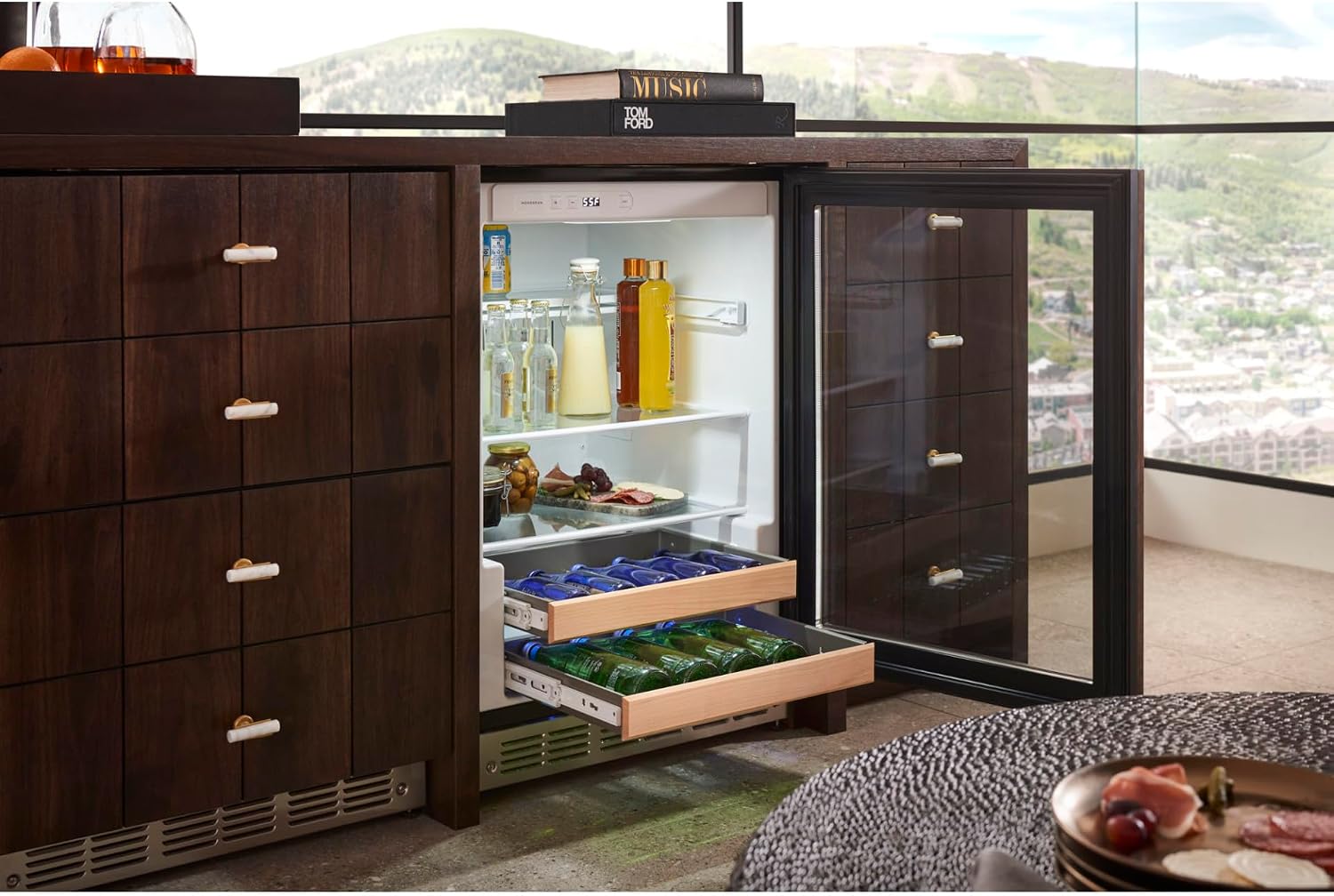
Image: The Monogram ZDBR240NBS beverage center with its glass door open, revealing the interior. The image shows various beverages on glass shelves and wine bottles stored on the pull-out wine racks.
3. Setup and Installation
3.1 Unpacking
Carefully remove all packaging materials. Inspect the appliance for any shipping damage. Keep packaging materials until you are satisfied with the product's condition. Remove any tape or temporary labels before use.
3.2 Location Requirements
This beverage center can be installed as a freestanding unit or built into cabinetry. Ensure the chosen location has a stable, level surface and adequate clearance for ventilation. Avoid direct sunlight or heat sources. The appliance requires a 120V, 60Hz, 15A grounded electrical outlet.
- Dimensions: 23.75"D x 23.75"W x 34.5"H. Allow for proper clearances as per the full installation guide.
- Ventilation: Ensure the front grille is not obstructed to allow for proper airflow.
3.3 Door Reversal
The door swing is reversible and can be changed from right-hand to left-hand swing, or vice-versa, as needed for your installation. Refer to the detailed installation instructions provided with your unit for specific steps on reversing the door. This process typically involves moving hinges and the door stop to the opposite side.
3.4 Handle Installation
This model requires a handle from either the Monogram Minimalist (ZXGW1H1CPSS) or Statement (ZXGW1H1PPSS) Collection, which are sold separately. Follow the instructions provided with your chosen handle for proper attachment to the door.
4. Operating Instructions
4.1 Digital Touch Controls
The beverage center is equipped with digital touch controls and an LED display located at the top of the interior. These controls allow for precise temperature adjustments.
- Temperature Adjustment: Use the up/down arrows on the control panel to set the desired temperature. The LED display will show the current and set temperatures.
- Temperature Range: The unit is designed to maintain optimal temperatures for various beverages. Refer to the full manual for specific recommended temperature settings for different types of drinks.
4.2 Interior LED Lighting
The soft interior LED lighting automatically activates when the door is opened. An internal on/off switch is also provided to manually control the lighting.
4.3 Loading the Beverage Center
Arrange bottles and cans to allow for proper air circulation. Do not block the internal fan or vents. The unit can accommodate:
- Up to 10 wine bottles on the two full-extension wine racks.
- Various 12-ounce cans, quart-size bottles, and two-liter plastic containers on the glass shelves.

Image: A detailed view of the Monogram ZDBR240NBS interior, showcasing its capacity. The shelves are filled with various cans and bottles, and the wine racks hold wine bottles, demonstrating the flexible storage options.
5. Maintenance and Cleaning
5.1 Cleaning the Interior
Unplug the appliance before cleaning. Use a mild soap and water solution with a soft cloth to clean the interior surfaces, shelves, and wine racks. Rinse thoroughly and dry. Do not use abrasive cleaners or scouring pads.
5.2 Cleaning the Exterior
For stainless steel surfaces, use a stainless steel cleaner and polish. For glass surfaces, use a glass cleaner. Wipe down the exterior with a soft, damp cloth and dry thoroughly. Avoid getting water into the control panel area.
5.3 Condenser Cleaning
The condenser coils are located at the front bottom of the unit. Periodically clean the condenser coils to ensure efficient operation. Use a vacuum cleaner with a brush attachment to remove dust and debris from the grille and coils. This should be done at least once every 6-12 months.
6. Troubleshooting
Before contacting service, review the following common issues and solutions:
| Problem | Possible Cause | Solution |
|---|---|---|
| Appliance does not operate | No power to the unit; circuit breaker tripped; power cord unplugged. | Check power supply, reset circuit breaker, ensure cord is securely plugged in. |
| Temperature is not cold enough | Door not closed properly; excessive door openings; warm items recently added; condenser coils dirty; temperature setting too high. | Ensure door is sealed; reduce door openings; allow time for new items to cool; clean condenser coils; lower temperature setting. |
| Unit is noisy | Normal operating sounds (compressor, fan); unit not level; items rattling inside. | Ensure unit is level; adjust items inside to prevent rattling. |
| Door does not close completely | Unit not level; gasket obstructed or dirty; shelves out of position. | Level the unit; clean or adjust door gasket; reposition shelves. |
7. Specifications
| Feature | Detail |
|---|---|
| Model Number | ZDBR240NBS |
| Brand | Monogram |
| Capacity | 5.5 Cubic Feet (126 Can Capacity) |
| Dimensions (D x W x H) | 23.75"D x 23.75"W x 34.5"H |
| Installation Type | Freestanding or Built-in |
| Voltage | 120 Volts |
| Shelf Type | Glass |
| Number of Shelves | 3 |
| Wine Racks | 2 (Full-extension, holds up to 10 bottles) |
| Reversible Door | Yes |
| Cooling Method | Compressor |
| Weight | 173.8 Pounds |
8. Warranty and Customer Support
8.1 Manufacturer's Warranty
This Monogram appliance is covered by a 1 Year Manufacturer's Warranty for parts and labor. Additionally, the product description indicates a 2-year limited parts and labor warranty with a 5-year limited sealed system manufacturer warranty. Please refer to the warranty card included with your product for full terms and conditions.
8.2 Customer Support
For technical assistance, service, or to order parts, please contact Monogram customer support. Have your model number (ZDBR240NBS) and serial number ready when you call. Contact information can typically be found on the Monogram official website or in the documentation included with your appliance.


