
1. Introduction
This manual provides comprehensive instructions for the setup, operation, and maintenance of your T10 Ultra Smartwatch. Please read this manual thoroughly to ensure proper use and to maximize the functionality of your device.
2. Product Overview
The T10 Ultra Smartwatch features a 2.09-inch big display, a sleek metal body with 53mm real screws, and supports calling and wireless charging. It functions as an activity tracker and is compatible with 3G/4G/5G Android devices.
- Display: 2.09" Inch Big Display for clear visuals and easy navigation.
- Design: Sleek Metal Body reinforced with 53mm Real Screws for durability.
- Connectivity: Built-in Calling Feature and compatibility with all 3G/4G/5G Android devices.
- Charging: Convenient Wireless Charging capability.
- Health & Fitness: Integrated Activity Tracker, Heart Rate Monitor, Blood Pressure Monitor, and SpO2 monitor.
- Notifications: Receive Incoming Call, Messaging, and other alerts.
- Additional Features: Alarm Clock, Camera control, Calorie Tracker, Sleep Monitor, Step Counter, Distance Tracker, Sedentary Multisport Tracker, Daily Workout Memory, Breath Monitor, Games, Music Player, Voice Call and Text Messaging Notifications.

Figure 2.1: T10 Ultra Smartwatch with its vibrant orange strap, showcasing the large display and sleek design.
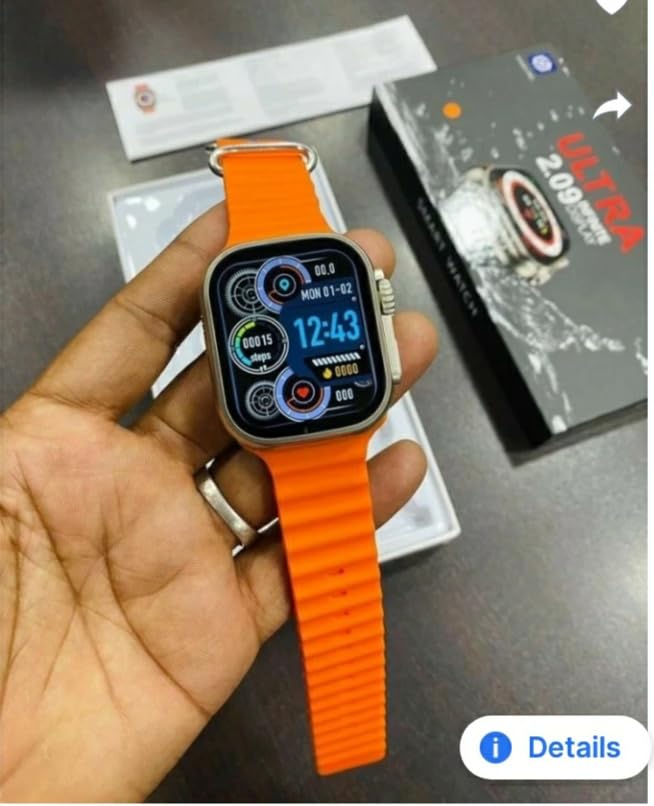
Figure 2.2: The retail packaging for the T10 Ultra Smartwatch, highlighting key features like "ULTRA 2.09 INFINITE DISPLAY".
3. Setup
3.1. Charging the Smartwatch
Before first use, fully charge your T10 Ultra Smartwatch. The device supports wireless charging.
- Place the smartwatch on the wireless charging pad. Ensure the watch is correctly aligned for charging to begin.
- The screen will indicate charging status.
- A full charge typically takes approximately 2-3 hours.
Note: Use the provided charger and a compatible power adapter.
3.2. Pairing with Your Smartphone
The T10 Ultra Smartwatch is compatible with most Android phones (3G/4G/5G).
- Ensure your smartwatch is charged and powered on.
- Enable Bluetooth on your smartphone.
- Download and install the companion application for the T10 Ultra Smartwatch from your phone's app store. (Specific app name not provided, refer to product packaging or quick start guide for app details).
- Open the application and follow the on-screen instructions to search for and pair with your smartwatch.
- Confirm the pairing request on both your smartphone and smartwatch.
4. Operating Instructions
4.1. Basic Navigation
Navigate the smartwatch interface using touch gestures on the 2.09-inch display and the physical buttons.
- Swipe Up/Down: Scroll through menus and notifications.
- Swipe Left/Right: Access different widgets or quick settings.
- Tap: Select an item or open an application.
- Physical Buttons: Used for power on/off, returning to the home screen, or accessing specific functions as configured.
4.2. Making and Receiving Calls
With Bluetooth connected to your smartphone, you can make and receive calls directly from your smartwatch.
- Making Calls: Access the dialer or contacts list on your smartwatch to initiate a call.
- Receiving Calls: When a call comes in, the smartwatch will display the caller ID. Tap to answer or decline.
4.3. Activity Tracking
The smartwatch continuously monitors your daily activities.
- Steps: Tracks your daily step count.
- Distance: Estimates the distance covered based on your steps.
- Calories: Calculates calories burned during activities.
- Sleep Monitor: Records your sleep patterns and quality.
- Heart Rate: Monitors your heart rate throughout the day.
- Blood Pressure & SpO2: Provides estimates for blood pressure and blood oxygen saturation levels.
Disclaimer: The health monitoring features are for reference only and should not be used for medical diagnosis or treatment.
4.4. Notifications and Messages
Receive alerts for incoming calls, messages, and app notifications directly on your wrist.
- Ensure notification permissions are enabled in the companion app on your smartphone.
- Notifications will appear on the smartwatch screen. Swipe to dismiss or view details.
4.5. Other Features
- Music Control: Control music playback on your smartphone (play, pause, skip tracks).
- Camera Remote: Use your smartwatch as a remote shutter for your smartphone camera.
- Alarm Clock: Set alarms directly from the watch.
- Games: Access pre-installed games for entertainment.
5. Maintenance
5.1. Cleaning Your Smartwatch
Regular cleaning helps maintain the appearance and functionality of your device.
- Wipe the screen and body with a soft, lint-free cloth.
- For stubborn marks, slightly dampen the cloth with water. Avoid harsh chemicals.
- Clean the charging contacts periodically to ensure efficient charging.
5.2. Battery Care
To prolong battery life:
- Avoid exposing the smartwatch to extreme temperatures (hot or cold).
- Do not allow the battery to fully discharge frequently.
- Charge the device regularly, even if not in daily use.
5.3. Storage
When storing the smartwatch for extended periods, ensure it is partially charged (around 50%) and kept in a cool, dry place.
6. Troubleshooting
If you encounter issues with your T10 Ultra Smartwatch, refer to the following common solutions:
- Device not turning on: Ensure the smartwatch is fully charged. Connect it to the charger and wait a few minutes before attempting to power on.
- Cannot pair with smartphone:
- Ensure Bluetooth is enabled on both devices.
- Make sure the smartwatch is within the Bluetooth range of your phone.
- Restart both the smartwatch and the smartphone.
- Clear Bluetooth cache on your phone (if applicable) and try pairing again.
- Notifications not appearing:
- Check notification permissions in the companion app on your smartphone.
- Ensure the smartwatch is properly connected via Bluetooth.
- Verify that "Do Not Disturb" mode is not active on either device.
- Inaccurate activity data:
- Ensure the smartwatch is worn snugly on your wrist.
- Calibrate the device through the companion app if an option is available.
If the issue persists, consider performing a factory reset (refer to the companion app or device settings for this option) or contact customer support.
7. Specifications
| Feature | Detail |
|---|---|
| Brand | FUSION WEARABLES |
| Model Name | T10 Ultra smart watch Wireless charging Big Display 2.09'' |
| Display Size | 2.09 Inches |
| Display Type | AMOLED |
| Resolution | 240 x 240 |
| Operating System | Android |
| Connectivity | Bluetooth, 3G/4G/5G Cellular Technology |
| Special Features | Wireless Charging, Calling Feature |
| Compatible Devices | Smartphone |
| Product Dimensions | 17 x 14 x 4 cm |
| Item Weight | 170 g |
| Mounting Hardware | Charger |
| Manufacturer | COBBLIVI |
8. Warranty and Support
8.1. Warranty Information
The T10 Ultra Smartwatch comes with a 1 Year Warranty from the date of purchase. This warranty covers manufacturing defects and issues arising from normal use. It does not cover damage caused by misuse, accidents, unauthorized repairs, or normal wear and tear.
Please retain your proof of purchase for warranty claims.
8.2. Customer Support
For technical assistance, troubleshooting not covered in this manual, or warranty claims, please contact the manufacturer, COBBLIVI, or the retailer where you purchased the product. Refer to your product packaging or the retailer's website for specific contact details.


