
1. Introduction
This user manual provides detailed instructions for the installation, operation, and maintenance of your COLOURFUL Sunsun XQP-500F Multifunctional Submersible Filter Pump. This device is designed to provide efficient filtration, circulation, and oxygenation for aquariums, ensuring a clean and healthy aquatic environment. Please read this manual thoroughly before use to ensure proper function and safety.

Image 1: The COLOURFUL Sunsun XQP-500F Submersible Filter Pump installed in an aquarium.
2. Product Features
The XQP-500F pump offers multiple functionalities to enhance your aquarium's health:
- Efficient Filtration: Provides mechanical and biological filtration for crystal clear water.
- Versatile Functionality: Operates as a filter, water pump, circulator, and aerator.
- Compact and Space-Saving Design: Integrates discreetly into any aquarium setup.
- Energy-Efficient Operation: 6-watt motor delivers powerful performance with minimal energy consumption and quiet operation.
- Easy Installation and Maintenance: Designed for user-friendly setup and hassle-free cleaning.

Image 2: Overview of the 4-in-1 filtration system capabilities.
3. Safety Instructions
Always follow these safety precautions to prevent injury or damage:
- Ensure the power supply matches the pump's specifications (220-240V/50Hz).
- Never operate the pump dry; it must be fully submerged in water.
- Disconnect power before performing any maintenance, installation, or removal.
- Do not use the pump if the power cord or plug is damaged.
- Keep out of reach of children.
- This appliance is for indoor aquarium use only.
4. Package Contents
Verify that all components are present upon unpacking:
- COLOURFUL Sunsun XQP-500F Filter Pump Unit
- Filter Sponges/Media
- Connecting Flange
- Oxygen Increasing Outlet
- Gas Regulating Valve
- Oxygenation Tube
- Suction Cups
5. Setup and Installation
Follow these steps for proper installation of your filter pump:
- Assemble the Filter Unit: Ensure all filter media (sponges) are correctly placed within the filter boxes.
- Choose Water Outlet Mode:
- Standard Water Outlet: Rotate and install the connecting flange clockwise onto the pump outlet. Connect the water pipe to get water out.
- Aerating Water Outlet: Rotate and install the connecting flange clockwise. Press the oxygen outlet to the connecting flange. Connect one end of the oxygenation tube to the oxygen port and the other end to the gas regulating valve.
- Positioning: Attach the suction cups to the pump body and firmly press the pump against the inside wall of your aquarium, ensuring it is fully submerged.
- Tank Size Suitability: This model (XQP-500F) is suitable for tanks between 1.5 to 2 feet in length. Using it in tanks smaller than 1.5 feet or larger than 2 feet may result in suboptimal performance.
- Power Connection: Once installed and fully submerged, connect the power plug to a suitable electrical outlet.
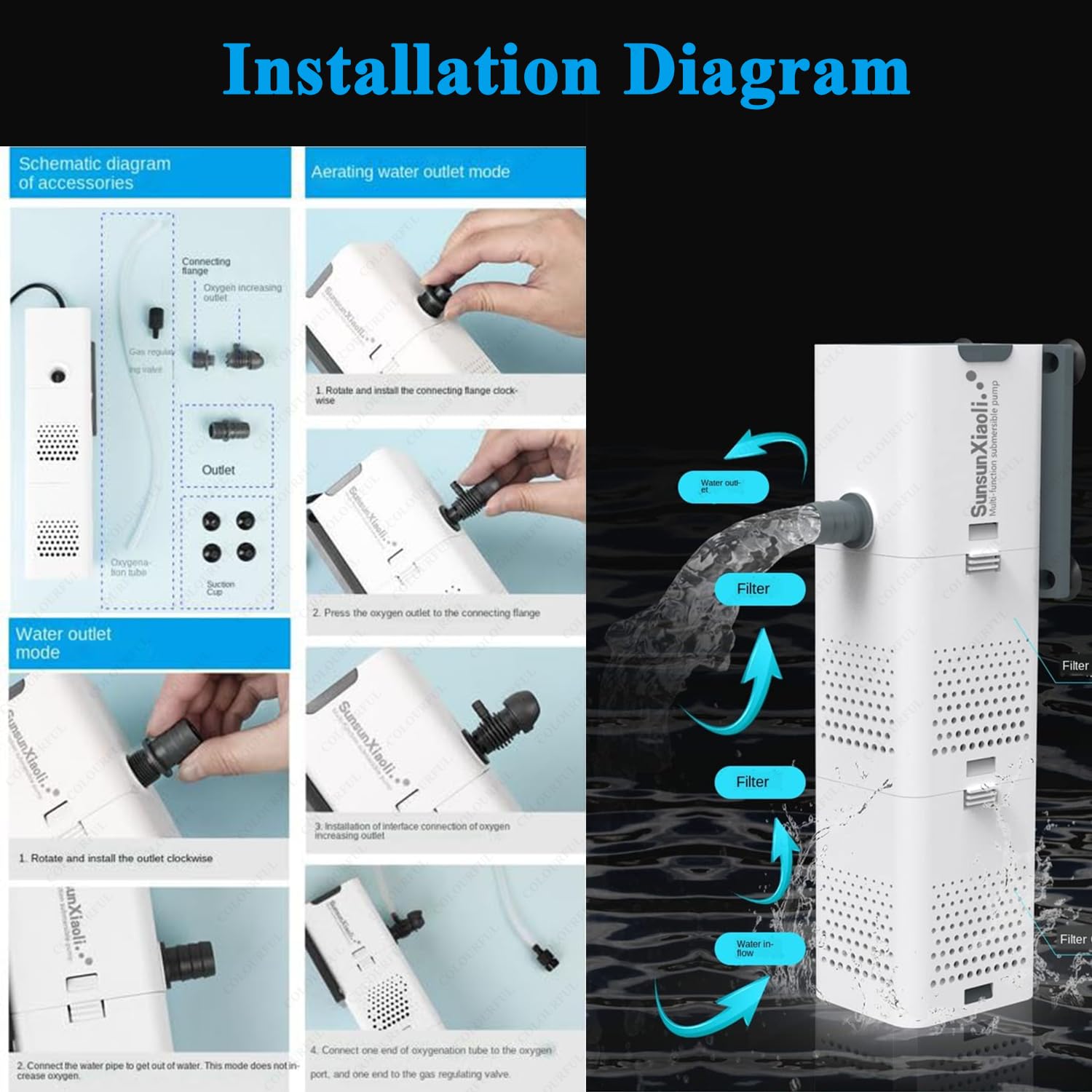
Image 3: Installation diagram for the XQP-500F pump.

Image 4: Tank size compatibility guide for the XQP-500F.
6. Operating Instructions
The XQP-500F pump is designed for continuous operation. Once properly installed and connected to power, it will begin to filter and circulate water. If the aerating water outlet mode is selected, air bubbles will be introduced into the tank.
- Ensure the pump is always fully submerged during operation.
- Monitor water flow and aeration to ensure optimal performance.
- Adjust the gas regulating valve (if using aeration) to control the amount of air bubbles.
7. Maintenance
Regular maintenance is crucial for the longevity and efficiency of your filter pump:
- Disconnect Power: Always unplug the pump from the power outlet before any maintenance.
- Clean Filter Media:
- Carefully remove the filter boxes from the pump unit.
- Rinse the filter sponges in old aquarium water (from a water change) to preserve beneficial bacteria. Do not use tap water directly, as chlorine can kill these bacteria.
- Replace heavily soiled or degraded filter media as needed.
- Clean Impeller:
- Gently remove the impeller cover and the impeller itself.
- Clean any debris, algae, or mineral buildup from the impeller and its housing using a small brush.
- Ensure the impeller spins freely before reassembling.
- Clean Pump Body and Outlets: Wipe down the exterior of the pump and clear any blockages in the water outlets or oxygenation tube.
- Reassemble: Carefully reassemble all components and ensure they are securely fitted before returning the pump to the aquarium and reconnecting power.
Perform routine cleaning every 2-4 weeks, depending on aquarium bioload and water conditions.
8. Troubleshooting
| Problem | Possible Cause | Solution |
|---|---|---|
| Pump does not start or has low flow. |
|
|
| Excessive noise. |
|
|
| Poor aeration. |
|
|
9. Specifications
Detailed technical specifications for the XQP-500F model:

Image 5: Product specifications for the XQP series.
| Specification | Value (XQP-500F) |
|---|---|
| Model | XQP-500F |
| Power | 6 watts |
| Max. Lift | 0.9 meters |
| Max. Flow Rate | 500 liters/hour |
| Outlet Diameter | 12 mm |
| Dimensions (LxWxH) | 197 x 58 x 64 mm |
| Power Supply | 220-240V/50Hz |
| Power Cord Length | 1.3 meters |
| Suitable Fish Tank Size | 1.5 - 2 feet length |
| Item Weight | 500 g |
| Manufacturer | COLOURFUL |
| Country of Origin | China |
10. Warranty and Support
For warranty information and customer support, please refer to the documentation provided with your purchase or contact COLOURFUL customer service. Keep your proof of purchase for any warranty claims.
Manufacturer: COLOURFUL
Importer: COLOURFUL® No-65, Co-Operative Colony, Chithode, Erode, TN-638102


