
1. Introduction
This manual provides essential information for the proper installation, operation, and maintenance of your BeNtli Robot Vacuum Cleaner Water Tank Replacement. Please read this manual thoroughly before use to ensure optimal performance and longevity of the product.
This product is designed to be compatible with AMIBOT Animal XL H2O Connect X755 Robot Vacuum Cleaners.
2. Product Components
The package includes the following components:
- 1x Water Tank
- 1x Mop Cloth
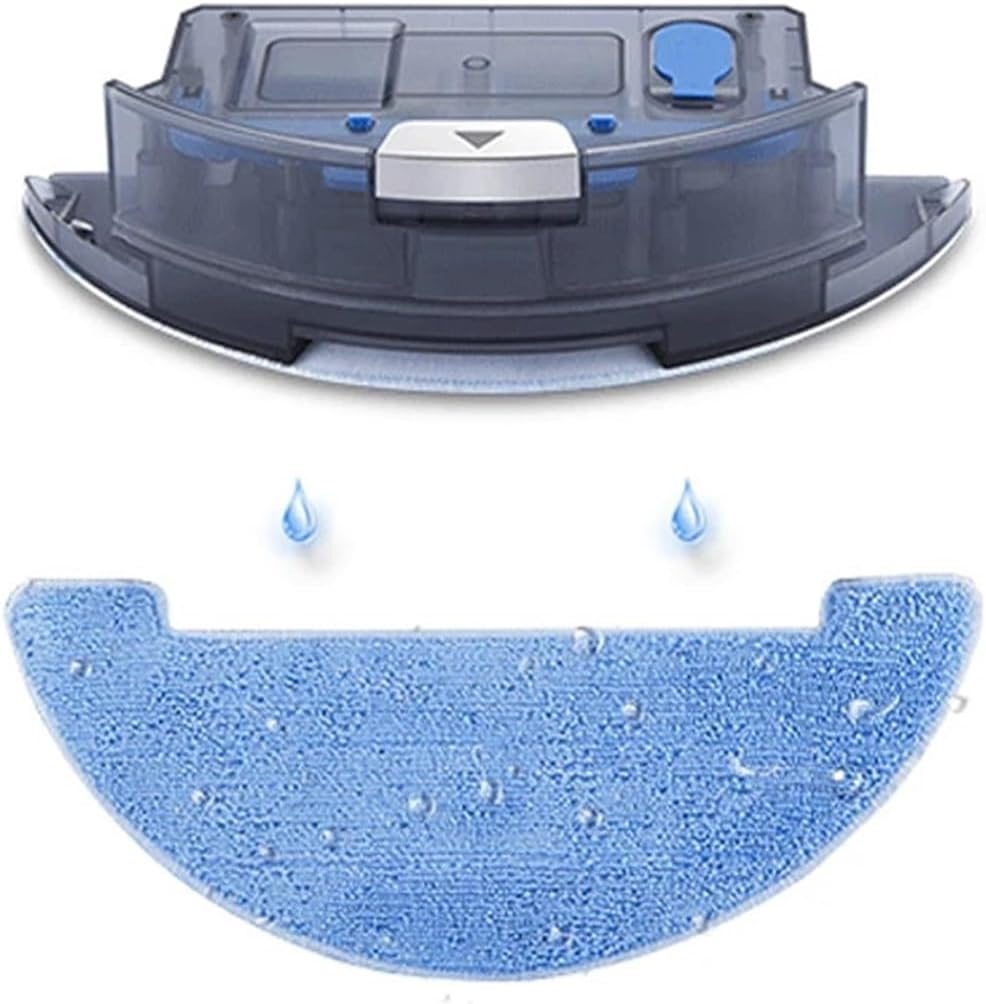
Figure 2.1: Overview of the BeNtli Robot Vacuum Cleaner Water Tank and Mop Cloth. The image shows the grey water tank assembly at the top and a blue mop cloth below it, with two water droplet icons indicating its function.
3. Setup and Installation
Follow these steps to properly install the water tank and mop cloth into your compatible robot vacuum cleaner:
- Prepare the Robot Vacuum: Ensure your AMIBOT Animal XL H2O Connect X755 robot vacuum cleaner is powered off and disconnected from its charging base.
- Remove Existing Components: If an old water tank or mop cloth is present, carefully remove it from the robot vacuum cleaner. Refer to your robot vacuum's original manual for specific removal instructions.
- Attach the Mop Cloth: Securely attach the new mop cloth to the designated area on the underside of the water tank. Ensure it is properly aligned and fastened.
- Fill the Water Tank: Open the water inlet on the water tank (typically a rubber stopper or cap). Fill the tank with clean tap water. Do not overfill. Close the inlet securely.

Figure 3.1: Top view of the water tank showing the blue water inlet cap. A warning label is visible, indicating "Do not immerse in water."
- Insert the Water Tank: Carefully slide the filled water tank assembly into the corresponding slot on your robot vacuum cleaner. Ensure it clicks into place or is firmly seated.

Figure 3.2: Underside view of the water tank, showing the filter mesh areas where water is dispensed to the mop cloth.
- Power On: You may now power on your robot vacuum cleaner and resume normal operation.
4. Operating Instructions
Once the water tank and mop cloth are installed, your robot vacuum cleaner can perform wet mopping functions. Refer to your robot vacuum cleaner's main user manual for specific instructions on activating mopping modes and adjusting water flow settings.
- Ensure the water tank is adequately filled before starting a mopping cycle.
- For best results, pre-sweep or vacuum the area to remove loose debris before mopping.
- Do not use cleaning solutions other than water unless explicitly approved by the robot vacuum cleaner manufacturer.
5. Maintenance
Regular maintenance of the water tank and mop cloth is crucial for optimal performance and hygiene.
5.1. Water Tank Cleaning
- After each mopping cycle, empty any remaining water from the tank.
- Rinse the water tank thoroughly with clean water.
- Allow the water tank to air dry completely before re-installing or storing to prevent mold and mildew.
- Do not immerse the entire water tank assembly in water, especially parts containing electronic components.
5.2. Mop Cloth Cleaning
- Remove the mop cloth from the water tank after each use.
- Hand wash the mop cloth with mild detergent and warm water, or machine wash on a gentle cycle.
- Air dry the mop cloth completely before re-attaching it to the water tank or storing. Do not tumble dry.
- Replace the mop cloth periodically (e.g., every 1-3 months, depending on usage) to maintain cleaning effectiveness.
6. Troubleshooting
If you encounter issues with the water tank or mop cloth, consider the following common solutions:
| Problem | Possible Cause | Solution |
|---|---|---|
| No water dispensing from tank | Tank empty; water outlet clogged; tank not properly installed. | Refill tank; clean water outlet; re-install tank securely. |
| Mop cloth not cleaning effectively | Mop cloth dirty or worn out; insufficient water. | Clean or replace mop cloth; ensure tank is filled. |
| Water leakage | Water inlet cap not closed properly; damaged tank. | Ensure cap is sealed; inspect tank for cracks and replace if damaged. |
For issues not listed here, please refer to the troubleshooting section of your AMIBOT Animal XL H2O Connect X755 robot vacuum cleaner's main user manual or contact customer support.
7. Specifications
| Feature | Detail |
|---|---|
| Brand | BeNtli |
| Model Name | leiyanhua |
| Compatible Models | AMIBOT Animal XL H2O Connect X755 |
| Package Dimensions | 1.18 x 0.79 x 0.39 inches |
| Item Weight | 1.76 ounces |
| Filter Type | Cloth (for mop) |
8. Warranty and Support
This product is a replacement part. For warranty information regarding the original robot vacuum cleaner, please refer to the manufacturer's documentation for your AMIBOT Animal XL H2O Connect X755.
For support regarding this BeNtli replacement water tank and mop cloth, please contact the seller directly through the platform where the purchase was made. The seller's name is leiyanhua.
For general inquiries or further assistance, please refer to the product listing on Amazon.com or contact BeNtli customer service if available.