
1. Introduction
Thank you for choosing the Philips 5000 Series Grill and Toaster, model HD6301/90. This versatile appliance is designed to provide excellent grilling and toasting results with its powerful 2200W heating, adjustable temperature control, and convenient features like removable non-stick plates and a 180-degree opening. Please read this user manual carefully before using the appliance to ensure safe and optimal performance. Keep this manual for future reference.

Figure 1: Philips 5000 Series Grill and Toaster (Model HD6301/90)
2. Important Safety Instructions
When using electrical appliances, basic safety precautions should always be followed, including the following:
- Read all instructions.
- Do not touch hot surfaces. Use handles or knobs.
- To protect against electrical shock, do not immerse cord, plugs, or appliance in water or other liquid.
- Close supervision is necessary when any appliance is used by or near children.
- Unplug from outlet when not in use and before cleaning. Allow to cool before putting on or taking off parts.
- Do not operate any appliance with a damaged cord or plug or after the appliance malfunctions, or has been damaged in any manner. Return appliance to the nearest authorized service facility for examination, repair, or adjustment.
- The use of accessory attachments not recommended by the appliance manufacturer may cause injuries.
- Do not use outdoors.
- Do not let cord hang over edge of table or counter, or touch hot surfaces.
- Do not place on or near a hot gas or electric burner, or in a heated oven.
- Extreme caution must be used when moving an appliance containing hot oil or other hot liquids.
- Always attach plug to appliance first, then plug cord into the wall outlet. To disconnect, turn any control to "off", then remove plug from wall outlet.
- Do not use appliance for other than intended use.
- This appliance is for household use only.
3. Product Overview
The Philips 5000 Series Grill and Toaster is engineered for convenience and performance. Familiarize yourself with its key components and features:
- Adjustable Temperature Control: A rotary dial allows you to select the perfect cooking temperature for various foods, from low to high (60-200°C).
- High Power (2200W): Ensures rapid heating and consistent heat distribution for delicious results every time.
- Wide Grilling Surface: Provides ample space for cooking multiple portions simultaneously, whether for a single person or a family.
- 180° Opening: The plates can open fully to 180 degrees, allowing you to grill on both surfaces at once, effectively doubling your cooking area.
- Adjustable Height: The top grilling plate can be easily adjusted to accommodate thicker foods like steaks or filled sandwiches, ensuring optimal contact and even grilling.
- Removable Non-stick Plates: The grilling plates feature a non-stick coating and are fully removable for easy cleaning.

Figure 2: Front view showing the temperature dial and power indicator.
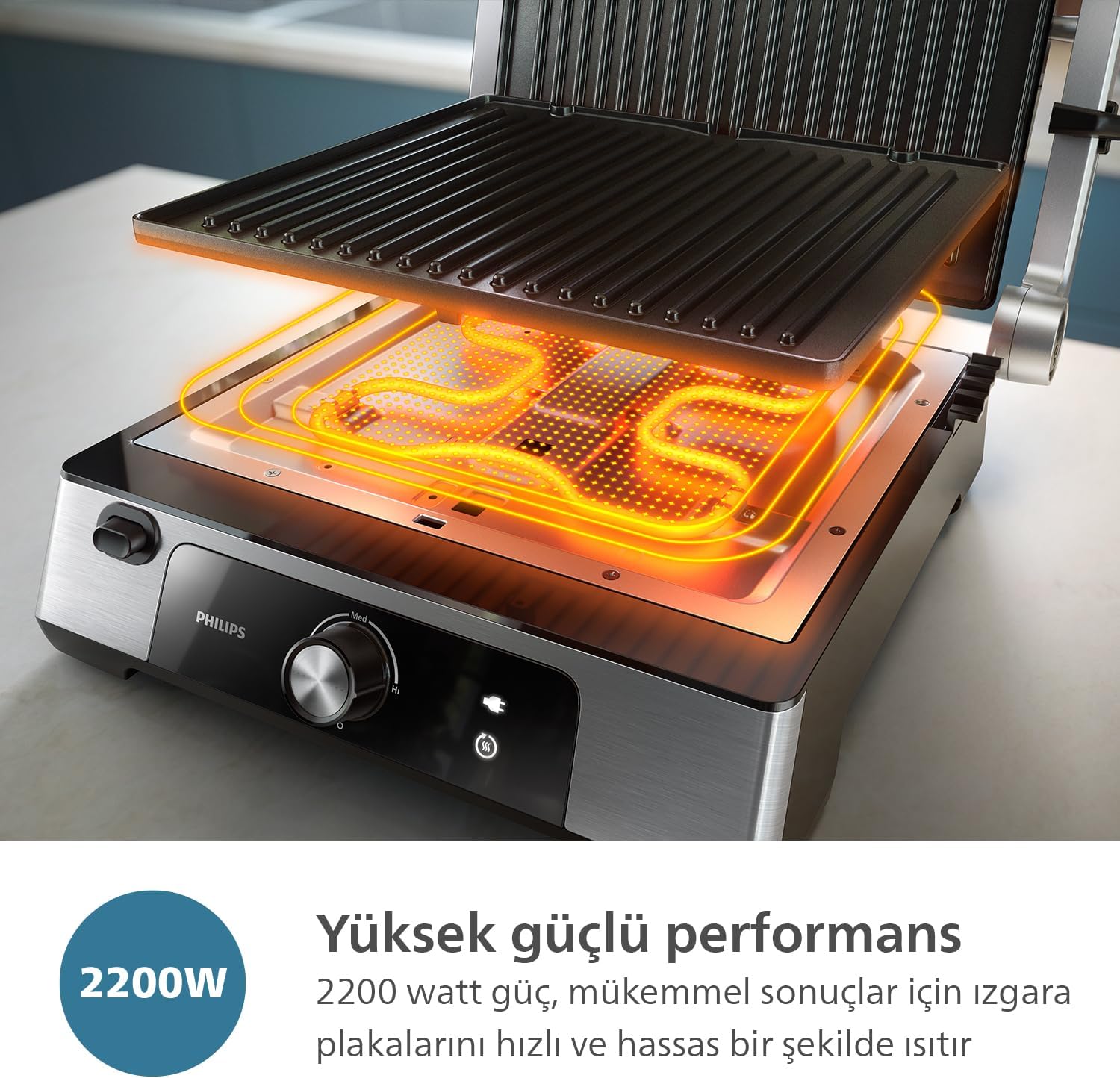
Figure 3: Illustration of the 2200W high-power heating elements for quick and precise heating.

Figure 4: The wide grilling surface accommodates multiple food items simultaneously.

Figure 5: The grill opens 180 degrees for double-sided grilling.

Figure 6: Adjustable height feature for grilling thicker items.
4. Setup
- Unpack: Carefully remove the grill and all accessories from the packaging. Retain packaging for future storage or transport.
- Initial Cleaning: Before first use, wipe the exterior of the appliance with a damp cloth. Remove the grilling plates and wash them with warm soapy water. Rinse thoroughly and dry completely.
- Assemble: Ensure the grilling plates are securely re-attached to the appliance. The drip tray should be correctly positioned to collect any excess fat or liquids.
- Placement: Place the grill on a stable, heat-resistant, and flat surface, away from walls and heat-sensitive materials. Ensure adequate ventilation around the appliance.
- Power Connection: Unwind the power cord completely and plug it into a grounded electrical outlet.
5. Operating Instructions
Preheating the Grill
- Close the grill plates.
- Plug the appliance into a power outlet. The power indicator light will illuminate.
- Turn the temperature control dial to your desired setting (Lo, Med, Hi, or a specific temperature between 60-200°C).
- Allow the grill to preheat for approximately 5-10 minutes, or until the ready indicator light illuminates (if present, or until the plates are visibly hot).

Figure 7: Adjusting the temperature dial for precise cooking.
Grilling Food
- Once preheated, carefully open the grill.
- Place your food onto the bottom grilling plate.
- For contact grilling: Close the top plate onto the food. Use the adjustable height feature if needed for thicker items.
- For open grilling (180°): Fully open the grill until the top plate lies flat, creating a larger grilling surface. Place food on both plates.
- Cook until desired doneness is achieved. Cooking times will vary based on food type, thickness, and desired results.
- Use heat-resistant utensils to remove food from the grill.
Tip: For best results, lightly brush food with oil before grilling to prevent sticking and enhance flavor.
6. Maintenance and Cleaning
Regular cleaning ensures the longevity and optimal performance of your Philips Grill and Toaster.
- Unplug and Cool: Always unplug the appliance from the power outlet and allow it to cool completely before cleaning.
- Remove Plates: Press the plate release buttons (if applicable) and carefully remove the non-stick grilling plates.
- Clean Plates: Wash the removable plates with warm, soapy water using a soft sponge or cloth. For stubborn residue, soak the plates for a few minutes before cleaning. The plates are also dishwasher safe.
- Clean Drip Tray: Empty and wash the drip tray with warm, soapy water.
- Clean Exterior: Wipe the exterior of the appliance with a damp cloth. Do not use abrasive cleaners or scouring pads, as they may damage the finish.
- Dry Thoroughly: Ensure all parts are completely dry before reassembling or storing the appliance.

Figure 8: Cleaning the removable non-stick plates.
Caution: Never immerse the main unit of the appliance in water or any other liquid.
7. Troubleshooting
If you encounter issues with your Philips Grill and Toaster, refer to the following table for common problems and solutions:
| Problem | Possible Cause | Solution |
|---|---|---|
| Appliance does not turn on. | Not plugged in; power outlet malfunction; appliance fault. | Ensure the plug is securely inserted into a working outlet. Test the outlet with another appliance. If problem persists, contact customer support. |
| Food sticks to plates. | Plates not properly cleaned; insufficient oil; non-stick coating wear. | Ensure plates are clean before use. Lightly brush food or plates with cooking oil. If coating is worn, consider replacement plates or contact support. |
| Grill not heating sufficiently. | Temperature setting too low; insufficient preheating time. | Increase the temperature setting. Allow adequate time for preheating (5-10 minutes). |
| Smoke or unusual odor during use. | Food residue on plates; first use odor; excessive fat. | Ensure plates are clean. A slight odor on first use is normal. Empty and clean the drip tray if excessive fat is accumulating. If smoke is persistent or excessive, unplug immediately and contact support. |
If the problem persists after trying these solutions, please contact Philips Customer Support.
8. Specifications
| Feature | Detail |
|---|---|
| Brand | PHILIPS |
| Model Number | HD6301/90 |
| Color | Black |
| Product Dimensions | 37.5 x 17.7 x 35.4 cm (14.76 x 6.97 x 13.94 inches) |
| Weight | 5 Kilograms (11 lbs) |
| Power/Wattage | 2200 watts |
| Voltage | 240V |
| Material | Stainless steel, PTFE |
| Special Features | Non-stick Coating, Adjustable Height, 180° Opening, Removable Plates |
| Country of Origin | China |
| First Available Date | April 16, 2024 |
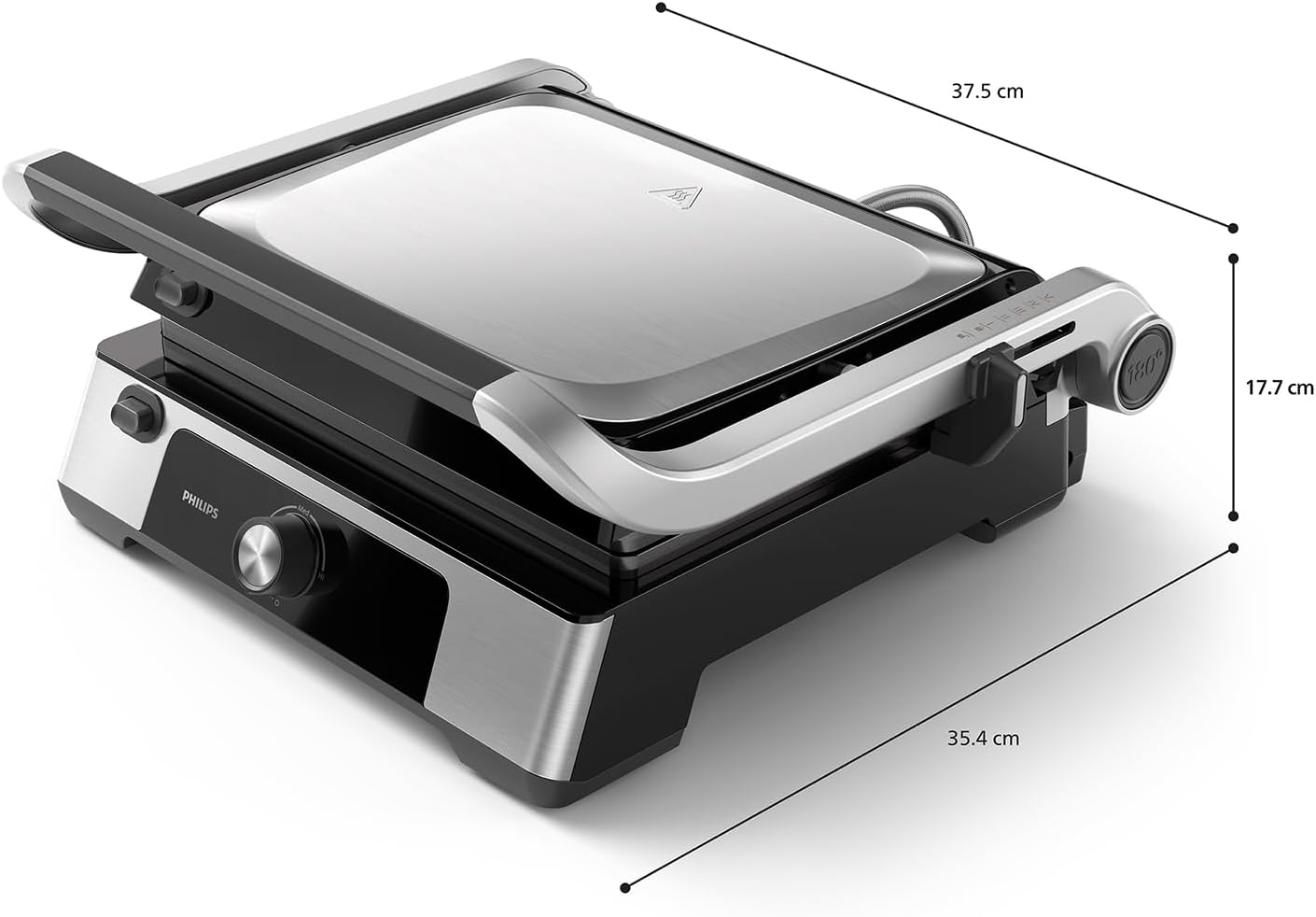
Figure 9: Product dimensions for the Philips Grill and Toaster.
9. Warranty and Support
Philips products are designed and manufactured to the highest standards. For information regarding warranty coverage, please refer to the warranty card included with your purchase or visit the official Philips website for your region. Keep your proof of purchase for warranty claims.
For technical support, troubleshooting assistance, or to order replacement parts, please contact Philips Customer Service:
- Online Support: Visit www.philips.com/support
- Phone Support: Refer to your regional Philips website for local contact numbers.
When contacting support, please have your product model number (HD6301/90) and serial number (if applicable) ready.