
VIKNAN 8GB+128GB
VIKNAN 12.3-inch Android Car Radio Multimedia Player User Manual
Model: 8GB+128GB | For Porsche Cayenne (2011-2017) with PCM 3.1 & PCM 4.0
1. Introduction
This manual provides detailed instructions for the installation, operation, and maintenance of your VIKNAN 12.3-inch Android Car Radio Multimedia Player. Please read this manual thoroughly before installation and use to ensure proper function and to prevent damage.
This unit is designed for Porsche Cayenne models manufactured between 2011 and 2017, compatible with both PCM 3.1 and PCM 4.0 original car systems.
2. Package Contents
Verify that all components are present in the package:
- 12.3-inch Android Head Unit
- Power Cable Set (for PCM 3.1 and PCM 4.0)
- GPS Antenna
- USB Cables
- External Microphone
- Installation Accessories (screws, brackets)
- User Manual (this document)

3. Vehicle Compatibility
This unit is specifically designed for the following vehicle models:
- Porsche Cayenne (2011-2017)
It supports both PCM 3.1 and PCM 4.0 original car systems. Please confirm your vehicle's original system before installation.

4. Installation Guide
Important: Professional installation is recommended. Disconnect the vehicle's battery before beginning installation. Refer to your vehicle's service manual for specific dashboard disassembly instructions.
4.1 Pre-Installation Checks
- Confirm vehicle compatibility and original PCM version.
- Ensure all package contents are present and undamaged.
- Gather necessary tools (e.g., trim removal tools, screwdrivers).
4.2 Step-by-Step Installation
- Disconnect Battery: Disconnect the negative terminal of the vehicle's battery.
- Remove Original Head Unit: Carefully remove the dashboard trim panels and the original head unit. Refer to your vehicle's specific service manual for detailed steps.
- Connect Wiring Harness:
- Identify the correct power cable set for your PCM version (3.1 or 4.0).
- Connect the new wiring harness to the vehicle's existing connectors. Ensure all connections are secure. This unit is designed for plug-and-play installation without cutting original wires.
- Connect the GPS antenna and any other auxiliary cables (USB, external microphone).
- Mount New Head Unit: Secure the VIKNAN 12.3-inch head unit into the dashboard opening using the provided brackets and screws.
- Reassemble Dashboard: Carefully reattach all removed trim panels.
- Reconnect Battery: Reconnect the negative terminal of the vehicle's battery.

5. Initial Setup and Configuration
5.1 First Power On
After installation, turn on the vehicle's ignition. The unit should power on automatically. Follow any on-screen prompts for initial language and time zone settings.
5.2 Network Connectivity (Wi-Fi & 4G SIM)
- Wi-Fi: Navigate to Settings > Network & Internet > Wi-Fi. Select your desired network and enter the password.
- 4G SIM Card: Insert a compatible 4G SIM card into the designated slot. After insertion, slide down the screen and tap the reset button to restart the car radio for SIM card activation.
Note: Wi-Fi and Wireless Carplay/Android Auto cannot be used simultaneously. When using Carplay or Android Auto via Bluetooth, Wi-Fi will be disconnected.
5.3 Bluetooth Pairing
To pair your smartphone:
- Go to Settings > Connected devices > Pair new device.
- Enable Bluetooth on your smartphone and search for available devices.
- Select the car radio's Bluetooth name (e.g., "VIKNAN Car Radio") and confirm the pairing code.

6. Operating Instructions
6.1 Touchscreen Interface
The unit features a 12.3-inch HD touchscreen with a resolution of 1920x970. Navigate through menus and applications by tapping, swiping, and pinching.
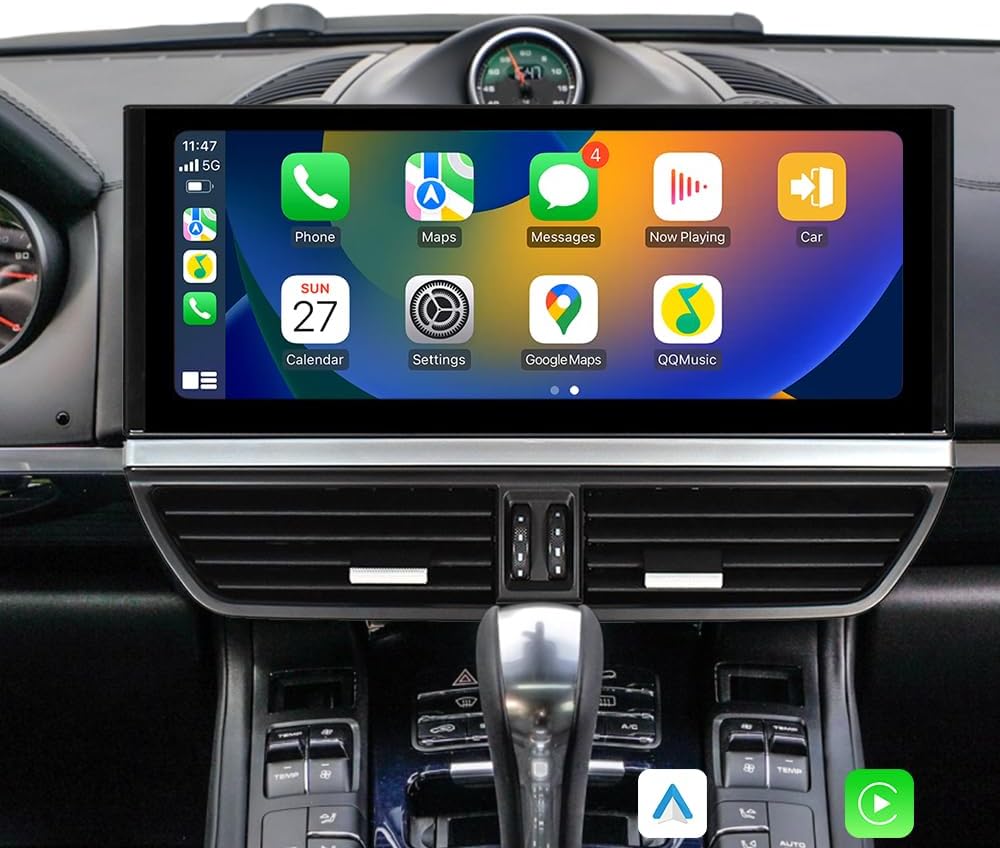
6.2 Wireless Carplay & Android Auto
Connect your smartphone via Bluetooth to activate Wireless Carplay or Android Auto. This allows access to phone functions, navigation, and media directly on the head unit's screen.

6.3 GPS Navigation
The unit supports various online and offline navigation applications. Download your preferred navigation app from the Play Store. The built-in GPS module provides accurate positioning.

6.4 Audio Settings (Equalizer)
Access the built-in equalizer to adjust audio output. The unit supports the original car amplifier and Bose speaker factory systems.

6.5 Steering Wheel Controls
The unit supports original steering wheel controls. Configuration may be required in the settings menu to map functions correctly.

6.6 Backup Camera Support
The unit supports original factory backup cameras and 360-degree cameras. The rear view camera display activates automatically when shifting into reverse gear, enhancing safety.

7. Maintenance
- Screen Cleaning: Use a soft, lint-free cloth to clean the touchscreen. Avoid abrasive cleaners or solvents.
- Software Updates: Periodically check for software updates through the unit's settings menu to ensure optimal performance and access to new features.
- General Care: Avoid exposing the unit to extreme temperatures or direct sunlight for prolonged periods.
8. Troubleshooting
| Problem | Possible Cause | Solution |
|---|---|---|
| Unit does not power on. | Incorrect wiring, blown fuse, vehicle battery disconnected. | Check all power connections. Verify vehicle battery is connected. Inspect vehicle fuses. |
| No sound output. | Volume too low, mute activated, incorrect audio settings, wiring issue. | Increase volume. Check mute status. Verify audio output settings. Recheck speaker wiring. |
| GPS signal weak or unavailable. | GPS antenna not properly connected or obstructed. | Ensure GPS antenna is securely connected and placed in an unobstructed location (e.g., dashboard). |
| Wireless Carplay/Android Auto not connecting. | Bluetooth not paired, Wi-Fi connected, phone compatibility issue. | Ensure Bluetooth is paired and Wi-Fi is disconnected. Check phone compatibility and software version. |
| Steering wheel controls not functioning. | Incorrect configuration, wiring issue. | Access the unit's settings to configure steering wheel controls. Verify wiring connections. |
If problems persist, please contact VIKNAN customer support.
9. Specifications
| Feature | Detail |
|---|---|
| Model | 8GB+128GB |
| Screen Size | 12.3 Inches |
| Resolution | 1920 x 768 |
| RAM | 8GB |
| ROM | 128GB |
| Operating System | Android |
| Connectivity | Wi-Fi, Bluetooth 5.0, 4G SIM Card Support |
| Special Features | Touchscreen, GPS Navigation, Wireless Carplay, Android Auto, Steering Wheel Control Support, Backup Camera Support, Original Amplifier Support |
| Vehicle Service Type | Car (Porsche Cayenne 2011-2017) |
| Mounting Type | Dashboard Mount |
| Audio Output Mode | Stereo |
10. Warranty Information
This product comes with a 1-year warranty from the date of purchase. The warranty covers manufacturing defects and malfunctions under normal use. It does not cover damage caused by improper installation, misuse, accidents, or unauthorized modifications.
For warranty claims, please retain your proof of purchase and contact VIKNAN customer support.
11. Customer Support
For technical assistance, installation guidance, or any other inquiries, please contact VIKNAN customer support:
- Email: viknav007@outlook.com
- Technical Support: Lifetime technical support is provided.
- Response Time: Expect a response within 24 hours.

Ask a question about this manual
Ask about setup, troubleshooting, compatibility, parts, safety, or missing instructions. Manuals+ will review the question and use this page’s manual context to help answer it.