
1. Introduction
This manual provides instructions for the safe and efficient operation of your Hasaller X5 Portable Turbo Fan. Please read this manual thoroughly before using the device and retain it for future reference. The Hasaller X5 is a compact and powerful portable fan designed for various applications requiring strong airflow, such as cleaning, drying, and inflation.
2. Product Overview
2.1 Key Features
- Compact and Lightweight Design: Easy to carry for outdoor activities and various tasks.
- Powerful Airflow: Achieves a maximum rotation speed of 130,000 RPM and a wind speed of up to 45 m/s.
- Precision-Engineered Blades: CNC-machined blades ensure optimal airflow and performance.
- High-Efficiency Brushless Motor: Low voltage, high-speed brushless motor for efficient operation and minimal heat generation.
- Durable Construction: Made from high-hardness, high-temperature resistant PETG carbon fiber material.
- Magnetic Suction Nozzle: For convenient attachment and removal.
- Multiple Speed Settings: Three adjustable speed gears.
- Versatile Applications: Suitable for cleaning outdoor equipment, vehicles, electronics, keyboards, cameras, sofas, plants, pet hair, and air cushion inflation.
2.2 Package Contents
- 1 x Hasaller X5 Portable Turbo Fan
- 1 x USB Type-C Charging Cable

Figure 1: The Hasaller X5 Portable Turbo Fan, a compact black device with a nozzle at the top and a power button on the side.

Figure 2: Front and back views of the Hasaller X5 Portable Turbo Fan, showing the exhaust nozzle and the air intake grille.
3. Safety Instructions
To ensure safe operation and prevent damage, please observe the following safety precautions:
- Do not insert fingers or foreign objects into the air inlet or outlet while the fan is operating.
- Keep the device away from water and other liquids. Do not operate in wet conditions.
- Do not use the fan near flammable gases or liquids.
- Keep out of reach of children. This is not a toy.
- Use only the provided USB Type-C cable for charging.
- Do not attempt to disassemble, repair, or modify the device. Contact qualified personnel for service.
- Avoid prolonged exposure to direct sunlight or high temperatures.
- Ensure the air inlets and outlets are not blocked during operation to prevent overheating.
4. Setup
4.1 Initial Charging
- Before first use, fully charge the Hasaller X5 Portable Turbo Fan.
- Connect the supplied USB Type-C cable to the charging port on the device.
- Connect the other end of the USB cable to a compatible USB power adapter (DC 5V, 2A recommended).
- The charging indicator light will illuminate. Charging typically takes over 2.5 hours for a full charge.
- Once fully charged, disconnect the charging cable.
4.2 Attaching the Nozzle
The Hasaller X5 features a magnetic suction nozzle for easy attachment.
- Align the nozzle with the air outlet of the fan.
- The magnetic connection will secure the nozzle in place.
- To remove, gently pull the nozzle away from the fan.

Figure 3: Illustration of the magnetic suction nozzle being attached to the Hasaller X5 Portable Turbo Fan.
5. Operating Instructions
5.1 Power On/Off and Speed Adjustment
The Hasaller X5 Portable Turbo Fan has three speed settings.
- Power On: Press and hold the power button located on the side of the device for a few seconds to turn on the fan at the lowest speed setting (Gear 1).
- Adjust Speed: Briefly press the power button to cycle through the speed settings:
- Press once for Gear 1 (Low Speed)
- Press twice for Gear 2 (Medium Speed)
- Press three times for Gear 3 (High Speed)
- Power Off: From any speed setting, press and hold the power button for a few seconds until the fan stops.
5.2 Recommended Uses
The Hasaller X5 Portable Turbo Fan is suitable for a variety of tasks:
- Dust Removal: Effectively blow dust from electronics, keyboards, camera lenses, and intricate equipment.
- Drying: Quickly dry wet surfaces, small items, or even pet hair (use lowest setting and maintain distance).
- Inflation: Inflate air cushions, small inflatable items, or assist with barbecue combustion.
- General Cleaning: Clear debris from outdoor equipment or hard-to-reach areas.
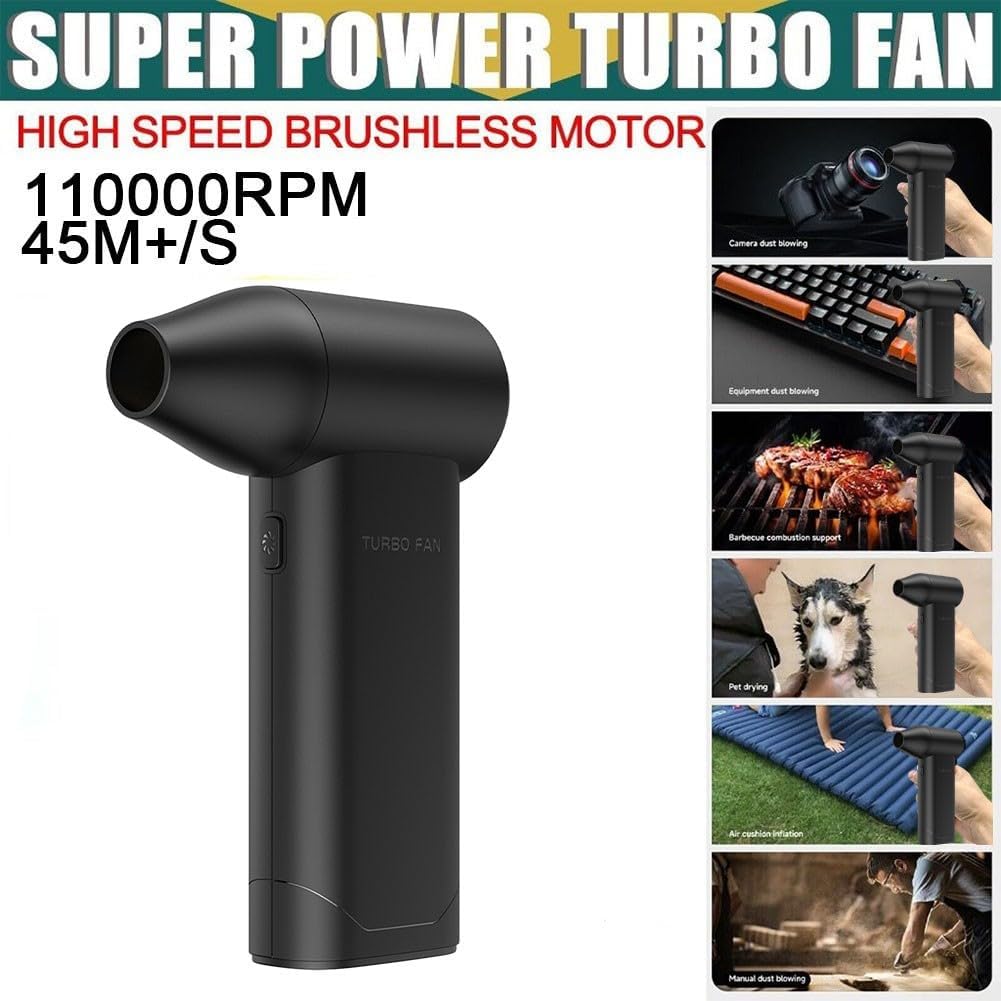
Figure 4: Various applications of the Hasaller X5 Portable Turbo Fan, including camera dust blowing, equipment cleaning, barbecue combustion support, pet drying, and air cushion inflation.

Figure 5: The Hasaller X5 Portable Turbo Fan being used for personal cooling during exercise and for inflating an air mattress.
6. Maintenance
6.1 Cleaning
- Ensure the device is turned off and disconnected from any power source before cleaning.
- Wipe the exterior of the fan with a soft, dry, or slightly damp cloth. Do not use abrasive cleaners or solvents.
- Gently remove any dust or debris from the air inlet and outlet grilles using a soft brush or compressed air.
- Do not immerse the device in water or any other liquid.
6.2 Storage
- Store the fan in a cool, dry place, away from direct sunlight and extreme temperatures.
- If storing for an extended period, charge the battery periodically (e.g., every 3 months) to maintain battery health.
7. Troubleshooting
| Problem | Possible Cause | Solution |
|---|---|---|
| Fan does not turn on. | Battery is depleted. | Charge the device fully using the provided USB Type-C cable. |
| Fan stops unexpectedly. | Low battery. Overheating. | Recharge the battery. Ensure air inlets/outlets are clear and allow the device to cool down. |
| Weak airflow. | Air inlets/outlets are blocked. Low battery. | Clear any obstructions. Charge the battery. |
| Charging is slow or not working. | Faulty cable or power adapter. | Try a different USB Type-C cable or a different 5V/2A USB power adapter. |
8. Specifications
| Feature | Detail |
|---|---|
| Model | X5 |
| Brand | Hasaller |
| Max Rotation Speed | 130,000 RPM |
| Max Wind Speed | 45 m/s |
| Battery Capacity | 3000 mAh (21700 Polymer Lithium Battery) |
| Operating Voltage | 6-8.4 V |
| Rated Input Current | DC 5 V, 2 A |
| Charging Time | > 2.5 hours |
| Charging Mode | USB Type-C |
| Endurance Time (approx.) | Gear 1: 2-3 hours; Gear 3: 15 minutes |
| Speed Gears | 3 |
| Motor Type | High-speed Brushless Motor |
| Shell Material | PETG Carbon Fiber |
| Dimensions (L x W x H) | 146 x 96 x 41 mm |
| Weight | 463 g |
| Power | 16.8 Watts |

Figure 6: A visual representation of the Hasaller X5 Portable Turbo Fan's technical specifications, including dimensions and battery details.
9. Warranty and Support
Information regarding the specific warranty period and terms for the Hasaller X5 Portable Turbo Fan is not provided in the product details. For warranty claims or technical support, please refer to the retailer or manufacturer's official website where the product was purchased. Keep your proof of purchase for any warranty-related inquiries.