
1. Introduction
Thank you for choosing the FELLAT 4x360° Self Leveling Green Cross Line Laser, Model MQT-16. This precision instrument is designed to provide accurate horizontal and vertical alignment for various construction, renovation, and DIY projects. This manual provides essential information for safe operation, proper setup, and effective use of your laser level.

Image 1.1: FELLAT 4x360° Self Leveling Green Cross Line Laser and accessories.
2. Safety Information
2.1 Laser Safety
This product emits a Class II laser beam. Adhere to the following safety guidelines:
- Do not stare directly into the laser beam. Direct eye exposure can cause temporary or permanent eye injury.
- Avoid pointing the laser beam at people or animals.
- Do not disassemble the laser level. Repairs should only be performed by authorized service personnel.
- Keep the device out of reach of children.
- The laser output power is less than 1mW.
2.2 General Safety
- Ensure the work area is clear of obstacles and potential hazards.
- Use the device in a stable environment to prevent accidental drops.
- Protect the device from extreme temperatures and moisture. The device has an IP54 rating for dust and splash protection, but it is not fully waterproof.

Image 2.1: The FELLAT laser level features IP54 dust and splash protection.
3. Package Contents
Verify that all items listed below are included in your package:
- 1x FELLAT 4x360° Laser Level
- 2x 4000mAh Rechargeable Batteries
- 1x Type-C Charging Cable
- 1x Charger
- 1x Carrying Case
- 1x Lifting Base
- 1x Wall Bracket
- 1x Iron Plate
- 1x Laser Target Plate
- 1x Remote Control
- 1x User Manual (Five Languages)

Image 3.1: All components included in the FELLAT laser level package.
4. Product Features and Overview
The FELLAT MQT-16 laser level offers advanced features for precise alignment:
- 4x360° Green Laser Lines: Projects two horizontal 360° lines and two vertical 360° lines for comprehensive coverage.
- High Visibility: Green laser beams are four times brighter than red lasers, providing a working distance of up to 40 meters (131 feet) indoors and outdoors.
- Self-Leveling Mode: Automatically levels within ±3° for quick and accurate setup. An alarm sounds if the tilt exceeds this range.
- Manual Mode: Allows locking the pendulum to project lines at any angle.
- Remote Control: Conveniently switch laser lines and adjust brightness from a distance.
- Rechargeable Batteries: Two 4000mAh batteries provide extended operation, rechargeable via Type-C port.
- Multiple Mounting Options: Compatible with 1/4"-20 and 5/8"-11 tripods, includes a magnetic pivoting base, lifting base, and wall bracket.

Image 4.1: Key features of the FELLAT 4x360° Laser Level.

Image 4.2: Superior visibility of the green laser beam.
5. Setup
5.1 Battery Installation and Charging
The laser level uses two 4000mAh rechargeable batteries. Ensure batteries are fully charged before first use.
- Open the battery compartment cover on the device.
- Insert the batteries, ensuring correct polarity.
- Close the battery compartment cover securely.
- To charge, connect the Type-C charging cable to the device and a power source using the provided charger. The battery indicator will show charging status.

Image 5.1: Battery charging via Type-C port.
5.2 Mounting Options
The FELLAT laser level offers versatile mounting for various applications:
- Tripod Mounting: Use the 1/4"-20 or 5/8"-11 thread at the bottom of the device to attach it to a standard tripod.
- Magnetic Pivoting Base: The included magnetic base allows attachment to metal surfaces or the provided iron plate. It also enables rotation for precise angle adjustments.
- Lifting Base: Use the lifting base for fine height adjustments, especially for floor-level tasks.
- Wall Bracket: Secure the laser level to a wall using the wall bracket for elevated projections.
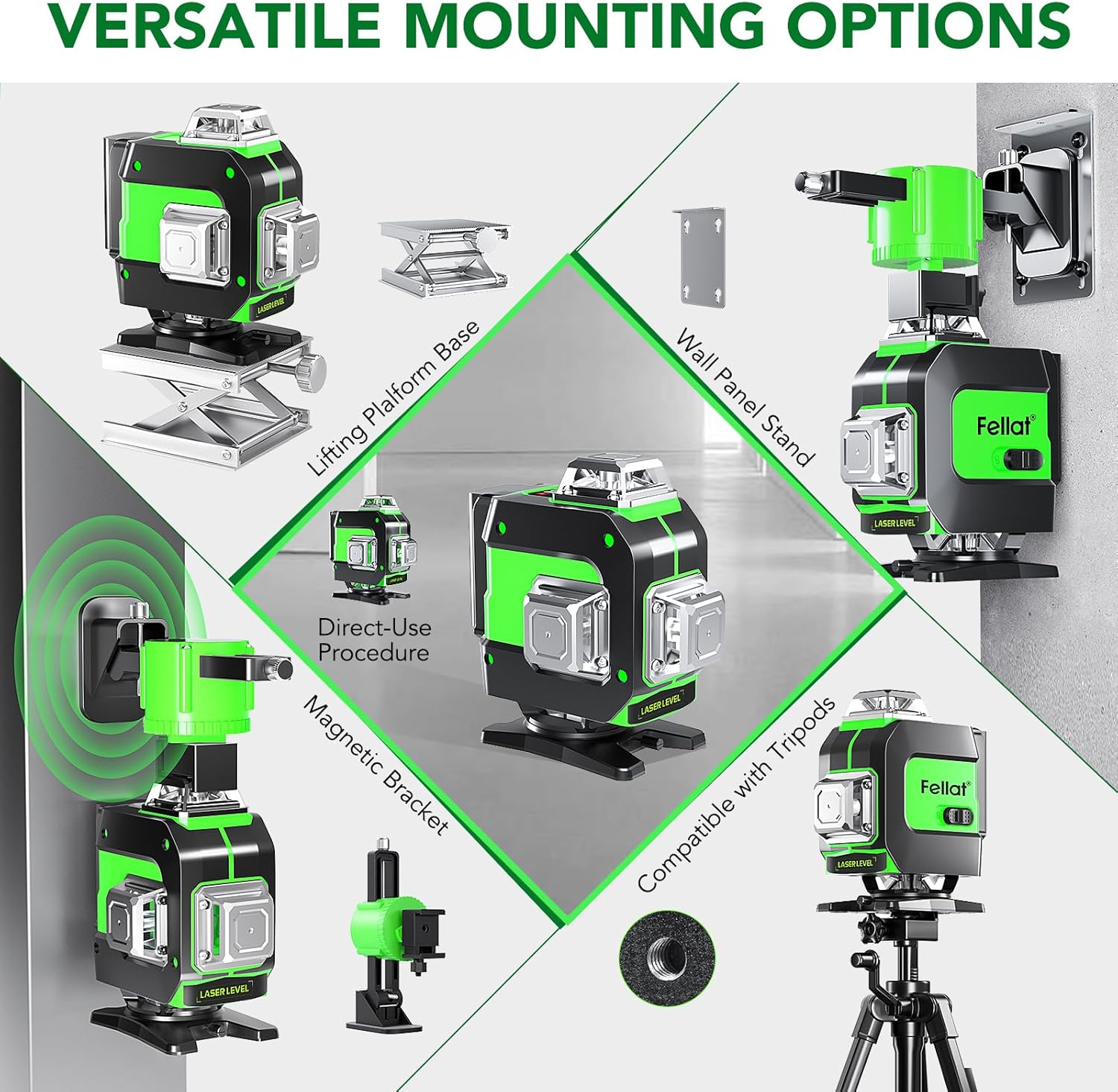
Image 5.2: Versatile mounting options for the laser level.

Image 5.3: Laser level mounted on a tripod using the 1/4" screw.

Image 5.4: Laser level mounted with the wall bracket.

Image 5.5: Laser level with lifting base for floor applications.
6. Operation
6.1 Power On/Off
To power on the device, slide the main switch to the 'ON' position. To power off, slide the switch to 'OFF'.
6.2 Self-Leveling Mode
When powered on, the device defaults to self-leveling mode. Place the laser level on a stable surface. The internal pendulum will automatically level the laser lines within ±3°. If the device is tilted beyond this range, the laser lines will flash and an audible alarm will sound, indicating that the device is out of level. Adjust the position of the device until the lines stabilize and the alarm stops.
6.3 Manual Mode (Tilt Mode)
To activate manual mode, press and hold the 'OD' (OUT) button on the control panel or remote control for approximately 3 seconds. In manual mode, the pendulum is locked, allowing you to project laser lines at any desired angle. The laser lines will not flash, and no alarm will sound, even if the device is tilted. Press and hold the 'OD' button again to return to self-leveling mode.
6.4 Switching Laser Lines and Brightness
Use the 'H' (Horizontal) and 'V' (Vertical) buttons on the control panel or remote control to switch between different laser line combinations:
- Press 'H' to activate/deactivate horizontal lines.
- Press 'V' to activate/deactivate vertical lines.
- The 'OD' button can also be used for brightness adjustment in some modes.

Image 6.1: Switching between different laser line modes.
6.5 Remote Control Usage
The remote control allows for convenient operation from a distance, especially useful in large work areas or when the device is mounted in hard-to-reach places.
- Use the 'H' button to control horizontal laser lines (H1 and H2).
- Use the 'V' button to control vertical laser lines (V1 and V2).
- The 'OD' button switches between automatic leveling and manual mode, and can also adjust brightness.

Image 6.2: Remote control for operating the laser level.

Image 6.3: Remote control in use for outdoor applications.
7. Maintenance
Proper maintenance ensures the longevity and accuracy of your laser level.
- Cleaning: Use a soft, damp cloth to clean the device. Do not use abrasive cleaners or solvents. Keep the laser windows clean for optimal beam clarity.
- Storage: Store the laser level in its carrying case in a dry, cool place, away from direct sunlight and extreme temperatures. Remove batteries if storing for extended periods.
- Battery Care: Recharge batteries regularly, even if not in use, to maintain their lifespan. Avoid fully discharging batteries.
- Laser Windows: The laser windows can be removed and replaced with a screwdriver if necessary for cleaning or service.
8. Troubleshooting
If you encounter issues with your FELLAT laser level, refer to the following common problems and solutions:
- Laser lines are flashing and alarm is sounding: The device is in self-leveling mode and is tilted beyond its ±3° self-leveling range. Adjust the device's position until it is within range.
- Laser lines are dim or not visible: Check battery charge. Ensure laser windows are clean. In bright outdoor conditions, use the laser target plate to enhance visibility.
- Device does not power on: Ensure batteries are correctly installed and fully charged.
- Remote control not working: Check the remote control's battery. Ensure there are no obstructions between the remote and the laser level.
If problems persist, contact customer support for assistance.
9. Specifications
| Feature | Specification |
|---|---|
| Brand | FELLAT |
| Model | MQT-16 |
| Laser Class | Class II |
| Laser Output Power | <1mW |
| Laser Color | Green |
| Laser Configuration | 4 x 360° (2 Horizontal, 2 Vertical) |
| Self-Leveling Range | ±3° |
| Working Distance | Up to 40 meters (131 feet) |
| Power Source | Battery Powered |
| Battery Type | 2 x 4000mAh Lithium Polymer (Rechargeable) |
| Charging Port | Type-C |
| IP Rating | IP54 (Dust and Splash Proof) |
| Mounting Thread | 1/4"-20 & 5/8"-11 |
| Operation Mode | Manual / Self-Leveling |
| Item Weight | 3.94 pounds |
| Material | Alloy Steel, Metal |
10. Warranty and Support
FELLAT is committed to providing high-quality products. For any questions, technical support, or warranty inquiries regarding your MQT-16 laser level, please refer to the contact information provided in your purchase documentation or visit the official FELLAT website. Please retain your proof of purchase for warranty claims.