
1. Introduction
Thank you for purchasing the SAMSUNG 21 cu.ft. Top Mount Refrigerator. This appliance is designed for overseas use, operating on 220 VOLT power. It features Twin Cooling Plus technology to maintain optimal humidity in the refrigerator and dry conditions in the freezer, ensuring fresher produce and reduced freezer burn. The space-saving ice maker produces up to 3.7 lbs. of ice per day, and the fingerprint-resistant stainless steel finish helps maintain a clean appearance. Key features include a reversible door for flexible installation, adjustable shelves for versatile storage, and high-efficiency LED interior lighting.
Please read this manual thoroughly before operating your new refrigerator to ensure safe and efficient use. Keep this manual for future reference.
2. Safety Information
Your safety and the safety of others are very important. We have provided many important safety messages in this manual and on your appliance. Always read and obey all safety messages.
Important Safety Instructions:
- This appliance is designed for 220V / 50Hz electrical systems. Ensure your power supply matches these requirements.
- Do not use an adapter or extension cord.
- Ensure the refrigerator is properly grounded.
- Keep ventilation openings clear of obstruction.
- Do not store explosive substances such as aerosol cans with a flammable propellant in this appliance.
- Do not damage the refrigerant circuit.
- Unplug the refrigerator before cleaning or performing any maintenance.
- Do not allow children to climb, stand, or hang on the shelves of the refrigerator.
3. Product Overview
Key Features:
- 21 cu.ft. capacity, Top Mount configuration.
- Twin Cooling Plus system for optimal humidity and freshness.
- Space-saving automatic ice maker (up to 3.7 lbs/day).
- Fingerprint Resistant Stainless Steel finish.
- Reversible door for flexible installation.
- Adjustable shelves and 2 Humidity Control Crispers.
- High-Efficiency LED interior lighting.
- Power Freeze and Power Cool Options.
- Sabbath Mode.
Dimensions and Weight:
| Specification | Value |
|---|---|
| Item Weight | 145 Pounds |
| Product Dimensions (D x W x H) | 32 x 32 x 67.75 inches |
| Capacity | 21 Cubic Feet |
| Refrigerator Fresh Food Capacity | 300 Liters |
| Freezer Capacity | 200 Liters |
Product Images:
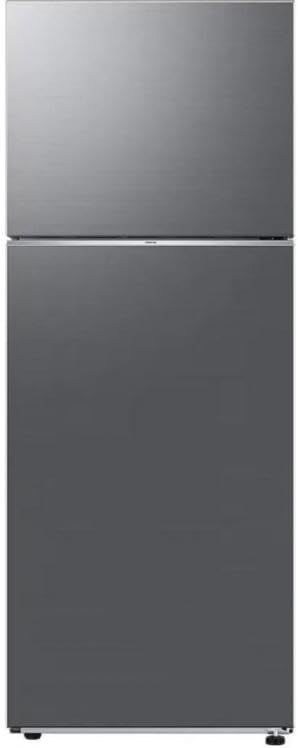
Figure 1: Front view of the Samsung 21 cu.ft. Top Mount Refrigerator, showcasing its sleek stainless steel finish and two-door design.
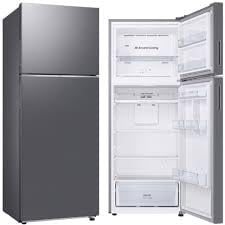
Figure 2: Interior view of the refrigerator section, highlighting the adjustable shelves, humidity-controlled crispers, and spacious door bins for organized storage.
4. Setup and Installation
4.1 Unpacking
- Remove all packaging materials, including tape and temporary labels.
- Clean the interior of the refrigerator with a soft cloth and mild detergent.
- Keep packaging materials out of reach of children.
4.2 Placement
- Place the refrigerator on a level, sturdy floor capable of supporting its weight.
- Allow adequate space around the refrigerator for proper ventilation (at least 2 inches on sides and back, 4 inches on top).
- Avoid direct sunlight or heat sources.
4.3 Electrical Connection
- This refrigerator requires a 220V / 50Hz power supply. Ensure your outlet meets these specifications.
- Plug the refrigerator into a dedicated, grounded electrical outlet. Do not use extension cords or multi-outlet adapters.
- Allow the refrigerator to stand upright for at least 2-3 hours before plugging it in to allow refrigerants to settle.
4.4 Door Reversal
The refrigerator doors are reversible to accommodate various kitchen layouts. Refer to the detailed instructions in the separate door reversal guide (if provided) or contact customer support for assistance. This process typically involves removing hinges and reattaching them on the opposite side.
5. Operating Instructions
5.1 Control Panel
The refrigerator features a blue lighted display control panel, typically located on the top front edge of the refrigerator compartment. Use this panel to adjust temperature settings and activate special functions.
5.2 Temperature Control (Twin Cooling Plus)
- The Twin Cooling Plus system independently controls the temperature in the refrigerator and freezer compartments.
- Adjust the refrigerator temperature between 1°C and 7°C (34°F and 44°F).
- Adjust the freezer temperature between -15°C and -23°C (5°F and -9°F).
- For optimal food preservation, recommended settings are 3°C (38°F) for the refrigerator and -18°C (0°F) for the freezer.
5.3 Special Features
- Power Freeze: Quickly lowers the freezer temperature to freeze food rapidly. Useful when adding large quantities of fresh food to the freezer.
- Power Cool: Quickly lowers the refrigerator temperature to cool food rapidly. Useful for chilling beverages or when the door has been open for an extended period.
- Sabbath Mode: Disables certain functions like interior lights, display, and audible alarms for observance of religious holidays. Refer to the control panel instructions for activation.
5.4 Ice Maker Operation
- The built-in automatic cube ice maker is located in the freezer compartment.
- Ensure the water supply line (if applicable and installed) is connected and the water valve is open.
- The ice maker will begin producing ice approximately 12-24 hours after initial setup.
- Discard the first few batches of ice to ensure cleanliness.
6. Maintenance and Care
6.1 Cleaning
- Exterior: Clean the fingerprint-resistant stainless steel finish with a soft cloth and a stainless steel cleaner or mild soap and water. Avoid abrasive cleaners.
- Interior: Wipe down interior surfaces, shelves, and bins with a solution of mild soap and warm water. Rinse and dry thoroughly.
- Door Gaskets: Clean door gaskets regularly with a damp cloth to ensure a tight seal.
- Condenser Coils: Periodically vacuum the condenser coils at the back or bottom of the refrigerator to maintain efficiency. Unplug the unit first.
6.2 Defrosting
This refrigerator features a Frost Free defrost system, eliminating the need for manual defrosting of the freezer compartment. Ice buildup is automatically melted and drained.
6.3 Crispers and Shelves
- The adjustable shelves can be repositioned to accommodate items of various heights.
- The humidity control crispers allow you to adjust humidity levels for optimal storage of fruits and vegetables.
- Remove shelves and bins for thorough cleaning as needed.
7. Troubleshooting
Before contacting service, check the following common issues and solutions:
| Problem | Possible Cause | Solution |
|---|---|---|
| Refrigerator not operating | No power; power cord unplugged; circuit breaker tripped. | Check power supply; ensure plug is secure; reset circuit breaker. |
| Temperature is too warm | Door not closed properly; temperature setting too high; excessive door openings. | Check door seal; adjust temperature setting; minimize door openings. |
| Excessive noise | Refrigerator not level; items rattling inside; normal operating sounds. | Level the refrigerator; rearrange items; some sounds (e.g., refrigerant flow) are normal. |
| Ice maker not producing ice | Water supply off; clogged water filter; ice maker switch off. | Check water supply; replace filter (if applicable); ensure ice maker switch is ON. |
| Water on floor | Drain pan overflowing; clogged drain tube. | Check and empty drain pan; clear drain tube blockage. |
8. Specifications
| Specification | Value |
|---|---|
| Brand | Samsung |
| Model Number | RT50CG6400S9 |
| Capacity | 21 Cubic Feet |
| Configuration | Freezer-on-Top |
| Voltage | 220V |
| Defrost System | Frost Free |
| Number of Doors | 2 |
| Crispers/Drawers | 2 |
| Shelves | 3 |
| Color | Silver |
| Installation Type | Freestanding |
| Item Weight | 145 Pounds |
| Product Dimensions (D x W x H) | 32"D x 32"W x 67.75"H |
| Country of Origin | China |
9. Warranty and Support
9.1 Warranty Information
This Samsung refrigerator comes with a limited manufacturer's warranty. Please refer to the warranty card included with your appliance for specific terms, conditions, and duration. Keep your proof of purchase for warranty claims.
9.2 Customer Support
For technical assistance, troubleshooting beyond this manual, or to schedule service, please contact Samsung Customer Service. Contact details can typically be found on the Samsung official website or on the warranty card.
When contacting support, please have your model number (RT50CG6400S9) and serial number ready.