Introduction
This manual provides comprehensive instructions for the setup, operation, and maintenance of your Smart Watch GT5. Please read this manual carefully before using the device to ensure proper functionality and to avoid damage.
Product Overview

Figure 1: Front view of the Smart Watch GT5, showcasing its detailed dial design and black strap.
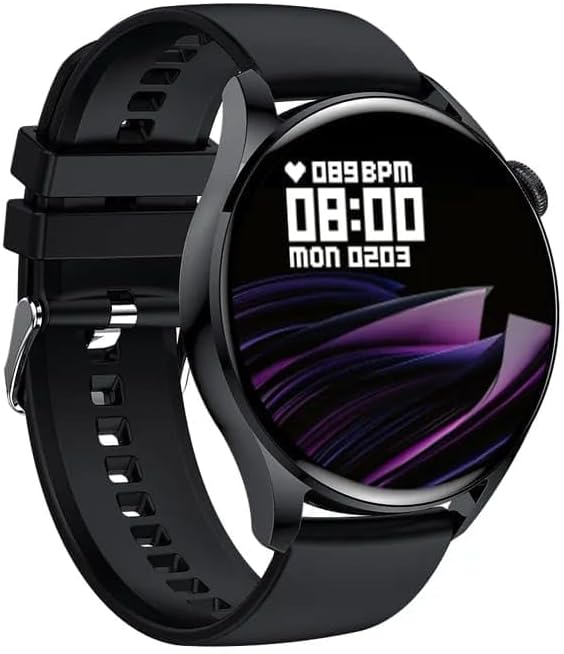
Figure 2: Display of the Smart Watch GT5, showing the current time (08:00), date (Mon 02/03), and heart rate (089 BPM).
The Smart Watch GT5 is a modern wearable device designed for connectivity and convenience. It features wireless charging capabilities and Bluetooth connectivity, compatible with Android 4.4 and above, and iOS 8.0 and above operating systems.
Setup
1. Initial Charging
Before first use, fully charge your Smart Watch GT5. Place the watch on the wireless charging pad. The charging indicator on the watch display will show the charging status. A full charge typically takes approximately 2 hours.
2. Powering On/Off
- To Power On: Press and hold the side button for 3-5 seconds until the screen illuminates.
- To Power Off: Press and hold the side button, then select "Power Off" from the options on the screen.
3. Pairing with Your Smartphone
- Ensure Bluetooth is enabled on your smartphone.
- Download and install the "HryFine" application from your smartphone's app store (Google Play Store for Android, Apple App Store for iOS).
- Open the HryFine app and follow the on-screen instructions to create an account or log in.
- In the app, navigate to the "Device" or "Add Device" section.
- Select "GT5" from the list of available devices.
- Confirm the pairing request on both your smartphone and the watch.
- Once paired, the watch will synchronize time and data with your phone.
Operating Instructions
Navigation
- Touch Screen: Swipe left/right, up/down to navigate through menus and features. Tap to select.
- Side Button: Press once to return to the home screen or wake the display. Press and hold for power options.
Key Features
- Time Display: The main screen displays the current time, date, and other selected information.
- Bluetooth Calls: Once paired, you can make and receive calls directly from your watch. Ensure the watch is within Bluetooth range of your phone.
- Notifications: Receive notifications for calls, messages, and app alerts from your paired smartphone. Configure notification settings in the HryFine app.
- Health Monitoring: The watch includes features for monitoring heart rate. Access these features through the watch menu or the HryFine app.
- Activity Tracking: Track steps, distance, and calories burned. Data can be viewed on the watch and synchronized with the HryFine app for detailed analysis.
Maintenance
- Cleaning: Wipe the watch and strap regularly with a soft, damp cloth. Avoid using harsh chemicals or abrasive materials.
- Water Resistance: The GT5 Smart Watch is designed for daily use and is resistant to splashes and sweat. It is not suitable for swimming or showering. Avoid prolonged exposure to water.
- Storage: When not in use for extended periods, store the watch in a cool, dry place.
- Charging: Use only the provided wireless charging pad. Do not attempt to charge the watch with damaged cables or chargers.
Troubleshooting
| Problem | Possible Cause | Solution |
|---|---|---|
| Watch does not power on. | Low battery. | Charge the watch fully. |
| Unable to pair with smartphone. | Bluetooth is off; watch is out of range; app issue. | Ensure Bluetooth is on. Bring watch closer to phone. Restart HryFine app or phone. Reset watch. |
| Notifications not received. | Notification permissions not granted; app not running in background. | Check app notification settings on your phone. Ensure HryFine app is running. |
| Inaccurate health data. | Improper fit; sensor obstruction. | Ensure watch is snug on wrist. Clean sensor area. |
Specifications
| Feature | Detail |
|---|---|
| Model Name | GT5 |
| Brand | Generic |
| Operating System Compatibility | Android 4.4 and above, iOS 8.0 and above |
| Connectivity Technology | Bluetooth |
| Special Features | Wireless Charging, Display, Bluetooth |
| Screen Size | 1.28 Inches |
| Item Shape | Square |
| GPS | No GPS |
Warranty and Support
For warranty information and technical support, please refer to the documentation provided with your purchase or contact the retailer. For general inquiries regarding the HryFine application, please visit the official HryFine support website or contact their customer service.
Note: A 2-Year Extended Warranty by Salama Care is available for purchase separately. Please check with your retailer for details.