
HOMCOM 800-185V80BK
HOMCOM Countertop Ice Maker Machine
Model: 800-185V80BK
Introduction
Thank you for choosing the HOMCOM Countertop Ice Maker Machine. This manual provides essential information for the safe and efficient operation, maintenance, and troubleshooting of your new appliance. Please read it thoroughly before first use and retain it for future reference.

Image: The HOMCOM Countertop Ice Maker Machine, black in color, shown with its lid open, revealing bullet-shaped ice cubes inside. An ice scoop filled with ice is placed next to it.
Important Safety Instructions
- Read all instructions before operating the appliance.
- Do not immerse the power cord, plug, or any part of the appliance in water or other liquids.
- Close supervision is necessary when any appliance is used by or near children.
- Unplug from the outlet when not in use and before cleaning.
- Do not operate any appliance with a damaged cord or plug, or after the appliance malfunctions or has been damaged in any manner.
- Use only potable water to fill the water tank.
- Ensure the appliance is placed on a stable, level surface, away from heat sources and direct sunlight.
Product Overview and Components
The HOMCOM Countertop Ice Maker is designed for convenience, producing bullet-shaped ice cubes quickly. Key components include:
- Control Panel: Features ON/OFF button, SELECT button for ice size, and indicator lights for 'ADD WATER', 'ICE FULL', 'POWER', 'S' (small ice), and 'L' (large ice).
- Visible Window: Allows observation of the ice-making process without opening the lid.
- Ice Basket: Removable basket for collecting ice cubes.
- Ice Scoop: For hygienic retrieval of ice cubes.
- Water Tank: 1.3L capacity for water supply.
- Drainage Hole: Located at the bottom for easy water drainage during cleaning.
- Carry Handle: For portability.
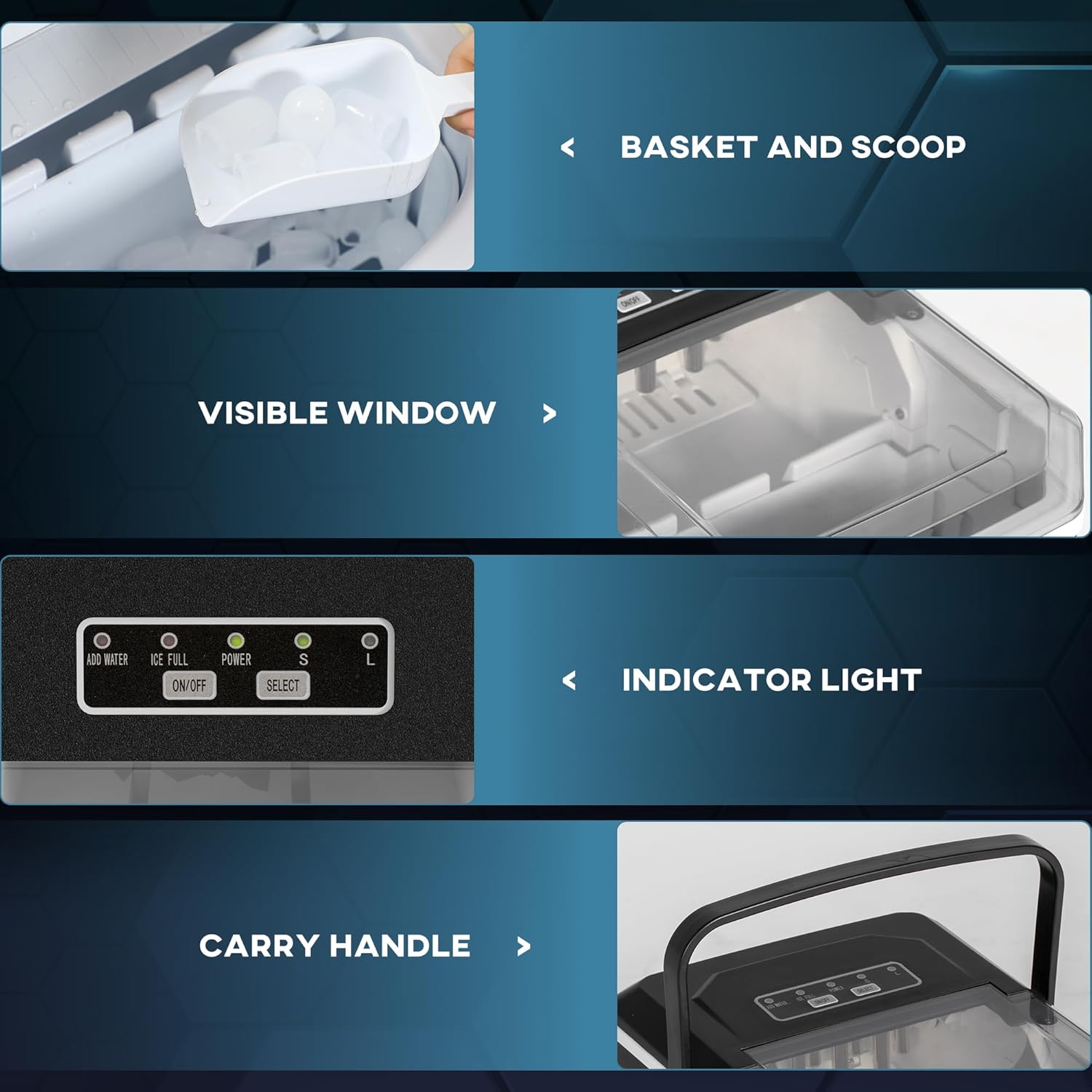
Image: A collage showing close-up views of the ice maker's features, including the ice basket and scoop, the transparent visible window, the control panel with indicator lights, and the integrated carry handle.
Setup and First Use
- Unpacking: Remove all packaging materials and check for any damage. Ensure all accessories (ice basket, ice scoop) are present.
- Placement: Place the ice maker on a flat, stable surface. Allow at least 4 inches (10 cm) of space around the unit for proper ventilation. Avoid placing it near heat sources or in direct sunlight.
- Initial Cleaning: Before first use, clean the interior of the ice maker. Remove the ice basket, wipe the interior with a soft cloth and mild detergent, then rinse thoroughly. Drain any remaining water through the bottom drainage hole.
- Power Connection: Plug the appliance into a grounded electrical outlet.
- Fill Water Tank: Open the lid and fill the water tank with potable water up to the MAX fill line. Do not overfill.

Image: The HOMCOM ice maker positioned on a modern kitchen countertop, surrounded by various glasses and beverages, demonstrating its compact size and suitability for kitchen environments.
Operating Instructions
- Power On: Press the 'ON/OFF' button to turn on the ice maker. The 'POWER' indicator light will illuminate.
- Select Ice Size: Press the 'SELECT' button to choose between small (S) or large (L) ice cubes. The corresponding indicator light will illuminate.
- Ice Production: The ice maker will begin its cycle. The first batch of ice cubes will be ready in approximately 6 to 13 minutes, depending on the selected size and ambient temperature.
- Ice Full Indicator: When the ice basket is full, the 'ICE FULL' indicator light will turn on, and the ice making process will pause. Remove ice cubes to resume operation.
- Add Water Indicator: If the water level in the tank is low, the 'ADD WATER' indicator light will illuminate. Add more potable water to the tank to continue ice production.
- Power Off: Press the 'ON/OFF' button to turn off the ice maker when not in use.
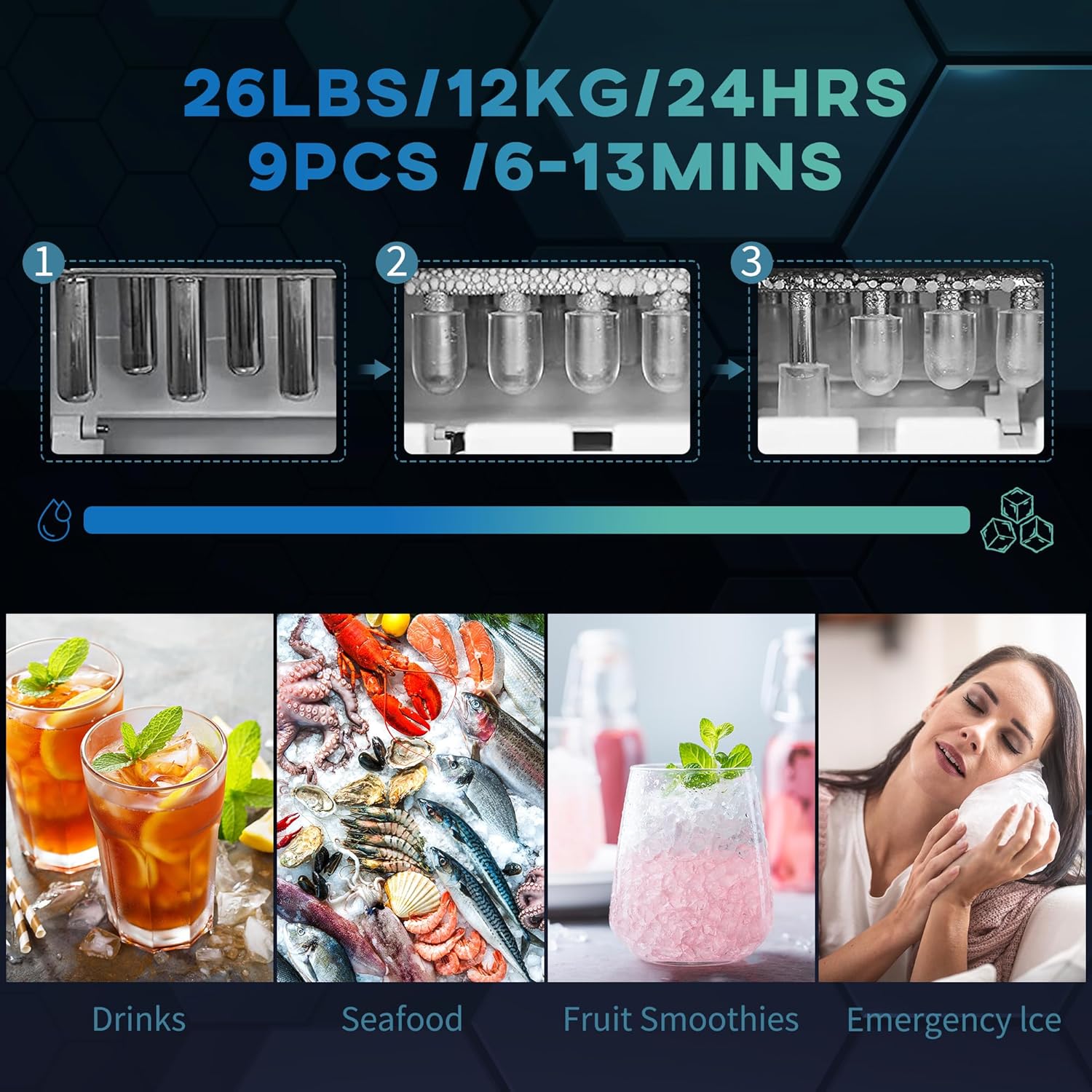
Image: An infographic illustrating the ice production capabilities: 26 lbs (12 kg) of ice in 24 hours, with 9 pieces produced every 6-13 minutes. It also shows the three stages of bullet ice formation.

Image: A visual comparison of the two available ice cube sizes, Small (S) and Large (L), with their respective dimensions (Small: Φ0.9" x 1.4" (Φ2.2 x 3.5 cm); Large: 1" L x 1.4" W (2.5 x 3.5 cm)).
Maintenance and Cleaning
- Self-Cleaning Function: The ice maker features a self-clean mode. To activate, long-press the 'ON/OFF' button for 5 seconds. This function helps eliminate bacteria and maintain hygiene.
- Draining Water: Regularly drain residual water from the tank using the bottom drainage hole. This is especially important before storing the unit or if it will not be used for an extended period.
- External Cleaning: Wipe the exterior of the appliance with a soft, damp cloth. Do not use abrasive cleaners or solvents.
- Ice Basket and Scoop: Wash the ice basket and scoop with warm, soapy water, rinse thoroughly, and dry before reinserting.
- Storage: Ensure the unit is clean and dry before storing. Store in a cool, dry place.

Image: A visual guide showing how to activate the self-cleaning function by long-pressing the 'ON/OFF' button for 5 seconds, alongside an image of the bottom drainage hole with its cap.
Troubleshooting Guide
| Problem | Possible Cause | Solution |
|---|---|---|
| Ice maker not working | No power; unit not plugged in. | Ensure the unit is properly plugged into a grounded outlet. Check the power supply. |
| 'ADD WATER' indicator on | Water tank is empty or water level is too low. | Fill the water tank with potable water up to the MAX line. |
| 'ICE FULL' indicator on | Ice basket is full. | Remove ice cubes from the basket. |
| Ice cubes are too small or not forming | Ambient temperature too high; water temperature too high; insufficient water. | Ensure the unit is in a cool environment. Use cold water. Check water level. |
| Unusual noise during operation | Normal operation sounds (compressor, water pump); unit not level. | Ensure the unit is on a stable, level surface. If noise is excessive or unusual, contact customer support. |
Specifications
| Feature | Detail |
|---|---|
| Model Number | 800-185V80BK |
| Product Dimensions | 29.4D x 22.2W x 29H Centimetres (11.6"D x 8.7"W x 11.4"H) |
| Water Tank Capacity | 1.3 Liters (0.3 gallons) |
| Ice Production Capacity | 12 kg (26 lbs) per 24 hours |
| Ice Production Speed | 9 cubes in 6-13 minutes |
| Ice Cube Shapes | Bullet-shaped |
| Ice Cube Sizes | Small (S) and Large (L) |
| Wattage | 105 watts |
| Voltage | 120 Volts |
| Refrigerant | R600a |
| Noise Level | Maximum 43dB |
| UPC | 673986244050 |

Image: A diagram illustrating the dimensions of the ice maker: 11.4 inches (29 cm) in height, 11.6 inches (29.4 cm) in depth, and 8.7 inches (22.2 cm) in width.
Warranty and Customer Support
For warranty information, technical assistance, or customer support, please refer to the contact details provided with your purchase documentation or visit the official HOMCOM website. Please have your model number (800-185V80BK) and UPC (673986244050) available when contacting support.