
DIYSET US-DIY-BF
DIYSET Queen Size Bed Frame Instruction Manual
Model: US-DIY-BF
Brand: DIYSET
1. Introduction
Thank you for choosing the DIYSET Queen Size Bed Frame. This upholstered platform bed frame is designed for comfort and convenience, featuring a headboard with integrated charging ports (AC, USB, Type-C) and three underbed storage drawers. This manual provides detailed instructions for assembly, operation, maintenance, and troubleshooting to ensure a seamless experience with your new bed frame.

Figure 1.1: Fully assembled DIYSET Queen Size Bed Frame.
2. Safety Information
WARNING: Do not bring near fire. Keep all flammable materials away from the bed frame.
- Ensure all screws and bolts are tightened securely before use. Periodically check and re-tighten as necessary.
- Do not exceed the maximum weight capacity of 850 lbs for the bed frame.
- Keep small parts and packaging materials away from children during assembly to prevent choking hazards.
- Use caution when operating the charging station. Do not overload outlets.
- Avoid standing or jumping on the bed frame.
3. Package Contents
Before beginning assembly, ensure all parts are present and accounted for. Refer to the included parts list in your physical manual for detailed component identification. Key components include:
- Upholstered Headboard with Integrated Charging Station
- Side Rails (Left and Right)
- Footboard
- Wooden Support Slats
- Metal Frame for Slats
- Underbed Storage Drawers (x3) with Wheels
- Assembly Hardware (screws, bolts, Allen wrench)
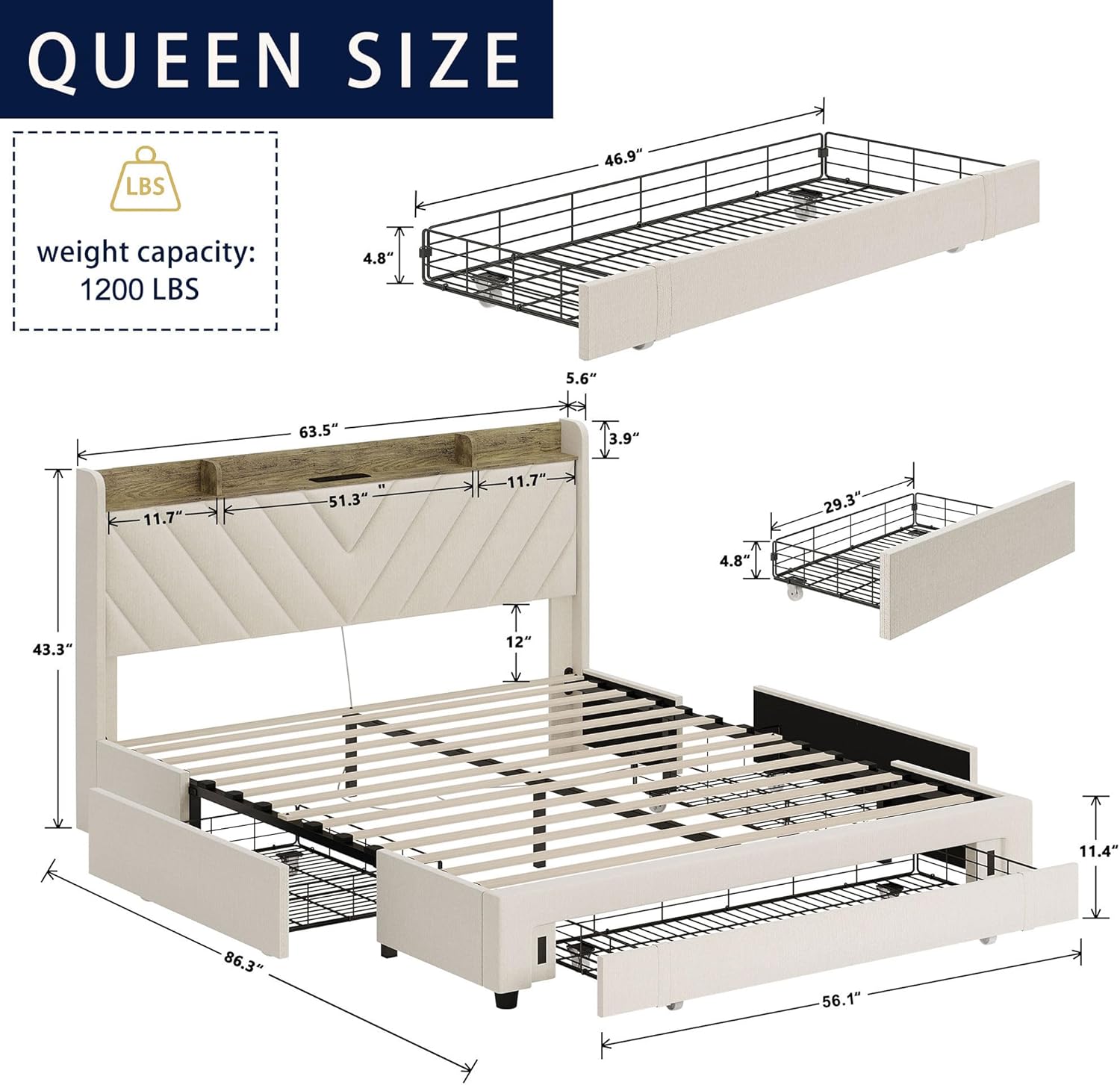
Figure 3.1: Overview of bed frame components and dimensions.
4. Setup (Assembly Instructions)
Assembly is designed to be straightforward. All necessary parts are prepared and labeled. It is recommended to have two people for assembly.
- Step 1: Unpack and Identify Parts. Lay out all components on a clean, soft surface to prevent scratches. Identify each part using the labels (A, B, C, etc.) and the hardware.
- Step 2: Assemble the Headboard. Attach the side supports to the main headboard section. Ensure the charging station is correctly oriented.
- Step 3: Connect Side Rails to Headboard. Securely attach the side rails to the headboard using the provided bolts and Allen wrench. Ensure a snug fit.
- Step 4: Attach the Footboard. Connect the footboard to the other end of the side rails. Double-check all connections for stability.
- Step 5: Install Center Support Beam. Place the center support beam along the middle of the frame and secure it according to the instructions.
- Step 6: Place Wooden Slats. Lay the wooden slats across the frame, ensuring they are evenly spaced and secured into their designated holders. The slats provide robust support for your mattress.
- Step 7: Assemble Storage Drawers. Assemble the metal wire baskets for the drawers and attach the upholstered front panels. Install the wheels on the bottom of each drawer.
- Step 8: Insert Storage Drawers. Slide the assembled drawers into the designated spaces under the bed frame.
Video 4.1: Detailed assembly guide for the bed frame, demonstrating step-by-step construction.
Video 4.2: Visual instructions for assembling and integrating the bed frame components.
5. Operating Instructions
5.1 Headboard Charging Station
The integrated charging station on the headboard provides convenient power access for your devices. It includes 2 AC outlets, 1 USB port, and 1 Type-C port.
- To use, simply plug the bed frame's power cord into a wall outlet.
- Connect your devices to the appropriate AC, USB, or Type-C ports for charging.
- The top shelf of the headboard can be used to store phones, glasses, books, or decorative items.

Figure 5.1: Headboard with charging station and storage compartments.

Figure 5.2: Close-up of the integrated charging ports.
5.2 Underbed Storage Drawers
The bed frame includes three spacious metal frame drawers covered in durable oxford fabric, equipped with smooth wheels for easy access.
- Simply pull the drawers out from under the bed to access your stored items.
- Push them back in until they are flush with the bed frame for a neat appearance.
- These drawers are ideal for storing bedding, clothes, shoes, or other personal belongings, helping to keep your bedroom organized.

Figure 5.3: Underbed storage drawers in use.
The side of the bed frame also features small pockets for additional convenient storage of small items like remote controls or mobile phones.

Figure 5.4: Convenient side storage pocket.
6. Maintenance
- Cleaning: Wipe with a dry cloth. For upholstered areas, use a soft, damp cloth with mild soap if necessary, and blot dry immediately. Avoid harsh chemicals.
- Regular Checks: Periodically inspect all bolts and screws to ensure they remain tight. Re-tighten as needed to maintain stability and prevent squeaking.
- Drawer Care: Keep the wheels of the storage drawers free from debris to ensure smooth operation.
7. Troubleshooting
- Issue: Bed frame is squeaking.
- Solution: Check all bolts and screws, especially those connecting the side rails and headboard/footboard. Tighten any loose connections. Ensure slats are properly seated.
- Issue: Storage drawers are difficult to open/close.
- Solution: Check the wheels for any obstructions (e.g., carpet fibers, dust). Clean the wheels and the area under the bed. Ensure the drawers are not overloaded.
- Issue: Charging station is not working.
- Solution: Verify that the bed frame's main power cord is securely plugged into a working wall outlet. Check if the wall outlet itself is functioning by plugging in another device. Avoid overloading the charging ports.
- Issue: Parts missing or damaged during assembly.
- Solution: Refer to the Warranty & Support section for information on contacting customer service for replacement parts.
8. Specifications
| Size | Queen |
| Product Dimensions (L x W x H) | 86.3" x 63.5" x 43.3" |
| Weight Capacity | Up to 850 lbs |
| Color | Beige |
| Special Features | Upholstered, Storage Drawer, Squeak Resistant, USB Port, Type-C Port, AC Outlets |
| Assembly Required | Yes |
| Material | Wood, Metal, Fabric Linen |
9. Warranty & Support
DIYSET offers a comprehensive warranty for your bed frame, including replacement for missing parts, quality issues, or dissatisfaction. For any support needs, please contact our dedicated after-sales customer service. We aim to provide prompt responses within 12 hours.
For a complete user manual in PDF format, please refer to the official document:
Ask a question about this manual
Ask about setup, troubleshooting, compatibility, parts, safety, or missing instructions. Manuals+ will review the question and use this page’s manual context to help answer it.