
1. Introduction
Thank you for choosing the Momax Portable Charger Power Bank. This compact and versatile power bank is designed to provide reliable and fast charging for your mobile devices on the go. Featuring a built-in foldable USB-C connector and an integrated USB-C cable, it offers unparalleled convenience, eliminating the need for extra cables. With a 5000mAh capacity and 20W fast charging, it's an essential accessory for your iPhone 15, Android phone, iPad, AirPods, and even some laptops.

Image: The Momax Portable Charger Power Bank, black, with its foldable USB-C connector plugged into a smartphone, demonstrating its direct charging capability.
2. Product Features
- 5000mAh Capacity: Provides approximately 0.5 to 0.8 full charges for most iPhones, making it ideal for emergency power or extending battery life during short trips.
- Compact & Portable Design: Designed to be as small as a lipstick, easily fitting into your pocket or purse for ultimate portability.
- Built-in Foldable USB-C Connector & USB-C Cable: Offers two integrated charging options, ensuring you always have a cable ready without tangles.
- 20W Fast Charging: All three ports support a maximum output of 20W, allowing your iPhone 15 Pro to charge from 0% to 50% in just 30 minutes.
- Charge Up to 3 Devices Simultaneously: Equipped with a foldable USB-C connector, a built-in USB-C cable, and an additional USB-C port, allowing you to charge three devices at once.
- Digital Display: An LCD digital display accurately shows the remaining power level of the power bank, so you always know when to recharge.
- Pass-Through Charging: Charge your smartphone while simultaneously recharging the power bank itself.
- Sturdy Foldable USB-C Connector: Engineered for durability, designed to withstand over 6,000 insertions and withdrawals, featuring Infinite Positioning Technology for a secure connection.
- Wide Compatibility: Compatible with iPhone 15 series, Android phones, iPad Pro/Air, AirPods, and other USB-C enabled devices.

Image: A person holding a smartphone connected to the Momax 5000mAh Pocket Charger, illustrating its compact size and charge capacity for different devices.

Image: The Momax Portable Charger being placed into a jeans pocket, highlighting its small, pocket-friendly size.

Image: Hands demonstrating the built-in USB-C charging cable of the Momax Portable Charger, emphasizing convenience over external cables.
Video: An official Momax video showcasing the compact design and fast charging capabilities of the portable charger, highlighting its 5000mAh capacity and USB-C compatibility.

Image: The Momax Portable Charger actively charging two smartphones and a pair of AirPods, illustrating its multi-device charging capability.
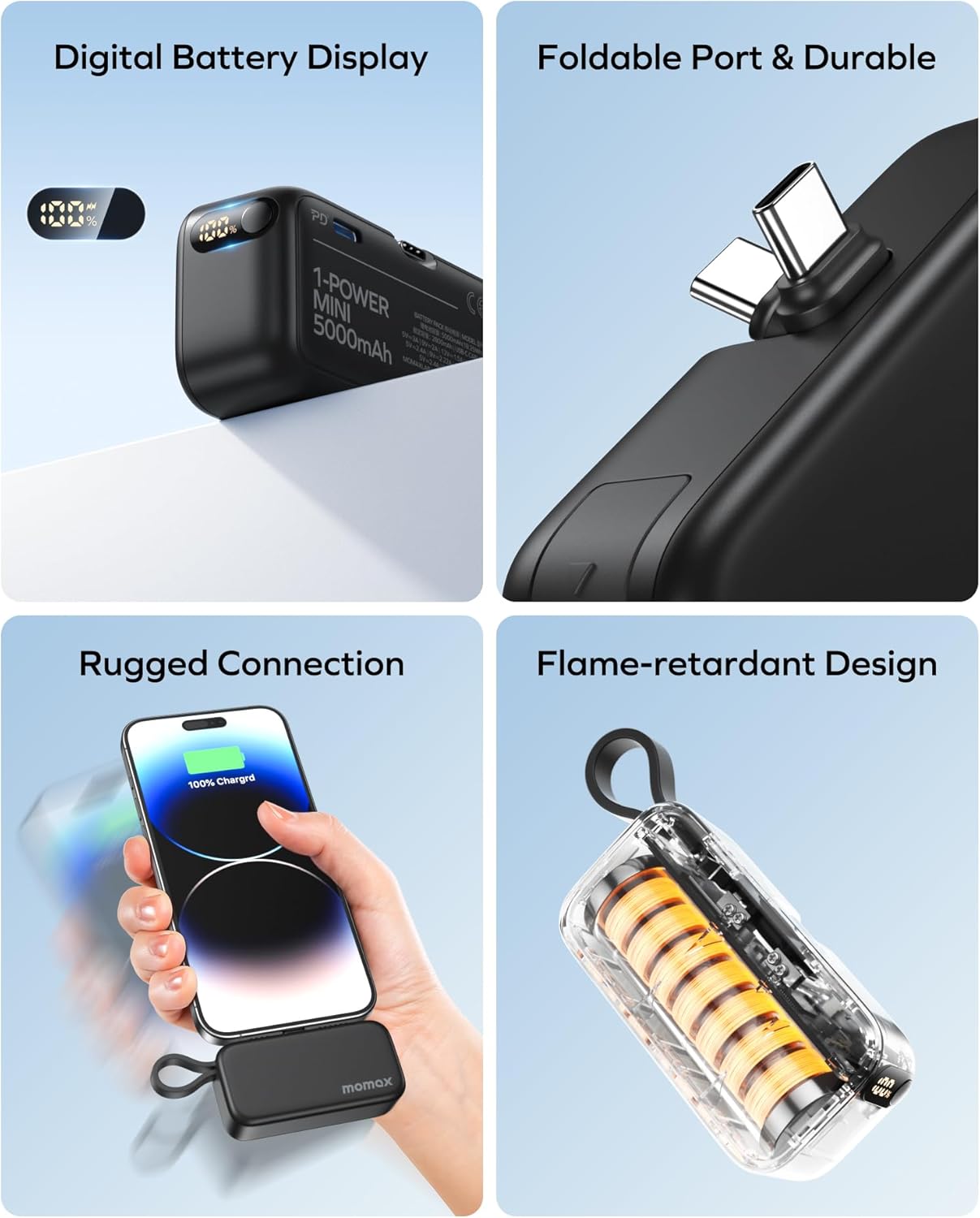
Image: A composite image highlighting key features: the digital battery display, the durable foldable USB-C port, the secure connection to a phone, and the transparent flame-retardant casing.
3. Setup
3.1 Initial Charging of the Power Bank
- Before first use, fully charge your Momax Portable Charger.
- Connect the power bank to a USB-C wall adapter (not included) using its built-in USB-C cable or the dedicated USB-C input port.
- The digital display will show the charging progress, indicating 100% when fully charged.
3.2 Connecting Your Device
- For devices with a USB-C port: Unfold the built-in USB-C connector and plug it directly into your device's charging port.
- For devices requiring a USB-C cable: Use the built-in USB-C cable to connect to your device.
- For a third device or if both integrated options are in use: Connect a separate USB-C to USB-C cable (not included) to the power bank's additional USB-C output port and then to your device.
4. Operating Instructions
4.1 Charging Your Devices
- Once connected, the power bank will automatically begin charging your device. The digital display will show the power bank's remaining battery percentage.
- To stop charging, simply disconnect your device from the power bank.
4.2 Understanding the Digital Display
The integrated LCD digital display provides real-time information about the power bank's battery level, shown as a percentage (0-100%). This allows you to monitor the remaining charge and plan your recharges accordingly.
4.3 Pass-Through Charging
The Momax Portable Charger supports pass-through charging. This means you can charge your smartphone or other devices while the power bank itself is being recharged. Simply connect the power bank to a power source and then connect your device(s) to the power bank.
5. Maintenance
- Cleaning: Use a soft, dry cloth to clean the exterior of the power bank. Avoid using harsh chemicals or abrasive materials.
- Storage: Store the power bank in a cool, dry place away from direct sunlight, extreme temperatures, and humidity.
- Battery Care: To prolong battery life, fully charge the power bank at least once every three months, even if not in regular use. Avoid completely draining the battery frequently.
6. Troubleshooting
- Power Bank Not Charging:
- Ensure the charging cable is securely connected to both the power bank and the wall adapter.
- Try a different USB-C cable or wall adapter.
- Verify the wall adapter is functioning correctly and providing sufficient power (e.g., 18W for fast recharging).
- Device Not Charging from Power Bank:
- Check if the power bank has sufficient charge (refer to the digital display).
- Ensure the built-in connector or cable is fully inserted into your device.
- Try a different port on the power bank if available.
- Restart your device.
- Slow Charging:
- Ensure your device supports 20W fast charging.
- Check if the cable used (if external) is rated for fast charging.
- Charging multiple devices simultaneously may reduce individual charging speeds.
- Digital Display Not Working:
- Try charging the power bank for a few minutes to see if the display reactivates.
- If the issue persists, contact customer support.
7. Specifications
| Feature | Detail |
|---|---|
| Model Number | IP130 |
| Battery Capacity | 5000 Milliamp Hours (mAh) |
| Input Power | 18W MAX |
| Output Power | 20W MAX (per port) |
| Product Dimensions | 3.03 x 1.41 x 1.06 inches |
| Item Weight | 6 ounces |
| Connector Type | USB Type C (Built-in foldable, Built-in cable, additional port) |
| Special Features | Digital Display, Pass-Through Charging, Foldable USB-C Connector, Built-in USB-C Cable |
| Manufacturer | Momax Technoloay (Shenzhen) ltd. |
| Country of Origin | China |
8. Warranty & Support
Momax products are manufactured to the highest quality standards. This product comes with a standard manufacturer's warranty. Please refer to the warranty card included in your product packaging for specific terms and conditions.
For technical support, troubleshooting assistance, or warranty claims, please contact Momax customer service through the official Momax website or your point of purchase. Please have your product model number (IP130) and purchase details ready when contacting support.
Video: An official Momax video highlighting the Momax Portable Charger as a travel essential, emphasizing its convenience and portability for on-the-go charging.


