
1. Introduction
The Zopec Explore Mini, introduced in 2024, is a compact and lightweight battery UPS backup system designed for CPAP and APAP device users. It provides reliable power for travel, camping, RV use, and as an emergency backup during power outages. Its advanced multi-voltage technology automatically adapts to various device voltage requirements, ensuring broad compatibility.

Figure 1: Zopec Explore Mini CPAP Battery UPS Backup.
2. Product Features
- Advanced Technology: Features patented automatic multi-voltage technology (24V, 12V, 19V, etc.) and Panasonic Lithium-Ion Cells for high quality and lightweight design. Utilizes solid-state cooling, eliminating noisy fans.
- Portability: Weighs approximately 1 pound with dimensions of 6.5" x 3" x 1". Designed for easy transport for air travel, RVs, and camping. FAA compliant for carry-on and in-flight use.
- Efficient Power: Provides up to 2 nights of CPAP operation and recharges in approximately 1.5 hours using the included USB-C charger. Also capable of rapidly charging phones, tablets, and laptops via USB-C. Multiple Zopec-Mini batteries can be linked for extended runtime.
- Broad Compatibility: Works with all PAP devices. Includes cables for ResMed AirMini / Air Sense 11 DC and ResMed AirSense 10 and Vauto DC. Additional cable kits for other devices (Dreamstation 1 and 2, Dreamstation Go, Resmed S9, 3B Medical Luna, Transcend Micro, DeVilbiss IntelliPAP 1 and HDM Zi / Z2, Devilbiss InteliPAP II, Lowenstein Medical prismaSMART, and Resvent iBreeze, Apex iCH and Hypnus APAP) are sold separately.
3. Package Contents
Upon opening the package, verify that all items listed below are present:
- Zopec Explore Mini Battery Unit
- USB-C 65W Charger
- ResMed AirMini / Air Sense 11 DC Cable
- ResMed AirSense 10 and Vauto DC Cable
- ResMed AirMini / AirSense 11 Charging Adapter
- Travel Pouch
- Quick Start Guide
- User Manual (this document)

Figure 2: Zopec Explore Mini and included travel pouch.
4. Product Diagram and Components
Familiarize yourself with the various ports and indicators on your Zopec Explore Mini:
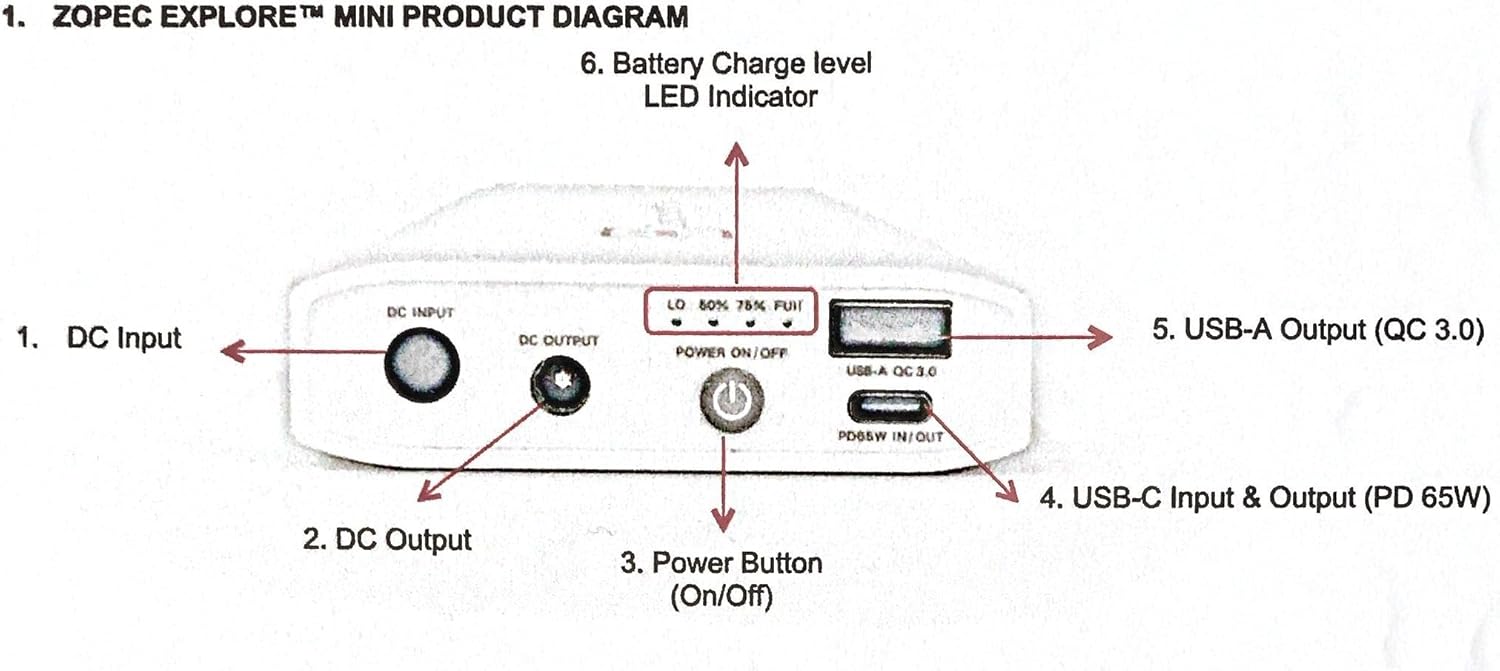
Figure 3: Zopec Explore Mini labeled diagram.
- 1. DC Input: Port for charging the Zopec Explore Mini battery.
- 2. DC Output: Port for connecting to CPAP/APAP devices.
- 3. Power Button (On/Off): Press to turn the unit on or off.
- 4. USB-C Input & Output (PD 65W): Multi-purpose port for charging the battery or charging other USB-C devices (laptops, tablets, phones).
- 5. USB-A Output (QC 3.0): Port for charging USB-A compatible devices (phones, etc.).
- 6. Battery Charge Level LED Indicator: Displays the current battery charge status (LO, 50%, 75%, FULL).
5. Setup and Charging
5.1 Initial Charge
Before first use, fully charge your Zopec Explore Mini. Connect the included USB-C 65W charger to the USB-C Input & Output port (4) on the battery and plug it into a wall outlet. The LED indicators (6) will illuminate to show charging progress. A full charge typically takes 1.5 hours.
5.2 Recharging During Use
The Zopec Explore Mini can be recharged using its USB-C port. This allows for flexible charging from various sources, including wall adapters, car chargers, or other power banks with USB-C output.
Video 1: Overview of Zopec Mini. This video demonstrates the product's features and usage, including charging and connecting to devices.
6. Operating Instructions
6.1 Connecting to a CPAP/APAP Device
The Zopec Explore Mini automatically detects and adapts to the voltage requirements of your CPAP/APAP device. Follow these steps:
- Ensure the Zopec Explore Mini is adequately charged.
- Select the appropriate DC cable for your CPAP/APAP device (e.g., ResMed AirMini/AirSense 11 cable, ResMed AirSense 10 cable).
- Connect one end of the DC cable to the DC Output port (2) on the Zopec Explore Mini.
- Connect the other end of the DC cable to your CPAP/APAP device's power input.
- Press the Power Button (3) on the Zopec Explore Mini to turn it on. The device will begin powering your CPAP/APAP machine.

Figure 4: Connection with ResMed AirMini and simultaneous phone charging.

Figure 5: Connection with ResMed AirSense 10.

Figure 6: Connection with ResMed AirSense 11.
Important Note: Using a humidifier or heated hose with your CPAP/APAP device will significantly reduce the battery runtime. For maximum battery life, it is recommended to disable these features when operating on battery power.
6.2 Charging Other Devices
The Zopec Explore Mini can also serve as a power bank for your portable electronic devices:
- Connect your USB-C compatible device (laptop, tablet, phone) to the USB-C Input & Output port (4) using a compatible USB-C to USB-C cable.
- Connect your USB-A compatible device (phone, etc.) to the USB-A Output port (5) using a compatible USB-A cable.
- Ensure the Zopec Explore Mini is turned on. Charging will commence automatically.
7. Performance and Runtime
The runtime of the Zopec Explore Mini varies depending on the CPAP/APAP machine model, pressure settings, and whether a humidifier or heated hose is used. Refer to the table below for estimated runtimes:

Figure 7: Estimated Runtime Table for Zopec Explore Mini with various PAP devices.
These runtimes are estimates and actual performance may vary based on device age, environmental conditions, and specific usage patterns. For optimal battery life, avoid using humidification and heated tubing when operating on battery power.
8. Travel Guidelines
The Zopec Explore Mini is designed with travel in mind and is FAA compliant for carry-on luggage. It can be used during air travel. Always check with your airline for their specific policies regarding portable electronic devices and medical equipment before your flight.

Figure 8: Zopec Explore Mini in use on an airplane.
9. Maintenance
- Cleaning: Wipe the exterior of the unit with a soft, dry cloth. Do not use liquid cleaners or abrasive materials.
- Storage: Store the Zopec Explore Mini in a cool, dry place away from direct sunlight and extreme temperatures. For long-term storage, ensure the battery is charged to approximately 50-75% and recharge it every 3-6 months to maintain battery health.
- Battery Care: Avoid fully discharging the battery frequently. While designed for deep cycles, maintaining some charge is beneficial for overall lifespan.
10. Troubleshooting
| Problem | Possible Cause | Solution |
|---|---|---|
| Device not turning on. | Battery is fully discharged. | Charge the Zopec Explore Mini using the included USB-C charger. |
| CPAP/APAP device not receiving power. | Incorrect cable or loose connection. | Ensure the correct DC cable is used and securely connected to both the Zopec Explore Mini and the CPAP/APAP device. Verify the Zopec Explore Mini is powered on. |
| Short runtime with CPAP/APAP device. | Humidifier or heated hose is active. High pressure settings. | Disable humidifier and heated hose features on your CPAP/APAP device. Lower pressure settings if possible. Refer to the runtime table in Section 7. |
| Other devices not charging via USB. | Zopec Explore Mini is off or cable is incompatible. | Ensure the Zopec Explore Mini is powered on. Use a compatible USB-C or USB-A cable for your device. |
If the problem persists after attempting these solutions, please contact Zopec Product Support for assistance.
11. Specifications
- Product Dimensions: 6.5 x 3 x 1 inches (16.5 x 7.6 x 2.5 cm)
- Item Weight: 1.1 pounds (0.5 kg)
- Model Number: 212700C
- Battery Type: Lithium Ion (1 battery included)
- Voltage Output: Automatically adapts (e.g., 12V, 19V, 24V DC)
- USB-C Output: PD 65W (Power Delivery)
- USB-A Output: QC 3.0 (Quick Charge)
- Manufacturer: Zopec Medical
- First Available Date: March 26, 2024
- Color: White
12. Warranty and Support
The Zopec Explore Mini battery is covered by a limited warranty for 18 months from the date of purchase. This warranty covers defects in materials and workmanship under normal use.
For warranty claims, technical assistance, or any product-related inquiries, please contact the Zopec Product Support Team. Contact information can typically be found on the product packaging or the official Atavyst website.
The Zopec Product Support Team is committed to providing high-quality and timely responses to all customer questions and issues.