
Bosch KTR15NWEB
Bosch KTR15NWEB Mini-Refrigerator User Manual
Model: KTR15NWEB | Brand: Bosch
Introduction
This manual provides essential information for the safe and efficient operation of your Bosch KTR15NWEB Mini-Refrigerator. Please read these instructions carefully before installation, use, and maintenance. Keep this manual for future reference.

Front view of the Bosch KTR15NWEB Mini-Refrigerator.
Safety Information
Always follow basic safety precautions when using electrical appliances to reduce the risk of fire, electric shock, and injury to persons.
- Ensure the appliance is properly grounded.
- Do not damage the refrigerant circuit.
- Do not use electrical appliances inside the food storage compartments.
- Unplug the appliance before cleaning or maintenance.
- Keep ventilation openings clear of obstruction.
- This appliance is intended for household use only.
Setup and Installation
Unpacking
Carefully remove all packaging materials. Inspect the appliance for any damage. Report any damage to your retailer immediately.
Placement
Place the refrigerator on a flat, stable surface away from direct sunlight and heat sources. Ensure adequate ventilation around the appliance.
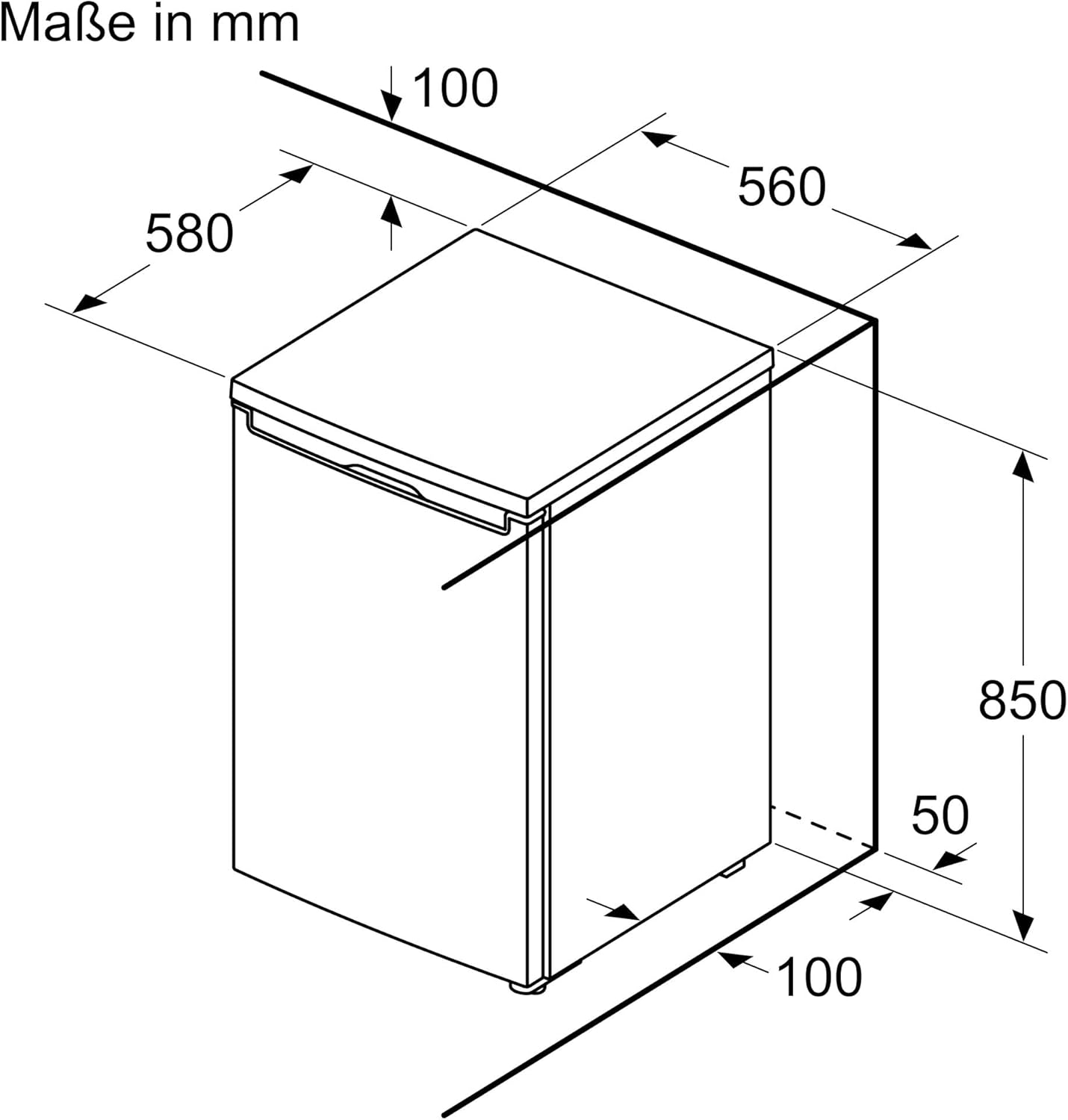
Product dimensions: 58 cm (depth) x 56 cm (width) x 85 cm (height). Allow for proper clearance around the unit for ventilation.
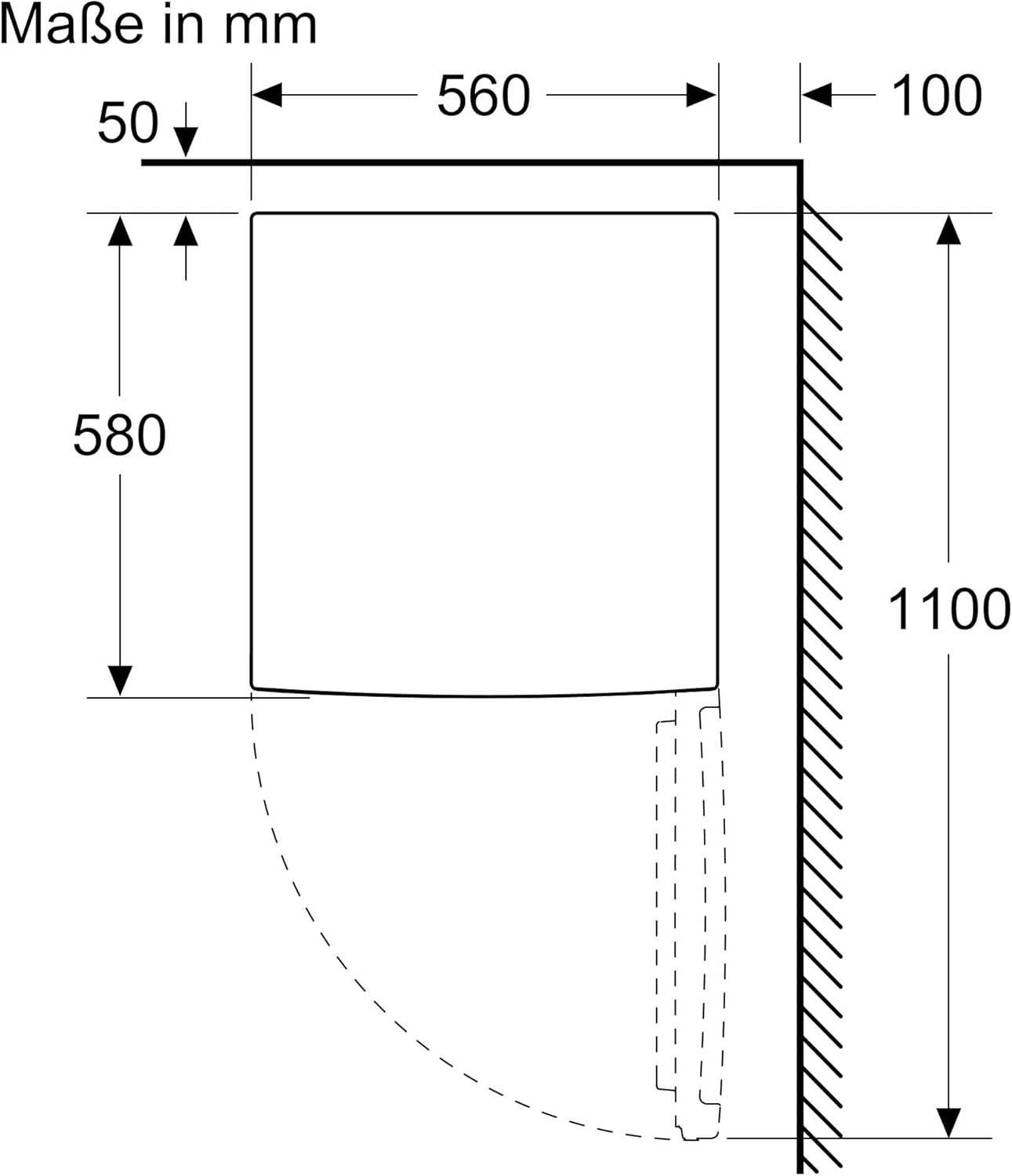
Top view dimensions indicating required clearances for door opening and ventilation.
Electrical Connection
Connect the appliance to a properly grounded 240 Volt AC outlet. Do not use extension cords or adapters.
Initial Operation
After plugging in, allow the refrigerator to stand for at least 2-3 hours before loading with food to allow the refrigerant to settle.
Operating Instructions
Temperature Control
The refrigerator features an intuitive temperature control panel. Adjust the temperature setting according to your needs. The recommended temperature for general food storage is between 2°C and 8°C.
MultiBox Drawer
The transparent MultiBox drawer is designed to keep fruits and vegetables fresh for longer. Its special wavy bottom prevents condensation from accumulating directly on produce, promoting better air circulation.

The refrigerator interior with the MultiBox drawer visible at the bottom, designed for fresh produce.

A close-up view of the MultiBox drawer filled with various fruits and vegetables, highlighting its capacity and design.

Detailed dimensions of the MultiBox drawer: approximately 45.5 cm length, 15.5 cm width, and 16.5 cm height.
Super Cooling Function
Activate the Super Cooling function before adding a large quantity of new groceries. This function temporarily lowers the refrigerator temperature by 2°C to quickly cool down new items and preserve their freshness. The function will automatically deactivate after a set period to save energy.
LED Lighting
The interior of your refrigerator is illuminated by energy-efficient LED lights. These LEDs provide bright, even, and glare-free illumination, making it easy to see all your stored items.

A close-up view of the integrated LED lighting strip, providing clear visibility of the refrigerator's contents.
Door Opening Alarm
The refrigerator is equipped with a door opening alarm. If the door remains open for an extended period, an audible alarm will sound to alert you, helping to prevent energy waste and maintain optimal internal temperature.

Illustration showing the door opening alarm feature, indicating an alert when the refrigerator door is left ajar.
Maintenance and Care
Cleaning the Interior
Before cleaning, always unplug the refrigerator. Clean the interior regularly with a soft cloth and a mild, non-abrasive detergent. Rinse with clean water and dry thoroughly. Do not use abrasive cleaners or solvents.
Cleaning the Exterior
Wipe the exterior surfaces with a soft, damp cloth. For stainless steel parts, use a specialized stainless steel cleaner. Avoid getting water into electrical components.
Defrosting
This refrigerator features an automatic defrost system, minimizing the need for manual defrosting. If ice buildup occurs, it will typically melt and evaporate automatically.
Troubleshooting
| Problem | Possible Cause | Solution |
|---|---|---|
| Refrigerator does not operate. | Not plugged in; power outage; circuit breaker tripped. | Check power cord connection; check household fuse/circuit breaker; ensure power supply is active. |
| Temperature is not cold enough. | Door left open; frequent door openings; warm food added; temperature setting too high. | Ensure door is closed properly; avoid frequent openings; allow hot food to cool before placing in fridge; adjust temperature setting lower. |
| Unusual noises. | Appliance not level; objects vibrating against the refrigerator; normal operating sounds. | Adjust leveling feet; ensure nothing is touching the back or sides; gurgling/hissing sounds are normal for refrigerant. |
| Door alarm sounds frequently. | Door not closing properly; door seal damaged. | Check for obstructions preventing door closure; inspect door seal for damage and clean if necessary. |
If the problem persists after attempting these solutions, please contact Bosch customer service.
Technical Specifications
| Feature | Specification |
|---|---|
| Manufacturer | Bosch |
| Model Identifier | KTR15NWEB |
| Product Dimensions (W x D x H) | 56 cm x 58 cm x 85 cm |
| Weight | 25.3 Kilograms |
| Capacity (Refrigerator Compartment) | 134 Liters |
| Annual Energy Consumption | 91 kWh per year |
| Noise Emission | 39 dB |
| Installation Type | Freestanding |
| Special Features | MultiBox, Super Cooling, Quiet Operation, LED Lighting |
| Color | White |
| Voltage | 240 Volt |
| Number of Drawers | 3 |
| Defrost System | Automatic |
| Door Hinge | Right (Reversible) |
| Number of Shelves | 3 |

Energy efficiency label showing E-rating, 91 kWh/annum consumption, 134 L capacity, and 39 dB noise level. For more details, visit the EPREL database.
What's in the Box
Upon unpacking, ensure all the following items are present:
- Bosch KTR15NWEB Mini-Refrigerator Unit
- 2 x Egg Trays
- User Manual (this document)
Warranty and Support
For warranty information and customer support, please refer to the warranty card included with your appliance or visit the official Bosch website. You can also contact Bosch customer service for assistance with product inquiries, technical support, or service requests.
For service and support, please visit: Bosch Service Website