
Introduction
This manual provides detailed instructions for the GOWENIC S55 Portable Mini Digital Electronic Wind Instrument Synthesizer. Please read this manual thoroughly before using the instrument to ensure proper operation and to maximize your musical experience. The S55 is designed for versatility and portability, offering a range of tones and features for musicians of all levels.
Package Contents
Upon unpacking, please verify that all the following items are included:
- 1 x GOWENIC S55 Electric Wind Instrument
- 2 x Replacement Nozzles (Silicone)
- 1 x USB Charging Cord
- 1 x Portable Storage Bag
- 1 x Instruction Manual (this document)
Product Overview
Familiarize yourself with the various parts and controls of your GOWENIC S55 instrument.
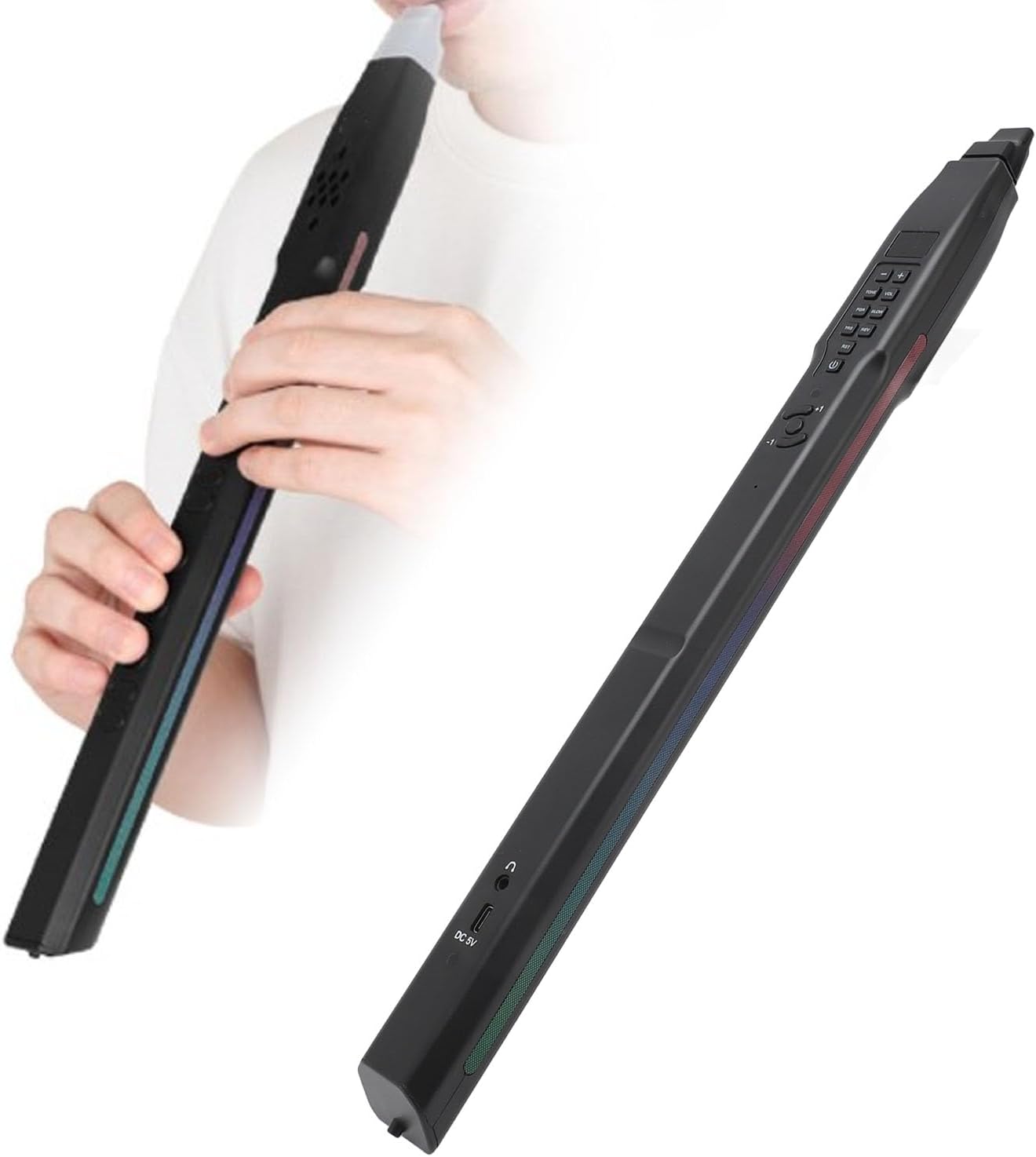
Figure 1: GOWENIC S55 Electronic Wind Instrument, showing its sleek design and a user playing it.
Key Components:
- Mouthpiece: Removable and washable silicone mouthpiece for comfortable playing.
- Finger Buttons/Keys: Touch-sensitive buttons for playing notes.
- Control Panel: Buttons for power, volume, tone selection, blowing sensitivity, and transposition.
- Built-in Speaker: Integrated 2W HiFi speaker for direct sound output.
- Charging Port (DC 5V): USB port for charging the internal battery.
- Headphone Jack: For private practice or connecting to external audio systems.

Figure 2: Close-up view of the control panel, showing buttons for Tone, Volume, Blowing Sensitivity (BLOW), Transposition (TRS), Reverb (REV), and Power.
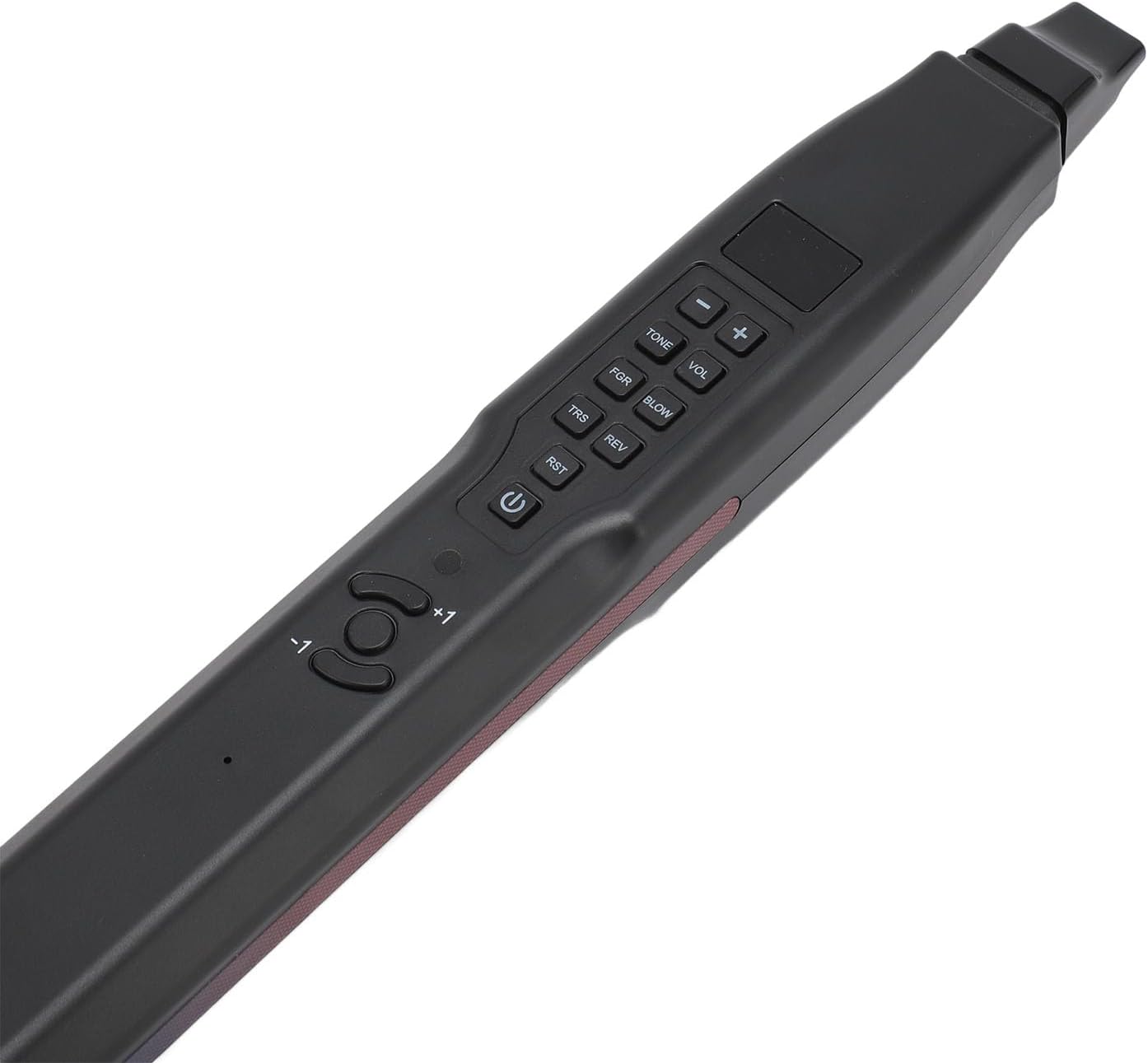
Figure 3: View of the bottom section, highlighting the headphone jack and the DC 5V charging port.
Setup
- Initial Charge: Before first use, fully charge the instrument using the provided USB charging cord. Connect the cord to the DC 5V port on the instrument and to a standard USB power adapter (not included). The charging indicator light will show charging status.
- Attach Mouthpiece: Gently attach one of the silicone nozzles to the instrument's mouthpiece opening. Ensure it is securely fitted.
- Power On: Press and hold the power button (usually marked with a circle and a vertical line) for a few seconds until the display or indicator lights activate.
Operating Instructions
Power On/Off:
- To power on, press and hold the Power button until the instrument activates.
- To power off, press and hold the Power button again until the instrument shuts down.
- The instrument features a power-saving mode and will automatically shut off after 10 minutes of inactivity.
Adjusting Volume:
- Use the VOL + and VOL - buttons on the control panel to increase or decrease the volume. There are 15 levels of volume adjustment.
Changing Tones:
- Press the TONE button to cycle through the available instrument tones.
- The S55 offers 13 distinct instrument tones.
Blowing Sensitivity:
- The instrument has 3 types of blowing sensitivity. Use the BLOW button to adjust the sensitivity to your preference.
Transposition:
- Use the TRS + and TRS - buttons to transpose the pitch up or down by 12 semitones.
Playing Notes:
- Place the mouthpiece in your mouth and blow gently while pressing the finger buttons to produce notes. Experiment with different fingerings to learn the various scales and melodies.
Tones and Features
The GOWENIC S55 offers a diverse range of instrument tones and additional features to enhance your playing.
Available Tones (13):
- Alto Saxophone
- Soprano Saxophone
- Clarinet
- Cucurbit Flute
- Trumpet
- Suona Horn
- Xun
- Long Flute
- Flute
- Clarinet
- Morin Khuur
- Violin
- Erhu
Note: The source lists "Clarinet" twice. This manual reflects the provided information.

Figure 4: Visual representation of some of the 13 instrument tones that can be simulated by the S55.
Backing Tones:
The instrument includes 12 backing tones to accompany your playing. Refer to the instrument's display or specific controls for selecting and adjusting backing tones.
Built-in Speaker:
The S55 features a built-in 2W HiFi speaker, allowing you to play directly without the need for external amplification.
Connectivity
The GOWENIC S55 offers various connectivity options for different playing scenarios.
- Headphones: Connect standard 3.5mm headphones to the headphone jack for private practice.
- External Speakers: Connect the instrument to external speakers or an amplifier via the headphone jack for louder sound output.
- MIDI Connection: The S55 supports wired MIDI connection, allowing it to be used with compatible software and hardware for advanced music production and control. It is compatible with Android and other systems.
Charging and Battery
The GOWENIC S55 is equipped with a built-in rechargeable lithium battery.

Figure 5: The GOWENIC S55 features an 800mAh lithium battery for extended playing sessions.
- Battery Type: Built-in 800mAh Lithium Battery.
- Battery Life: A full charge provides approximately 4 hours of continuous playing time.
- Charging: Use the provided USB charging cord to connect the instrument to a 5V USB power source. The charging indicator will illuminate during charging and turn off or change color when fully charged.
Maintenance
Proper maintenance ensures the longevity and hygiene of your instrument.

Figure 6: The removable silicone mouthpiece is designed for easy cleaning and replacement.
- Mouthpiece Cleaning: The silicone mouthpiece is removable and washable. Detach it from the instrument and clean it with mild soap and water. Rinse thoroughly and allow it to air dry completely before reattaching.
- Instrument Body: Wipe the instrument body with a soft, dry cloth. Do not use abrasive cleaners or solvents.
- Moisture Warning: Do not get the instrument wet. Avoid exposing it to water or high humidity to prevent damage to internal electronics.
- Storage: When not in use, store the instrument in its portable storage bag in a cool, dry place away from direct sunlight.
Troubleshooting
If you encounter any issues with your GOWENIC S55, please refer to the following common solutions:
- No Sound:
- Ensure the instrument is powered on.
- Check the volume level and increase if necessary.
- If using headphones or external speakers, ensure they are properly connected and their volume is adjusted.
- Verify that the mouthpiece is correctly attached and you are blowing into it with sufficient airflow.
- Instrument Not Charging:
- Ensure the USB charging cable is securely connected to both the instrument and the power source.
- Try a different USB power adapter or port.
- Check if the charging cable is damaged.
- Buttons Unresponsive:
- Power off the instrument and then power it back on to reset.
- Ensure your fingers are making proper contact with the touch-sensitive buttons.
If the problem persists, please contact GOWENIC customer support for further assistance.
Specifications
| Brand | GOWENIC |
| Model Name | S55 (GOWENIC7t3qg4i6he) |
| Material | Acrylonitrile Butadiene Styrene (ABS) |
| Body Material | Plastic |
| Item Weight | 386 Grams (13.6 ounces) |
| Package Dimensions | 20.08 x 3.54 x 1.57 inches |
| Tones | 13 Instrument Tones |
| Backing Tones | 12 Backing Tones |
| Volume Levels | 15 Levels |
| Blowing Sensitivity | 3 Types |
| Transposition | Up and down 12 semitones |
| Speaker | Built-in 2W HiFi Speaker |
| Battery | Built-in 800mAh Lithium Battery |
| Battery Life | Approx. 4 hours (fully charged) |
| Connectivity | Headphone Jack, External Speaker Support, Wired MIDI |
| Compatible Systems | Android and other systems (for MIDI) |
Warranty and Support
GOWENIC products are designed for quality and performance. For warranty information, technical support, or any questions regarding your S55 instrument, please refer to the contact information provided with your purchase or visit the official GOWENIC website.
Please retain your proof of purchase for warranty claims.