
1. Introduction
Thank you for choosing the WATTSMART HK-DE001 Dehumidifier. This manual provides essential information for the safe and efficient operation of your new appliance. Please read it thoroughly before use and retain it for future reference. This dehumidifier is designed to effectively remove excess moisture from areas up to 2,500 square feet, helping to prevent mold, mildew, and musty odors, creating a more comfortable and healthy environment.
2. Safety Information
Always follow basic safety precautions when using electrical appliances to reduce the risk of fire, electric shock, and injury. Ensure the unit is placed on a stable, level surface. Do not block air inlets or outlets. Keep children and pets away from the appliance during operation. Unplug the unit before cleaning or maintenance. Refer to the product label for specific electrical requirements.
3. Product Overview
The WATTSMART HK-DE001 Dehumidifier features a sleek, modern design with user-friendly controls. It is equipped with universal wheels and integrated handles for easy portability. The unit includes a visible water level indicator for convenient monitoring of the 55 oz (1.6 L) water tank.

Figure 1: Front view of the WATTSMART HK-DE001 Dehumidifier, showing the main unit with the drain hose connected and the water tank visible.

Figure 2: Internal view highlighting the high-efficiency compressor, designed for effective moisture removal.
4. Setup
4.1 Unboxing and Initial Placement
Carefully remove the dehumidifier and all accessories from the packaging. Place the unit on a firm, level surface in the desired location. Ensure there is adequate space around the unit for proper airflow.
Video 1: This video demonstrates the unboxing process of the Wattsmart Dehumidifier, showing all included components and initial setup steps.
Video 2: This video provides a detailed look at the Wattsmart Dehumidifier immediately after unboxing, showcasing its design and features before operation.
4.2 Drainage Options
Your dehumidifier offers two methods for water drainage:
- Manual Drainage: The unit will collect condensed water in its internal 55 oz (1.6 L) water tank. When the tank is full, the dehumidifier will automatically shut off and an indicator will alert you to empty it.
- Continuous Drainage: For extended operation without manual emptying, connect the included 3.3 ft drain hose to the designated outlet on the back of the unit. Route the hose to a suitable drain point (e.g., floor drain, sink). Ensure the hose is not kinked or blocked to allow for smooth water flow.
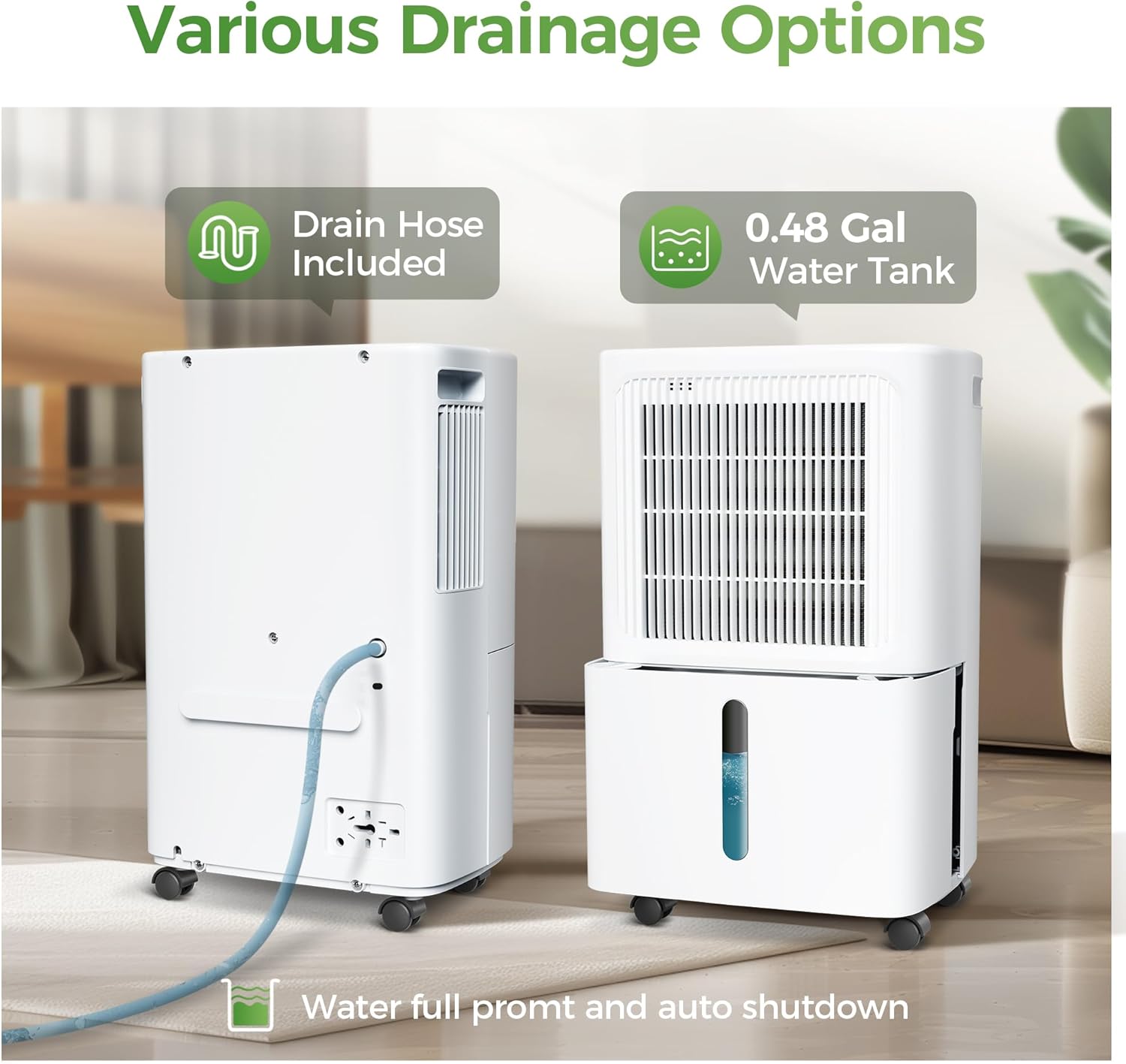
Figure 3: Illustration of the two drainage methods: the removable water tank for manual emptying and the continuous drain hose connection.
5. Operating Instructions
5.1 Control Panel Overview
The intuitive control panel located on the top of the unit allows for easy management of all functions.
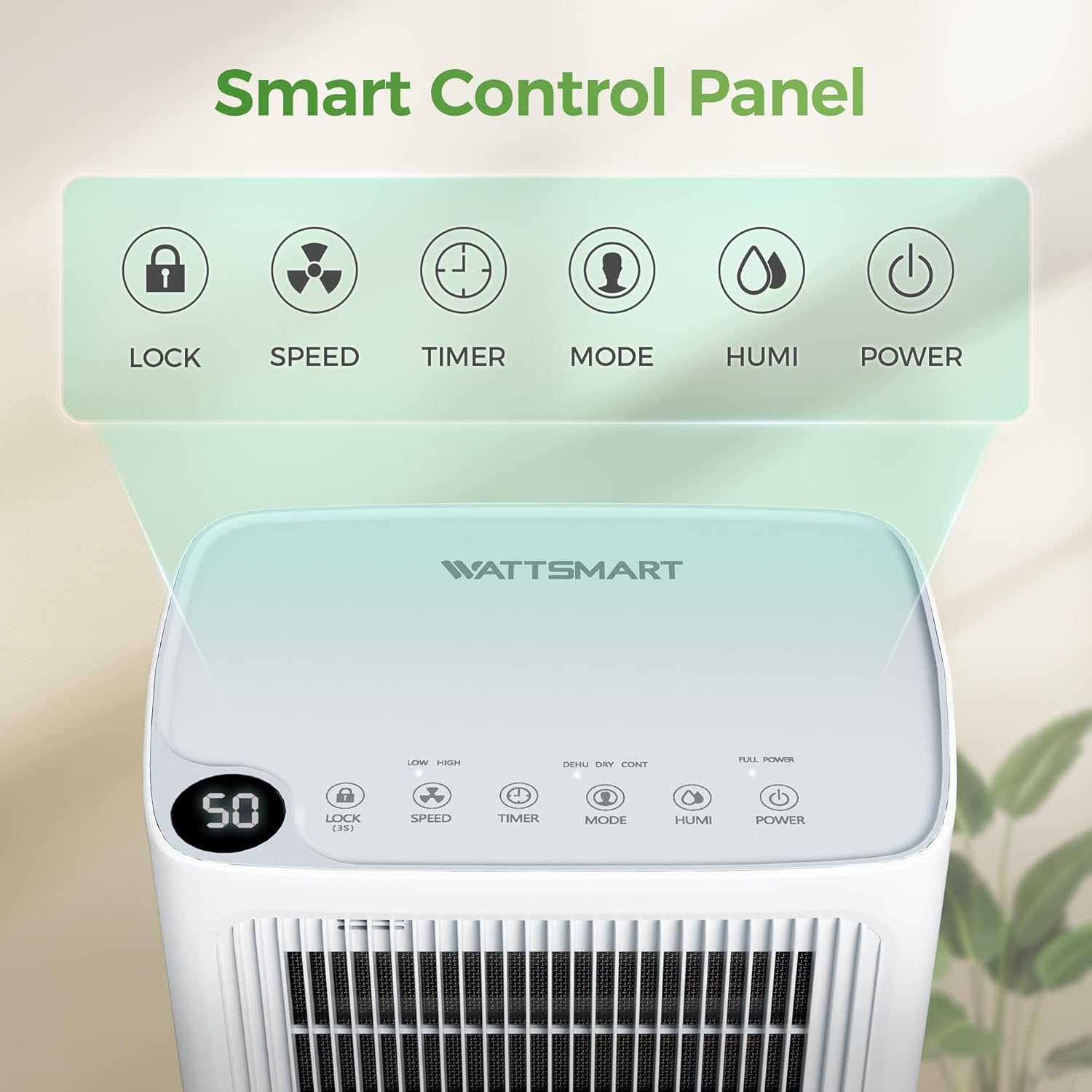
Figure 4: Detailed view of the control panel, showing buttons for Lock, Speed, Timer, Mode, Humidity, and Power, along with a digital display.
- Power Button: Turns the unit ON or OFF.
- Mode Button: Cycles through available operating modes:
- DEHU (Dehumidification): Standard operation to reduce humidity.
- DRY: Ideal for faster drying, such as laundry.
- CONT (Continuous): Runs continuously, often used with the drain hose.
- Humidity (Humi) Button: Adjusts the desired humidity level (typically 30% to 80% RH). The unit will operate until this level is reached and then maintain it.
- Speed Button: Selects fan speed (Low or High).
- Timer Button: Sets a 24-hour timer for automatic ON/OFF operation.
- Lock Button (3s): Press and hold for 3 seconds to activate/deactivate the child lock function, preventing accidental changes to settings.
5.2 Setting Desired Humidity and Timer
Use the Humidity button to set your target humidity. The digital display will show the current and target humidity levels. The 24-hour timer allows you to schedule operation according to your needs, optimizing energy use.

Figure 5: The display indicates the target humidity setting and options for timing the unit's operation.
5.3 Quiet Operation
The dehumidifier is designed for quiet operation, ensuring minimal disruption to your daily activities or sleep. Its noise level is typically below 38dB.

Figure 6: The dehumidifier operating in a bedroom, illustrating its low noise output.
Video 3: This video showcases the Wattsmart Dehumidifier's control panel and quiet operation in a bathroom setting, demonstrating how to adjust settings.
6. Maintenance
6.1 Cleaning the Filter
Regularly clean the washable filter to ensure optimal performance. A dirty filter can reduce efficiency and airflow. Simply remove the filter, rinse it under running water, and allow it to dry completely before reinserting.
6.2 Emptying the Water Tank
When using manual drainage, empty the water tank when the 'Tank Full' indicator illuminates. Carefully pull out the tank, discard the collected water, and slide it back into place until it clicks securely.
6.3 Auto Defrost
The unit features an automatic defrost function to prevent ice buildup on the coils, ensuring continuous and efficient operation even in cooler environments.

Figure 7: User-friendly design features including rotatable wheels, handle, visual water level, and auto defrost.
7. Troubleshooting
If your dehumidifier is not operating as expected, please check the following common issues:
- Unit not turning on: Ensure the power cord is securely plugged into a working electrical outlet. Check if the water tank is full and needs emptying.
- No dehumidification: Verify that the desired humidity level is set lower than the current room humidity. Ensure air inlets and outlets are not blocked.
- Water tank full indicator: Empty the water tank and ensure it is correctly reinserted.
- Unusual noise: Check for any obstructions in the fan or filter area. Ensure the unit is on a stable surface.
For further assistance, please contact customer service.
8. Specifications
| Feature | Specification |
|---|---|
| Brand | WATTSMART |
| Model Name | HK-DE001 |
| Floor Area Coverage | 2500 Square Feet |
| Dehumidification Capacity | 34 Pints per Day |
| Water Tank Volume | 55 OZ (1.6 Liters) |
| Product Dimensions | 7.68"D x 10.83"W x 17.32"H |
| Item Weight | 24.8 pounds (11.27 Kilograms) |
| Wattage | 230 watts |
| Number of Speeds | 2 |
| Special Features | Adjustable Humidity Control, Automatic Moisture Removal, Automatic Restart, Automatic Shutoff, Portable |
| Included Components | Drain Hose, Dehumidifier |
9. Warranty and Support
WATTSMART offers a 30-day money-back guarantee for this product. For any questions or assistance, our 24/7 customer service team is available online. Please refer to the contact information provided in your product packaging for support.