
1. Introduction
Thank you for choosing the NALACAL Wireless Car Charger Phone Holder. This device combines the convenience of a smartphone holder with the efficiency of wireless charging, designed for safe and hands-free use in your vehicle. Please read this manual carefully before use to ensure proper operation and to maximize the product's lifespan.
2. Product Overview
The NALACAL Wireless Car Charger Phone Holder is a 2-in-1 solution that functions as both a secure phone mount and a fast wireless charger. It features intelligent sensing for automatic clamping and a 360-degree rotating joint for flexible viewing angles.
Package Contents:
- 1 x Smart Wireless Car Charging Holder
- 1 x Air Vent Clip
- 1 x USB Type-C Charging Cable
- 1 x User Manual (this document)

Image 2.1: NALACAL Wireless Car Charger Phone Holder in use, demonstrating smart sensing and fast charging capabilities.
3. Setup Instructions
3.1 Attaching the Air Vent Clip
- Unscrew the nut on the back of the main charging holder unit.
- Insert the ball joint of the air vent clip into the nut, then into the socket on the back of the holder.
- Tighten the nut securely to fix the air vent clip to the holder.
3.2 Installing in Your Vehicle
- Locate a suitable air vent in your car. Ensure the vent blades are sturdy enough to support the holder and your phone.
- Push the air vent clip firmly onto one of the vent blades.
- Turn the tightening wheel on the air vent clip to secure it in place. Ensure the holder is stable and does not wobble.
- Connect the provided USB Type-C charging cable to the port on the bottom of the holder and plug the other end into a car charger (not included, 5V/2A adapter recommended for 5W charging, or a Quick Charge 2.0/3.0 adapter for 15W fast charging).

Image 3.1: Illustration of the upgraded chuck design for secure air vent attachment.
4. Operating Instructions
4.1 Placing Your Phone
- Ensure the charger is powered on. The side clamps will automatically open when the smart sensor detects your phone approaching.
- Gently place your smartphone (4.7 to 6.9 inches) into the holder. The side clamps will automatically close and secure your phone, initiating wireless charging.
- The silicone pads on the clamp arms protect your phone from scratches.
4.2 Adjusting Viewing Angle
The universal ball joint allows for 360-degree rotation. You can freely adjust your phone's position between horizontal (landscape) and vertical (portrait) orientations for optimal viewing.
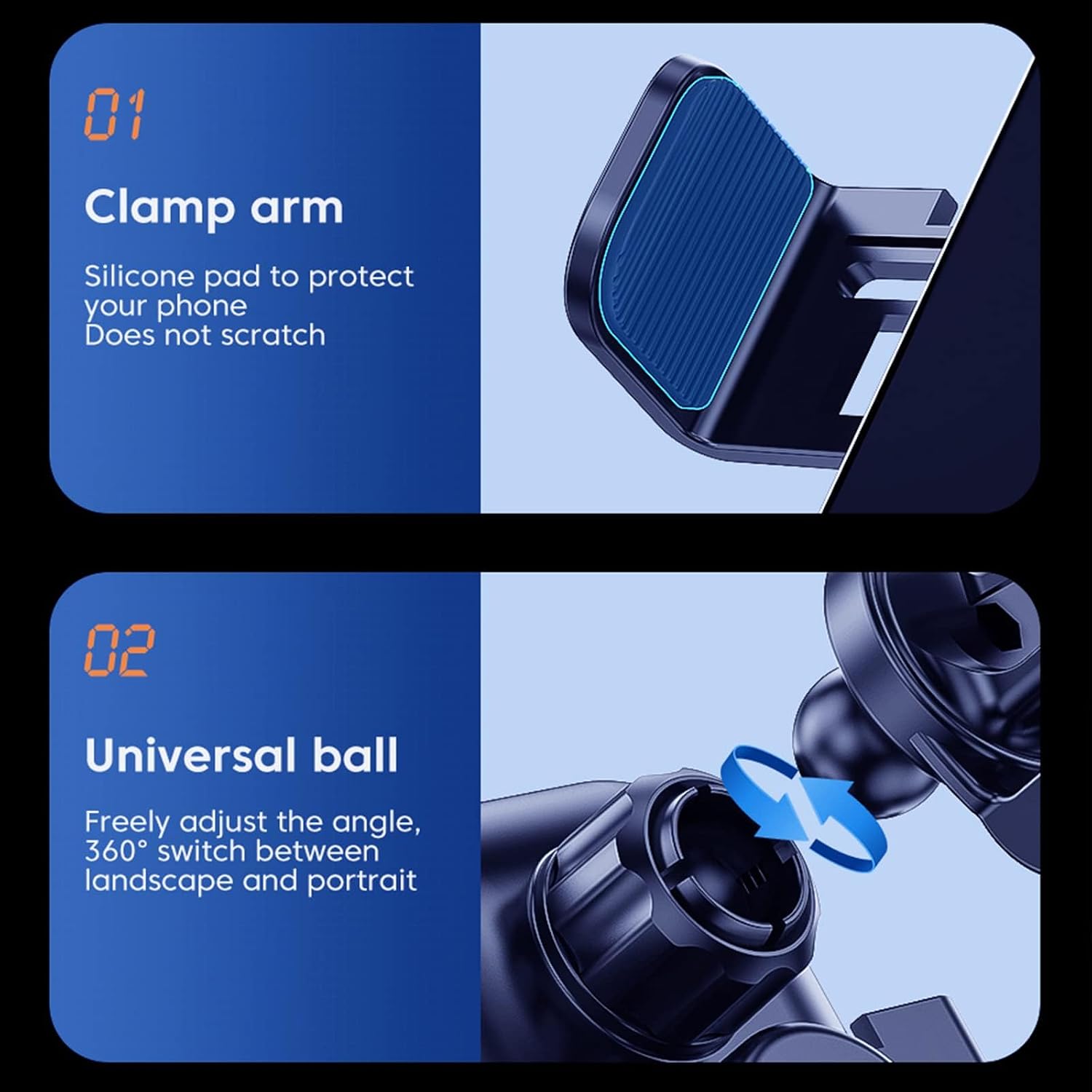
Image 4.1: Details of the clamp arm and universal ball joint for flexible positioning.
4.3 Removing Your Phone
To remove your phone, simply touch the sensitive sensor area located at the bottom of the holder. The clamps will automatically open, allowing you to retrieve your phone with one hand.

Image 4.2: Location of the reserved charging port and the touch-sensitive release area.
5. Maintenance
5.1 Cleaning
Wipe the surface of the charger with a soft, dry cloth. Do not use abrasive cleaners or solvents, as these may damage the device.
5.2 Storage
When not in use, store the charger in a cool, dry place away from direct sunlight and extreme temperatures.
5.3 Temperature Control
The intelligent control chip is designed to maintain a low temperature throughout the charging process, ensuring safe and stable operation.

Image 5.1: Visual representation of the intelligent control chip maintaining low temperatures during charging.
6. Troubleshooting
6.1 Phone Not Charging
- Check Power Connection: Ensure the USB Type-C cable is securely connected to both the charger and a powered car adapter.
- Foreign Object Detection (FOD): The charger has an FOD function to prevent abnormal charging. Remove any metal or magnetic objects, credit cards, or pop holders from the back of your phone or between the phone and the charger.
- Phone Compatibility: Ensure your smartphone supports wireless charging (Qi standard).
- Case Compatibility: While the charger is case-friendly, very thick or metallic cases may interfere with wireless charging. Try removing the phone case.
- Adapter Output: For optimal charging, use a car charger adapter that provides at least 5V/2A. For 15W fast charging, a Quick Charge 2.0/3.0 compatible adapter is required.
6.2 Automatic Clamps Not Opening/Closing
- Power Check: Ensure the charger is receiving power.
- Sensor Obstruction: Ensure the smart sensor area is not obstructed.
- Manual Release: If the clamps are stuck, gently touch the bottom touch-sensitive area to attempt a manual release.
6.3 Holder is Loose in Air Vent
- Tighten Clip: Ensure the tightening wheel on the air vent clip is fully secured.
- Vent Type: Some car air vents may not be suitable for this type of clip. Ensure the vent blades are horizontal and robust.
7. Specifications
| Feature | Specification |
|---|---|
| Brand | NALACAL |
| Model | Wireless Car Charger Phone Holder |
| Input Interface | USB Type-C |
| Wireless Charging Output | Up to 15W (Fast Charge), 5W (Standard Charge) |
| Phone Size Compatibility | 4.7 to 6.9 inches |
| Product Dimensions | 11 x 12 x 8 cm |
| Product Weight | 220 grams |
| Rotation | 360-degree |
| Safety Features | Foreign Object Detection (FOD), Intelligent Temperature Control |
8. Warranty Information
Specific warranty details are not provided in the product information. Please refer to the retailer's return policy or contact the seller directly for warranty inquiries.
9. Support
For technical support or further assistance, please contact the seller through the platform where the product was purchased. Keep your purchase receipt or order number handy for faster service.