
Introduction
This manual provides comprehensive instructions for the installation, operation, and maintenance of your new ROEDE Replacement Membrane Switch Panel. This panel is specifically designed to restore functionality to Sharp microwave oven models R-6G65, R-583, and R-6C65. Please read this manual carefully before proceeding with installation to ensure proper and safe use.
Safety Information
- Always unplug the microwave oven from the power outlet before attempting any installation, repair, or maintenance. Failure to do so can result in electric shock or serious injury.
- If you are unsure about any step, consult a qualified technician.
- Handle the new membrane switch panel carefully to avoid damage to the delicate electronic components.
- Keep small parts away from children.
Product Overview
The ROEDE Replacement Membrane Switch Panel is a high-quality, durable component designed to replace a faulty or worn-out control panel on compatible Sharp microwave ovens. It features a touch-sensitive interface that replicates the original functionality of your microwave's controls.
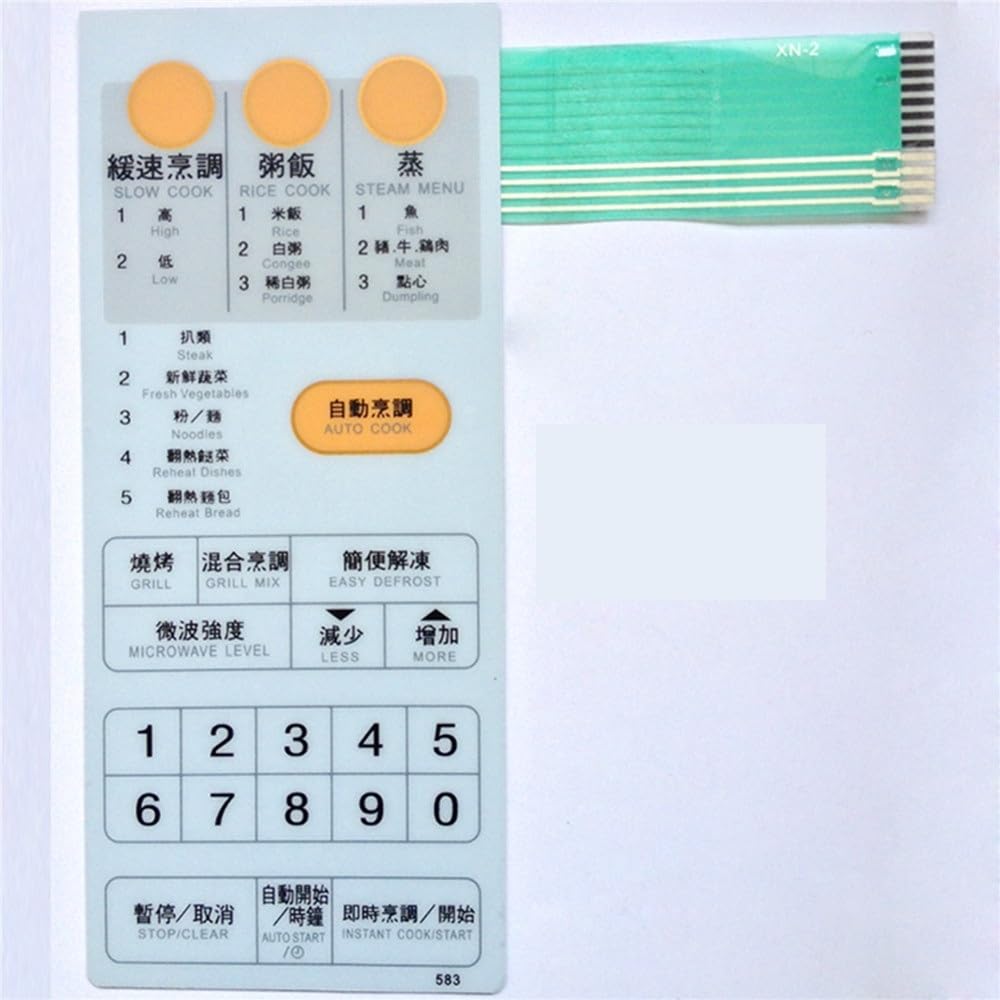
Image showing the ROEDE Replacement Membrane Switch Panel, a touch button interface designed for specific Sharp microwave oven models.
Setup and Installation
Follow these steps carefully to replace your microwave oven's membrane switch panel:
- Disconnect Power: Unplug the microwave oven from the electrical outlet.
- Access Control Panel: Depending on your specific Sharp microwave model (R-6G65, R-583, R-6C65), you may need to remove screws from the back, top, or side panels to access the control board assembly. Refer to your microwave's original service manual if available for precise disassembly instructions.
- Remove Old Panel: Carefully detach the old membrane switch panel. This usually involves peeling it away from the control board housing and disconnecting its ribbon cable from the main control board. Note the orientation of the ribbon cable connector.
- Clean Surface: Ensure the surface where the new panel will be adhered is clean, dry, and free of any residue from the old panel.
- Connect New Panel: Connect the ribbon cable of the new ROEDE Replacement Membrane Switch Panel to the corresponding connector on the microwave's control board. Ensure it is seated firmly and correctly oriented.
- Adhere New Panel: Carefully align the new membrane switch panel with the control panel housing and firmly press it into place. Most panels have an adhesive backing. Ensure all buttons align correctly with their respective positions.
- Reassemble Microwave: Reassemble the microwave oven by reversing the disassembly steps. Ensure all screws are tightened and panels are securely in place.
- Test Functionality: Plug the microwave oven back into the electrical outlet. Test all buttons on the new membrane switch panel to ensure they respond correctly and the microwave functions as expected.
Operating Instructions
The ROEDE Replacement Membrane Switch Panel is designed to replicate the original functionality of your Sharp microwave oven's control interface. Once installed, operate your microwave as you normally would. Each button on the panel corresponds to a specific function (e.g., time set, power level, start, stop, number keys).
- Press buttons firmly but gently.
- Ensure the microwave door is properly closed before attempting to operate.
- If a button does not respond, refer to the Troubleshooting section.
Maintenance
To ensure the longevity and responsiveness of your membrane switch panel:
- Cleaning: Wipe the surface of the panel with a soft, damp cloth. Use mild soap if necessary, then wipe with a clean, damp cloth to remove any soap residue.
- Avoid Harsh Chemicals: Do not use abrasive cleaners, solvents, or harsh chemicals, as these can damage the panel's surface and functionality.
- Prevent Spills: Try to prevent liquids from spilling onto the control panel, as moisture can seep into the electronics and cause damage.
Troubleshooting
| Problem | Possible Cause | Solution |
|---|---|---|
| Buttons are unresponsive or intermittent. | Ribbon cable not fully seated; panel not properly adhered; internal microwave issue. |
|
| Panel does not fit correctly. | Incorrect model purchased; old adhesive residue. |
|
| Microwave does not power on after installation. | Microwave not plugged in; circuit breaker tripped; internal wiring issue. |
|
If you encounter problems not listed here or if the suggested solutions do not resolve the issue, please contact customer support.
Specifications
- Product Model: ROEDE321
- Compatible Microwave Models: Sharp R-6G65, Sharp R-583, Sharp R-6C65
- Dimensions (Approximate):
- Length: 18.7 cm (7.36 inches)
- Width: 8.0 cm (3.15 inches)
- Item Weight: 1.76 ounces (50 grams)
- Material: High-quality membrane material
- Package Includes: 1 x ROEDE Replacement Membrane Switch Panel
Warranty and Support
ROEDE stands behind the quality of its products. While specific warranty details may vary, we are committed to providing reliable replacement parts. For technical assistance, installation questions, or to inquire about warranty coverage, please contact ROEDE customer service through the retailer where the product was purchased or visit our official website.
Please have your product model number (ROEDE321) and purchase information ready when contacting support.