
1. Introduction
This manual provides detailed instructions for the assembly, operation, and maintenance of your EZISE TA204-W Rolling TV Stand. Please read this manual thoroughly before assembly and use to ensure safe and correct operation. This mobile TV stand is designed to accommodate televisions from 32 to 75 inches, supporting a maximum weight of 150 lbs and VESA patterns up to 600x400mm.
2. Safety Information
- Weight Capacity: Do not exceed the maximum weight capacity of 150 lbs (68 kg) for the TV mount.
- TV Size Compatibility: Ensure your TV size is between 32 and 75 inches.
- VESA Compatibility: Verify your TV's VESA mounting pattern is compatible (up to 600x400mm).
- Assembly: Follow all assembly instructions carefully. Improper assembly can lead to product failure or injury.
- Stability: Always lock the wheels when the TV stand is in a stationary position to prevent accidental movement.
- Placement: Avoid placing the stand on uneven surfaces.
- Children: Keep children away from the stand during assembly and ensure they do not climb on or play with the stand once assembled.
3. Parts List
Before beginning assembly, please verify that all components listed below are present and undamaged. Refer to the diagram for visual identification of each part.
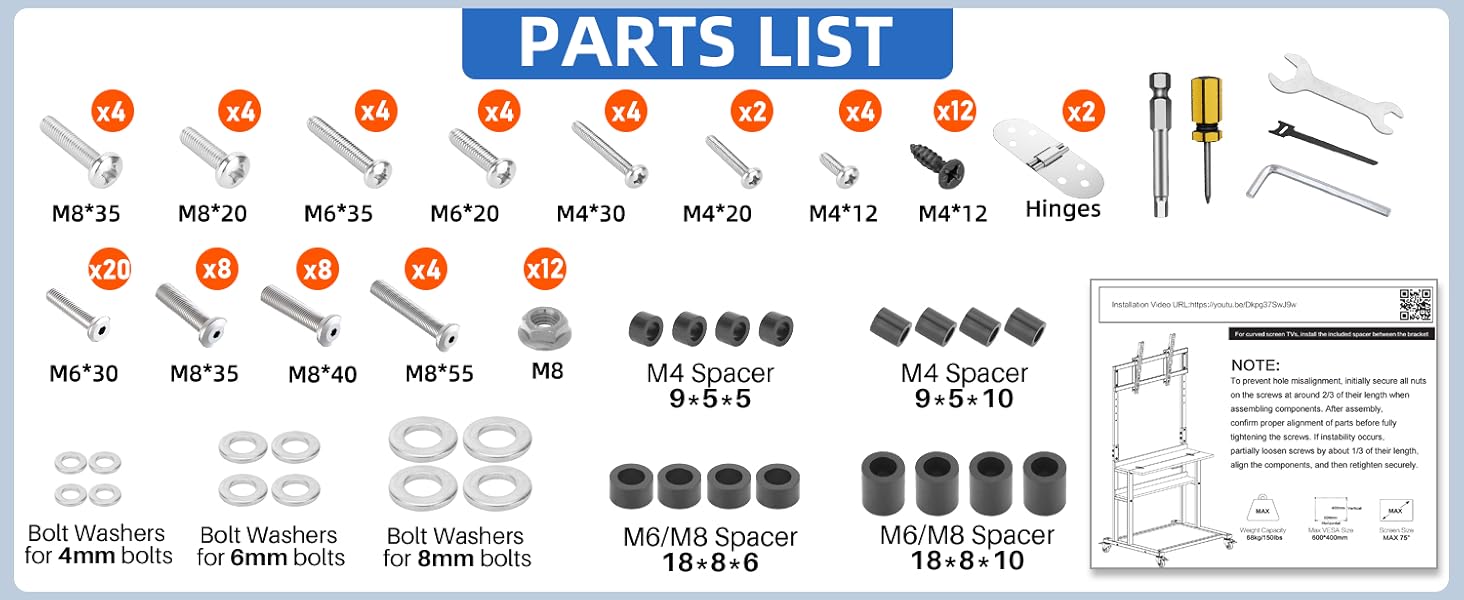
Figure 3.1: Detailed view of all included parts and hardware for the EZISE TA204-W Rolling TV Stand.
Hardware and Components:
- Various bolts (M8*35, M8*20, M6*35, M6*20, M4*30, M4*20, M4*12)
- Self-tapping screws (M4*12)
- Hinges for foldable shelf
- Tools: Screwdriver, wrench, Allen key
- Bolts (M6*30, M8*35, M8*40, M8*55)
- M8 Nuts
- M4 Spacers (9x5x5, 9x5x10)
- M6/M8 Spacers (18x8x6, 18x8x10)
- Bolt Washers for 4mm, 6mm, and 8mm bolts
- Main frame components (vertical posts, base, shelves)
- TV mounting brackets
- Lockable swivel wheels
4. Setup and Assembly
Assembly of the EZISE TA204-W TV stand is designed to be straightforward. All components are labeled, and necessary tools are included. For a visual guide, please refer to the installation video below.
Video 4.1: Installation guide for the EZISE TA204 Mobile TV Cart. This video demonstrates the step-by-step assembly process, helping users complete setup efficiently.
Assembly Steps:
- Attach Wheels to Base: Secure the four 360° swivel wheels to the base frame using the provided hardware. Ensure they are firmly attached.
- Assemble Vertical Posts: Connect the vertical support posts to the base. Pay attention to the orientation of the posts for proper height adjustment mechanism alignment.
- Install Shelves: Attach the three storage shelves to the vertical posts at your desired heights. The top shelf is foldable; ensure hinges are correctly installed.
- Mount TV Brackets: Secure the TV mounting brackets to the vertical posts. These brackets allow for height and tilt adjustments.
- Attach TV to Brackets: Carefully lift your television and attach it to the mounting brackets. Ensure the VESA pattern aligns and all screws are tightened securely. It is recommended to have assistance for this step.
- Cable Management: Utilize the integrated cable management features to organize and conceal wires for a tidy appearance.

Figure 4.2: Diagram illustrating the dimensions, height adjustment range (51-62 inches), 10-degree tilt capability, and VESA compatibility (up to 600x400mm) of the EZISE TA204-W TV Stand.
5. Operating Instructions
5.1 Adjusting TV Height and Tilt
- Height Adjustment: The TV mount offers 6 levels of height adjustment. To adjust, loosen the securing bolts on the vertical posts, slide the TV to the desired height, and re-tighten the bolts firmly.
- Tilt Adjustment: The TV can be tilted up to 10 degrees to optimize viewing angles and reduce glare. Loosen the tilt adjustment knobs/bolts on the TV brackets, set the desired angle, and re-tighten.
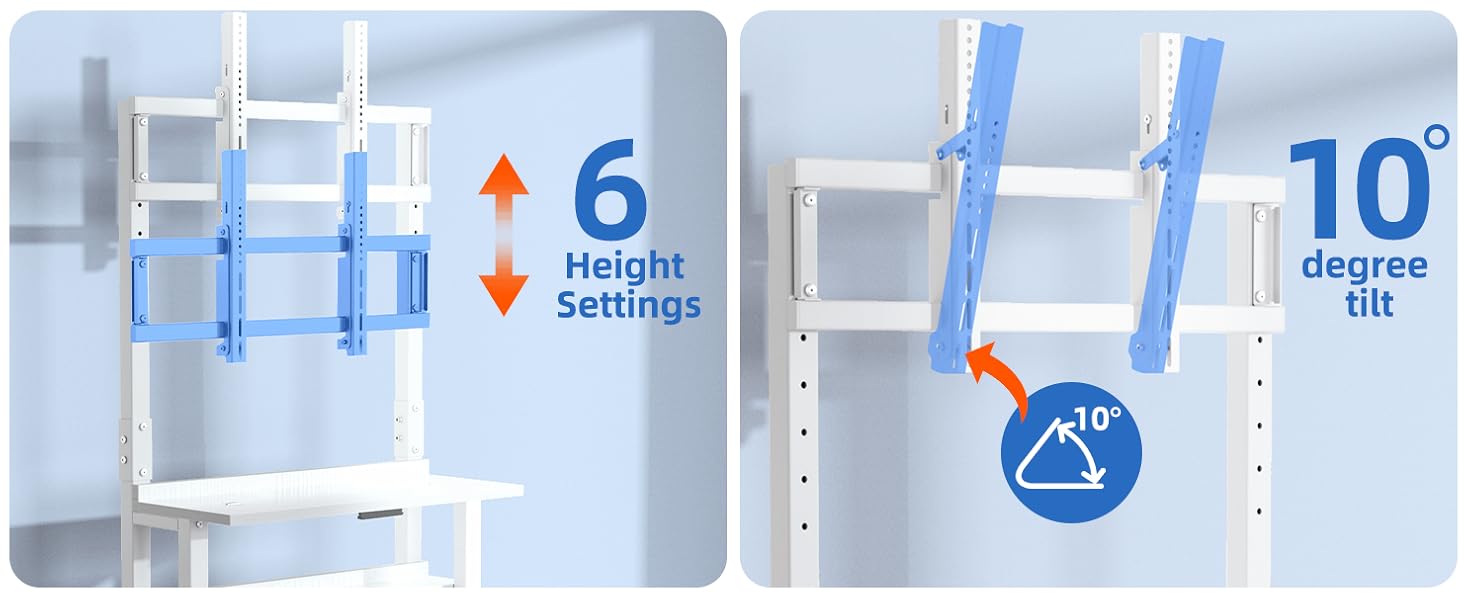
Figure 5.1: Visual representation of the 6 height settings and 10-degree tilt adjustment feature of the TV mount on the EZISE TA204-W stand.
5.2 Using the Rolling Wheels
- Movement: To move the TV stand, unlock all four 360° swivel wheels. Gently push the stand to its new location.
- Locking: Once the stand is in the desired position, engage the locks on all four wheels to secure it in place and prevent accidental rolling.

Figure 5.2: The EZISE TA204-W TV stand being moved across a room, highlighting its portability and the functionality of its 360° swivel wheels.
5.3 Utilizing Storage Shelves
- The stand features three tiers of storage shelves. These can be used for media devices, gaming consoles, books, or decorative items.
- The top shelf is foldable, providing a versatile surface that can be extended when needed and folded away for space-saving.

Figure 5.3: Illustration of the EZISE TA204-W TV stand's multifunction design, showcasing the foldable table, 3-tier storage, and 360° rotate lockable wheels.
5.4 Cable Management
- Integrated cable management clips or channels are provided along the vertical posts. Use these to route and secure power cords and AV cables, maintaining a neat and organized appearance.

Figure 5.4: Rear view of the EZISE TA204-W TV stand demonstrating effective cable management to keep wires organized and tidy.
6. Maintenance
- Cleaning: Wipe the stand with a soft, damp cloth. Avoid abrasive cleaners or solvents that could damage the finish.
- Hardware Check: Periodically check all bolts and screws to ensure they remain tight. Re-tighten if necessary to maintain stability.
- Wheel Care: Keep the wheels free of debris to ensure smooth rolling. Lubricate if needed.
7. Troubleshooting
- Stand is unstable: Ensure all assembly bolts are securely tightened. Verify the stand is on a level surface. Lock all four wheels when stationary.
- TV not level: Check that the TV mounting brackets are installed evenly on the vertical posts. Adjust the tilt mechanism if necessary.
- Wheels not rolling smoothly: Check for debris (hair, dust) caught in the wheels. Clean as needed. Ensure wheel locks are disengaged.
- Difficulty with assembly: Re-check the parts list against the diagram. Review the assembly video and instructions carefully. Contact customer support if issues persist.
8. Specifications
| Feature | Detail |
|---|---|
| Model Number | TA204-W |
| Brand | EZISE |
| Compatible TV Sizes | 32 to 75 inches |
| Maximum Weight Capacity | 150 lbs (68 kg) |
| VESA Compatibility | Up to 600x400mm (e.g., 600x400, 600x200, 400x400, 400x300, 300x300, 300x200, 200x200, 200x100, 100x100) |
| Height Adjustment | 6 levels (51 to 62 inches) |
| Tilt Angle | Up to 10 degrees |
| Storage Shelves | 3-tier, including 1 foldable shelf |
| Mobility | Four 360° swivel lockable wheels |
| Material | Alloy Steel |
| Product Dimensions | 30.94 x 26.62 x 55.51 inches (L x W x H) |
| Item Weight | 29.8 pounds |
9. Warranty and Support
EZISE products are manufactured with quality and durability in mind. For specific warranty details, please refer to the product packaging or the official EZISE website. If you encounter any issues during assembly or operation, or if you have questions about your product, please contact EZISE customer support. Contact information can typically be found on the product packaging or on the EZISE brand store page on Amazon.
Visit the EZISE Store for more information and support resources.