
YOMILUVE B0CZ36ZG5R
YOMILUVE 65-Inch Computer Desk User Manual
Model: B0CZ36ZG5R
Introduction
Thank you for choosing the YOMILUVE 65-Inch Computer Desk. This versatile workstation is designed to enhance your home office or study space with its integrated file cabinet, storage shelves, and a long monitor stand. This manual provides essential information for assembly, operation, maintenance, and troubleshooting to ensure optimal use and longevity of your desk.

Figure 1: Overview of the YOMILUVE 65-Inch Computer Desk.
Important Safety Information
- Always assemble this desk with a partner to ensure stability.
- Keep children and pets away from the work area during assembly.
- This desk has a maximum weight limit of 150 lbs (68 kg) evenly distributed. Do not exceed this limit to maintain the desk's stability and safety.
- Ensure all screws and fasteners are securely tightened before use. Periodically check and re-tighten as needed.
- Do not stand or sit on the desk.
Setup and Assembly
The YOMILUVE Computer Desk is designed for straightforward assembly. All necessary parts, tools, and detailed instructions are included in the package. It is highly recommended to have two people for assembly to ensure stability and ease of construction.
Before You Begin:
- Unpack all components and verify against the parts list provided in your instruction manual.
- Clear a spacious area for assembly, preferably on a soft surface to prevent scratches.
- Familiarize yourself with the assembly steps by reviewing the included diagrams.
Assembly Steps:
Follow the step-by-step instructions and diagrams provided in the separate assembly guide included with your product. Key steps typically involve:
- Assembling the main desk frame.
- Attaching the side cabinets and supports.
- Installing the monitor stand.
- Assembling and inserting the drawers.
- Securing all connections.

Figure 2: Desk Dimensions and Component Layout.
Tip: While a Phillips head screwdriver is sufficient, a drill can significantly save time and effort during assembly, especially for tightening screws. Ensure not to overtighten.
Operating Instructions
Integrated Features:
- Monitor Stand: The full monitor stand provides an elevated surface for your monitors or laptops, promoting an ergonomic viewing angle to reduce eye, neck, and back strain. It also offers additional storage space underneath.
- File Cabinet: The desk includes a file cabinet with three drawers. The bottom drawer is equipped with two sliding hanging rods, suitable for organizing legal, letter, A4, and F4 size files. The top surface of the file cabinet can serve as a convenient printer stand.
- Storage Shelves: The left cabinet features two-tier shelves inside and one open shelf on top. The middle shelf within the cabinet is adjustable, allowing you to customize storage space for various items like books, headphones, or decorative pieces.
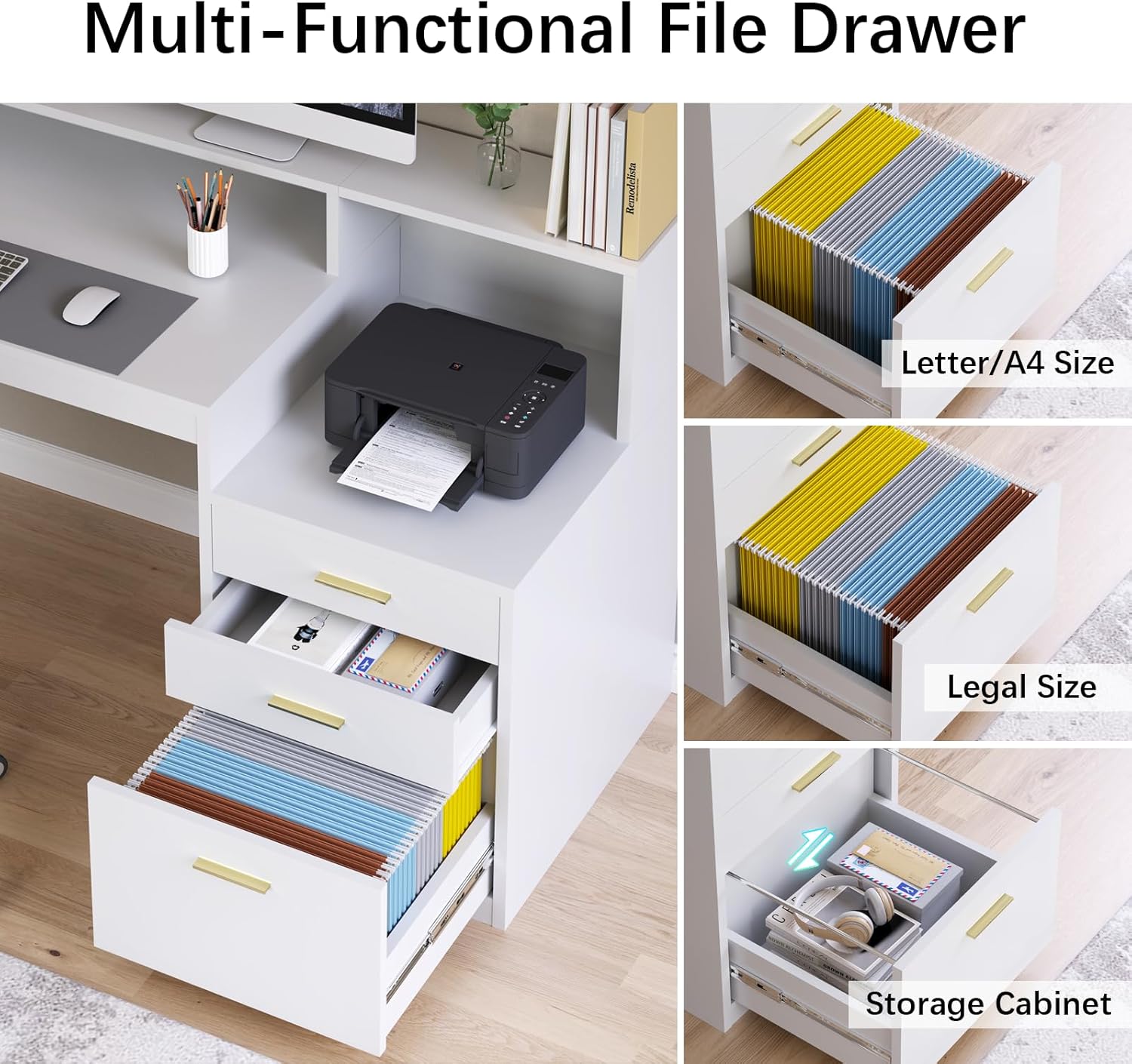
Figure 3: Multi-Functional File Drawer Details.

Figure 4: Adjustable Storage Shelves.
Maintenance and Care
To ensure the longevity and appearance of your YOMILUVE Computer Desk, follow these maintenance guidelines:
- Cleaning: Wipe surfaces with a soft, damp cloth. Avoid harsh chemicals or abrasive cleaners, as they can damage the painted finish.
- Spills: Immediately wipe up any spills to prevent staining or water damage to the engineered wood.
- Protection: Use coasters for drinks and desk pads for writing or heavy objects to protect the surface from scratches and heat.
- Fasteners: Periodically check all screws and connections to ensure they remain tight. Re-tighten if necessary to maintain stability.
- Sunlight Exposure: Avoid prolonged direct sunlight exposure, which can cause fading or discoloration over time.
Troubleshooting
If you encounter any issues with your YOMILUVE Computer Desk, refer to the following common problems and solutions:
| Problem | Possible Cause | Solution |
|---|---|---|
| Desk is wobbly or unstable. | Loose fasteners or uneven floor. | Ensure all screws and bolts are securely tightened. Check if the desk is on a level surface; use furniture pads if needed to stabilize. |
| Drawers do not slide smoothly. | Improper installation of drawer slides or obstruction. | Verify that drawer slides are installed correctly and aligned. Check for any debris or objects obstructing the tracks. |
| Missing parts during assembly. | Packaging error or lost during unpacking. | Carefully check all packaging materials. If parts are still missing, contact YOMILUVE customer support with your purchase details. |
| Surface scratches or chips. | Impact during transport or use. | For minor scratches, touch-up paint pens matching the desk color may be used. Use desk pads and coasters to prevent future damage. |
If the problem persists or is not listed here, please contact YOMILUVE customer support for assistance.
Specifications
- Brand: YOMILUVE
- Model: B0CZ36ZG5R
- Product Dimensions (D x W x H): 21.7" x 65" x 35.4"
- Color: White
- Material: Engineered Wood
- Finish Type: Painted
- Maximum Weight Recommendation: 150 Pounds (evenly distributed)
- Number of Drawers: 3 (including 1 file drawer)
- Number of Shelves: 3 (adjustable)
- Included Components: Full monitor stand, file cabinet with 3 drawers
- Assembly Required: Yes
- Recommended Number of People for Assembly: 2
Warranty and Support
YOMILUVE is committed to providing high-quality products. For any questions, concerns, or assistance with your product, please contact YOMILUVE customer support. Please have your model number (B0CZ36ZG5R) and purchase date ready when contacting support.
While specific warranty details are not provided in this manual, standard manufacturer warranties typically cover defects in materials and workmanship for a limited period from the date of purchase. Please refer to your purchase documentation or contact the seller for detailed warranty information.
For further assistance, you may visit the official YOMILUVE store on Amazon: YOMILUVE Store
Ask a question about this manual
Ask about setup, troubleshooting, compatibility, parts, safety, or missing instructions. Manuals+ will review the question and use this page’s manual context to help answer it.