
1. Introduction
Thank you for choosing the VBESTLIFE G61 Mini Mechanical Wired RGB Gaming Keyboard. This compact 61-key keyboard is designed for both gaming and office use, featuring a mechanical feel, customizable RGB backlighting, and an ergonomic design for comfortable long-term use. This manual provides essential information for setting up, operating, maintaining, and troubleshooting your new keyboard.
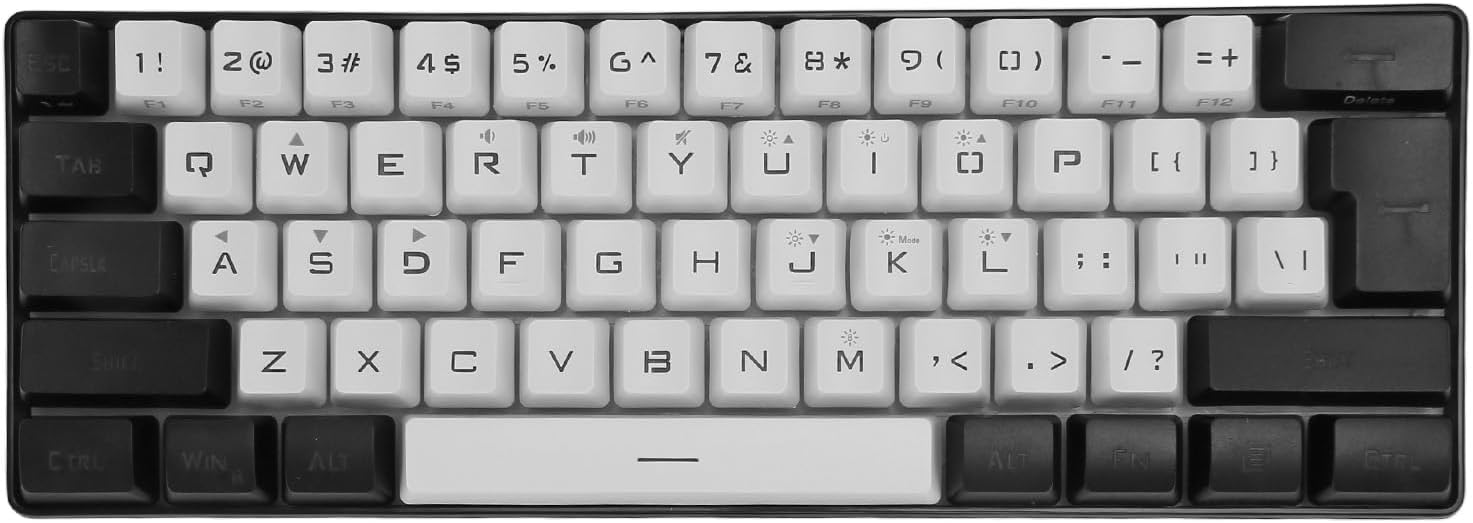
Image 1.1: Overview of the VBESTLIFE G61 Mini Mechanical Wired RGB Gaming Keyboard.
2. Setup
The VBESTLIFE G61 keyboard is designed for simple plug-and-play functionality, requiring no additional drivers or software for basic operation.
2.1 Package Contents
- VBESTLIFE G61 Mini Mechanical Wired RGB Gaming Keyboard
- USB Type-C Cable
- User Manual (this document)
2.2 Connecting the Keyboard
- Locate the USB Type-C port on the back or side of the keyboard.
- Connect one end of the provided USB Type-C cable to the keyboard.
- Connect the other end of the USB cable to an available USB port on your computer (PC or laptop).
- The keyboard will automatically be recognized by your operating system. The RGB backlighting will illuminate, indicating successful connection.

Image 2.1: The G61 keyboard connected to a laptop via its USB-C cable.

Image 2.2: The G61 keyboard and its detachable USB-C cable.
2.3 Compatibility
The keyboard is compatible with a wide range of operating systems, including Windows 98, NT, 2000, XP, 7, 8, 10, and OS X.
3. Operating Instructions
The G61 keyboard features a 61-key QWERTY layout and various functions accessible via key combinations.
3.1 RGB Backlighting
The keyboard offers multiple RGB lighting modes and LED backlighting. You can customize the brightness and breathing frequency to your preference.
- Changing RGB Modes: Use the designated key combination (often Fn + a specific key, refer to keycaps for symbols) to cycle through different RGB lighting effects. The keyboard supports 6 backlight effects and 8 backlight color switching options, as well as 11 different RGB lighting modes.
- Adjusting Brightness: Use the designated key combination (e.g., Fn + Up/Down arrow if available, or specific keys with brightness symbols) to increase or decrease the backlight brightness.
- Adjusting Breathing Frequency: Use the designated key combination (e.g., Fn + Left/Right arrow if available, or specific keys with speed symbols) to change the speed of dynamic lighting effects.

Image 3.1: The keyboard showcasing a dynamic RGB lighting effect.

Image 3.2: Examples of various RGB backlight modes available on the keyboard.
3.2 Key Functions and Layout
The G61 features a compact 61-key layout, providing 99% functionality in a 90% compact form factor, saving desk space. Many functions are accessed via the Function (Fn) key in combination with other keys.

Image 3.3: The compact 61-key layout, designed for efficiency and space-saving.
3.3 Ergonomic Design
The keyboard is ergonomically designed with a high and low key profile and an adjustable support stand. This allows you to set an optimal typing angle, minimizing hand fatigue during extended use.

Image 3.4: The ergonomic key height design for comfortable typing.

Image 3.5: The keyboard's side profile demonstrating its ergonomic angle.
4. Maintenance
Proper maintenance ensures the longevity and optimal performance of your keyboard.
- Cleaning: Regularly clean the keyboard with a soft, dry cloth. For deeper cleaning, use compressed air to remove dust and debris from between the keycaps. For stubborn dirt, a slightly damp cloth with a mild cleaning solution can be used, ensuring no liquid enters the keyboard.
- Keycap Removal (Hot-Swappable): This keyboard features hot-swappable switches. If you need to remove keycaps or switches, use a keycap puller and switch puller (not included unless specified) to avoid damage.
- Storage: Store the keyboard in a cool, dry place away from direct sunlight and extreme temperatures.
- Avoid Spills: Liquids can severely damage the keyboard's internal components. Exercise caution when using beverages near the keyboard.
5. Troubleshooting
If you encounter issues with your VBESTLIFE G61 keyboard, refer to the following common solutions:
- Keyboard Not Responding:
- Ensure the USB Type-C cable is securely connected to both the keyboard and the computer.
- Try connecting the keyboard to a different USB port on your computer.
- Test the keyboard on another computer to determine if the issue is with the keyboard or the original computer.
- Restart your computer.
- Backlight Not Working or Incorrect:
- Ensure the keyboard is properly connected and receiving power.
- Cycle through the RGB modes using the designated key combinations (e.g., Fn + key) to see if the backlight reactivates or changes.
- Adjust the brightness settings using the designated key combinations.
- Keys Not Registering:
- Clean the affected key area to remove any debris that might be obstructing the switch.
- If the switch is hot-swappable, carefully remove and re-insert the switch to ensure it is seated correctly.
6. Specifications
| Feature | Specification |
|---|---|
| Model Number | VBESTLIFE9rseu1qd20-11 |
| Brand | VBESTLIFE |
| Connectivity Technology | USB-C Wired |
| Number of Keys | 61 |
| Keyboard Layout | QWERTY |
| Switch Type | Mechanical |
| Special Features | RGB LED Backlight, Hot-Swappable Switches |
| Recommended Uses | Office, Gaming, Mobile Computing |
| Compatible Devices | Laptop, PC |
| Compatible Operating Systems | Windows (98, NT, 2000, XP, 7, 8, 10), OS X |
| Power Source | USB |
| Operating Current | 100 mA |
| Operating Voltage | DC 5V |
| Product Dimensions (L x W x H) | 28.9L x 10.1W x 3.4H cm (11.36L x 3.9W x 1.3H inches) |
| Material | Acrylonitrile Butadiene Styrene (ABS) |

Image 6.1: Dimensions of the VBESTLIFE G61 Mini Mechanical Wired RGB Gaming Keyboard.
7. Warranty and Support
7.1 Warranty Information
This product comes with a 2-year manufacturer's warranty. Please retain your proof of purchase for warranty claims. The warranty covers defects in materials and workmanship under normal use. It does not cover damage caused by misuse, accidents, unauthorized modifications, or normal wear and tear.
7.2 Customer Support
For technical assistance, troubleshooting, or warranty inquiries, please contact your retailer or the VBESTLIFE customer support team. Refer to the product packaging or the retailer's website for specific contact details.