1. Introduction
This manual provides essential information for the setup, operation, and maintenance of your Toshiba 32LF3F63DAZ Fire TV. This 32-inch Full HD television offers a comprehensive viewing experience with advanced picture technologies and smart features.
The Toshiba 32LF3F63DAZ Fire TV features a Full HD display with HDR10 support, including HLG, TRU Resolution, and Micro Dimming technologies for enhanced contrast, natural colors, and detailed images. An integrated triple tuner (DVB-C/T2/S2) allows direct reception of satellite, cable, or terrestrial broadcasts without additional equipment. Connectivity options include 2 HDMI ports (CEC + ARC), a USB port with media player functionality, Wi-Fi, and Bluetooth. Powered by Fire OS, this smart TV offers access to various applications such as Prime Video, Netflix, YouTube, DAZN, and Disney+. Voice control is available through the integrated Alexa microphone.

Front view of the Toshiba Fire TV displaying the Fire TV home screen with various streaming apps and content.
2. Setup
2.1 Unpacking and Assembly
Carefully remove the TV from its packaging. Ensure all components are present: TV unit, stand, remote control, and 2 AAA batteries. Follow the instructions below for stand assembly or wall mounting.
Stand Assembly:
- Place the TV screen-down on a soft, flat surface to prevent scratches.
- Align the stand with the mounting holes on the bottom of the TV.
- Secure the stand using the provided screws.
Wall Mounting (VESA):
This TV supports VESA M4 75x75 mounting. Ensure you use a compatible wall mount bracket (sold separately) and follow its installation instructions carefully. Consult a professional if unsure.
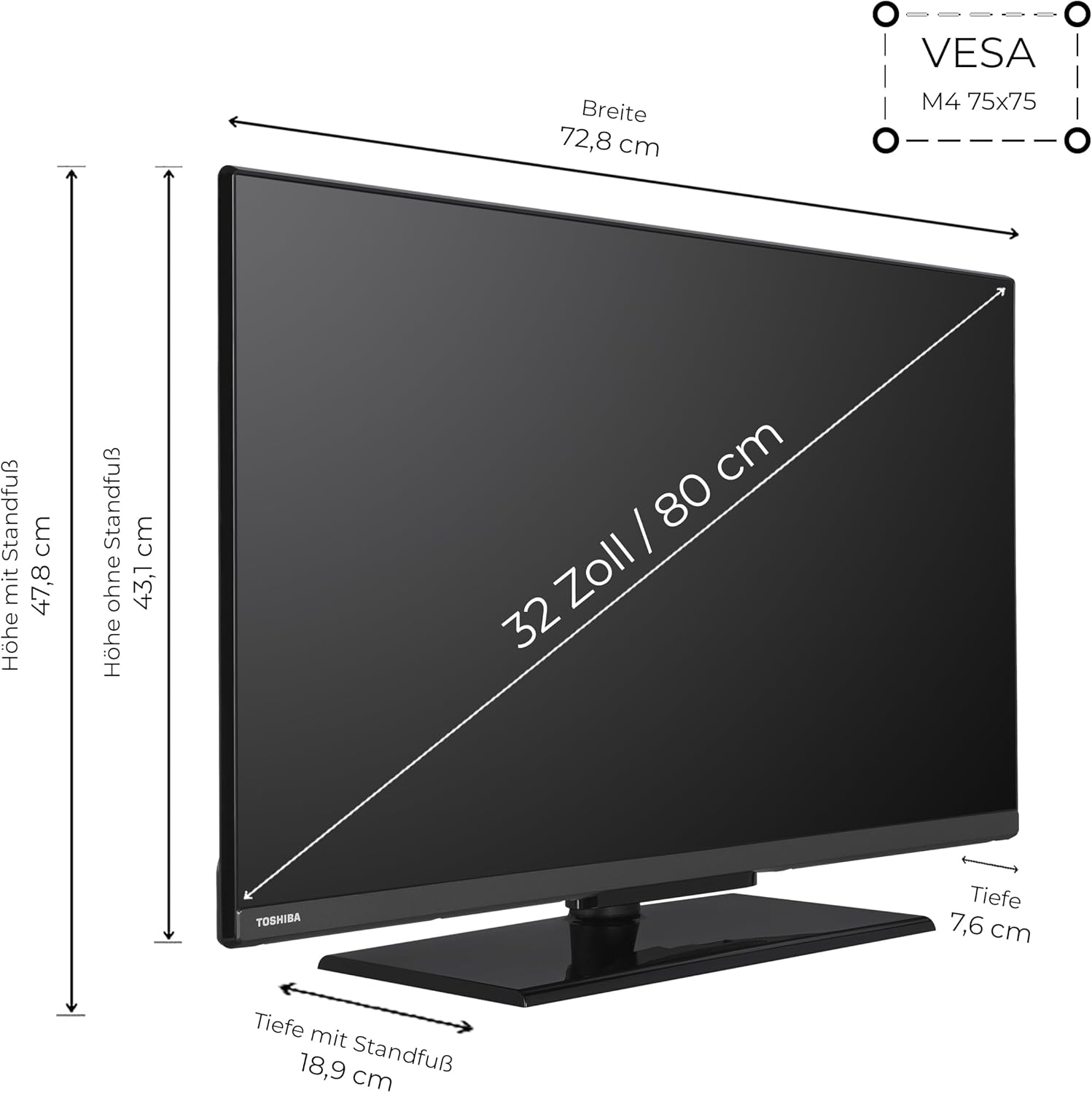
Diagram illustrating the physical dimensions of the 32-inch Toshiba Fire TV, including width (72.8 cm), height with stand (47.8 cm), height without stand (43.1 cm), depth with stand (18.9 cm), depth (7.6 cm), screen diagonal (32 inches / 80 cm), and VESA mounting specifications (M4 75x75).
2.2 Connecting Peripherals
Connect your external devices to the appropriate ports on the TV. Refer to the diagram below for port locations.
- HDMI Ports (2x): For connecting devices like game consoles, Blu-ray players, or set-top boxes. HDMI 1 supports ARC (Audio Return Channel).
- USB Port (1x): For connecting USB storage devices to play media files.
- Digital Audio Out: For connecting to external audio systems.
- Antenna (RF/F): For connecting a terrestrial or cable antenna.
- LAN Port: For a wired internet connection.
- CI Slot: For inserting a Common Interface module (e.g., for encrypted channels).
- Headphone Jack: For connecting headphones.

Close-up view of the TV's rear panel, highlighting all available connection ports including 2 HDMI, 1 USB, Digital Audio Out, Antenna (RF/F), Headphone jack, Bluetooth, LAN, and CI Slot.
2.3 Initial Power On and Network Setup
- Plug the power cord into the TV and then into a wall outlet.
- Press the power button on the remote control or TV.
- Follow the on-screen instructions to select your language, country, and connect to your Wi-Fi network.
- Sign in with your Amazon account or create a new one to access Fire OS features.
3. Operating the TV
3.1 Remote Control Functions
The included remote control (CT-8571) provides full control over your Fire TV. It features dedicated buttons for popular streaming services and an integrated microphone for Alexa voice commands.
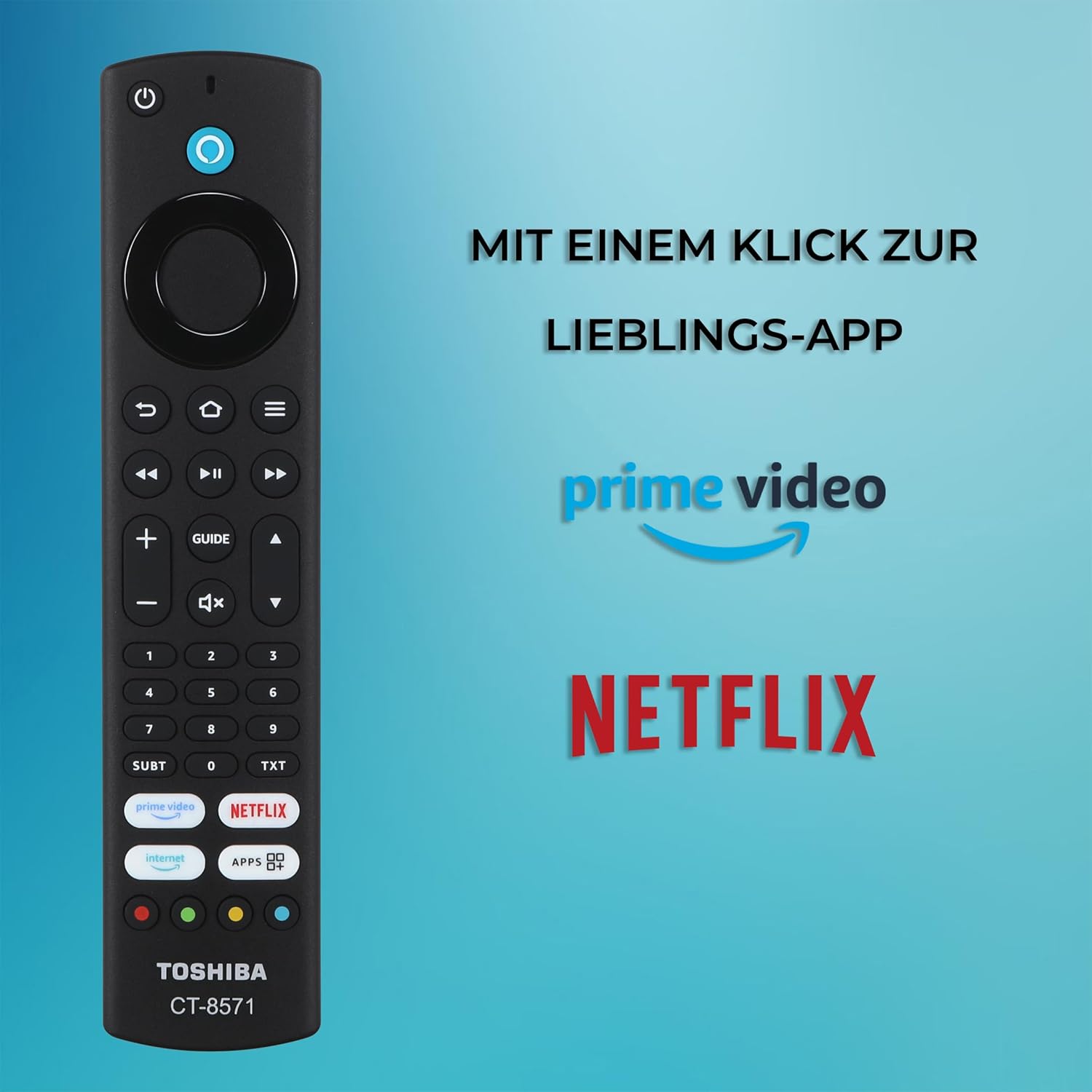
Image of the Toshiba remote control (CT-8571) featuring dedicated buttons for Prime Video and Netflix, illustrating quick access to streaming applications.
3.2 Fire OS Navigation
The Fire OS interface allows you to browse content, launch applications, and manage settings. Use the directional pad and select button on your remote to navigate.
- Home Screen: Access recommended content, recently used apps, and input sources.
- Apps: Download and manage applications from the Amazon Appstore.
- Settings: Adjust picture, sound, network, and device preferences.
3.3 Alexa Voice Control
Your TV has Alexa built-in. Press the Alexa button on your remote and speak into the microphone to issue commands.

A user interacting with the TV using Alexa voice commands, demonstrating how to access streaming services hands-free. Alexa built-in allows direct access to favorite streaming services via voice command.
- "Alexa, open Netflix."
- "Alexa, switch to HDMI 1."
- "Alexa, turn up the volume."
- "Alexa, search for action movies."
4. Key Features
- Picture Quality: Experience Full HD resolution with HDR10, HLG, TRU Resolution, and Micro Dimming for vibrant colors and sharp contrast.
- Smart TV Features: Access a wide range of streaming services and applications via Fire OS, including Prime Video, Netflix, YouTube, DAZN, and Disney+.
- Voice Control: Utilize the integrated Alexa microphone for hands-free control of TV functions, such as changing channels, adjusting volume, and launching applications.
- Connectivity: Connect external devices using 2 HDMI ports (CEC + ARC), a USB port, Wi-Fi, and Bluetooth.
- Integrated Tuner: The built-in triple tuner supports DVB-T2 (terrestrial), DVB-C (cable), and DVB-S2 (satellite) reception, eliminating the need for an external receiver.
4.1 TRU Resolution & Micro Dimming
These technologies work together to enhance your viewing experience:
- TRU Resolution: Upscales non-Full HD content to near Full HD quality, improving clarity and detail.
- TRU Micro Dimming: Optimizes black levels and precisely calculates brightness for every area of the display, resulting in stronger contrast and deeper blacks.

Visual explanation of TRU Resolution and TRU Micro Dimming technologies, detailing how they enhance image clarity, contrast, and optimize black levels and brightness across the screen.
5. Maintenance
5.1 Cleaning the TV
- Always unplug the TV before cleaning.
- Use a soft, dry, lint-free cloth to wipe the screen and cabinet.
- For stubborn marks, lightly dampen the cloth with water or a mild, non-abrasive screen cleaner. Do not spray cleaner directly onto the screen.
- Avoid using alcohol, benzene, thinners, or other volatile substances.
5.2 Software Updates
Your Fire TV will automatically check for and install software updates when connected to the internet. Ensure your TV is connected to a stable network for optimal performance and security.
6. Troubleshooting
If you encounter issues with your TV, refer to the following common solutions:
- No Power: Check if the power cord is securely plugged into both the TV and the wall outlet. Try a different outlet.
- No Picture/Sound: Ensure the correct input source is selected. Check all cable connections (HDMI, antenna).
- Remote Control Not Working: Replace the AAA batteries. Ensure there are no obstructions between the remote and the TV.
- Network Connection Issues: Restart your router and modem. Go to TV settings to re-establish the Wi-Fi connection. For wired connections, ensure the LAN cable is properly connected.
- App Not Loading: Try restarting the app or clearing its cache in the TV settings. If the issue persists, try reinstalling the app.
- Picture Quality Issues: Adjust picture settings (brightness, contrast, color) in the TV menu. Ensure your content source is of high quality.
If problems persist, perform a factory reset (Settings > Device & Software > Reset to Factory Defaults). Note that this will erase all personal data and settings.
7. Specifications
| Feature | Specification |
|---|---|
| Brand | Toshiba |
| Model Number | 32LF3F63DAZ |
| Screen Size | 32 Inches (80 cm diagonal) |
| Display Technology | LED-LCD |
| Resolution | Full HD (1920x1080 pixels) |
| Aspect Ratio | 16:9 |
| Refresh Rate | 50 Hz |
| Operating System | FireOS |
| Special Features | Fire TV, TRU Micro Dimming, TRU Resolution, HDR10, HLG, Alexa Built-In |
| Connectivity | 2x HDMI (CEC + ARC), 1x USB, Wi-Fi, Bluetooth, LAN, Digital Audio Out, Antenna (RF/F), Headphone, CI Slot |
| Compatible Devices | Laptop, game console, speakers, smartphone, tablet |
| Product Dimensions (with stand) | 18.9D x 72.8W x 47.8H cm |
| Color | Black |
| Included Components | User manual, TV with stand, Remote control with 2 AAA batteries |
| Energy Efficiency Class (SDR) | E (26 kWh/1000h) |
| Energy Efficiency Class (HDR) | G (45 kWh/1000h) |
| EPREL Database Link | View EPREL Data |
7.1 Optimal Viewing Distance
The recommended viewing distance for your 32-inch Full HD TV is approximately 160 cm.
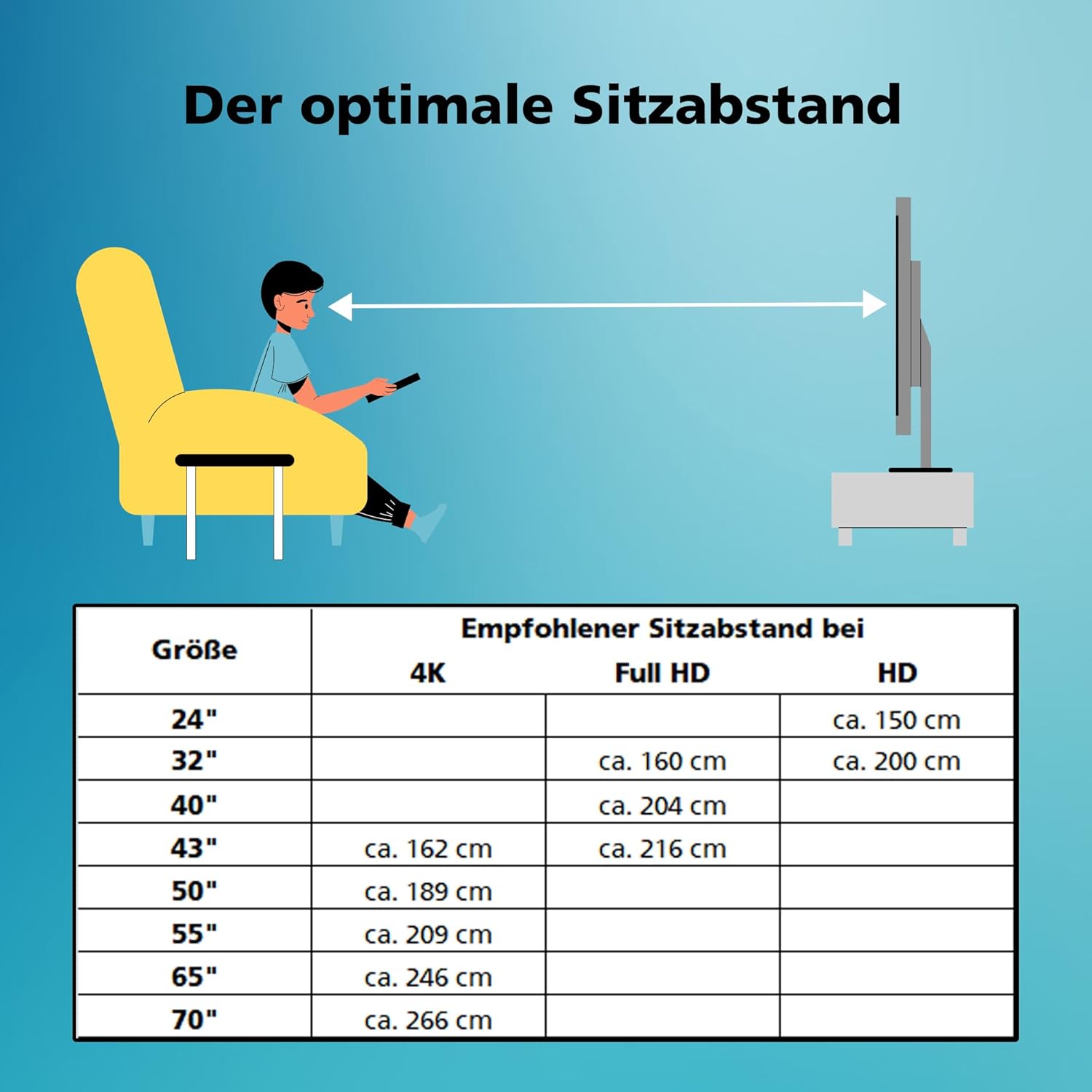
Table showing recommended viewing distances for different TV screen sizes and resolutions (4K, Full HD, HD), indicating that for a 32-inch Full HD TV, the optimal distance is approximately 160 cm.
8. Warranty and Support
For technical support or warranty inquiries, please contact Toshiba customer service. Information regarding software updates and spare parts availability is as follows:
- Spare Parts Availability: 7 Years
- Software Updates Guaranteed Until: Information not available


