
1. Introduction
This manual provides essential instructions for the safe and effective use of your VANPO 1/4 inch 3-25 Nm Torque Wrench Set. Please read this manual thoroughly before operation to ensure proper usage, prevent damage to the tool or workpiece, and ensure personal safety. Keep this manual for future reference.
2. Product Components
Your VANPO Torque Wrench Set includes a comprehensive collection of tools designed for precision fastening. The 49-piece set typically includes:
- 1 x 1/4 inch Torque Wrench
- 1 x 1/4 inch Extension Rod (75 mm)
- 1 x 1/4 inch - 3/8 inch Adapter
- 1 x 1/4 inch Bit Adapter
- 1 x 1/4 inch Quick Change Bit Adapter
- 14 x 1/4 inch Sockets: 4, 4.5, 5, 5.5, 6, 7, 8, 9, 10, 11, 12, 13, 14, 15 mm
- 10 x 1/4 inch Long Bits: H2, H2.5, H3, H4, H5, H6, T10, T15, T25, PH2
- 20 x 1/4 inch Short Bits: H1.5, H2, H2.5, H3, H4, H5, H6, HPH1, PH2, H10, T6, T7, T8, T9, T10, T15, T20, T25, T30
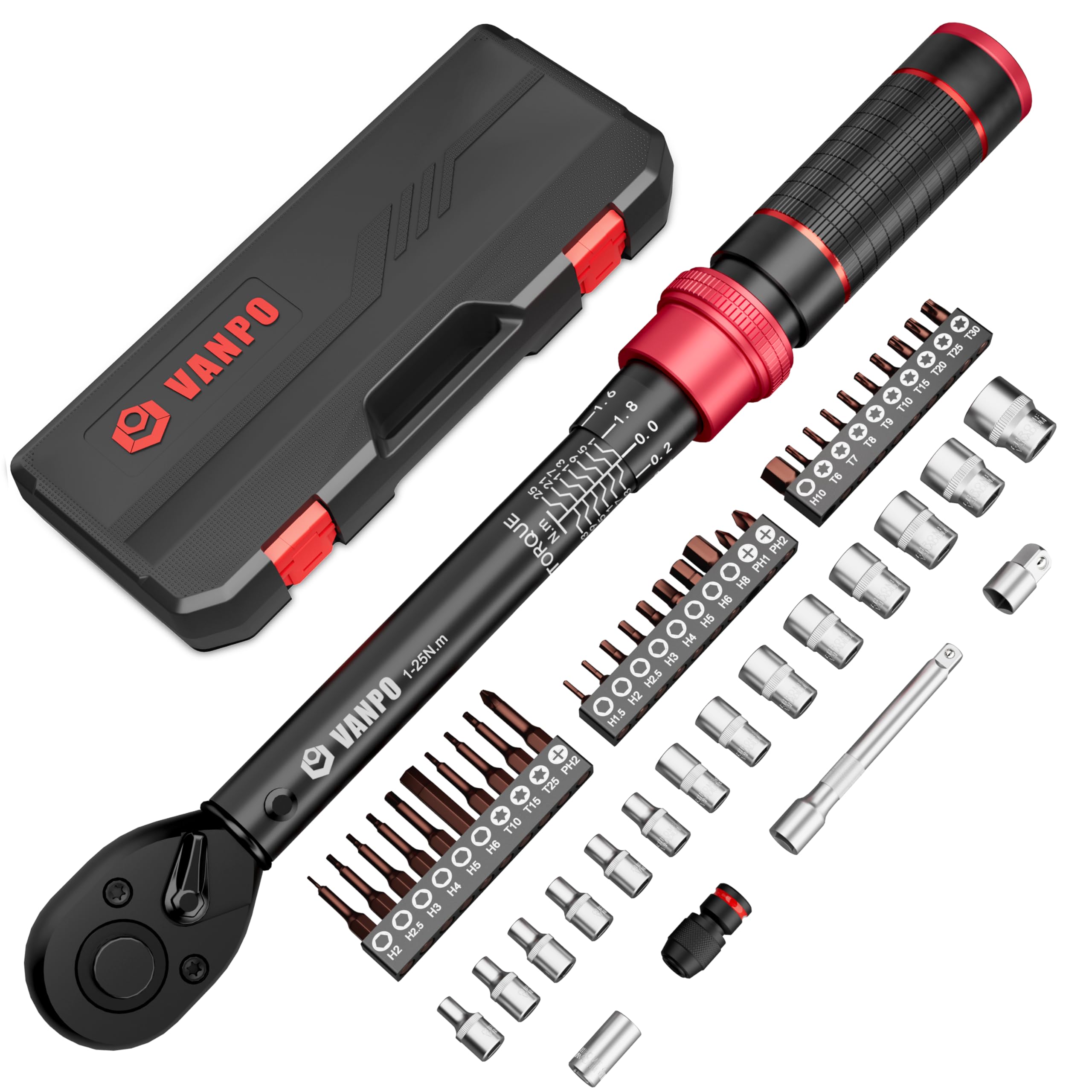
Figure 2.1: Overview of the 49-piece VANPO Torque Wrench Set components.
3. Safety Information
Always prioritize safety when using any tools. Failure to follow safety guidelines can result in injury or damage to equipment.
- Read the Manual: Understand all instructions before operating the torque wrench.
- Wear Safety Gear: Always wear appropriate personal protective equipment, such as safety glasses.
- Proper Use: Use the torque wrench only for its intended purpose of applying precise torque to fasteners. Do not use it as a standard ratchet or for breaking loose seized fasteners.
- Secure Workpiece: Ensure the item you are working on is stable and secure to prevent movement during operation.
- Audible Click: When the preset torque value is reached, the wrench will emit a clear "click" sound, accompanied by a distinct hand vibration. This indicates that the target torque has been achieved, and you should stop applying force immediately.
- Low Torque Settings: For very low torque settings, the "click" sound may be quieter. Operate in a quiet environment to ensure you can hear and feel the click.
- Storage: After use, always reset the torque wrench to its minimum torque setting (3 Nm) before storing it. This relieves tension on the internal spring, preserving the wrench's accuracy over time.
- Inspection: Before each use, inspect the torque wrench and its accessories for any signs of damage or wear. Do not use damaged tools.

Figure 3.1: Visual representation of the audible 'click' and tactile feedback indicating target torque achievement.
4. Setup and Operation
4.1. Setting the Torque Value
The VANPO torque wrench allows for precise torque adjustment within its 3-25 Nm range. Follow these steps to set the desired torque:
- Lock: Ensure the locking knob at the base of the handle is in the locked position (pushed in) before making adjustments.
- Unlock: Pull down the locking knob at the base of the handle to unlock the adjustment mechanism.
- Set: Rotate the handle to align the desired main torque value (e.g., 10 Nm) on the main scale with the indicator line. Then, fine-tune by rotating the handle further until the desired decimal value (e.g., 0.0, 0.2, 0.4) on the micrometer scale aligns with the main scale's indicator line. For example, to set 10.4 Nm, align '10' on the main scale and '0.4' on the micrometer scale.
- Lock: Push the locking knob back into the locked position to secure the set torque value.

Figure 4.1: Steps for setting the torque value on the VANPO torque wrench.
4.2. Reversible Ratchet Head
The torque wrench features a 72-tooth reversible ratchet head, allowing for both clockwise (CW) and counter-clockwise (CCW) operation. This provides flexibility for various fastening and loosening tasks, though torque should only be applied in the specified direction for tightening.
- Direction Adjustment: A small lever on the ratchet head allows you to switch the direction of rotation.
- Quick Release: The head is equipped with a quick-release button for fast and easy installation and removal of sockets and bits.

Figure 4.2: Reversible ratchet head for clockwise and counter-clockwise use.
4.3. General Operation
Once the torque is set and the appropriate accessory is attached:
- Place the socket or bit onto the fastener.
- Apply smooth, steady force to the wrench handle. Avoid sudden jerks.
- Continue applying force until you hear and feel the distinct "click."
- Stop applying force immediately after the click. Do not overtighten.
5. Maintenance
Proper maintenance ensures the longevity and accuracy of your torque wrench.
- Cleaning: Wipe the wrench clean with a dry, soft cloth after each use. Do not use solvents or harsh chemicals, as these can damage the finish or internal components.
- Storage: Always reset the torque wrench to its minimum torque value (3 Nm) before storing it. This reduces stress on the internal spring mechanism, helping to maintain calibration accuracy over time. Store the wrench in its protective case in a dry, clean environment.
- Calibration: Torque wrenches are precision instruments and may require periodic recalibration, especially after heavy use or if dropped. Consult a professional calibration service if you suspect accuracy issues.
- Lubrication: The internal mechanism is factory-lubricated. Do not attempt to lubricate internal parts yourself, as this can affect calibration.
6. Troubleshooting
If you encounter issues with your torque wrench, consider the following:
- Click Noise Too Quiet: If you are setting a low torque value, the click noise may be subtle. Ensure you are in a quiet environment and pay close attention to the tactile vibration in your hand. If still in doubt, test on a non-critical fastener.
- Inaccurate Readings: Ensure the torque value is correctly set and locked. Verify that the wrench is being used in the correct tightening direction. If accuracy issues persist, the wrench may require professional recalibration.
- Stuck Adjustment: Ensure the locking knob is fully disengaged (pulled down) before attempting to adjust the torque setting. Do not force the adjustment mechanism.
7. Specifications
| Specification | Detail |
|---|---|
| Brand | VANPO |
| Model Number | VP001-25B |
| Drive Size | 1/4 inch |
| Torque Range | 3-25 Nm |
| Accuracy | ±3% |
| Ratchet Teeth | 72-tooth |
| Material | Alloy Steel (40Cr with CR-MO steel handle) |
| Item Weight | 1.31 kg |
| Head Style | Square Drive |
| Operation Mode | Mechanical |
8. Warranty and Support
For warranty information or technical support, please refer to the documentation included with your purchase or contact VANPO customer service through the retailer where the product was purchased. Keep your purchase receipt as proof of purchase.

