
Introduction
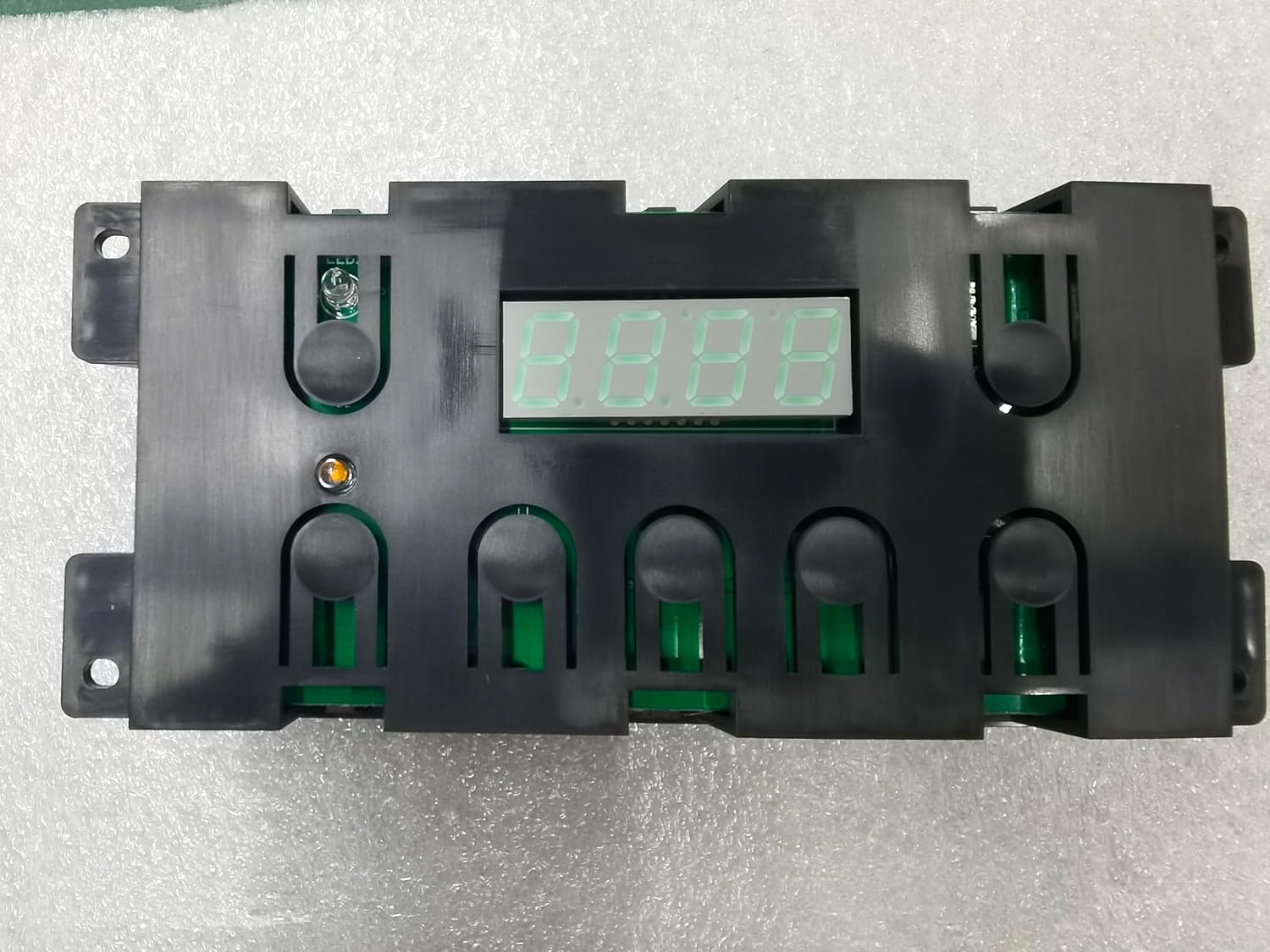
This manual provides essential information for the installation, operation, and maintenance of the Generic 316455500 Oven Range Control Board. This component serves as an upgraded replacement for original part number 316455500, commonly found in Frigidaire and Electrolux oven ranges. It integrates the clock, timer, and oven control functions into a single unit.
Safety Information
WARNING: Before attempting any installation or repair, always disconnect power to the appliance at the circuit breaker or fuse box. Failure to do so can result in serious injury or electrical shock.
- Ensure the appliance is completely powered off and unplugged before beginning work.
- Wear appropriate personal protective equipment, such as gloves and safety glasses.
- If you are unsure about any step, consult a qualified appliance technician.
- Keep children and pets away from the work area.
Compatibility Verification
This control board is designed as a direct replacement for original part number 316455500. To ensure compatibility with your specific oven range model, locate the model number label on your appliance. This label is typically found inside the oven door frame, on the back of the range, or in a storage drawer. Verify that your appliance requires part number 316455500 before proceeding with installation.

Setup and Installation
The following steps outline the general procedure for replacing the oven control board. Specific steps may vary slightly depending on your oven range model. Always refer to your appliance's service manual if available.
- Disconnect Power: As stated in the safety section, turn off the power to your oven range at the main circuit breaker.
- Access the Control Board: Depending on your model, you may need to remove screws from the back panel or the control panel assembly to gain access to the existing control board.
- Document Wiring: Before disconnecting any wires, take clear photos or make a diagram of the existing wiring connections. This will aid in correct reassembly.
- Disconnect Wires: Carefully disconnect all wire harnesses and connectors from the old control board.
- Remove Old Board: Unscrew or unclip the old control board from its mounting brackets.
- Install New Board: Position the new Generic 316455500 control board and secure it with the original screws or clips.
- Connect Wiring: Reconnect all wire harnesses and connectors to the new board, using your photos or diagram as a guide. Ensure all connections are secure.
- Install Overlay: This replacement board includes both a black and a white overlay. Select the overlay that matches your appliance's aesthetic and carefully apply it to the control panel.
- Reassemble Appliance: Reattach any panels or covers that were removed during the process.
- Restore Power: Turn the power back on at the circuit breaker.

Operation
The 316455500 control board features a 7-button interface and a digital display. Its functions include:
- Current Time Display: Shows the current time.
- Cooking/Baking Details: Displays information related to active cooking or baking cycles.
- Countdown Timer: Can be set to function as a kitchen timer.
- Oven Temperature Display: Shows the internal oven temperature when the timer is not active.
- Bake Function: Initiates the baking cycle.
- Broil Function: Initiates the broiling cycle.
- Timer On/Off: Activates or deactivates the timer function.
- Clock: Used for setting the current time.
- Clear/Off: Cancels current settings or turns off the oven.
- Up/Down Arrows (^ / V): Used to adjust time, temperature, or navigate settings.

Maintenance
The Generic 316455500 control board is designed for durability and requires minimal maintenance. To ensure its longevity:
- Keep the control panel clean using a soft, damp cloth. Avoid abrasive cleaners or excessive moisture.
- Ensure proper ventilation around the appliance to prevent overheating of internal components.
- Periodically check for loose connections if the appliance is moved or serviced.
Troubleshooting
If you experience issues with your oven range after installing the control board, consider the following:
| Symptom | Possible Cause | Solution |
|---|---|---|
| Display lights are faded or numbers are not lighting up. | Faulty control board or display component. | If this issue persists after installation, the control board may need replacement. Ensure all connections are secure. |
| Oven functions (bake/broil) are not working. | Incorrect wiring, faulty heating element, or issue with the control board. | Verify all wiring connections are correct and secure. Check heating elements for continuity. If elements are functional, the control board may be faulty. |
| Buttons are unresponsive or overly sensitive. | Overlay misalignment or internal button issue. | Ensure the overlay is correctly aligned over the buttons. If the issue persists, the control board may have a manufacturing defect. |
| Oven not heating to correct temperature. | Faulty temperature sensor (thermistor) or control board issue. | Test the oven temperature sensor for proper resistance. If the sensor is functional, the control board may be at fault. |
For issues not listed here, or if troubleshooting steps do not resolve the problem, it is recommended to contact a qualified appliance repair technician.
Specifications
- Model Number: 316455500
- Brand: Generic
- Color: Black (with included black and white overlays)
- Product Dimensions: 4"D x 7"W x 4"H
- Item Weight: 13.4 ounces
- Screen Size: 7 Inches (display area)
- Number of Settings: 2 (referring to primary functions like Bake/Broil, or possibly display modes)
- Manufacturer: Xinrui
- Compatibility: Direct replacement for Frigidaire and Electrolux ovens requiring part 316455500.
Warranty Information
Please refer to the specific warranty information provided by the retailer or manufacturer at the time of purchase. Warranty terms and conditions may vary.
Customer Support
For further assistance, technical support, or inquiries regarding this product, please contact the seller or manufacturer through the platform where the purchase was made. Provide your order number and a detailed description of the issue for efficient support.