
TECHBREY 117605_246261
TECHBREY Salamina Silent Ceiling Fan User Manual
Model: 117605_246261 | Brand: TECHBREY
1. Introduction
The TECHBREY Salamina 132cm Silent Ceiling Fan with DC Motor combines functionality with elegance, providing optimal air circulation and lighting for your space. Featuring 6 speed levels, it adapts perfectly to your needs, whether in summer or winter. Its brushless DC motor and 6-blade design ensure quiet operation, making it ideal for bedrooms and workspaces by significantly reducing noise emissions.
Equipped with a Summer/Winter function, the fan ensures uniform heat distribution in winter and efficient dissipation of warm air in summer, enhancing energy efficiency. The included remote control allows for easy management of all functions, including light adjustment and a timer. This model represents a durable investment, offering reliability and energy efficiency. With dimensions of 1320mm wide and 300mm high, this fan is a lightweight yet robust choice for any room, suitable for those who value quiet and efficient climate control.

Front view of the TECHBREY Salamina Ceiling Fan, showcasing its sleek white design with three blades and integrated LED light.
2. Safety Instructions
Please read all safety instructions carefully before installation and use to prevent injury or damage. Keep this manual for future reference.
- Electrical Safety: Always disconnect power at the main circuit breaker before installation, cleaning, or maintenance. Ensure all electrical connections comply with local codes and regulations.
- Installation: The fan must be installed by a qualified electrician. Ensure the mounting structure can support the fan's weight (approximately 6.1 kg). Do not install the fan in a location where blades could strike objects or people.
- Blade Clearance: Maintain a minimum clearance of 2.3 meters (7.5 feet) from the floor to the bottom of the fan blades. Ensure adequate clearance from walls and other obstructions.
- Usage: Do not insert any objects into the fan blades while in operation. This appliance is not intended for use by persons (including children) with reduced physical, sensory or mental capabilities, or lack of experience and knowledge, unless they have been given supervision or instruction concerning use of the appliance by a person responsible for their safety.
- Cleaning: Use a soft, damp cloth for cleaning. Do not use abrasive cleaners or solvents.
3. Package Contents
Please verify that all components are present and undamaged before proceeding with installation.
- TECHBREY Salamina Ceiling Fan Unit (Motor, Blades, Light Kit)
- Remote Control
- Wall Switch (if applicable to your model)
- Mounting Hardware
- User Manual

The remote control unit for the Salamina fan, featuring buttons for power, speed, light color temperature (CCT), light intensity, and timer functions.
4. Installation
Installation should be performed by a qualified professional to ensure safety and proper functioning.
- Preparation: Turn off power at the circuit breaker. Ensure the mounting location is structurally sound and can support the fan's weight.
- Mounting Bracket Installation: Securely attach the mounting bracket to the ceiling junction box using appropriate hardware.
- Wiring: Connect the fan's electrical wires to the household wiring according to the wiring diagram provided in the separate installation guide (not included in this manual). Ensure all connections are secure.
- Fan Assembly: Attach the fan motor assembly to the mounting bracket. Install the fan blades and light kit as per the specific instructions in the installation guide.
- Final Check: Double-check all connections and ensure the fan is securely mounted before restoring power.

The TECHBREY Salamina Ceiling Fan in a room featuring decorative shelving, showcasing its versatile design.
5. Operating Instructions
The Salamina ceiling fan is controlled via the included remote control. Ensure batteries are installed correctly in the remote.
Fan Functions:
- Power On/Off: Press the Power button to turn the fan on or off.
- Speed Control: Use the Speed Up (+) and Speed Down (-) buttons to cycle through the 6 available fan speeds.
- Summer/Winter Mode (Air Dual Technology): Press the Mode button (often indicated by a circular arrow icon) to switch between summer (downward airflow for cooling) and winter (upward airflow for heat distribution) modes.
- Timer Function: Set the fan to turn off automatically after a specified period (e.g., 1H, 2H, 4H) using the dedicated timer buttons on the remote.
Light Functions (CCT LED):
- Light On/Off: Press the Light button (often indicated by a light bulb icon) to turn the light on or off.
- Color Temperature Control (CCT): Use the CCT+ and CCT- buttons to adjust the light's color temperature from warm white to cool white.
- Brightness Adjustment: Use the Brightness Up (+) and Brightness Down (-) buttons to dim or brighten the light.

A hand holding the remote control, demonstrating its use with the TECHBREY Salamina Ceiling Fan visible in the background.
6. Maintenance
Regular maintenance ensures the longevity and optimal performance of your ceiling fan.
- Cleaning: Periodically clean the fan blades and motor housing with a soft, lint-free cloth. For stubborn dirt, a slightly damp cloth can be used, followed by a dry cloth. Ensure power is off before cleaning.
- Blade Balance: If the fan wobbles, check that all blade screws are tightened. Minor wobbles can sometimes be corrected with a blade balancing kit (not included).
- No Lubrication Needed: The DC motor is permanently lubricated and does not require additional oiling.
- Light Source: The integrated LED light source is designed for long life and is generally not user-replaceable. Contact a qualified technician if the light fails.
7. Troubleshooting
If you encounter issues with your fan, refer to the following common problems and solutions:
| Problem | Possible Cause | Solution |
|---|---|---|
| Fan does not start | No power supply; Loose wiring; Remote control battery low/dead. | Check circuit breaker; Verify wiring connections (consult electrician); Replace remote control batteries. |
| Fan wobbles excessively | Loose blade screws; Unbalanced blades; Loose mounting bracket. | Tighten all blade screws; Use a blade balancing kit; Ensure mounting bracket is securely fastened. |
| Light does not work | Light switch off; Loose wiring; LED module failure. | Ensure light is turned on via remote/wall switch; Check wiring connections; Contact customer support if LED module is faulty. |
| Remote control not working | Batteries dead/incorrectly inserted; Remote not paired (if applicable); Obstruction between remote and receiver. | Replace batteries, ensure correct polarity; Refer to pairing instructions (if any); Remove obstructions. |
| Fan is noisy | Loose screws; Motor hum; Blades hitting an obstruction. | Tighten all screws; Ensure fan is securely mounted; Check for any obstructions near blades. |
8. Specifications
| Feature | Specification |
|---|---|
| Brand | TECHBREY |
| Model Number | 117605_246261 |
| Color | White (Wall switch + remote control with no light) |
| Power | 35 Watts |
| Voltage | 230 Volts |
| Material | Plastic, Metal |
| Automatic Shut-off Function | Yes |
| Number of Speeds | 6 |
| Special Feature | Lightweight |
| Item Weight | 6.1 Kilograms |
| Fan Design | Ceiling Fan |
| Power Source | Corded Electric |
| Style | Modern and Minimalist |
| Room Type | Bedroom |
| Controller Type | Button Control |
| Country of Origin | China |
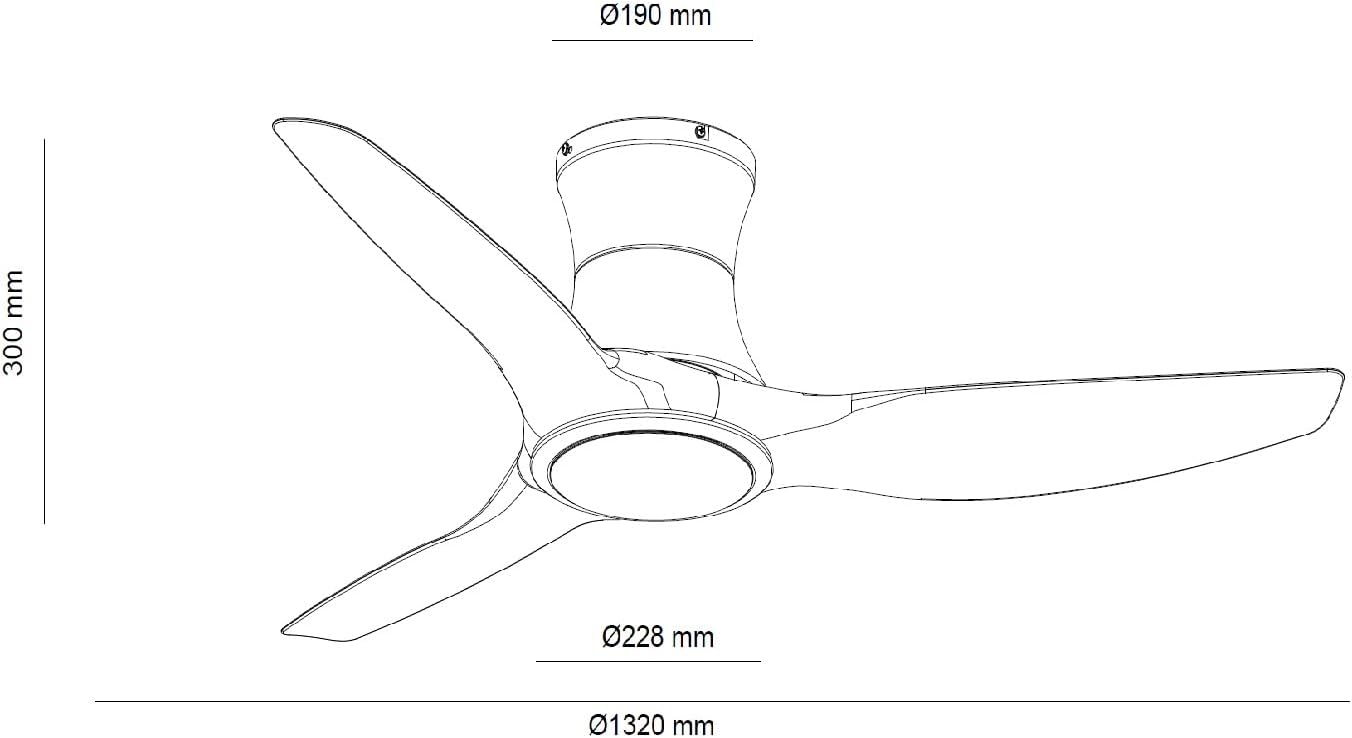
Technical drawing illustrating the dimensions of the TECHBREY Salamina Ceiling Fan, including its 1320mm diameter and 300mm height.
9. Warranty and Support
For warranty information and customer support, please refer to the documentation provided at the time of purchase or contact your retailer. Information regarding spare parts availability is currently unavailable.
For any technical assistance or inquiries, please contact TECHBREY customer service through their official channels.
Ask a question about this manual
Ask about setup, troubleshooting, compatibility, parts, safety, or missing instructions. Manuals+ will review the question and use this page’s manual context to help answer it.