
Svimi B0CYSVS4K6
Svimi TV Stand with LED Lights User Manual
Model: B0CYSVS4K6
1. Introduction
Thank you for purchasing the Svimi TV Stand with LED Lights. This entertainment center is designed to accommodate TVs up to 65 inches and features ample storage with glass shelves and enclosed compartments, along with integrated RGB LED lighting. This manual provides detailed instructions for assembly, setup, operation, maintenance, and troubleshooting to ensure you get the most out of your new TV stand.
2. Safety Information
Please read all safety warnings and instructions carefully before assembly and use. Failure to follow these instructions may result in injury or damage to the product.
- Always use caution when assembling furniture. Ensure all components are correctly aligned and securely fastened.
- Secure items properly to prevent tipping. Consider using anti-tip hardware if available or recommended for your specific setup.
- Keep small parts and packaging materials away from children and pets to prevent choking hazards.
- Do not overload shelves or the top surface. Refer to the specifications for maximum weight capacities.
- Ensure proper ventilation around electronic devices placed on the stand.
- Disconnect the LED light power supply before cleaning or performing any maintenance.
3. Package Contents
Before beginning assembly, verify that all parts are present and undamaged. If any parts are missing or damaged, please contact customer support.
- Top Plate (Walnut Color and White Marble Color Top Plate)
- Side Panels and Base Panels
- Glass Shelves (2 tiers)
- Enclosed Storage Doors (2)
- Legs and Support Feet
- Assembly Hardware (screws, dowels, cam locks, hinges, handles)
- RGB LED Light Strip with Remote Control
- Instruction Manual (this document)

Figure 3.1: Overview of key product details and components.
4. Assembly Instructions
Assembly of the Svimi TV Stand is designed to be straightforward. Please follow the step-by-step instructions provided in the included assembly guide. It is recommended to have a Phillips head screwdriver and potentially a power drill for certain steps, especially for attaching cabinet doors if pre-drilled holes are not present.
- Unpack and Identify Parts: Lay out all components on a clean, soft surface to prevent scratches. Refer to the parts list to ensure everything is accounted for.
- Assemble the Main Frame: Connect the side panels to the base and top plates using the provided hardware (dowels, cam locks, screws). Ensure all connections are secure.
- Install Shelves: Insert the glass shelves into their designated slots.
- Attach Legs: Securely fasten the table legs to the bottom of the TV stand.
- Install Doors: Attach the hinges to the doors and then to the main frame. Adjust hinges as needed for proper door alignment. Note: Some users have reported that pre-drilled holes for door hinges may be absent, requiring manual drilling. Exercise caution if this is the case.
- Apply LED Light Strip: Carefully adhere the RGB LED light strip to the designated area, typically along the inner edges of the open shelving. Ensure the strip is clean and dry before application.
- Connect LED Power: Connect the LED light strip to its power adapter and controller.

Figure 4.1: Assembled TV stand with LED lights active, demonstrating storage.
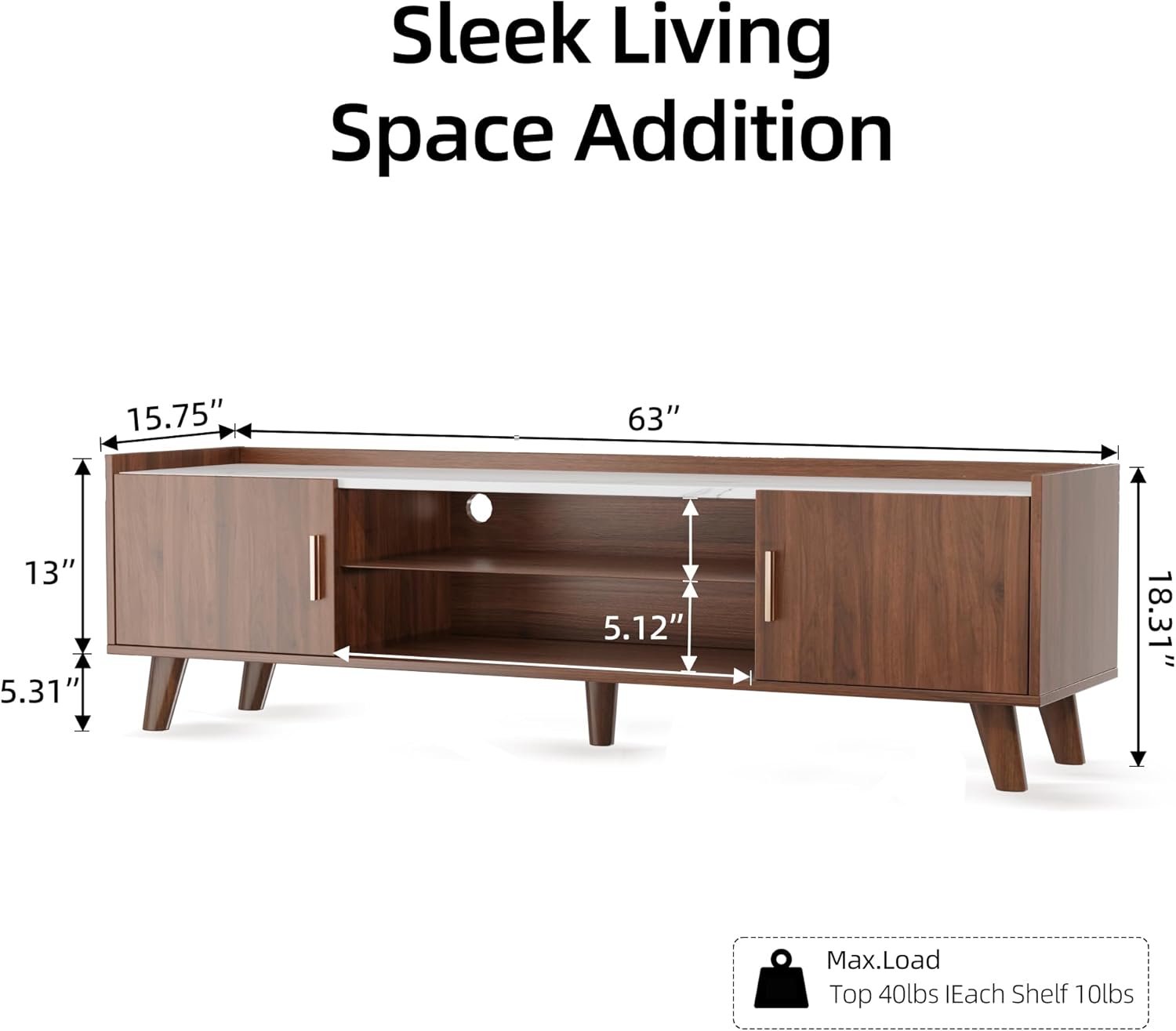
Figure 4.2: Product dimensions and weight capacities for assembly planning.
5. Setup
Once assembled, place your Svimi TV Stand in its desired location. Ensure the surface is level and stable. The stand is designed to accommodate TVs up to 65 inches.
- Placement: Position the TV stand against a wall or in a suitable area, ensuring there is enough space for cable management and ventilation.
- Cable Management: Utilize the pre-drilled holes on the back panel to route cables from your TV and other devices, keeping them organized and out of sight.
- TV Placement: Carefully place your television on the top surface of the stand. Ensure it is centered and stable.

Figure 5.1: TV stand in a typical living room setup.
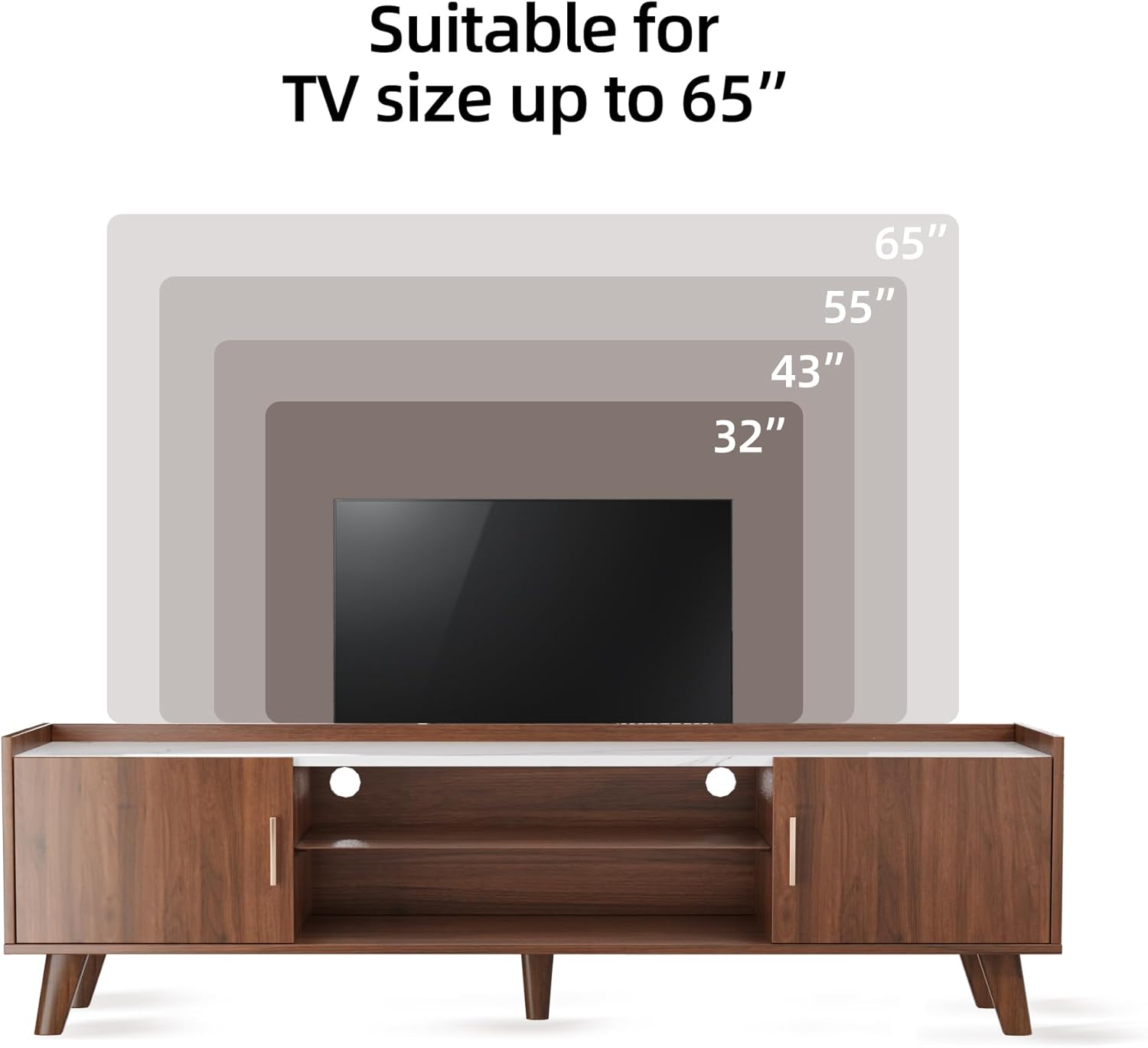
Figure 5.2: TV size compatibility guide for the stand.
6. Operating the LED Lights
The integrated RGB LED light strip enhances the ambiance of your entertainment area. The lights can be controlled via the included remote control or a dedicated mobile application.
- Remote Control: Use the provided remote to turn the lights on/off, change colors, adjust brightness, and select various lighting modes (e.g., flash, fade).
- Mobile App Control: Download the compatible mobile application (supports iOS and Android phones). Pair your device with the LED lights via Bluetooth. The app allows for more advanced control, including:
- Precise color selection and brightness adjustment.
- Setting up various fancy flash modes.
- Music synchronization, where the lights change rhythmically with music.
Refer to the separate small instruction manual included with the LED light kit for specific app names and pairing procedures.
7. Maintenance
Proper care will help maintain the appearance and longevity of your TV stand.
- Cleaning: Wipe the surfaces with a dry cloth. Avoid using harsh chemicals or abrasive cleaners, which can damage the finish.
- Spills: Immediately wipe up any spills to prevent staining or damage to the wood and marble-patterned surfaces.
- Hardware Check: Periodically check all screws and fasteners to ensure they remain tight. Re-tighten if necessary to maintain stability.
- LED Lights: The LED lights are designed for long-term use and generally require no maintenance. If issues arise, refer to the troubleshooting section.
8. Troubleshooting
This section addresses common issues you might encounter.
| Problem | Possible Cause | Solution |
|---|---|---|
| Difficulty Assembling Doors | Lack of pre-drilled holes for hinges. | Carefully mark and manually drill pilot holes for the hinges. A power drill with a small bit is recommended. Ensure proper alignment before drilling. |
| Stand Feels Loose/Flimsy After Assembly | Hardware not fully tightened; incorrect assembly step. | Review the assembly instructions to ensure all steps were followed correctly. Re-tighten all screws, cam locks, and fasteners. Ensure dowels are fully seated. |
| LED Lights Not Working | Power connection issue; remote battery dead; app not paired. | Check if the power adapter is securely plugged into the wall outlet and the LED strip. Replace the remote control battery. Ensure the mobile app is correctly paired via Bluetooth. |
| Scratches on Surface | Abrasive cleaning; sharp objects. | Use only soft, dry cloths for cleaning. Avoid dragging sharp or heavy objects across the surface. Consider using coasters or protective pads under decorative items. |
If you encounter issues not listed here or require further assistance, please contact Svimi customer support.
9. Specifications
| Feature | Detail |
|---|---|
| Brand | Svimi |
| Model Number | B0CYSVS4K6 |
| Product Dimensions (L x W x H) | 63 x 15.75 x 18.31 inches |
| Color | Brown and White (Walnut Color and White Marble Color Top Plate) |
| Material | 16mm thickness P2 grade particleboard, Glass |
| Number of Shelves | 2 (glass shelves) |
| Max TV Size Compatibility | Up to 65 inches |
| Max Load Capacity (Top) | 40 lbs |
| Max Load Capacity (Each Shelf) | 10 lbs |
| Lighting | RGB LED Light Strip (Remote and App controlled) |
| Product Care Instructions | Wipe with Dry Cloth |
10. Warranty and Support
For warranty information or technical support, please contact the seller, Home of Svimi, directly through your purchase platform. Keep your order number and product model (B0CYSVS4K6) ready for faster assistance.
Protection plans may be available for purchase separately. Please refer to your purchase details for more information on extended warranty options.