1. Product Overview
The EIBOS Polyphemus is an advanced 3D printer filament dryer box designed to maintain optimal filament conditions for high-quality 3D printing. It features automatic 360° rotation, precise humidity and temperature control, and a large capacity for various spool sizes and filament types.

Figure 1: EIBOS Polyphemus Filament Dryer Box with two spools inside, highlighting the 360-degree auto-rotation feature.
Key Features:
- Automatic 360° Rotation: A geared motor ensures even heating by automatically rotating the filament spool, eliminating temperature variations.
- Large Capacity: Accommodates two 1kg spools (210x170mm) or one large 3kg spool (250x170mm) with an included extension kit.
- Automatic Humidity & Temperature Control: Maintains a set relative humidity level and offers temperature control from 20℃ to 80℃.
- Efficient Heating System: Utilizes a 130W PTC heater and forced hot-air circulation with 8 vents for safe, environmentally friendly, and quiet operation (35-36 dB).
- Storage Box & Spool Holder: Features an adjustable exhaust vent for storage, two desiccant compartments, and small plugs for sealed, dust-proof protection.
2. Setup
2.1 Unboxing and Packing List
Carefully unpack all components and verify against the packing list below:

Figure 2: Detailed packing list and component overview.
2.2 Assembly Procedure
Follow these steps to assemble your Polyphemus filament dryer:
- Assemble the transparent panels to form the main chamber.
- Attach the top lid and handle securely.
- Place the assembled chamber onto the bottom base, ensuring it aligns correctly with the heating and rotation mechanisms.
- If using for 3KG spools, install the extension kit between the base and the chamber.

Figure 3: Visual guide for dryer assembly.
2.3 Loading Filament
Open the top lid and place your filament spool(s) onto the rollers inside the chamber. Ensure the filament unwinds smoothly. For optimal drying, remove the magnetic plates from the bottom of the removable boxes to allow warm air circulation during drying. Reattach them for sealed storage.
3. Operating Instructions
3.1 Control Panel Overview
The dryer features an intelligent built-in LCD interface for easy control and monitoring. All setting parameters are clearly indicated on the screen.

Figure 4: Intelligent Built-in LCD Interface.
3.2 Setting Drying Parameters
The dryer offers preset time and temperature configurations for various filaments. You can also customize settings.
- Filament Type Selection: Choose from predefined modes for PLA, ABS, PETG, PA, TPU, PC, ASA, PVA, PP, or use custom settings (M1, M2, M3).
- Temperature Range: Adjustable from 20℃ to 80℃.
- Drying Time: Default settings from 30 minutes to 24 hours, or set to unlimited.
- Automatic Rotation: Activate the rotating mode for 360° surround heating, especially when not actively printing.
- Automatic Humidity Hold: Activate the humidity mode to maintain a certain relative humidity level, keeping filament ready for use.

Figure 5: Recommended Optimal Setting Time & Temperature.
3.3 Printing While Drying
The Polyphemus is designed with 8 vents (2 in the back, 3 in the front, and 3 on the top) to allow filament feeding from multiple directions, enabling direct printing from the dryer.
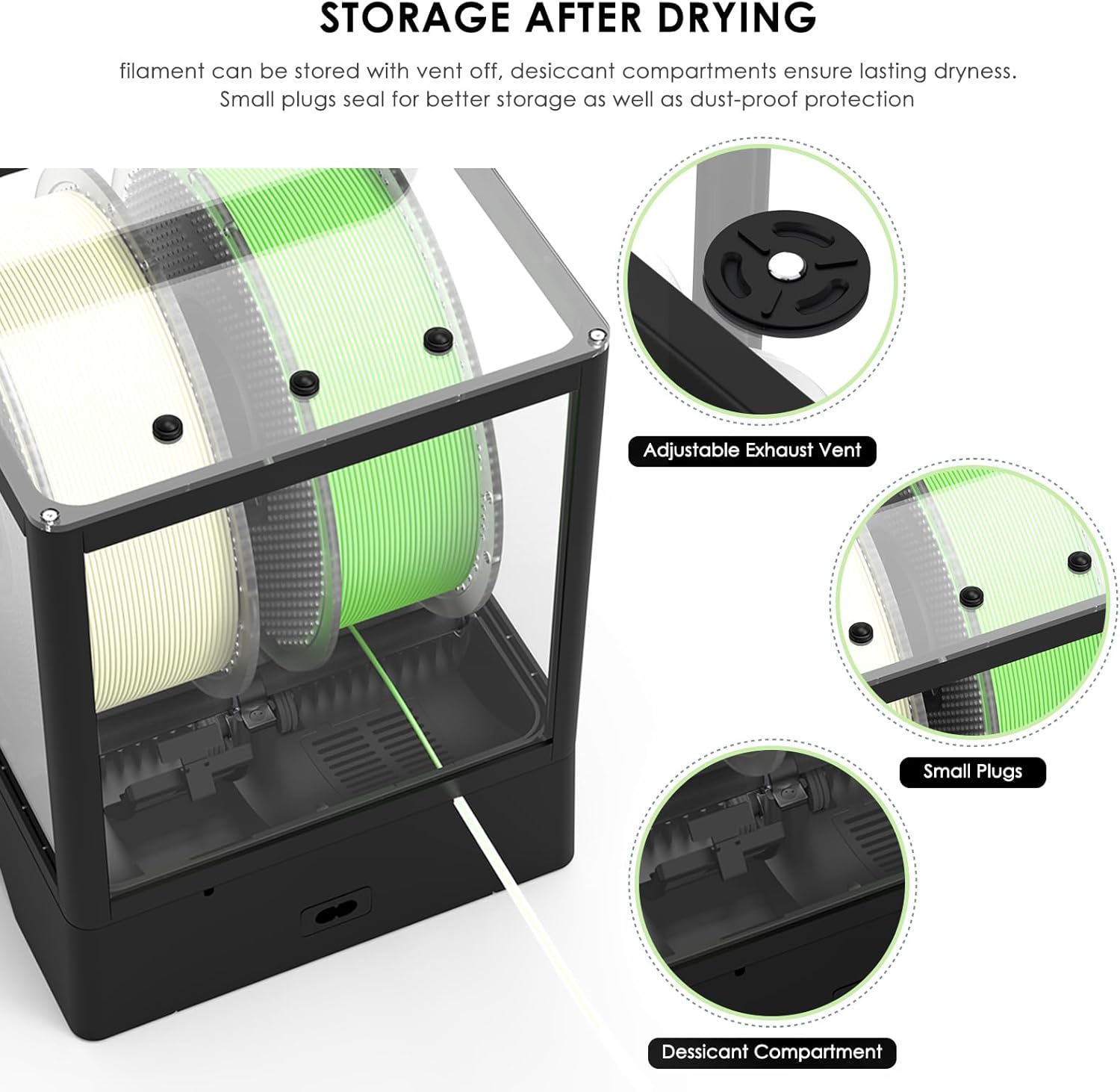
Figure 6: Filament feeding options from the dryer.
3.4 Official Product Videos
The best filament dryer with Auto-rotation-Eibos Polyphemus
Video 1: An overview of the EIBOS Polyphemus filament dryer, highlighting its auto-rotation feature and benefits for 3D printing.
The FIRST filament dryer with AUTO-ROTATION-eibos polyphemus
Video 2: Demonstrates the unique auto-rotation feature of the EIBOS Polyphemus, emphasizing its innovation in filament drying.
What makes eibos polyphemus filament dryer difference?
Video 3: Explores the distinguishing features and advantages of the EIBOS Polyphemus filament dryer compared to other models.
Unboxing of Eibos 3d printer filament dryer Polyphemus!
Video 4: A detailed unboxing experience of the EIBOS Polyphemus 3D printer filament dryer, showcasing its components.
About EIBOS easdry filament dryer- Accurate Temperature
Video 5: Highlights the accurate temperature control capabilities of the EIBOS Easdry filament dryer.
4. Maintenance and Storage
4.1 Storing Filament After Drying
After the drying process is complete, you can turn off the exhaust fan and use the provided rubber plugs to seal the ports for better drying conditions. The two compartments are designed for placing desiccants to maintain a dry environment for your filament long-term.

Figure 7: Storage features for maintaining filament dryness.
4.2 Desiccant Management
Regularly check and replace or regenerate desiccants in the designated compartments to ensure continued moisture absorption. The dryer's heating capabilities can assist in regenerating certain types of desiccants.
5. Troubleshooting
If you encounter issues with your EIBOS Polyphemus, consider the following:
- Inconsistent Drying/Temperature: Ensure the magnetic plates are removed from the bottom of the removable boxes during active drying to allow proper air circulation. Verify that the selected temperature and time settings are appropriate for your filament type.
- Filament Rotation Issues: Check that spools are correctly seated on the rollers. If the auto-rotation is inconsistent, ensure the spare motor is properly installed or consider replacing it if necessary.
- Humidity/Temperature Display Inaccuracy: While the unit provides readings, external calibrated sensors can be used for verification if precise measurements are critical for your application.
- Air Gaps/Sealing: Ensure all panels and the lid are properly closed and sealed. The small plugs should be used for ports when not actively printing to maintain a dry environment.
6. Specifications
| Attribute | Value |
|---|---|
| Product Dimensions | 10.8 x 8 x 10.9 inches (10.8"D x 8"W x 10.9"H) |
| Item Weight | 6.6 pounds |
| Brand | EIBOS |
| Material | Acrylonitrile Butadiene Styrene |
| Color | Black |
| Manufacturer | EIBOS |
| Input Voltage | 110V-120V (US Plug) |
| Heating Power | 130W PTC |
| Temperature Range | 20℃ to 80℃ |
| Noise Level | 35-36 dB |
7. Warranty and Support
For warranty information, technical support, or service inquiries, please contact EIBOS Official Store directly through their official channels or the retailer where the product was purchased.
Visit the EIBOS Official Store for more information.


