
1. Introduction
Thank you for choosing the Bluelander E9 MAX Electric Scooter. This manual provides essential information for the safe operation, maintenance, and troubleshooting of your new scooter. Please read it thoroughly before your first ride to ensure optimal performance and safety.

Image: The Bluelander E9 MAX Electric Scooter, showcasing its sleek design and robust build.
2. Safety Information
Your safety is paramount. Always adhere to the following guidelines:
- Always wear a helmet and appropriate protective gear (knee pads, elbow pads) when riding.
- Observe all local traffic laws and regulations regarding electric scooters.
- Do not ride under the influence of alcohol or drugs.
- Avoid riding in wet conditions, heavy rain, or on slippery surfaces.
- Ensure the battery is fully charged before each use, and never operate the scooter while it is charging.
- Do not exceed the maximum weight capacity of 120 kg (265 lbs).
- Regularly check brakes, tires, and all moving parts for wear and tear.
- Maintain a safe distance from other vehicles and pedestrians.
- Children should only operate the scooter under adult supervision.
3. Package Contents
Upon opening the package, please verify that all the following items are included:
- Bluelander E9 MAX Electric Scooter
- Charging Adapter
- Installation Kit (tools for assembly)
- User Manual (this document)
4. Setup and Assembly
The Bluelander E9 MAX scooter comes mostly pre-assembled. Follow these steps to prepare it for use:
- Unfolding the Scooter: Carefully lift the handlebar stem until it locks into place. Ensure the folding mechanism is securely latched.
- Handlebar Attachment: If the handlebars are not pre-attached, align them with the stem and secure them using the screws provided in the installation kit. Tighten firmly.
- Initial Charge: Before first use, fully charge the scooter's battery. Connect the charging adapter to the charging port on the scooter and then to a power outlet. The indicator light on the charger will change when charging is complete.

Image: Illustration of the scooter's folding design and rear wheel assembly.
5. Operating Instructions
Familiarize yourself with the scooter's controls before riding.
5.1 Powering On/Off
Press and hold the power button on the display to turn the scooter on or off.
5.2 Speed Modes
The E9 MAX features three distinct speed modes. Press the mode button (usually indicated by a gear icon or 'M') to cycle through them:
- Mode 1 (Eco): Lower speed for energy saving and beginners.
- Mode 2 (Standard): Balanced speed for daily commuting.
- Mode 3 (Sport): Maximum speed up to 35 km/h for experienced riders.

Image: Close-up of the handlebar display, showing current speed, battery level, and riding mode.
5.3 LCD Display
The integrated LCD display provides real-time information:
- Battery Level: Indicates remaining battery charge.
- Current Speed: Shows your speed in km/h.
- Riding Mode: Displays the active speed mode.
- Headlight Indicator: Shows if the headlight is on.

Image: Detailed view of the scooter's LED display, highlighting battery, speed, and mode indicators.
5.4 Braking
The scooter is equipped with a rear brake. Apply the brake lever gently to slow down and firmly for emergency stops. Practice braking in a safe, open area.
5.5 Folding Mechanism
To fold the scooter for storage or transport, locate the folding latch near the base of the handlebar stem. Follow the instructions in the installation kit to safely release and fold the scooter. Ensure it is securely latched when folded.
6. App Control (Tuya Smart)
Enhance your riding experience by connecting your Bluelander E9 MAX to the Tuya Smart app via Bluetooth. The app allows you to:
- Lock/Unlock: Secure your scooter remotely.
- Control Lights: Turn headlights on/off.
- Adjust Speed: Fine-tune speed settings.
- Manage Cruise Control: Activate or deactivate cruise control for consistent speed.
- View Ride Data: Access detailed statistics about your rides.
Download the "Tuya Smart" app from your device's app store (available for iOS and Android). Follow the in-app instructions to pair your scooter via Bluetooth.

Image: The scooter's LCD display alongside a smartphone showing the Tuya Smart app interface, demonstrating connectivity and control features.
7. Maintenance
Regular maintenance ensures the longevity and safe operation of your scooter.
- Battery Care:
- Charge the battery fully after each use.
- Avoid completely draining the battery.
- If storing for extended periods, charge to 50-70% and recharge every 2-3 months.
- Do not charge in extreme temperatures.
- Tire Pressure: Check tire pressure regularly and inflate to the recommended PSI (refer to tire sidewall or specifications).
- Cleaning: Wipe down the scooter with a damp cloth. Do not use high-pressure water jets or immerse the scooter in water.
- Brake Inspection: Periodically check brake pads and cables for wear. Adjust or replace as needed.
- General Inspection: Tighten any loose screws and check for any unusual noises or vibrations before each ride.
8. Troubleshooting
If you encounter issues with your Bluelander E9 MAX, refer to the following common problems and solutions:
| Problem | Possible Cause | Solution |
|---|---|---|
| Scooter does not turn on | Low battery; Loose connection; Power button issue | Charge the battery; Check all connections; Contact support if issue persists |
| Reduced range/speed | Low tire pressure; Overload; Battery degradation; Riding uphill frequently | Inflate tires to correct pressure; Ensure rider weight is within limits; Charge fully; Adjust riding style |
| Brakes not responsive | Worn brake pads; Loose brake cable | Inspect and replace brake pads; Adjust brake cable tension |
| App connection issues | Bluetooth off; Scooter not in pairing mode; App outdated | Ensure Bluetooth is on; Restart scooter and app; Update app to latest version |
For issues not listed here, or if solutions do not resolve the problem, please contact Bluelander customer support.
9. Specifications
Detailed technical specifications for the Bluelander E9 MAX Electric Scooter:
| Feature | Specification |
|---|---|
| Model Name | E9MAX |
| Motor Power (Max) | 960W Brushless |
| Max Speed | 35 km/h (21.7 mph) |
| Battery Capacity | 36V/15AH Lithium Ion |
| Range | 40-45 km (25-28 miles) |
| Max Load Capacity | 120 kg (265 lbs) |
| Wheel Size | 10 Inches |
| Frame Material | Aluminum Alloy |
| Brake Type | Rear Brake |
| Product Dimensions (L x W x H) | 113 x 40 x 115 cm (44.5 x 15.7 x 45.3 inches) |
| Product Weight | 15 kg (33 lbs) |
| Special Features | Rechargeable, Speed Control, Foldable, Bluetooth App Control |

Image: A comparison table showing specifications for different Bluelander scooter models, including the E9 MAX.
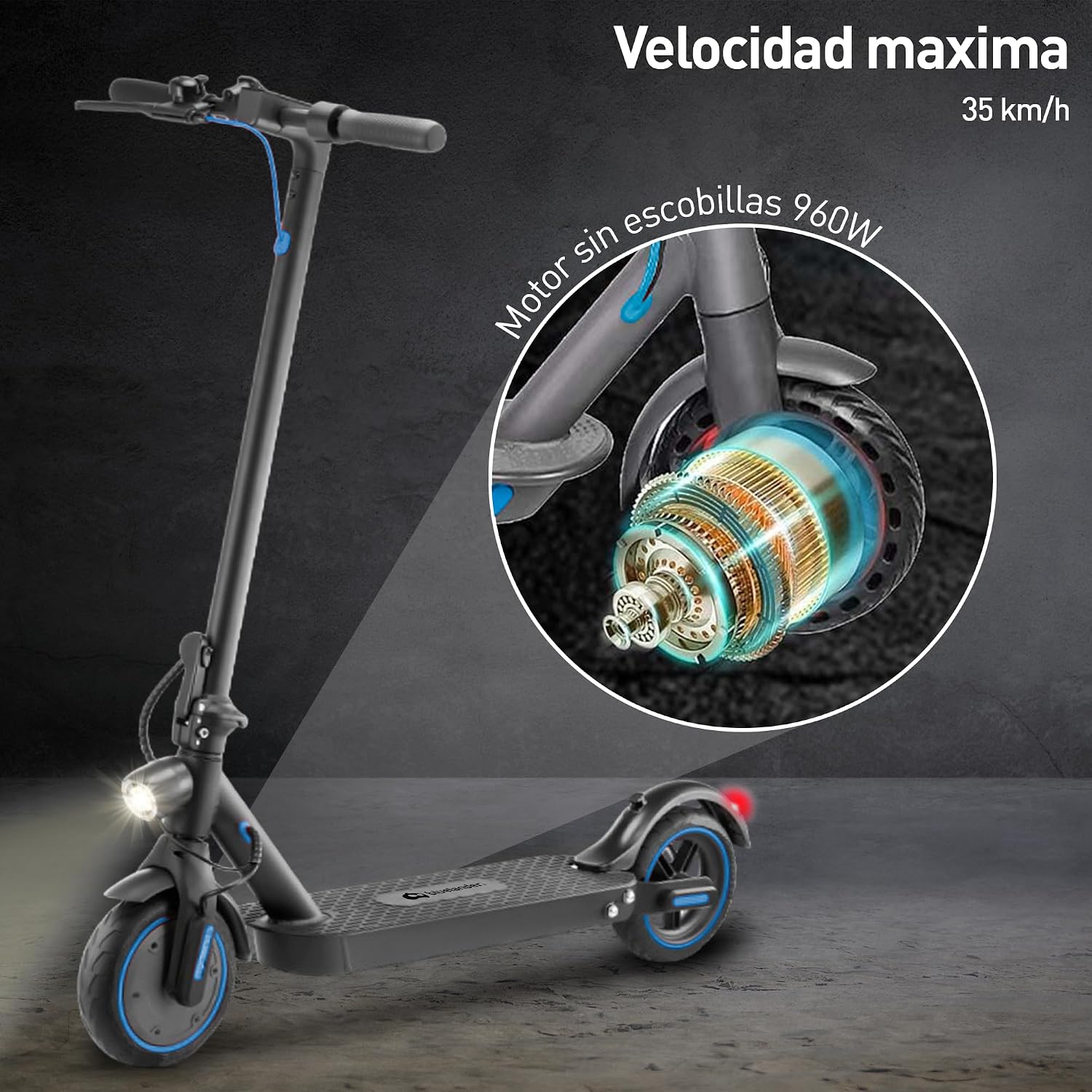
Image: An exploded view highlighting the 960W brushless motor of the Bluelander E9 MAX scooter.
10. Warranty and Support
For warranty information, please refer to the documentation included with your purchase or visit the official Bluelander website. If you require technical support or have questions not covered in this manual, please contact Bluelander customer service through their official channels.
For the latest information and support, visit the Bluelander Store on Amazon.